
HTTPS and SEO meet in three places: Google has used HTTPS as a “very lightweight” ranking signal since 2014, it prefers HTTPS URLs as canonical when the setup is clean, and Chrome now warns visitors before loading any public page over plain HTTP. In practice, the SEO risk today is less about “not having HTTPS” and more about broken HTTPS — invalid certificates, redirects back to HTTP and mixed signals that make Google pick the wrong version.
Key takeaways
- Google called HTTPS “a very lightweight signal” affecting fewer than 1% of global queries when it announced it on August 7, 2014.
- Google prefers HTTPS pages as canonical, but bad TLS certificates or HTTPS-to-HTTP redirects make it prefer HTTP “very strongly” — and HSTS can’t override that.
- Chrome 154 (October 2026) switched on “Always Use Secure Connections” by default, so Chrome now asks permission before opening insecure HTTP pages.
- In the Web Almanac 2025, 98.8% of mobile requests used HTTPS, but only 36% of mobile pages sent an HSTS header.
- Maximum certificate validity fell to 200 days on March 15, 2026, and drops to 100 days in 2027 and 47 days in 2029, so renewals must be automated.
Is HTTPS a Google ranking factor?
Yes, but a small one. When Google announced HTTPS as a ranking signal on August 7, 2014, it said: “For now it’s only a very lightweight signal—affecting fewer than 1% of global queries,” and that it carried “less weight than other signals such as high-quality content.” The same post said Google “may decide to strengthen it” over time.
Google’s current page experience documentation (last updated September 22, 2026) still lists HTTPS in its self-assessment questions — “Are your pages served in a secure fashion?” — but it also says that “beyond Core Web Vitals, other page experience aspects don’t directly help your website rank higher in search results.” Google hasn’t said the 2014 signal was retired, so the fair reading is this: HTTPS is a baseline you should have, not a lever that will move rankings on its own. If you want page experience gains, Core Web Vitals are where Google says its ranking systems look.
How does Google choose between the HTTP and HTTPS version of a page?
Most sites still answer on both http:// and https://, so Google has to choose one as canonical. In December 2015 Google said it would start crawling HTTPS equivalents of HTTP pages “even when the former are not linked to from any page,” and would “typically choose to index the HTTPS URL” when all of the conditions below were met. Each one is still a useful audit check.
| Google’s condition for indexing HTTPS (2015) | What breaks it | How to check |
|---|---|---|
| No insecure dependencies | Scripts, styles or iframes loaded over HTTP | Browser console; crawl for http:// resources |
| Not blocked by robots.txt | A disallow rule on the HTTPS host | robots.txt on the HTTPS host; URL Inspection |
| Doesn’t redirect to or through HTTP | HTTPS → HTTP → HTTPS hops | Crawl redirect chains from HTTPS start URLs |
| No rel=”canonical” to HTTP | Hard-coded http:// canonicals in templates | View source on key templates |
| No noindex | Leftover staging noindex | Crawl for robots meta and X-Robots-Tag |
| No on-host links to HTTP URLs | Menus, footers or content linking to http:// | Crawl for internal links starting http:// |
| Sitemap lists HTTPS (or doesn’t list HTTP) | Old HTTP URLs left in the XML sitemap | Download each sitemap and search for http:// |
| Valid TLS certificate | Expired, mismatched or self-signed certificate | Browser padlock; SSL test; Search Console HTTPS report |
Google’s current canonicalization guidance (updated July 10, 2026) says the same thing more bluntly: “Google prefers HTTPS pages over equivalent HTTP pages as canonical, except when there are issues or conflicting signals.” It then warns: “Avoid bad TLS/SSL certificates and HTTPS-to-HTTP redirects because they cause Google to prefer HTTP very strongly. Implementing HSTS cannot override this strong preference.” It also says not to include HTTP URLs in your sitemap or hreflang annotations. Our guide to canonical tags and duplicate content covers the other signals in that decision.
What changed in Chrome in 2025 and 2026?
On October 28, 2025, Chrome’s security team announced that “with the release of Chrome 154 in October 2026,” Chrome would turn on “Always Use Secure Connections” by default. Chrome 147 (April 2026) enabled it first for the more than 1 billion users enrolled in Enhanced Safe Browsing. In that mode, Chrome “attempts every connection over HTTPS” and shows a bypassable warning when a public site isn’t available over HTTPS.
On October 21, 2026, Google confirmed the rollout: Chrome now “explicitly asks users for permission before making an insecure HTTP connection,” for all users by default, and won’t warn again for the same site until the user hasn’t visited it “for at least two weeks.” Google says “nearly 95% of Chrome users on Desktop don’t see any HTTP warnings in a given week.” That is because most of the web already uses HTTPS: Google’s 2025 post says the share of main-frame page loads over HTTPS rose from around 30–45% in 2015 to “around the 95-99% range around 2020,” then “largely plateaued.”
For SEO, this is a user-experience problem rather than a new ranking rule. Any page, landing page or old campaign URL that still loads over HTTP — or an HTTP link that doesn’t redirect — now puts an interstitial warning between a searcher and your content. It builds on Chrome’s July 2018 change, when Chrome 68 began labelling all HTTP pages “not secure.”
How widely is HTTPS used today?
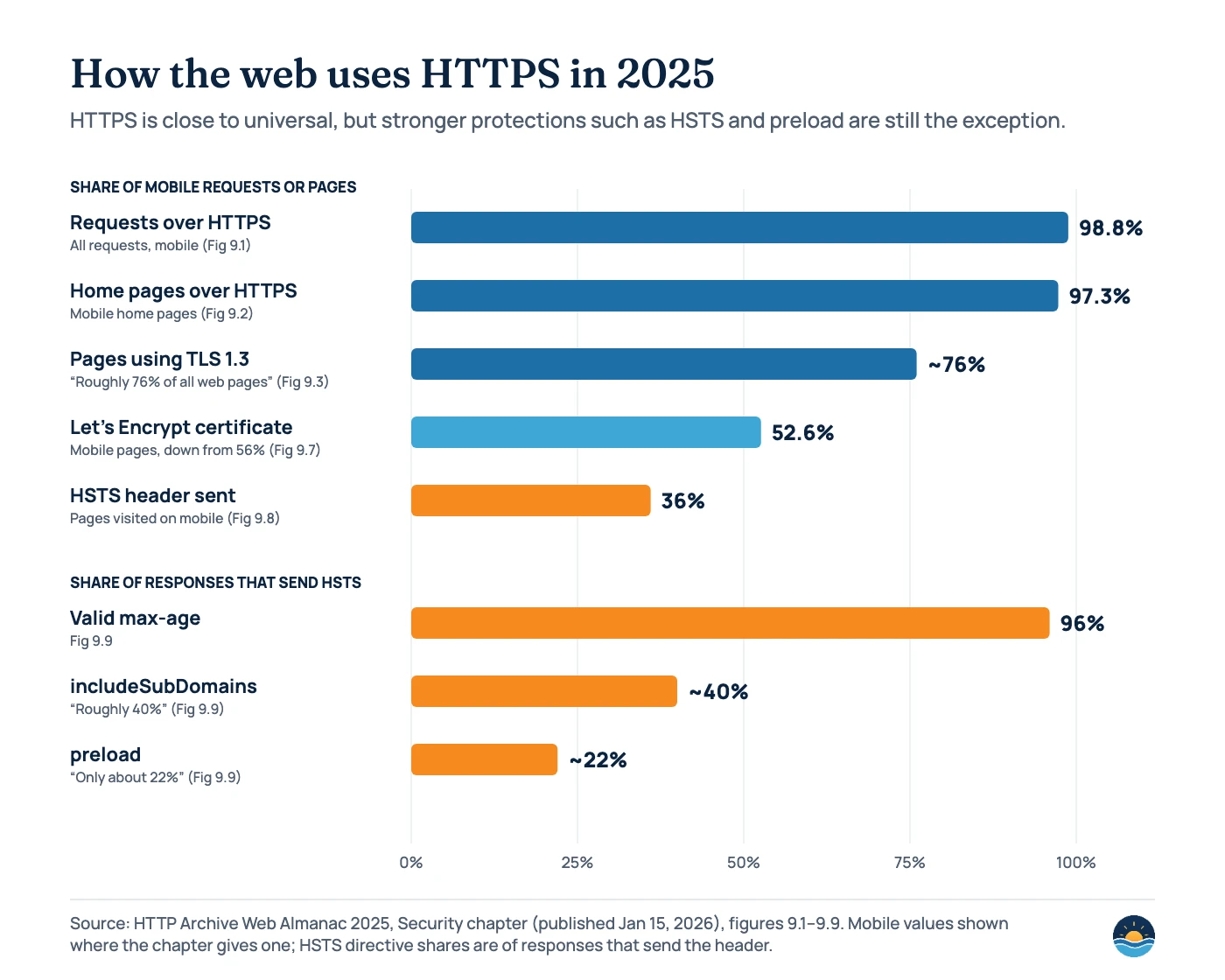
The HTTP Archive’s Web Almanac 2025 found HTTPS on 98.8% of mobile requests and on 97.5% of desktop and 97.3% of mobile home pages. TLS 1.3 powers “roughly 76% of all web pages,” and Let’s Encrypt issues the certificates for 52.6% of mobile pages, down from 56% in the previous edition. The gap is in hardening: only 36% of pages visited on mobile send a Strict-Transport-Security (HSTS) header, and among responses that do, roughly 40% protect subdomains and about 22% use the preload directive.
HSTS, mixed content and certificates: the parts audits miss
HSTS
HSTS tells browsers to use HTTPS for a host for a set time (max-age, in seconds). To join the browser preload list, hstspreload.org requires a valid certificate, an HTTP-to-HTTPS redirect on the same host, all subdomains on HTTPS, max-age of at least 31536000 (one year), plus includeSubDomains and preload. It suggests ramping up from 300 seconds to a week to a month first, and warns that removal “tends to be slow and painful.”
Mixed content
MDN defines mixed content as secure pages that load resources over HTTP. Browsers now auto-upgrade image, video and audio requests and block insecure requests for all other resource types — so a hard-coded http:// script can silently break a template. The fix is to “serve all the content as HTTPS.” Google also lists “insecure dependencies (other than images)” as a reason it may not choose the HTTPS URL as canonical.
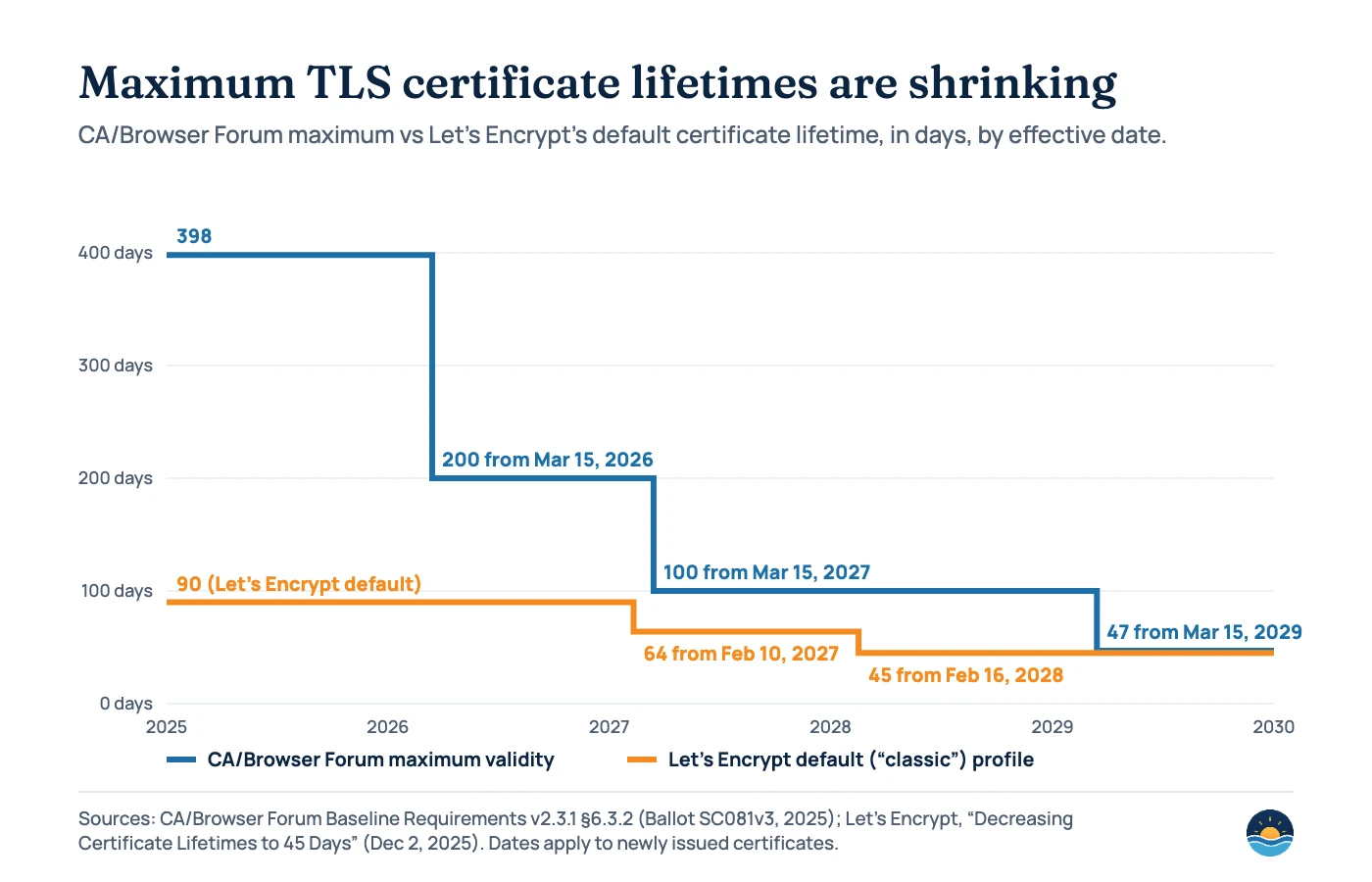
Certificates are the most likely thing to break. CA/Browser Forum Ballot SC081v3 (April 2025) set a schedule that cuts the maximum validity of public TLS certificates from 398 days to 200 days from March 15, 2026, 100 days from March 15, 2027 and 47 days from March 15, 2029. Let’s Encrypt, which already issues 90-day certificates, will move its default profile to 64 days on February 10, 2027 and 45 days on February 16, 2028, and warns that “renewing at a hardcoded interval of 60 days will no longer be sufficient.” An expired certificate is exactly the kind of “bad TLS/SSL certificate” that makes Google prefer HTTP — and it shows every visitor a full-page browser error.
How to read the Search Console HTTPS report
Search Console’s HTTPS report shows whether Google can serve your pages over HTTPS. It is “available only for Domain properties and HTTPS URL-prefix properties,” and Google warns that “if a site has a lot of HTTPS issues, it can prompt Google to stop crawling your HTTPS pages.” Check it alongside the Page indexing report.
| Issue in the HTTPS report | What it usually means | Fix |
|---|---|---|
| HTTP marked with canonical tag | The HTTPS page’s rel=”canonical” points to the HTTP URL | Update canonicals to the HTTPS URL |
| HTTPS has invalid certificate | Expired, mismatched or untrusted certificate | Renew or reissue; automate renewal |
| Sitemap points to HTTP | The submitted sitemap lists HTTP URLs | List only HTTPS URLs; resubmit |
| HTTPS has redirect | The HTTPS URL redirects, often to HTTP | Remove HTTPS → HTTP redirects |
| HTTPS URL is roboted | robots.txt blocks the HTTPS URL | Allow crawling on the HTTPS host |
| HTTPS not evaluated | No working HTTPS equivalent (4xx/5xx), Google chose the HTTP version as canonical, too many other errors, or the URL isn’t crawled yet | Fix the other errors first, make sure the HTTPS URL exists and is canonical, then recheck |
Moving a site from HTTP to HTTPS
Google treats an HTTP-to-HTTPS change as a site move with URL changes. Its guide (updated August 20, 2026) says to install the TLS certificates first, use permanent redirects “such as 301 and 308,” avoid redirect chains (Googlebot follows “up to 10 hops”), and keep redirects “generally at least 1 year.” You don’t use the Change of Address tool for this: Google says “You don’t need it for HTTP to HTTPS moves.” Our guides to HTTP status codes and domain migrations cover redirect choices in more depth.
A seven-step HTTPS audit
- Confirm the certificate. Check the padlock, expiry date and covered hostnames (www and non-www), and confirm renewal is automated — not a calendar reminder.
- Test every hostname and protocol. Request
http://,http://www.,https://andhttps://www.versions of the home page and a few deep URLs. Each should reach the final HTTPS URL in one permanent redirect. - Crawl for HTTP leftovers. Look for internal links, canonicals, hreflang, Open Graph images and structured data URLs that still start with
http://. - Check mixed content. Open key templates with the browser console and fix any blocked or auto-upgraded HTTP resources at the source.
- Clean your sitemaps. Make sure every sitemap URL is HTTPS and returns 200.
- Review Search Console. Use a Domain property, check the HTTPS report and the Page indexing report, and inspect a sample of URLs to confirm Google selected the HTTPS canonical.
- Decide on HSTS. Once the steps above are stable, add HSTS with a short max-age, raise it gradually, and only consider preload when every subdomain is ready for HTTPS.
If you want the wider picture, our SEO audit checklist puts these checks alongside crawling, indexing and content.
Frequently asked questions
Will switching to HTTPS improve my rankings?
Probably not much on its own. Google described HTTPS as a very lightweight signal in 2014, and its current page experience documentation says aspects other than Core Web Vitals don’t directly help pages rank higher. The bigger benefit is avoiding problems: browser warnings, broken resources and Google choosing the HTTP version.
Do I need the Change of Address tool when moving to HTTPS?
No. Google’s site move guidance says you don’t need it for HTTP to HTTPS moves, and the Change of Address help page lists that change as one not to use the tool for. Use permanent redirects and update internal links, canonicals and sitemaps instead.
Does HSTS help SEO?
Not directly. HSTS protects visitors by making browsers use HTTPS for your host, and it avoids the extra HTTP-to-HTTPS redirect on repeat visits. Google says implementing HSTS can’t override its strong preference for HTTP when a site has bad certificates or HTTPS-to-HTTP redirects, so fix those first.
What happens to SEO if my SSL certificate expires?
Visitors see a full-page browser error, and Google’s guidance says bad certificates cause it to prefer HTTP very strongly. Search Console may also report “HTTPS has invalid certificate.” With certificate lifetimes falling to 200 days in 2026 and 47 days by 2029, automated renewal is the only safe option.
Sources
- HTTPS as a ranking signal — Google Search Central Blog, August 7, 2014 — lightweight signal, fewer than 1% of global queries
- Indexing HTTPS pages by default — Google Search Central Blog, December 17, 2015 — conditions for indexing the HTTPS URL
- Understanding page experience in Google Search results — Google Search Central, updated September 22, 2026 — HTTPS self-assessment question; other aspects don’t directly help ranking
- How to specify a canonical URL with rel=”canonical” and other methods — Google Search Central, updated July 10, 2026 — HTTPS preference; certificates, redirects and HSTS
- Site moves with URL changes — Google Search Central, updated August 20, 2026 — HTTP to HTTPS moves, redirects, 10 hops, 1 year
- Change of Address tool — Search Console Help — not used for http to https changes
- HTTPS report — Search Console Help — availability, issue types, crawling warning
- HTTPS by default — Google (Chrome Security), October 28, 2025 — Chrome 147 and Chrome 154 plans; HTTPS trend
- Chrome now warns before insecure HTTP connections — Google (Chrome Security), October 21, 2026 — rollout to all users; two-week rule; warning rates
- A milestone for Chrome security: marking HTTP as “not secure” — Google, July 24, 2018 — Chrome 68
- Web Almanac 2025: Security — HTTP Archive, published January 15, 2026 — HTTPS, TLS, certificate issuer and HSTS data
- Ballot SC081v3: Introduce schedule of reducing validity and data reuse periods — CA/Browser Forum, April 11, 2025 — 398 to 47 days
- Baseline Requirements for TLS Server Certificates (§6.3.2) — CA/Browser Forum, version 2.3.1 — effective dates for 200, 100 and 47 days
- Decreasing Certificate Lifetimes to 45 Days — Let’s Encrypt, December 2, 2025 — 64-day and 45-day schedule
- Mixed content — MDN Web Docs, modified August 15, 2026 — definition, upgrade and blocking behaviour
- Strict-Transport-Security — MDN Web Docs, modified September 11, 2026 — max-age and preload requirements
- HSTS Preload List Submission — hstspreload.org — submission requirements and ramp-up advice
Cite this article: Bright Harbour Media. “HTTPS and SEO: What Google Checks and How to Audit It.” Bright Harbour Media Insights, October 2026. https://brightharbourmedia.com/https-seo/
You are welcome to reference the charts and frameworks in this article with a link back to this page.
Not sure whether your HTTPS setup is helping or quietly hurting? Our SEO audits check certificates, redirects, canonicals and Search Console reports together — get in touch to book one.