
An HTTP status code is the three-digit number a server sends with every response, and it tells Google’s crawlers whether a page exists, has moved, is gone or is temporarily unavailable. Google treats each class differently: 2xx content can be indexed, 3xx redirects pass the crawler on, 4xx pages drop out of the index, and 5xx or 429 errors slow crawling down.
Key takeaways
- Google’s status code page (updated Feb 4, 2026) covers “the top 20 status codes” its crawlers see, and says a 2xx code “doesn’t guarantee indexing”.
- Google’s crawlers follow up to 10 redirect hops; 301 and 308 are strong signals that the target should be canonical, while 302, 303 and 307 are weak signals.
- All 4xx codes except 429 are treated the same: indexed URLs are removed, and they have no effect on crawl rate. Google doesn’t treat 410 differently from 404.
- 5xx and 429 errors slow crawling across the whole hostname; Google says not to use them for “longer than 1-2 days”.
- Cloudflare data published April 17, 2026 showed 13.7% of verified AI crawler requests got a 4xx response and 11.3% a redirect.
Why do status codes matter for SEO?
Before Google reads a single word of a page, it reads the status code. That number decides whether the content is passed to indexing, whether the crawler follows a redirect, whether an already indexed URL is removed, and how fast Google keeps crawling the site. Getting it wrong is one of the most common reasons good pages disappear or bad pages linger.
Google moved this documentation to its crawling infrastructure site in December 2025, under the title “How HTTP status codes affect Google’s crawlers”. Its changelog says “The functionality hasn’t changed, only the location”, so older advice based on the previous page still broadly holds. Network and DNS errors now have their own page.
How does Google handle 2xx success codes?
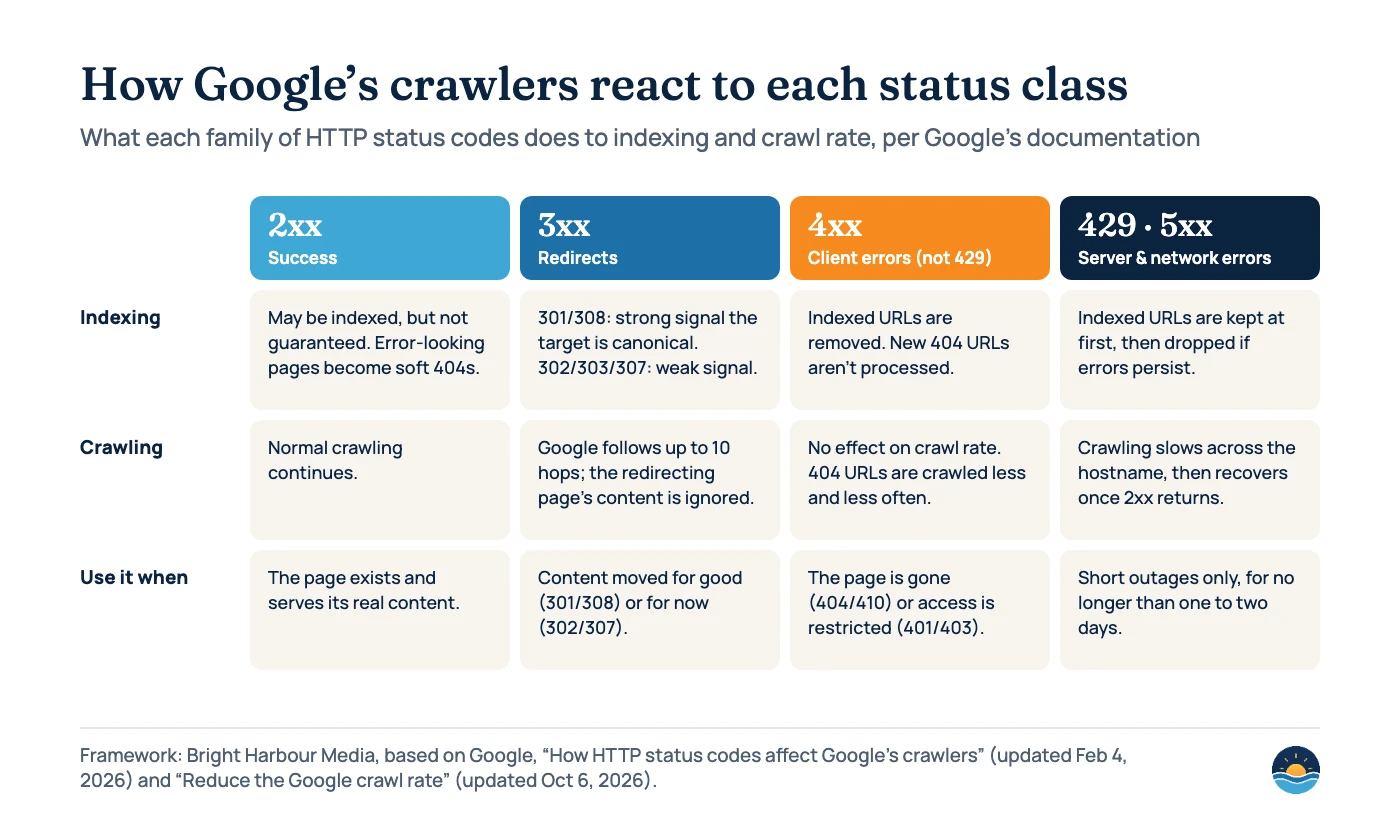
A 200 means the server returned the content. Google says its indexing systems “may index the content, but that’s not guaranteed”, because indexing also depends on quality, duplication and other signals. For 201 and 202, Google waits a limited time for content and then passes on whatever it received. A 204 means there was no content to process.
There is one important trap. If a page returns 200 but looks like an error, such as “an empty page or an error message”, Search Console reports it as a soft 404. Google’s troubleshooting guide says such pages “are excluded from Search”, and its crawl budget guide adds that soft 404 pages “will continue to be crawled, and waste your budget”. Our guide to the Page indexing report shows where these appear.
How does Google handle 3xx redirects?
Google’s crawlers follow up to 10 redirect hops by default and ignore any content on the redirecting URL itself. What changes is how strongly the redirect suggests the new URL should replace the old one in search results.
| Code | Meaning (RFC 9110) | How Google treats it | Typical SEO use |
|---|---|---|---|
301 | Moved permanently | Strong signal that the redirect target should be processed and become canonical | Permanent URL changes, domain moves, HTTP to HTTPS |
308 | Permanent; request method must not change | “Equivalent to 301” | Permanent moves where the method must be kept |
302 | Found (temporary) | Weak signal; the source URL usually stays in results | Short-term promotions, A/B tests |
303 | See other | Grouped with 302 | Form submissions, rarely needed for SEO |
307 | Temporary; request method must not change | “Equivalent to 302” | Temporary moves where the method must be kept |
304 | Not modified | Signals may be recalculated, otherwise no effect on indexing | Efficient recrawling of unchanged pages |
Google’s redirects guide (updated April 14, 2026) lists server-side redirects as the most reliable, then meta refresh, then JavaScript redirects, which it says to use only if you can’t do the others because Google “might never see it if rendering of the content failed.” Its canonicalization page adds that all permanent redirect methods have the same effect, but “For the quickest effect, use HTTP (also known as server-side) redirects.” The crawl budget guide also warns to “avoid long redirect chains”. For moves between domains, see our domain migration guide.
How does Google handle 4xx client errors?
Google’s rule is simple: “All 4xx errors, except 429, are treated the same”. URLs that are already indexed and start returning a 4xx are removed from the index, and “Newly encountered 404 pages aren’t processed.” Crawling of those URLs gradually slows. The Page indexing report help adds that there is no way to make Googlebot permanently forget a URL, “although it will crawl it less and less often.”
- 404 vs 410: RFC 9110 says 410 means the resource is likely gone permanently, but Google’s documentation doesn’t treat 410 differently from 404. Use whichever is accurate.
- 401 and 403: Google says Googlebot never provides credentials, so a 403 on a public page means the server is blocking it incorrectly.
- Rate limiting: Google’s Gary Illyes wrote in February 2023 that sites and CDNs were wrongly using 4xx codes to slow crawling. Google says 4xx codes other than 429 “have no effect on crawl rate” and will remove content from Search instead.
- Crawl budget: Google’s crawling myths page says pages that serve 4xx codes (except 429) “don’t waste crawl budget”.
A removed page should return a real 404 or 410. If the content has moved, redirect it to the closest equivalent; don’t send every old URL to the homepage, which Google can treat as a soft 404.
How does Google handle 5xx and 429 errors?
Server errors and 429 Too Many Requests tell Google the server is struggling. Google says they “prompt Google’s crawlers to temporarily slow down with crawling”, and the slowdown is proportionate to how many URLs return errors. Already indexed URLs are kept at first “but eventually dropped” if errors persist. Network timeouts, connection resets and DNS errors are treated much like 5xx errors, and Google says unreachable indexed URLs “will be removed from Google’s index within days.”
You can deliberately return 500, 503 or 429 to slow Googlebot during an outage or overload, but Google’s crawl rate page (updated Oct 6, 2026) says not to do it for longer than one to two days. If Googlebot sees these codes on the same URL “for multiple days, the URL may be dropped from Google’s index.” The same update documented the Retry-After header, which can be sent with a 503 or 429 as a number of seconds or a date.
| Situation | Status code to return | What Google does |
|---|---|---|
| Page removed with no replacement | 404 or 410 | Removes the URL from the index; crawls it less often |
| Page moved for good | 301 or 308 to the closest equivalent | Treats the target as the likely canonical |
| Page moved for a short time | 302 or 307 | Usually keeps showing the original URL |
| Planned maintenance or overload | 503 (optionally with Retry-After) | Slows crawling; drops URLs if it lasts multiple days |
| Empty search results or “not found” template | 404, not 200 | Avoids a soft 404 |
| robots.txt missing | 404 | Crawls as if there were no robots.txt |
| robots.txt server error | 5xx (avoid) | Stops crawling for 12 hours, then uses the last good copy for up to 30 days |
What do crawlers actually receive?
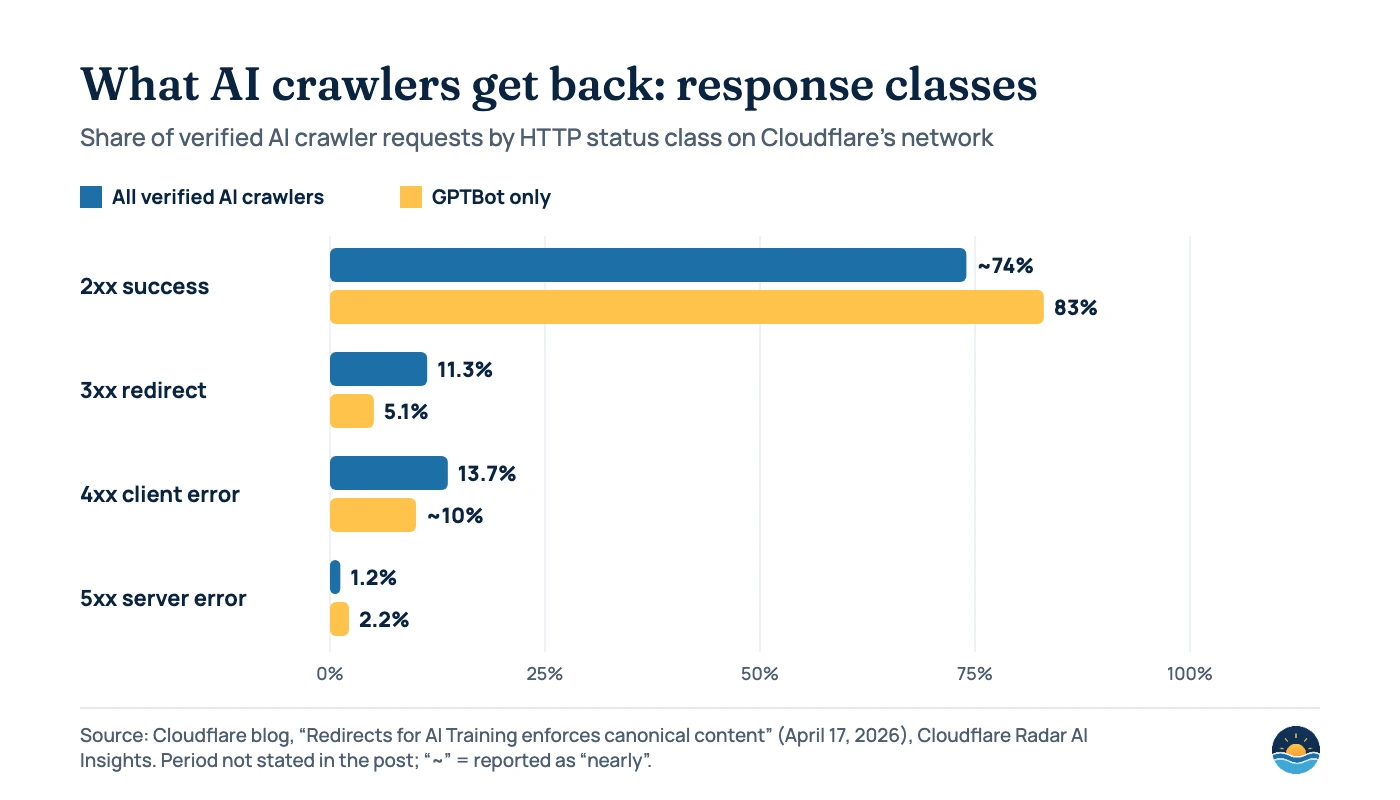
Google doesn’t publish how often Googlebot sees each code. The best recent public snapshot comes from Cloudflare, which published response-code shares for verified AI crawlers on April 17, 2026. Across all AI crawlers, nearly 74% of requests got a 2xx response, 13.7% a 4xx, 11.3% a 3xx and 1.2% a 5xx. For OpenAI’s GPTBot, 83% got a 2xx. The post doesn’t state the time window and covers AI crawlers, not Googlebot, so treat it as an indication of how much crawling goes to redirects and errors rather than a benchmark.
Usually fine
- A 404 for a page you deliberately deleted
- A single 301 from an old URL to its replacement
- A brief 503 during planned maintenance
- A 304 for unchanged pages
Fix these
- Soft 404s: error pages that return 200
- Redirect chains and loops
- Old URLs redirected to the homepage
- 5xx or 429 lasting more than a day or two
- 403s served to Googlebot on public pages
A seven-step status code audit
- Crawl the site with an SEO crawler and export every URL with its status code, including redirects and their final destinations.
- Check Search Console’s Page indexing report for “Not found (404)”, “Soft 404”, “Server error (5xx)” and “Redirect error”, and inspect examples with the URL Inspection tool.
- Fix soft 404s by returning a real 404 or 410 for missing content, or a 301 if it moved.
- Flatten redirect chains so internal links and old URLs point straight to the final 200 page.
- Update internal links that point to redirects or 404s, and make sure your XML sitemap lists only 200 URLs.
- Review Crawl Stats and server logs for spikes in 5xx or 429 responses, and confirm your CDN or firewall isn’t blocking verified Googlebot.
- Re-check after deployments, especially redesigns, migrations and plugin updates, which often change status codes by accident.
Frequently asked questions
Is a 404 error bad for SEO?
Not on its own. Google says a 404 is the right response for pages that don’t exist, and pages returning 4xx codes don’t waste crawl budget. It becomes a problem when important pages or pages with links return 404 by mistake.
Should I use 404 or 410 for deleted pages?
Either works for Google. Its documentation treats all 4xx codes except 429 the same way, so indexed URLs are removed whichever you use. RFC 9110 defines 410 as likely permanent, so use it when you are sure the page is gone for good.
Do 301 redirects lose ranking signals?
Google describes 301 and 308 redirects as strong signals that the target should become canonical, and says all permanent redirect methods have the same effect in Search. Use server-side redirects for the quickest effect and avoid long chains.
How long can a site return 503 before rankings suffer?
Google says not to use 500, 503 or 429 to slow crawling for longer than one to two days. If the same URL keeps returning these codes for multiple days, it may be dropped from the index.
Sources
- How HTTP Status Codes Affect Google’s Crawlers — Google Crawling Infrastructure, updated Feb 4, 2026 — handling of 2xx, 3xx, 4xx, 5xx
- Debug Network and DNS Errors for Google’s Crawlers — Google Crawling Infrastructure, updated Dec 18, 2025 — network and DNS errors
- Reduce Google Crawl Rate — Google Crawling Infrastructure, updated Oct 6, 2026 — 1–2 day limit, Retry-After
- How Google Interprets the robots.txt Specification — Google Crawling Infrastructure, updated Oct 23, 2026 — robots.txt error handling
- Redirects and Google Search — Google Search Central, updated Apr 14, 2026 — redirect types and methods
- How to Specify a Canonical with rel=”canonical” and Other Methods — Google Search Central, updated Jul 10, 2026 — redirects as canonical signals
- Troubleshoot Google Search Crawling Errors — Google Search Central, updated Dec 18, 2025 — soft 404s
- Crawl Budget Management — Google Crawling Infrastructure, updated Jul 22, 2026 — soft 404s, redirect chains
- Myths and facts about crawling — Google Crawling Infrastructure, updated Dec 18, 2025 — 4xx and crawl budget
- Site Move with URL Changes — Google Search Central, updated Aug 20, 2026 — avoid redirecting many URLs to the home page (possible soft 404)
- Page indexing report — Search Console Help — 404, 403, soft 404 and redirect error statuses
- Don’t use 403s or 404s for rate limiting — Google Search Central Blog (Gary Illyes), Feb 17, 2023
- Google’s Crawling Documentation Changelog — Google — Dec 18, 2025 move; Oct 6, 2026 Retry-After update
- RFC 9110: HTTP Semantics — IETF, June 2022 — status code definitions
- Redirects for AI Training enforces canonical content — Cloudflare Blog, Apr 17, 2026 — AI crawler response-code shares
Cite this article: Bright Harbour Media. “HTTP Status Codes and SEO: How Google Handles Each One.” Bright Harbour Media Insights, October 2026. https://brightharbourmedia.com/http-status-codes-seo/
You are welcome to reference the charts and frameworks in this article with a link back to this page.
Not sure what your server is telling Google? Our technical SEO team audits status codes, redirects and crawl errors and fixes what’s holding your pages back. Get in touch to book a review.