
The URL Inspection tool in Google Search Console shows how Google sees one specific URL: whether it is indexed, how it was discovered and crawled, which canonical Google chose, and which enhancements it found. A live test also checks whether the current version of the page could be indexed. In an SEO audit it is the tool for confirming, page by page, why an important URL is or isn’t in Google.
Key takeaways
- The default result is “not a live test”: it reports the most recently indexed version of the page. The live test fetches the URL in real time.
- The live test can’t check canonical selection, sitemaps, referring pages or duplicate status, so a passing live test does not mean the page will be indexed.
- If robots.txt blocks a page, “Indexing allowed?” will always say “Yes”, because Google can’t see the noindex.
- Google publishes no number for the Request Indexing quota; it says crawling “can take anywhere from a few days to a few weeks.”
- The URL Inspection API (launched Jan 31, 2022) allows 2,000 queries per day and 600 per minute per property, but returns indexed data only.
What does the URL Inspection tool show?
According to Google’s Search Console Help page, the tool “provides information about Google’s indexed version of a specific page, and also allows you to test whether a URL might be indexable.” It covers indexing, structured data, video and linked AMP pages. You can open it by pasting a fully qualified URL into the bar at the top of Search Console (the URL must belong to the property you have open) or by clicking Inspect next to a URL in most reports.
The first thing you see is a verdict. Read it carefully, because each wording means something specific.
| Verdict | What Google says it means | Audit action |
|---|---|---|
| URL is on Google | Indexed, can appear in Search, and no problems found with enhancements | Fine. Note that it “doesn’t guarantee that your page is appearing in Search results” |
| URL is on Google, but has issues | Indexed, but problems may stop it showing with all enhancements (for example malformed structured data or AMP errors) | Open the Enhancements section and fix invalid items |
| URL is not on Google | This URL won’t appear in Google Search results | Read the Page indexing reason and work through the crawl and indexing fields |
| URL is an alternate version | An AMP page that is an alternate of a canonical non-AMP page | Usually expected; inspect the canonical instead |
How do you read the Page indexing section?
Under the verdict, the Page indexing section groups the evidence into discovery, crawl and indexing. This is where most audit findings come from. The same reasons appear in the site-wide Page indexing report; the URL Inspection tool lets you confirm them for a single URL.
| Field | What it tells you | What to look for |
|---|---|---|
| Sitemaps | Sitemaps submitted in Search Console or listed in robots.txt that contain the URL | “No referring sitemap” for a page you care about means it’s missing from your sitemap |
| Referring page | A page Google possibly used to discover the URL | None shown can mean weak internal linking (Google notes it may know the URL from sources it doesn’t report) |
| Last crawl | When Google last crawled it, in your local time | A very old date on a page you updated recently |
| Crawled as | Desktop or mobile user agent | Mobile is expected for most sites |
| Crawl allowed? | Whether robots.txt allows crawling | “No” means a robots.txt rule blocks Google |
| Page fetch | Whether Google could get the page from your server | “Failed” with soft 404, not found (404), 401/403, server error (5xx) or redirect error |
| Indexing allowed? | Whether a noindex meta tag or HTTP header was found | “No” on a page that should rank; remember it always shows “Yes” if robots.txt blocks crawling |
| User-declared canonical | The canonical you set with rel=canonical, a header, a sitemap or other methods | “None” is fine for a page that isn’t an alternate |
| Google-selected canonical | The URL Google chose as canonical | A different URL from yours means Google sees the page as a duplicate |
Two details trip people up. First, the help page notes that “fetching can be successful even if the page is not indexed for another reason,” so a successful fetch only rules out server problems. Second, the Google-selected canonical “can be a few hours out of date,” and only the indexed data can show it. If yours and Google’s don’t match, our guide to canonical tags and duplicate content explains which signals to align.
Indexed result vs live test: which should you trust?
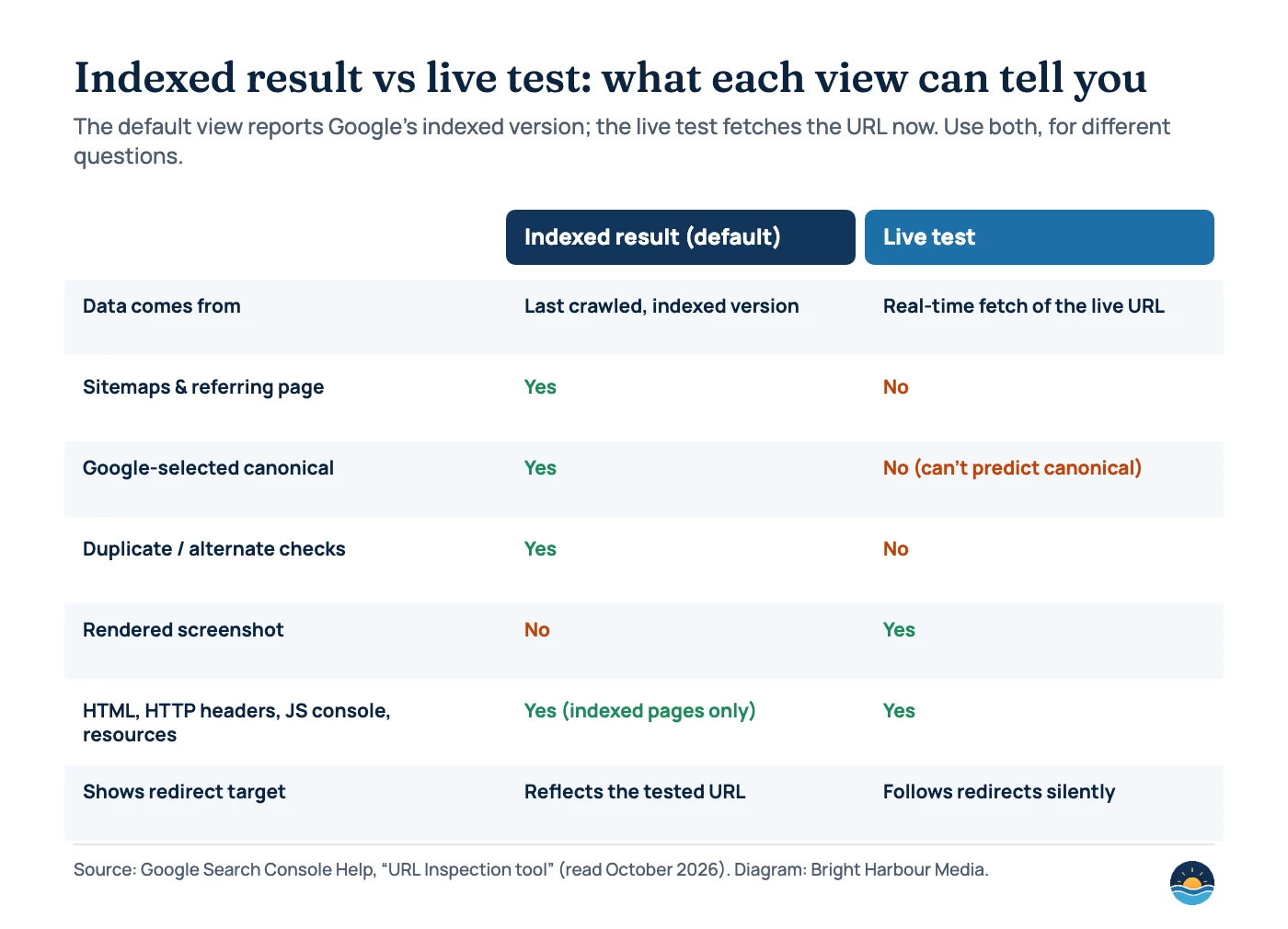
Both, for different questions. The indexed result tells you what Google currently has. The live test tells you whether Google’s inspection crawler (Google-InspectionTool) can access and index the page as it is now. Google is explicit that a valid live test does not mean the page will be indexed: “The live URL test only confirms if Google-InspectionTool can access your page for indexing.”
The live test cannot check several common reasons for non-indexing, including Crawled – currently not indexed, Discovered – currently not indexed, Duplicate without user-selected canonical and Duplicate, Google chose different canonical than user. It also doesn’t check manual actions, removals or quality issues. When it follows a redirect, it doesn’t tell you, so always test the final URL directly.
Use the indexed result to…
- Confirm whether a page is in Google’s index
- See which canonical Google selected
- Check discovery: sitemap and referring page
- Find the last crawl date and crawler type
Use the live test to…
- Confirm a fix (noindex removed, robots.txt changed, 5xx fixed)
- See a screenshot of the rendered page
- Check JavaScript console errors and blocked resources
- Check structured data on the current version
The rendered screenshot is available only in the live test, and the help page says screenshots are not available for the indexed URL. That makes the live test the quickest way to check whether content loaded by JavaScript is visible to Google; see our JavaScript SEO guide for what to do if it isn’t.
An eight-step URL Inspection triage for audits
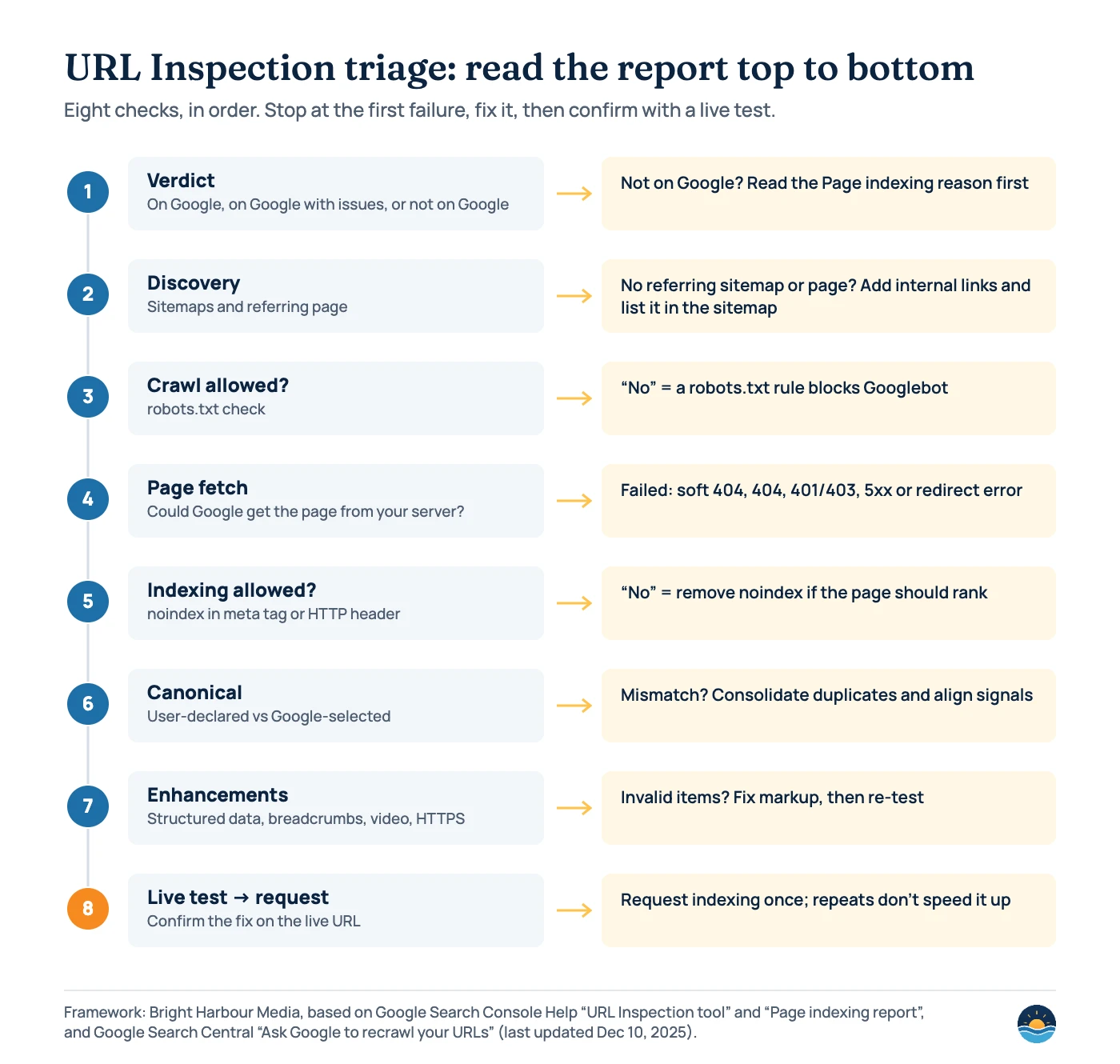
In our SEO audits we inspect a sample of the URLs that matter most (the homepage, top service or product pages, and pages that lost traffic) and read each result in the same order:
- Read the verdict. If the URL is not on Google, note the Page indexing reason before anything else.
- Check discovery. No referring sitemap or referring page suggests the page is hard to find. Add it to the XML sitemap and link to it from relevant pages.
- Check “Crawl allowed?”. A “No” points to a robots.txt rule. Fix the rule, not the page.
- Check “Page fetch”. Failures such as server errors (5xx), not found (404), access denied (401/403), soft 404 and redirect errors need a technical fix before anything else will work.
- Check “Indexing allowed?”. A “No” means a noindex in the meta robots tag or X-Robots-Tag header. Remove it if the page should rank.
- Compare canonicals. If Google picked a different canonical, decide whether that’s right, then consolidate duplicates with redirects or rel=canonical and consistent internal links.
- Check enhancements. Fix invalid structured data items. Remember the tool “does not yet show all possible enhancements.”
- Run a live test, then request indexing once. Once the live test shows the fix, click Request indexing. Google says requesting a recrawl “multiple times for the same URL won’t get it crawled any faster.”
How much can you inspect, and how fast does Google respond?
Google sets daily limits but doesn’t publish the numbers for the Search Console interface. The help page says there is “a daily limit of inspection requests for each property,” a per-property daily limit of live inspections, and “a daily limit to how many index requests you can submit.” You can’t request indexing at all if the live test says the page is non-indexable.
On timing, the help page says indexing “typically takes only a day or so, but can take much longer in some cases,” and “can take up to a week or two.” Google’s recrawl documentation (last updated December 10, 2025) says crawling “can take anywhere from a few days to a few weeks” and recommends a sitemap if you have large numbers of URLs. For many updated pages, Google suggests a sitemap “with the updated pages marked by <lastmod>” rather than individual requests.
| Limit | Figure | Source |
|---|---|---|
| URL Inspection API, per property | 2,000 queries per day; 600 per minute | Search Console API usage limits (last updated Aug 28, 2025) |
| URL Inspection API, per Google Cloud project | 10,000,000 queries per day; 15,000 per minute | Search Console API usage limits |
| Request indexing in Search Console | Daily limit; number not published | Search Console Help, “URL Inspection tool” |
| Rows shown in Search Console tables | Maximum 1,000 | Search Console Help, “About Search Console data” |
Should you use the URL Inspection API for bigger audits?
For sites with more than a handful of key pages, yes. Google launched the URL Inspection API on January 31, 2022, saying it returns “the indexed information currently available in the URL Inspection tool.” The response includes the verdict, coverage state, robots.txt state, indexing state, last crawl time, page fetch state, Google-selected and user-declared canonicals, the crawler type, sitemaps and referring URLs. Google’s own launch post suggests using it for “checking if there are differences between user-declared and Google-selected canonicals.”
Two limits matter. The API has no live test, so it can only tell you what is in the index. And its mobile usability field is deprecated: Google retired the Mobile Usability report and the Mobile-Friendly Test on December 1, 2023, and pointed people to Lighthouse instead.
Frequently asked questions
Does “URL is on Google” mean the page ranks?
No. Google says it “doesn’t guarantee that your page is appearing in Search results.” For a definitive check, Google suggests searching for the URL on Google.
Why does the live test pass but the page still isn’t indexed?
The live test only confirms Google can access the page for indexing. It doesn’t test canonical selection, duplicates or reasons like “Crawled – currently not indexed”, which depend on Google’s own assessment of the page.
How many times can I request indexing?
Google doesn’t publish the number; it only says there is a daily limit. Requesting the same URL repeatedly won’t speed it up, so request once after fixing the issue and use a sitemap for many URLs.
Can I inspect URLs on a site I don’t own?
No. The URL must be in a Search Console property you have access to. For other sites, Google points to public tools such as the Rich Results Test.
Sources
- URL Inspection tool — Google Search Console Help, read October 2026 — verdicts, fields, live test limits, request indexing
- Page indexing report — Google Search Console Help, read October 2026 — not-indexed reasons, live test limitations
- Ask Google to recrawl your URLs — Google Search Central, last updated Dec 10, 2025 — quota, timing, sitemaps
- Welcoming the new Search Console URL Inspection API — Google Search Central blog, Jan 31, 2022 — API launch and use cases
- UrlInspectionResult — Search Console API reference, last updated Jan 21, 2025 — response fields
- Usage limits — Search Console API, last updated Aug 28, 2025 — URL Inspection API quotas
- The role of page experience in creating helpful content — Google Search Central blog, Apr 19, 2023 — Mobile Usability report and Mobile-Friendly Test retired Dec 1, 2023
- About Search Console data — Google Search Console Help — 1,000-row table limit
Cite this article: Bright Harbour Media. “How to Use the URL Inspection Tool in an SEO Audit.” Bright Harbour Media Insights, October 2026. https://brightharbourmedia.com/url-inspection-tool/
You are welcome to reference the charts and frameworks in this article with a link back to this page.
Need to know why your key pages aren’t in Google? Our SEO audits inspect the URLs that matter and turn the findings into a prioritised fix list. Contact us to request an audit.