

JavaScript SEO is the part of technical SEO that makes sure search engines can find, render and index content that a website builds with JavaScript. Google processes JavaScript pages in three phases — crawling, rendering and indexing — and most JavaScript SEO problems happen when important content, links or tags only appear after rendering, or never appear at all.
Key takeaways
- Google renders pages with an evergreen version of Chromium, and queues every page that returns a 200 status code for rendering — whether or not it uses JavaScript.
- Google can only discover links that are
<a>elements with anhref; URL fragments such as#/productscan’t be relied on. - If the original HTML contains
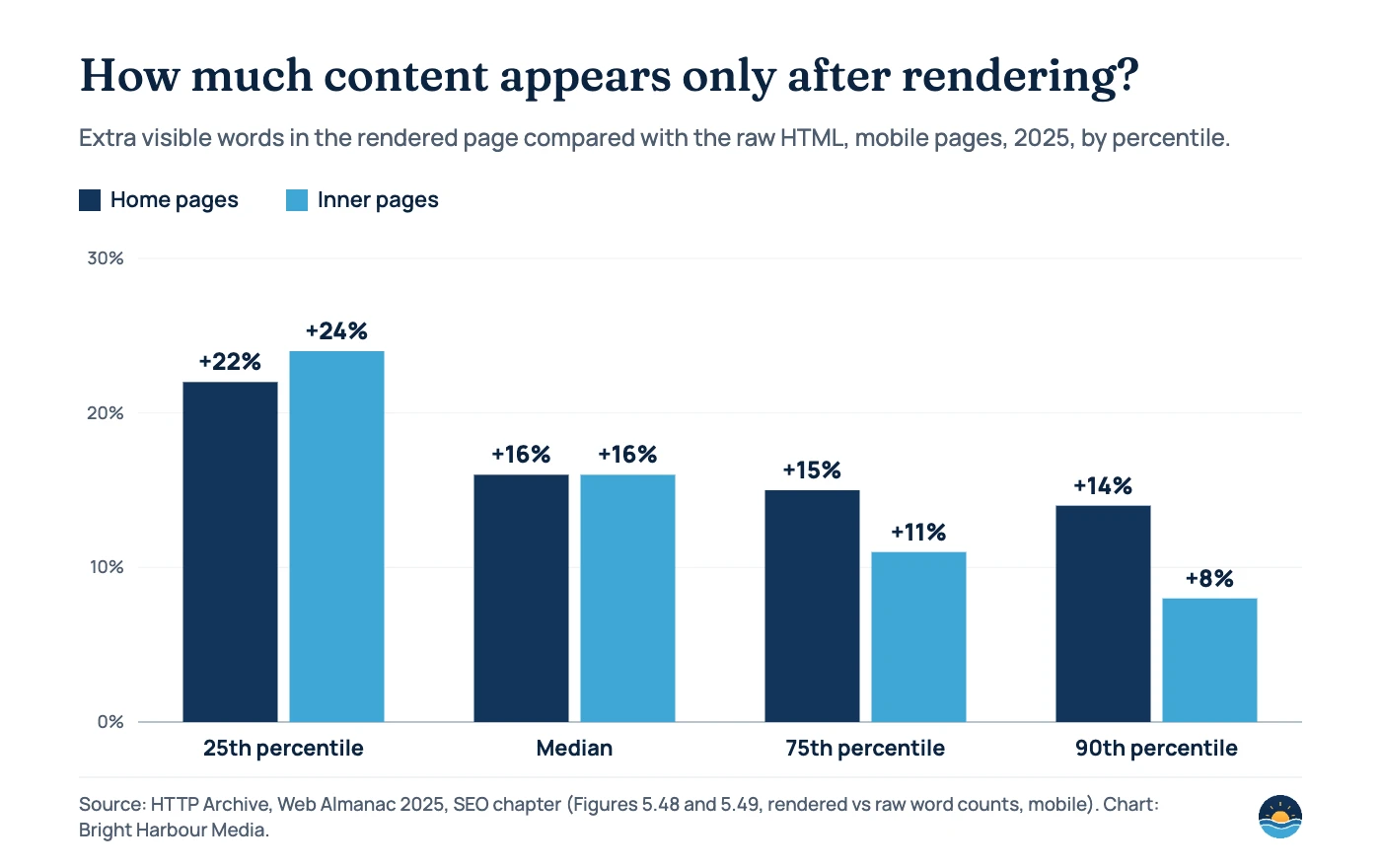
noindex, Google may skip rendering, so removing it later with JavaScript may not work. - On the median mobile page, the rendered page has 16% more visible words than the raw HTML; JavaScript changes the canonical tag on 3.02% of mobile pages (Web Almanac 2025).
- Google calls dynamic rendering “a workaround and not a long-term solution” and recommends server-side rendering, static rendering or hydration.
Can Google crawl and index JavaScript?
Yes — but with conditions. Google’s JavaScript SEO basics guide says Google Search “runs JavaScript with an evergreen version of Chromium”, which means it can see most content a modern browser would see. The catch is that rendering is an extra step with its own queue, its own limits and its own ways to fail. Other search engines and many crawlers, Google notes, may not run JavaScript at all.
That is why Google still says server-side or pre-rendering “is still a great idea because it makes your website faster for users and crawlers, and not all bots can run JavaScript.” JavaScript SEO is less about whether Google can render your site, and more about whether the important parts survive every step reliably.
How does Google process JavaScript pages?
Google describes three main phases. Understanding them makes most JavaScript SEO issues easy to diagnose.
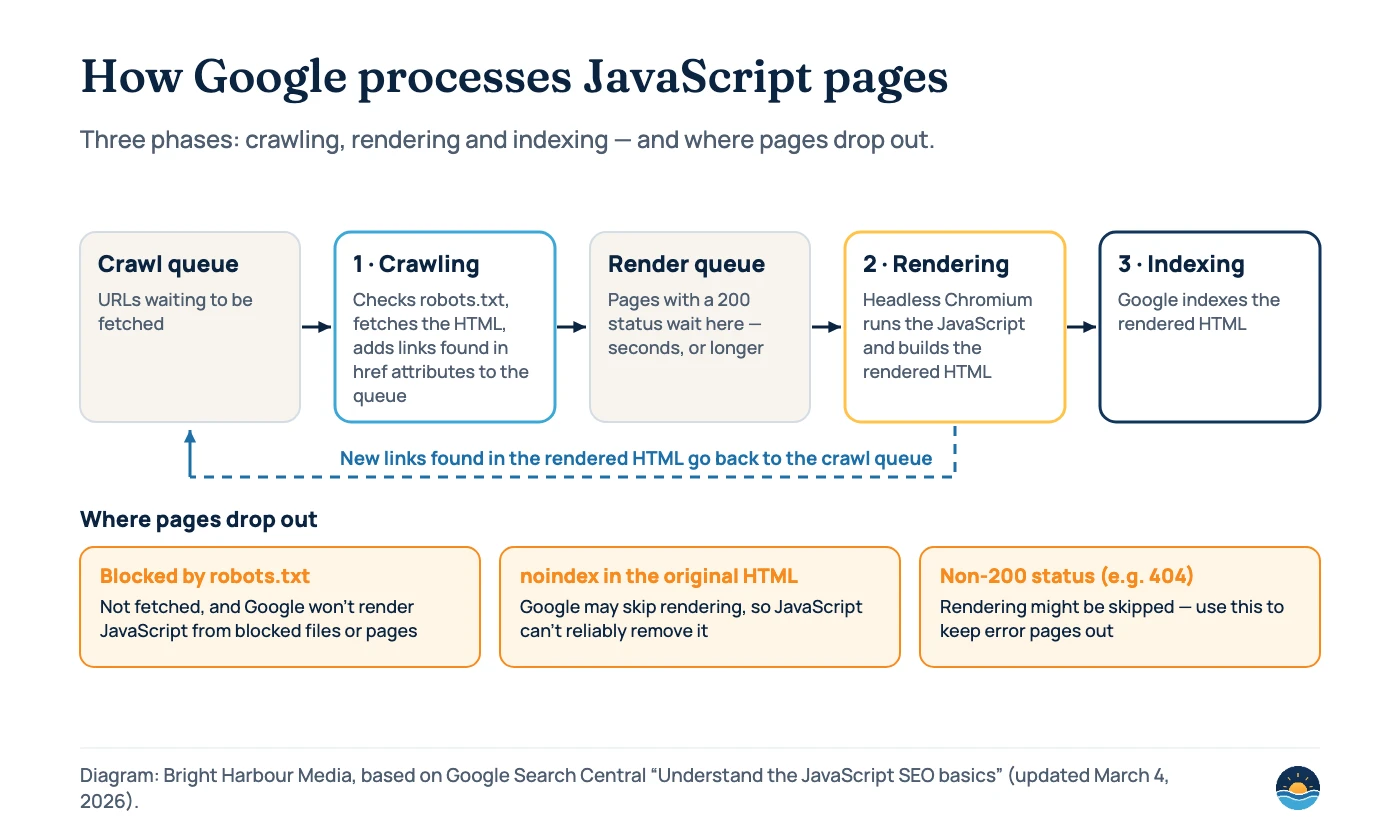
- Crawling. Googlebot takes a URL from the crawl queue and first checks robots.txt. If the URL is disallowed, it skips the request — and Google “won’t render JavaScript from blocked files or on blocked pages.” If allowed, it fetches the HTML and adds URLs found in
hrefattributes of links to the crawl queue. - Rendering. Google queues all pages with a 200 HTTP status code for rendering, unless a robots meta tag or header tells it not to index the page. A page “may stay on this queue for a few seconds, but it can take longer than that.” When resources allow, a headless Chromium renders the page and runs the JavaScript.
- Indexing. Google parses the rendered HTML for links again, queues new URLs for crawling, and uses the rendered HTML to index the page.
Pages that return a non-200 status, such as a 404, may skip rendering altogether. This matters for single-page apps, which often return 200 for every URL, including errors — more on that below.
Which rendering approach is best for SEO?
How your site produces its HTML decides how much work Google has to do before it sees your content. web.dev’s Rendering on the Web defines the main approaches; the SEO column is our summary of how each affects what a crawler receives.
| Approach | What it means (web.dev) | What the first HTML response contains | SEO risk |
|---|---|---|---|
| Server-side rendering (SSR) | Rendering an app on the server to send HTML, rather than JavaScript, to the client | Full content, links and tags | Low |
| Static rendering | Separate HTML files produced for each URL at build time | Full content, links and tags | Low |
| Prerendering | Running a client-side app at build time to capture its initial state as static HTML | Initial content; interactivity added later | Low to medium |
| SSR with hydration | Client-side scripts add state and interactivity to server-rendered HTML | Full content, then JavaScript takes over | Low, if the HTML and the hydrated page match |
| Client-side rendering (CSR) | Rendering pages in the browser, using JavaScript to modify the DOM | Often an “app shell” with little or no content | Higher — everything depends on rendering |
| Dynamic rendering | Serving a server-rendered version to bots and the client-side version to users | Depends on bot detection | Google calls it a workaround, not a recommended solution |
Google’s own advice is consistent: dynamic rendering “creates additional complexities and resource requirements”, and the better long-term choices are server-side rendering, static rendering or hydration. If dynamic rendering serves “completely different content to users and crawlers”, Google says it can be considered cloaking.
How much do real websites depend on rendering?
The HTTP Archive’s Web Almanac 2025 SEO chapter compares the raw HTML of millions of pages with the rendered version after JavaScript runs. For most sites, the gap is modest — but it is not zero, and on some pages it is large.
| Measure (Web Almanac 2025) | Desktop | Mobile |
|---|---|---|
| Median extra visible words after rendering — home pages | 18% | 16% |
| Median extra visible words after rendering — inner pages | 17% | 16% |
| Pages with a canonical tag in the raw HTML | 64.40% | 64.27% |
| Pages with a canonical tag in the rendered HTML | 66.01% | 66.11% |
| Pages where rendering changes the canonical tag | 2.71% | 3.02% |
| Pages with conflicting canonical signals (mismatch) | 0.72% | 0.71% |
The Almanac’s authors suggest some of the mobile gap comes from layouts such as accordions and tabs, where content sits in the HTML but is hidden at small screen sizes. On the canonical side they conclude that “a static, server-side canonical tag is generally the safer option”, which matches Google’s guidance. If you want to go deeper on canonical conflicts, see our guide to canonical tags and duplicate content.
The most common JavaScript SEO problems (and fixes)
Almost every JavaScript SEO issue we see falls into one of the patterns below. All of the fixes come from Google’s troubleshooting guide and its JavaScript SEO basics page.
| Problem | What you see | Fix |
|---|---|---|
Links built with click handlers or fragments (#/page) | Pages missing from the index; few URLs discovered | Use real <a href="/page"> links and the History API for routing |
| Soft 404s in single-page apps | Error pages indexed or reported as “Soft 404” | Redirect to a URL that returns a real 404, or add noindex to error views |
| JavaScript changes the canonical tag | “Google chose different canonical than user” | Set the canonical in the HTML; if JavaScript must set it, use the same value and only one tag |
noindex in the HTML, removed by JavaScript | Page stays out of the index | Don’t ship noindex in the original HTML for pages you want indexed |
| Content behind permissions or interactions | Content missing from the rendered HTML | Don’t require camera, location or similar permissions to show content; Googlebot declines them |
| Content relying on cookies or local storage | Different or empty content for Googlebot | Don’t rely on state between page loads; Google’s renderer clears storage and cookies |
| Old JavaScript or CSS served from cache | Rendered page looks broken or out of date | Use content fingerprinting in file names, such as main.2bb85551.js |
| Content loaded over WebSockets or WebRTC | Data never appears in the rendered page | Provide an HTTP fallback; Googlebot only uses HTTP requests |
Web components without <slot> | Light DOM content missing after rendering | Use slots, then check the rendered HTML in URL Inspection |
Links deserve special attention. Google is explicit that it “can only discover your links if they are <a> HTML elements with an href attribute.” A menu that changes the view on click but has no real URLs can leave whole sections of a site undiscovered. The same principle sits at the heart of our internal linking strategy guide.
<!-- Crawlable: Google can find this URL -->
<a href="/services/technical-seo/">Technical SEO</a>

<!-- Not reliably crawlable -->
<span onclick="goTo('technical-seo')">Technical SEO</span>
<a href="#/technical-seo">Technical SEO</a>
Titles, meta tags and structured data in JavaScript
Safe to set with JavaScript
- The
<title>element and meta description - JSON-LD structured data, if you test it
- A canonical tag that is absent from the HTML, as long as only one ends up on the page
- Adding
noindexto an error view
Risky with JavaScript
- Changing a canonical to a different URL than the one in the HTML
- Removing a
noindexthat was in the original HTML - Main content that only loads after a click, scroll or permission prompt
- Navigation without real
hrefURLs
Google confirms you can use JavaScript to set or change the title and meta description, and to generate JSON-LD. But for signals that control indexing — canonicals and robots rules — the safest place is the original HTML response. When Google sees noindex there, it “may skip rendering and JavaScript execution”, so a script that later removes it may never run.
How to audit a JavaScript site: a 7-step process
- Compare raw and rendered HTML. View the page source, then the rendered HTML in Search Console’s URL Inspection tool or the Rich Results Test. Note any content, links, titles or tags that only exist after rendering.
- Check robots.txt for blocked resources. Make sure the JavaScript and CSS files needed to render key content are not disallowed.
- Test links. Crawl the site with JavaScript rendering off, then on. URLs that only appear with rendering on depend on JavaScript for discovery.
- Check status codes on error routes. Request a URL that shouldn’t exist. It should return a 404 or carry
noindex, not a 200 page that says “not found”. - Inspect canonical and robots tags in both versions. They should match, and there should be only one canonical tag.
- Review JavaScript errors. URL Inspection shows console messages and exceptions. Google also suggests logging JavaScript errors from real visitors, including Googlebot.
- Monitor indexing. Watch Search Console’s Page indexing report for soft 404s, canonical issues and “Crawled – currently not indexed”. Our guide to the Page indexing report explains each status.
Rendering approach also affects speed. web.dev notes that client-side rendering can be “difficult to make and keep fast for mobile devices”, because the amount of JavaScript tends to grow with the app. If your Core Web Vitals are struggling, the rendering model is often part of the reason.
Frequently asked questions
Is dynamic rendering still recommended?
No. Google’s documentation says dynamic rendering was a workaround and not a long-term solution, and recommends server-side rendering, static rendering or hydration instead. It is not considered cloaking as long as bots and users get similar content.
How long does Google take to render a page?
Google doesn’t give a fixed time. Its documentation says a page may stay in the rendering queue for a few seconds, but it can take longer. That uncertainty is one reason to put critical content and links in the initial HTML.
Do single-page apps hurt SEO?
Not by themselves. Problems arise when a single-page app uses URL fragments for routing, returns a 200 status for error pages, or hides links behind click handlers. Using the History API, real links and proper 404 handling avoids most issues.
Does WordPress need JavaScript SEO?
Usually less than JavaScript frameworks, because WordPress sends server-rendered HTML. It still matters if themes, page builders or plugins load menus, reviews, tabs or other content with JavaScript, so it is worth comparing raw and rendered HTML on key templates.
Sources
- Understand the JavaScript SEO basics — Google Search Central (updated March 4, 2026) — crawling, rendering and indexing phases
- Fix Search-related JavaScript problems — Google Search Central (updated December 18, 2025)
- Dynamic rendering as a workaround — Google Search Central (updated December 10, 2025)
- Rendering on the Web — web.dev (updated January 5, 2026) — SSR, static rendering, CSR and hydration definitions
- Web Almanac 2025: SEO — HTTP Archive — raw vs rendered word counts and canonical tags
Cite this article: Bright Harbour Media. “JavaScript SEO: How Google Crawls and Renders Your Site.” Bright Harbour Media Insights, October 2026. https://brightharbourmedia.com/javascript-seo/
You are welcome to reference the charts and frameworks in this article with a link back to this page.
Not sure whether Google sees the same site your visitors do? Our technical SEO service compares raw and rendered pages, fixes what breaks and works with your developers on the long-term setup — get in touch to talk it through.