
The Page indexing report in Google Search Console shows how many of your known URLs Google has indexed and gives a reason for every URL it left out. Auditing it means sorting those reasons into real problems to fix and exclusions that are working exactly as intended.
Key takeaways
- Google says you should not expect every URL on your site to be indexed — “only the canonical pages.”
- The example URL list for each reason is capped at 1,000 rows and isn’t guaranteed to show every affected URL.
- Validating a fix in Search Console “typically takes up to about two weeks,” and sometimes much longer.
- In 2025, 84.9% of robots.txt requests returned a 200 response and 13.3% returned a 404 on desktop (HTTP Archive Web Almanac).
- A
noindexrule only works if robots.txt does not block the page — Google has to crawl it to see the rule.
What does the Page indexing report show?
The report lives under Indexing → Pages in Search Console. Google describes it as a way to see “which pages Google can find and index on your site, and learn about any indexing problems encountered.” It splits every URL Google knows about into two states: indexed and not indexed, and charts both totals over time.
Below the chart is the table that matters most in an audit: Why pages aren’t indexed. Each row is a reason — a server error, a noindex rule, a duplicate — with a count of affected URLs. Click a row and you get example URLs and a history chart for that reason.
| Part of the report | What it tells you | How to use it in an audit |
|---|---|---|
| Indexed / not indexed totals | How many known URLs Google has and hasn’t indexed | Compare with the number of pages you actually want in search |
| History chart | How those totals changed over time | Look for sudden jumps after a launch, migration or template change |
| Why pages aren’t indexed | Each exclusion reason and its URL count | Your working list — sort every row into fix, confirm or improve |
| Example URLs | Up to 1,000 sample URLs per reason | Spot patterns (a folder, a parameter, a template); not a complete list |
| Sitemap filter | All known pages, all submitted pages, unsubmitted pages only, or one sitemap | Start with submitted pages — the URLs you’ve told Google matter |
Google adds an honest caveat: the totals above the chart are “complete and accurate from Google’s perspective,” but small discrepancies can occur. Treat the report as Google’s view of your site, then confirm individual URLs with the URL Inspection tool.
Is it normal to have pages that aren’t indexed?
Yes. This is the single most misunderstood point about the report. Google states plainly: “You should not expect all URLs on your site to be indexed, only the canonical pages.” Redirected URLs, deliberate noindex pages, parameter variations and alternate versions of a page should all appear as not indexed. That is the system working.
Google also notes that sites with fewer than about 500 pages may not need this report at all, because a quick site: search can show what is indexed. For small service businesses, the report is still useful as an early-warning system when something breaks.
The cases worth worrying about are the ones Google itself calls out: more non-indexed than indexed pages, often caused by a robots.txt rule blocking large sections of the site or by a large number of duplicate pages, and sudden spikes in errors, which often follow a template change or a sitemap that lists URLs robots.txt blocks.
What each “Why pages aren’t indexed” reason means
Search Console uses fixed labels for exclusion reasons. The table below summarises the ones you will meet most often, what Google says about each, and the usual next step.
| Reason | What Google says it means | Usual next step |
|---|---|---|
| Server error (5xx) | Your server returned a 500-level error when the page was requested | Check server logs and hosting; fix urgently if these are important pages |
| Redirect error | A redirect chain was too long, looped, or failed in another way | Point every old URL straight to its final destination |
| URL blocked by robots.txt | Your robots.txt file blocked the page | Confirm the block is intended; remove the rule if you want the page indexed |
| URL marked ‘noindex’ | Google found a noindex directive and did not index the page | Confirm it’s deliberate; remove the tag from pages that should rank |
| Soft 404 | The page shows a “not found” style message but doesn’t return a 404 status | Return a real 404/410, or add genuine content if the page should exist |
| Not found (404) | The URL returned a 404 when Google requested it | Fine for deleted pages; redirect if a valuable page moved |
| Blocked (401 / 403 / other 4xx) | Googlebot was asked for authorisation, refused access, or hit another 4xx | Unblock public pages; leave private areas blocked |
| Page with redirect | A non-canonical URL that redirects elsewhere, so it won’t be indexed | Usually fine — update internal links to the destination URL |
| Alternate page with proper canonical tag | The page correctly points to a canonical page, which is indexed | No action needed |
| Duplicate without user-selected canonical | A duplicate of another page with no preferred canonical declared | Add a canonical or consolidate the duplicates |
| Duplicate, Google chose different canonical than user | You marked this page canonical, but Google prefers another URL | Check which page Google picked and align your signals |
| Discovered – currently not indexed | Google found the page but hasn’t crawled it yet | Strengthen internal links and sitemap inclusion; monitor |
| Crawled – currently not indexed | Google crawled the page but didn’t index it; it may or may not be indexed later | Review the page’s unique value; consolidate thin or overlapping pages |
Duplicate and canonical rows deserve their own investigation — our guide to canonical tags and duplicate content walks through how Google picks a canonical and which signals are strongest.
A simple way to triage the report
Before fixing anything, ask one question of every reason row: is this a URL I want in Google? The answer puts each row into one of three buckets.
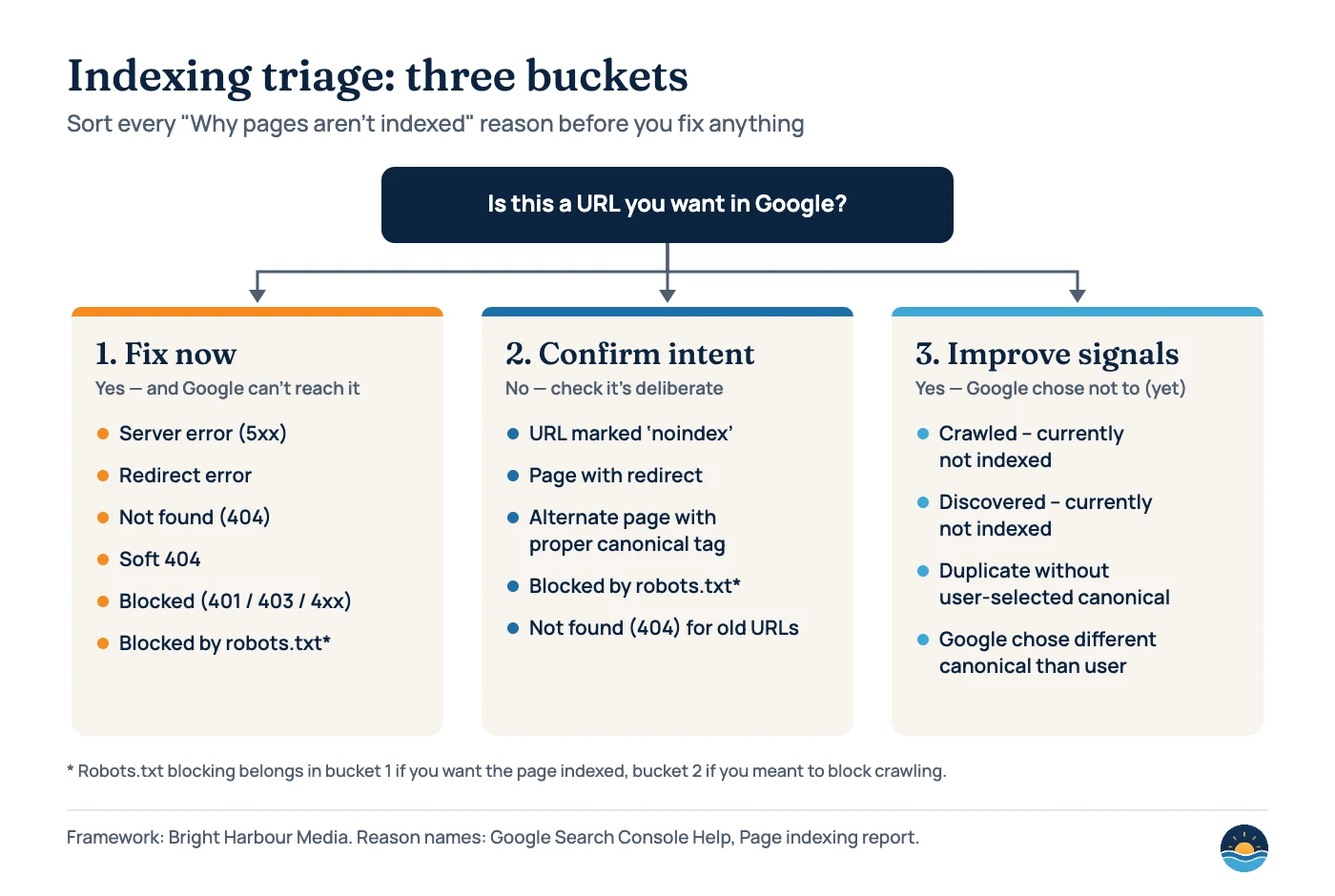
Bucket 1: Fix now
- Pages you want indexed that Google can’t reach
- Server errors, redirect errors, soft 404s, accidental blocks
- Usually a template, hosting or configuration problem — fix once, fix many
Bucket 2: Confirm intent
- Pages excluded on purpose
noindex, redirects, alternate canonicals, retired URLs- Check a sample, document the rule, then leave it alone
The third bucket — improve signals — holds pages you want indexed that Google can reach but has chosen not to index yet. These rarely have a one-line fix, which is why they take the most judgement.
How to audit the Page indexing report, step by step
- Filter to submitted pages. Use the sitemap filter to view “All submitted pages.” These are the URLs you have told Google matter, so exclusions here are the most likely to be real problems. If your sitemap is messy, start with our guide to XML sitemaps and crawl budget.
- List every reason and its count. Note the totals and the trend in each reason’s history chart. A reason that jumped on a specific date usually points to a specific change.
- Sort each reason into a bucket. Fix now, confirm intent, or improve signals. Robots.txt blocks and 404s can belong to either of the first two, depending on whether you meant them.
- Inspect sample URLs. Open a few examples in the URL Inspection tool. Compare the indexed version with a live test, and check the user-declared and Google-selected canonical.
- Fix at the source. Look for the shared cause — a template, a plugin setting, a URL parameter — rather than patching URLs one by one.
- Validate the fix. Click Validate fix on the reason row so Google re-checks the affected URLs and emails you the outcome.
- Re-check monthly. Add the report to your routine checks and note any site changes alongside the dates. It is also one of the first places to look in a full SEO audit.
Robots.txt and noindex: the most common self-inflicted problems
Many indexing problems start with two controls that are easy to confuse. Robots.txt controls crawling; noindex controls indexing. Mixing them up produces some of the most stubborn rows in the report.
Robots.txt is also a file almost every site requests constantly. HTTP Archive’s 2025 Web Almanac found that 84.9% of robots.txt requests returned a successful 200 response on both desktop and mobile, while about 13% returned a 404 — meaning no robots.txt file existed.
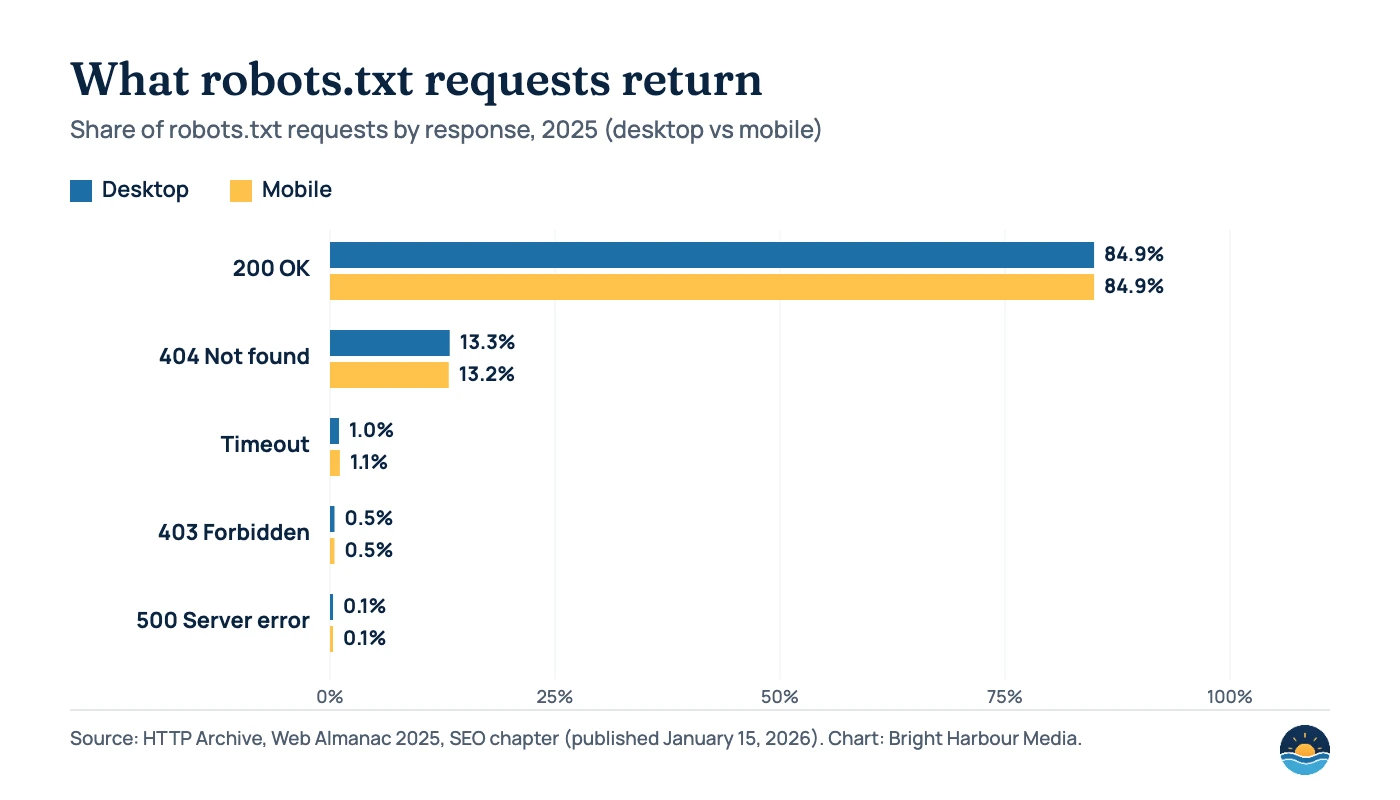
A missing robots.txt is not a problem in itself. Google’s documentation says its crawlers treat all 4xx responses except 429 “as if a valid robots.txt file didn’t exist” — so everything may be crawled. Server errors are more serious: for the first 12 hours Google stops crawling the site while it keeps trying to fetch the file, and for the next 30 days it uses the last good version it has. Google generally caches robots.txt for up to 24 hours and ignores anything beyond a 500 KiB file size limit.
| Situation | What Google does | Audit check |
|---|---|---|
| robots.txt returns 200 | Follows the rules in the file | Read the file; make sure no important folder is disallowed |
| robots.txt returns 404 (or other 4xx except 429) | Treats the site as having no robots.txt | Fine, unless you meant to block something |
| robots.txt returns 5xx or times out | Stops crawling for 12 hours, then uses the last good version for up to 30 days | Fix hosting errors fast; check server monitoring |
| Page blocked in robots.txt | Can’t read the content, but may still index the URL without a snippet | Use noindex (and allow crawling) to keep a page out of results |
Page has noindex and is crawlable | Drops the page from results once it recrawls it | Allow crawling; request recrawling for important changes |
The key trap: if you block a page in robots.txt and add noindex, Google can’t crawl the page to see the noindex. Google’s documentation is explicit that for noindex to work, the page “must not be blocked by a robots.txt file.” It also warns that it can take months for Googlebot to revisit a less important page, so request recrawling through URL Inspection for pages that matter.
“Discovered” vs “Crawled – currently not indexed”: what to do
These two reasons cause the most anxiety because Google doesn’t give a specific cause. What Google does tell you is the stage: Discovered means Google knows the URL exists but hasn’t crawled it yet; Crawled means it fetched the page but decided not to index it for now — and it “may or may not be indexed in the future.”
For a small business site, our approach is practical rather than technical. For discovered URLs, make sure each page is in your sitemap and linked from relevant pages — see our internal linking strategy. For crawled URLs, look honestly at the page: is it substantially different from your other pages, and would a searcher learn something here they can’t get elsewhere? Thin location variants, tag archives and near-duplicate service pages are common culprits. Consolidating them is often better than pushing for more indexing.
Remember too that indexing is not ranking. Google’s URL Inspection documentation notes that even “URL is on Google” doesn’t guarantee a page will appear in search results.
How Search Console validation works
Once you have fixed a reason, click Validate fix. Google re-checks the known affected URLs and sends an email when it has confirmed the fix — or found remaining instances. Don’t restart validation while a cycle is running.
| Validation status | Meaning |
|---|---|
| Not started | Some instances of the issue have never been part of a validation request |
| Started | Validation is under way and no remaining instances have been found yet |
| Looking good | All instances checked so far have been fixed |
| Passed | All known instances are gone (or the URLs are no longer available) |
| Failed | A certain threshold of pages still has the issue after you clicked Validate |
| N/A | Google found the issue fixed on all URLs without a validation request |
Frequently asked questions
How long does it take Google to index a page?
Google says it can take a week or so to start crawling and indexing a new page or site. After you request indexing through URL Inspection, indexing “typically takes only a day or so,” but can take much longer, and there is a daily limit on requests.
Should every page on my site be indexed?
No. Google says to expect only canonical pages to be indexed. Redirects, deliberate noindex pages and alternate versions should show as not indexed. Focus on whether the pages you want in search are indexed.
Does blocking a page in robots.txt remove it from Google?
Not reliably. Google can’t read a blocked page’s content, but it may still index the URL and show it without a snippet. To keep a page out of results, allow crawling and use a noindex rule instead.
Why does the report show fewer example URLs than the count?
The example list for each reason is limited to 1,000 URLs and isn’t guaranteed to show every URL with that status. Use patterns in the examples — a folder, a parameter, a template — to find the rest.
Sources
- Page indexing report — Google Search Console Help — report contents, reason labels, limits, validation
- URL Inspection tool — Google Search Console Help — indexed version vs live test, request indexing
- How Google interprets the robots.txt specification — Google Search Central (updated August 31, 2026) — status codes, caching, size limit
- Block Search indexing with noindex — Google Search Central (updated December 10, 2025) — noindex and robots.txt interaction
- Web Almanac 2025: SEO chapter — HTTP Archive, published January 15, 2026 — robots.txt response codes
Cite this article: Bright Harbour Media. “Page Indexing Report: How to Audit Indexing in Search Console.” Bright Harbour Media Insights, October 2026. https://brightharbourmedia.com/page-indexing-report/
You are welcome to reference the charts and frameworks in this article with a link back to this page.
Not sure which of your excluded pages actually matter? Our SEO audit service reviews your indexing, crawling and content together and gives you a prioritised fix list — get in touch to request an audit.