
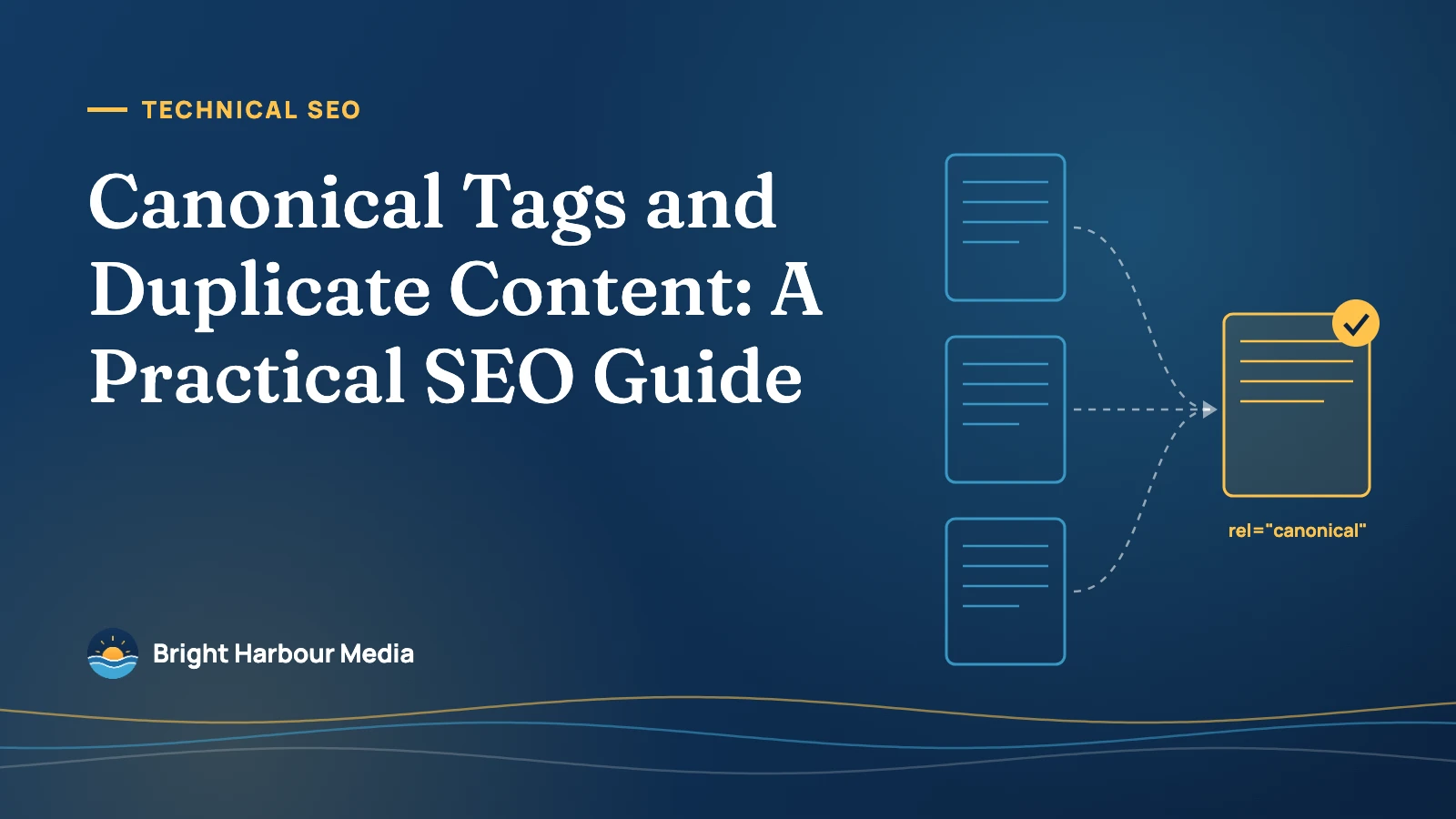
A canonical tag (rel="canonical") tells search engines which URL is the main version of a page when the same or very similar content is available at more than one address. Google calls the process of choosing that main URL canonicalization, and it treats your canonical tag as a strong hint — not a command.
Key takeaways
- Google says some duplicate content on a site is normal and is not a violation of its spam policies — the real costs are split signals, wasted crawling and the wrong URL showing in search.
- Google describes redirects and
rel="canonical"as strong canonical signals and XML sitemaps as a weak one. - In 2025, 68% of desktop pages and 67% of mobile pages had a canonical tag, according to HTTP Archive’s Web Almanac.
- JavaScript rendering changed the canonical on 2.71% of desktop and 3.02% of mobile pages — a risk Google’s own guidance warns against.
- Google says not to use robots.txt, the URL removal tool or noindex to pick a canonical, and not to send conflicting signals.
What is duplicate content, and does Google penalise it?
In Google’s terms, duplicate content means substantially the same content reachable at more than one URL. When Google finds a set of duplicates, it groups them and picks one URL as the canonical — the version it treats as the main one and normally shows in search results. The others become alternates.
The good news first: Google states plainly that some duplicate content on a site is normal and “not a violation of Google’s spam policies.” There is no duplicate content penalty for ordinary technical duplication. What duplication does do is make Google guess. If you leave the choice to Google, it may show a URL you didn’t want, spread links and other signals across several versions, and spend crawl time on copies instead of new pages.
Most duplication is accidental. Google lists the usual causes:
| Cause | Typical example | Usual fix |
|---|---|---|
| Protocol and host variants | http:// and https://, or www and non-www versions both load | 301 redirect every variant to one preferred version |
| Site functions | Sorting, filtering and tracking parameters, e.g. ?sort=price or ?utm_source= | rel="canonical" to the clean URL |
| Device variants | Separate mobile URLs such as m.example.com | Serve one responsive URL where possible; otherwise point duplicates to the main version |
| Regional variants | Near-identical pages for the US and UK in the same language | hreflang annotations so each region gets the right page |
| Accidental variants | A staging or demo copy of the site left open to crawlers | Password-protect the copy; redirect or remove anything indexed |
How does Google choose the canonical URL?
Google collects signals during indexing and weighs them together. Your declared preference is one of them, but Google is explicit that it is “a hint, not a rule.” Other signals include whether the page is served over HTTPS, redirects, whether the URL is in your sitemap, and how consistently you link to it internally. Google also says it generally prefers HTTPS pages over their HTTP equivalents, and favours URLs that are part of an hreflang cluster.
That is why fixing duplication is about making every signal agree, not just adding a tag. When your canonical tag, your redirects, your sitemap and your internal links all point to the same URL, Google rarely overrules you.

Which canonicalization method should you use?
Google documents three main ways to tell it which URL you prefer. They are not interchangeable: each fits a different situation.
| Method | Google’s description | Best for | Watch out for |
|---|---|---|---|
| 301/308 redirect | A strong signal that the redirect target should become canonical | Duplicates you want to retire: old URLs, HTTP, non-www, trailing-slash variants | Needs server or CMS access; users never see the old URL again |
rel="canonical" link element | A strong signal that the specified URL should become canonical | Duplicates that must stay live, such as filtered, sorted or tracked URLs | Only works in HTML; can be hard to maintain on large sites |
rel="canonical" HTTP header | Same strength as the link element; doesn’t increase page size | PDFs and other non-HTML files | Requires server configuration |
| XML sitemap | A weak signal that helps listed URLs become canonical | Supporting the other methods across large sites | Google still has to work out which pages are the duplicates |
In practice most sites use a combination: redirects for variants that should never be visited, a self-referencing canonical tag on every indexable page, and a sitemap that lists only canonical URLs. Our guide to XML sitemaps and crawl budget covers the sitemap side in more detail.
How to implement canonical tags correctly
A canonical link element sits in the <head> of the page and points to the preferred URL:
<link rel="canonical" href="https://www.example.com/services/plumbing/" />For a PDF or other file, the same instruction goes in the HTTP response header:
Link: <https://www.example.com/downloads/price-guide.pdf>; rel="canonical"Google’s best practices boil down to a short list of rules:
- Use absolute URLs. Google recommends full paths (
https://www.example.com/page/) rather than relative ones (/page/). - Add a self-referencing canonical. Google supports putting a canonical tag on the canonical page itself, pointing to its own URL. This protects against parameters and scrapers creating unplanned variants.
- Link internally to the canonical URL. Navigation, breadcrumbs and in-content links should all use the preferred version, not a parameter or non-HTTPS variant.
- Keep one canonical per page. Don’t specify different canonical URLs for the same page using different methods — for example a tag pointing one way and a sitemap pointing another.
- Put it in the raw HTML. Google says if you can’t set the canonical in the HTML source, leave it out and set it only with JavaScript — and never use JavaScript to change it to something different from what the HTML says.
- Never canonicalize to a fragment. A URL with a
#sectionis not a valid canonical target.
How common are canonical tags — and canonical mistakes?
HTTP Archive’s Web Almanac measures millions of pages every year. Its 2025 SEO chapter, published in January 2026, found that canonical tags are now on roughly two in three pages, up from 65% on both desktop and mobile in 2024. Almost all are placed in the HTML; the HTTP header method is used on well under 1% of pages.
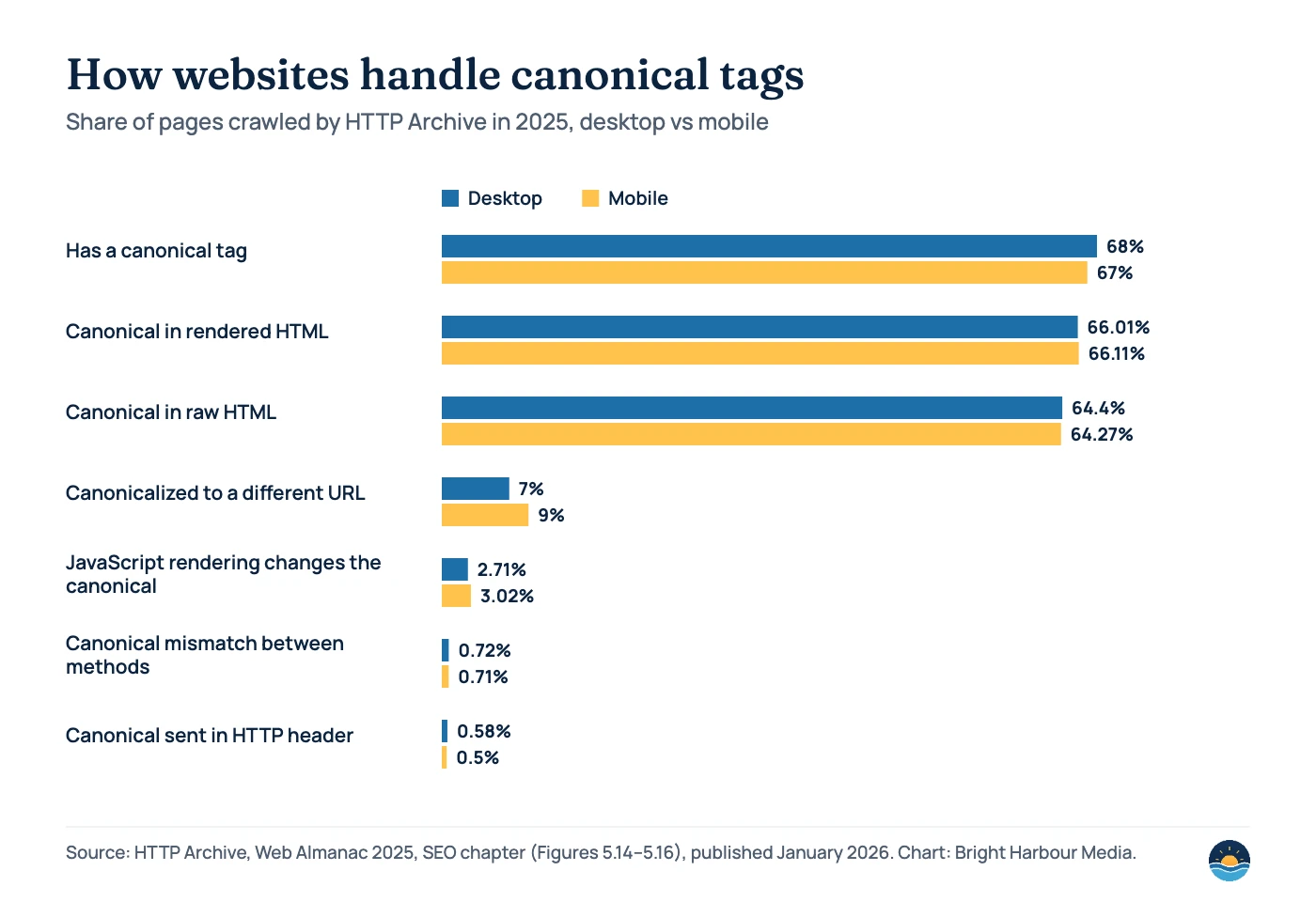
Two numbers stand out for anyone auditing a site. First, 7% of desktop pages and 9% of mobile pages are canonicalized to a different URL — they tell Google “index that page instead of me.” That is correct for genuine duplicates, but on a template-driven site one bad rule can quietly canonicalize hundreds of pages you need indexed. Second, JavaScript rendering changed the canonical on 2.71% of desktop and 3.02% of mobile pages. The Almanac’s authors note that a static, server-side canonical is generally the safer option, which matches Google’s JavaScript guidance.
Canonical mistakes that cause real problems
Mistakes we see most
- Every page canonicalized to the homepage by a theme or plugin setting
- Paginated pages (page 2, 3…) canonicalized to page 1, hiding the items they list
- Canonical tag pointing to a URL that redirects, returns 404 or is set to noindex
- HTTP or staging URLs used as canonicals after a migration
- JavaScript rewriting the canonical after the page loads
What good looks like
- Each indexable page has one self-referencing canonical in the raw HTML
- Canonical targets return 200, are indexable and listed in the sitemap
- Parameter and tracking URLs point to the clean URL
- Redirects handle protocol, host and trailing-slash variants
- Internal links use the canonical URL everywhere
Google’s troubleshooting guide adds two less obvious causes: CMS plugins that point canonicals at the wrong URLs, and hacked sites where attackers inject cross-domain canonicals or redirects. If Google suddenly picks a canonical on another domain, treat it as a possible security issue.
A related point on syndication: Google says the canonical link element isn’t recommended for content you syndicate to other sites. Instead, it advises asking partners to block indexing of their copy.
Canonical tags vs noindex vs robots.txt
These three tools are often mixed up, and Google’s guidance is clear that only one of them is for canonicalization.
| Tool | What it does | Use it to choose a canonical? |
|---|---|---|
rel="canonical" | Hints which URL in a duplicate set should be indexed; signals are consolidated to it | Yes |
noindex | Asks Google to keep a page out of the index entirely | No — Google advises using rel="canonical" instead |
| robots.txt disallow | Stops crawling, so Google can’t see the page’s canonical tag at all | No — Google says not to use robots.txt for canonicalization |
| URL removal tool | Temporarily hides a URL from search results | No — Google says not to use it for canonicalization |
How to find and fix duplicate content issues
Search Console is the best place to start, because it shows what Google actually decided rather than what your tags say. Use this five-step process, which also fits into a full SEO audit:
- Open the Page indexing report. Look at the “Why pages aren’t indexed” table for the canonical-related statuses in the table below.
- Inspect sample URLs. The URL Inspection tool shows the canonical you declared and the one Google selected. Where they differ, compare the two pages side by side.
- Crawl the site. Use a crawler to list every canonical tag, flag canonicals that point to redirects, 404s or noindexed pages, and find pages whose rendered canonical differs from the raw HTML.
- Align every signal. Fix the tag, then make redirects, sitemap entries and internal links agree with it.
- Make genuinely different pages more different. Google notes that pages split out of a duplicate cluster faster when the difference in content is “clear and significant.” Then request re-indexing.
| Page indexing status | What Google means | What to do |
|---|---|---|
| Alternate page with proper canonical tag | The page correctly points to a canonical that is indexed | Nothing — this is expected |
| Duplicate without user-selected canonical | Google sees a duplicate with no declared canonical and picked another URL | Declare a canonical, or make the page meaningfully different |
| Duplicate, Google chose different canonical than user | You declared a canonical, but Google thinks another URL is better | Inspect both URLs; check content similarity and conflicting signals |
| Page with redirect | A non-canonical URL that redirects; it won’t be indexed | Usually fine — check the redirect target is indexed |
Migrations and redesigns are the most common trigger for canonical problems, because URLs, templates and plugins change at once. Our technical SEO checklist before a redesign includes the canonical checks to run before and after launch.
Frequently asked questions
Is duplicate content a Google penalty?
No. Google says some duplicate content on a site is normal and is not a violation of its spam policies. The risk is that Google picks a URL you didn’t want and splits signals across versions. Copying other sites’ content to manipulate rankings is a different matter and can fall under spam policies.
Should every page have a self-referencing canonical tag?
It’s good practice. Google’s documentation supports adding a canonical on the canonical page itself, and it protects you when tracking parameters or other variants create extra URLs.
Why did Google ignore my canonical tag?
Because canonical tags are hints. Google may choose another URL when other signals disagree — for example, internal links or the sitemap point elsewhere, the target redirects, or the pages aren’t actually duplicates. Check the URL Inspection tool and make every signal consistent.
Should I use canonical tags for syndicated content?
Google says the canonical link element isn’t recommended for syndication. Instead, ask partners who republish your content to block indexing of their copy. And if you ever see a canonical pointing to a domain you don’t recognise, check for hacking — Google lists injected cross-domain canonicals as a known attack.
Sources
- What is URL canonicalization — Google Search Central (updated August 2026) — definitions, causes of duplicates, spam policy position
- How to specify a canonical URL with rel=”canonical” and other methods — Google Search Central (updated July 10, 2026) — methods, signal strength, best practices
- Fix canonicalization issues — Google Search Central (updated August 2026) — common issues and troubleshooting
- Page indexing report — Search Console Help — canonical-related indexing statuses
- Understand JavaScript SEO basics — Google Search Central (updated March 2026) — setting canonicals with JavaScript
- Web Almanac 2025: SEO chapter — HTTP Archive, published January 15, 2026 — canonical usage and inconsistency data
Cite this article: Bright Harbour Media. “Canonical Tags and Duplicate Content: A Practical SEO Guide.” Bright Harbour Media Insights, October 2026. https://brightharbourmedia.com/canonical-tags-duplicate-content/
You are welcome to reference the charts and frameworks in this article with a link back to this page.
Not sure which URLs Google treats as canonical on your site? Our technical SEO service finds and fixes duplication, redirects and indexing issues — get in touch to talk it through.