

An SEO audit is a structured review of everything that affects how a website is crawled, indexed, ranked and clicked in search: technical health, content, site architecture, authority, local signals and measurement. A useful audit ends with a prioritized plan — not just a list of warnings.
Key takeaways
- Google’s minimum technical requirements are short: Googlebot is not blocked, the page returns an HTTP 200 status and it has indexable content. Start your audit there.
- This checklist covers 40 checks across seven areas, each with a default priority.
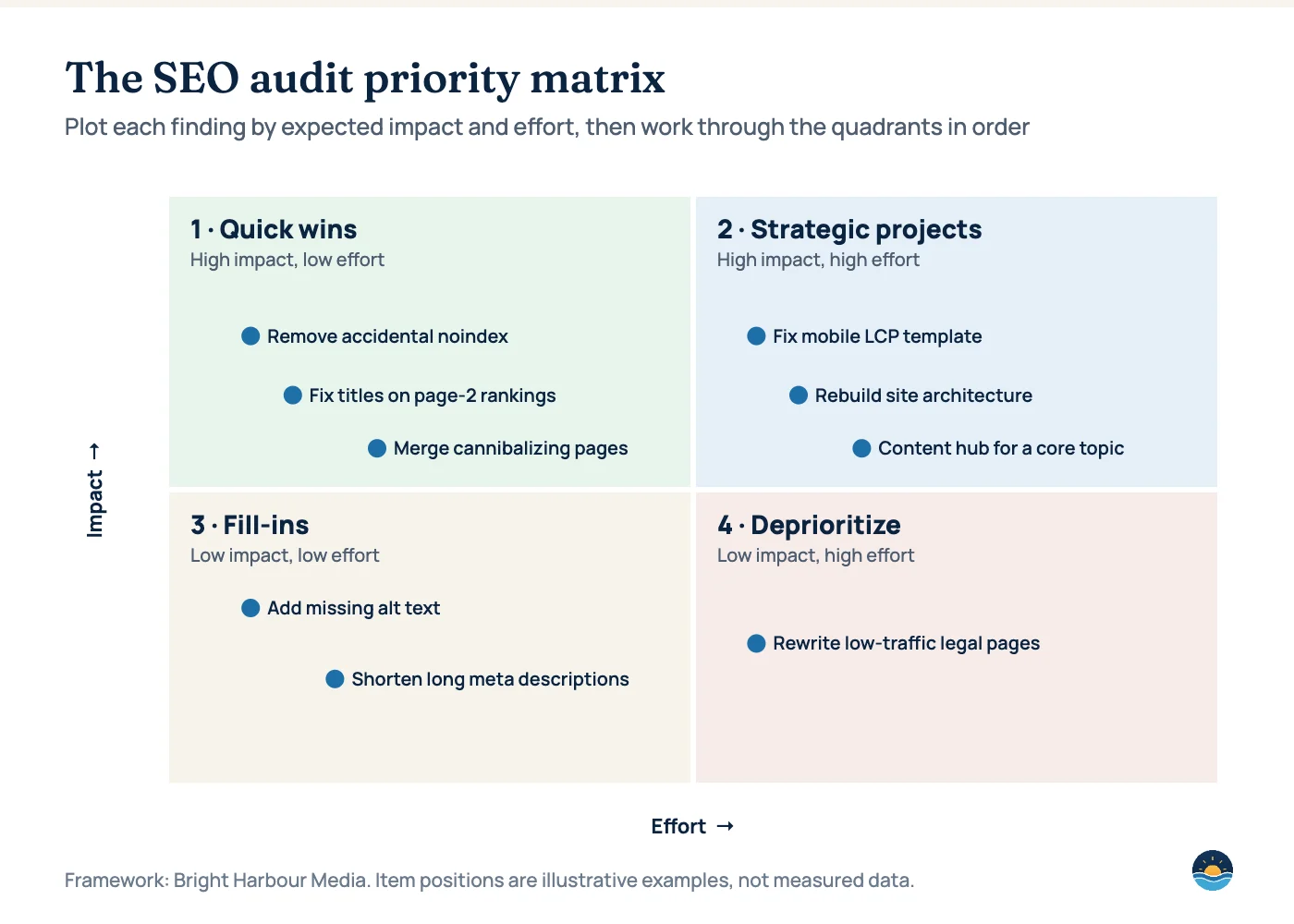
- Prioritize findings on an impact–effort matrix: quick wins first, then strategic projects; most low-impact warnings can wait.
- Re-audit after major releases, migrations or traffic changes — not just once a year.
Start with Google’s three technical requirements
According to Google Search Central, a page must meet three minimum requirements to be eligible for indexing: Googlebot is not blocked from crawling it, the page works and returns an HTTP 200 (success) status code, and the page has indexable content that does not violate Google’s spam policies. Google notes that meeting these requirements makes a page eligible, but does not guarantee indexing. Every check below builds on that foundation.
How to prioritize what you find
An audit of even a small site can surface hundreds of issues. Plot each finding by expected impact and effort, then work through the quadrants in order.
1. Crawling and indexing
| # | Check | Why it matters | Priority |
|---|---|---|---|
| 1 | robots.txt allows important sections | Blocked sections cannot be crawled or ranked | High |
| 2 | No accidental noindex on key pages | A stray noindex removes pages from search entirely | High |
| 3 | Key pages return HTTP 200 | Error and soft-404 pages are not indexed | High |
| 4 | XML sitemap is valid and submitted | Helps search engines discover and prioritize URLs | Medium |
| 5 | Canonical tags point to the preferred URL | Prevents duplicate versions competing | High |
| 6 | Redirects are single-hop 301s | Chains and loops waste crawl and dilute signals | Medium |
| 7 | Search Console Pages report reviewed | Shows exactly why pages are excluded | High |
| 8 | Parameter and faceted URLs controlled | Prevents index bloat from near-duplicate URLs | Medium |
2. Performance and page experience
| # | Check | Why it matters | Priority |
|---|---|---|---|
| 9 | Core Web Vitals pass on mobile (field data) | Slow, unstable pages lose visitors and may rank lower | High |
| 10 | LCP element identified per template | Most LCP fixes are template-level | Medium |
| 11 | Third-party scripts audited | A common cause of poor INP | Medium |
| 12 | Mobile layout and tap targets usable | Most searches happen on phones | High |
| 13 | HTTPS everywhere, no mixed content | Security and trust baseline | High |
3. On-page and content
| # | Check | Why it matters | Priority |
|---|---|---|---|
| 14 | Each page has one primary intent | Clear intent makes pages easier to rank | High |
| 15 | No keyword cannibalization | Competing pages split relevance and links | High |
| 16 | Unique, descriptive title tags | Titles influence rankings and click-through rate | High |
| 17 | Compelling meta descriptions | Improve click-through rate from results | Low |
| 18 | One clear H1 and logical headings | Helps users and search engines scan content | Medium |
| 19 | Thin and outdated pages refreshed or consolidated | Low-value pages drag down overall quality | Medium |
| 20 | Clear authorship and expertise signals | Supports trust for important topics | Medium |
| 21 | Images have descriptive alt text | Accessibility and image search | Low |
4. Site architecture and internal links
| # | Check | Why it matters | Priority |
|---|---|---|---|
| 22 | Important pages within three clicks of the homepage | Shallow pages are crawled and valued more | Medium |
| 23 | No orphan pages | Pages without internal links are hard to discover | High |
| 24 | Descriptive internal anchor text | Tells search engines what the target page is about | Medium |
| 25 | Breadcrumbs and logical URL structure | Clarifies hierarchy for users and crawlers | Low |
| 26 | Broken internal links fixed | Wastes crawl and frustrates users | Medium |
5. Authority and backlinks
| # | Check | Why it matters | Priority |
|---|---|---|---|
| 27 | Referring domains benchmarked against competitors | Shows the size of the authority gap | High |
| 28 | Links point to priority pages, not only the homepage | Commercial pages need authority to rank | Medium |
| 29 | No patterns of manipulative links | Link spam can lead to manual actions | High |
| 30 | Broken backlinks redirected | Recovers authority you already earned | Medium |
| 31 | Unlinked brand mentions identified | Easy opportunities to earn links | Low |
6. Local search (if relevant)
| # | Check | Why it matters | Priority |
|---|---|---|---|
| 32 | Google Business Profile complete and accurate | Drives map-pack visibility and calls | High |
| 33 | Name, address and phone consistent everywhere | Inconsistency undermines trust | Medium |
| 34 | Location or service-area pages exist | Gives local queries a relevant landing page | Medium |
| 35 | Review volume and responses healthy | Reviews influence rankings and decisions | Medium |
7. Tracking and reporting
| # | Check | Why it matters | Priority |
|---|---|---|---|
| 36 | Search Console verified (domain property) | Essential for indexing and performance data | High |
| 37 | Analytics installed on every page | Missing tags hide real performance | High |
| 38 | Conversions and key events tracked | Connects SEO to leads and revenue | High |
| 39 | Organic baseline recorded before changes | Without a baseline, impact cannot be proven | Medium |
| 40 | AI search impact monitored by query type | Separates AI-driven click changes from ranking changes | Low |
Turning the audit into a roadmap
- Score: rate each failed check for impact, effort and confidence.
- Sequence: fix crawling and indexing blockers before content or links — they gate everything else.
- Assign: give each task an owner and a deadline.
- Measure: record a baseline, ship, then compare after recrawling.
- Repeat: re-run critical checks after every major release.
Frequently asked questions
How often should I run an SEO audit?
A full audit once or twice a year is typical, with lighter checks after major releases, migrations, redesigns or unexpected traffic drops.
What is the most important thing to check first?
Whether your important pages can be crawled and indexed: not blocked by robots.txt, returning HTTP 200 and free of accidental noindex tags.
Can I run an SEO audit myself?
Yes — Search Console and a crawler cover most checks. The hard part is prioritization: deciding which findings actually matter for your business.
How long does an SEO audit take?
It depends on site size and scope. A focused audit of a small site can take days; large or complex sites take longer.
Sources
- Google Search technical requirements — Google Search Central
- Spam policies for Google web search — Google Search Central
- Web Vitals — web.dev (Google)
Cite this article: Bright Harbour Media. “The SEO Audit Checklist: 40 Checks, Prioritized by Impact.” Bright Harbour Media Insights, October 2026. https://brightharbourmedia.com/seo-audit-checklist/
You are welcome to reference the charts and frameworks in this article with a link back to this page.
Prefer an expert review? Our SEO audits work through every check above and finish with a prioritized roadmap — request yours.