

Core Web Vitals are three metrics Google uses to measure real-world page experience: Largest Contentful Paint (LCP) for loading, Interaction to Next Paint (INP) for responsiveness and Cumulative Layout Shift (CLS) for visual stability. A page “passes” when at least 75% of real visits meet the “good” threshold for all three.
Key takeaways
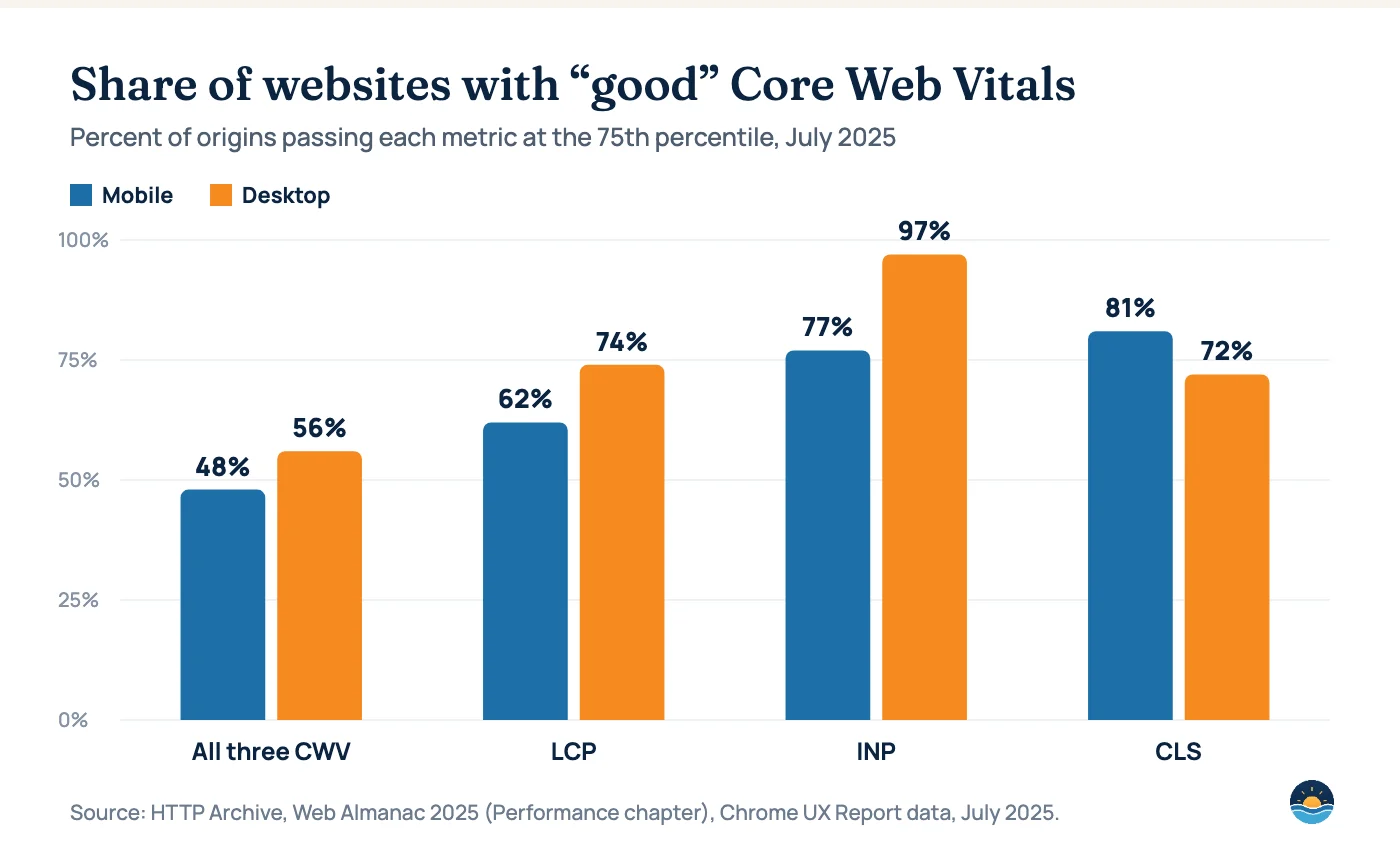
- Only 48% of mobile websites and 56% of desktop websites passed all three Core Web Vitals in July 2025, according to HTTP Archive’s Web Almanac.
- On mobile, LCP is the weakest link: just 62% of sites load their main content fast enough.
- INP is almost solved on desktop (97% good) but still fails nearly a quarter of mobile sites (77% good).
- Fix in this order for most sites: mobile LCP, then mobile INP, then CLS — and judge success on field data, not lab scores.
Core Web Vitals sit at the intersection of SEO and conversion rate optimization. They will not rescue a page that does not match what searchers want, but slow, jumpy or unresponsive pages lose visitors that good content has already earned. This guide summarizes the current thresholds, what the latest real-world data shows and a practical order of operations for fixing them.
The three Core Web Vitals and their thresholds
Google assesses each metric at the 75th percentile of page loads, separately for mobile and desktop. That means your score reflects the experience of your slower visitors, not your fastest test run.
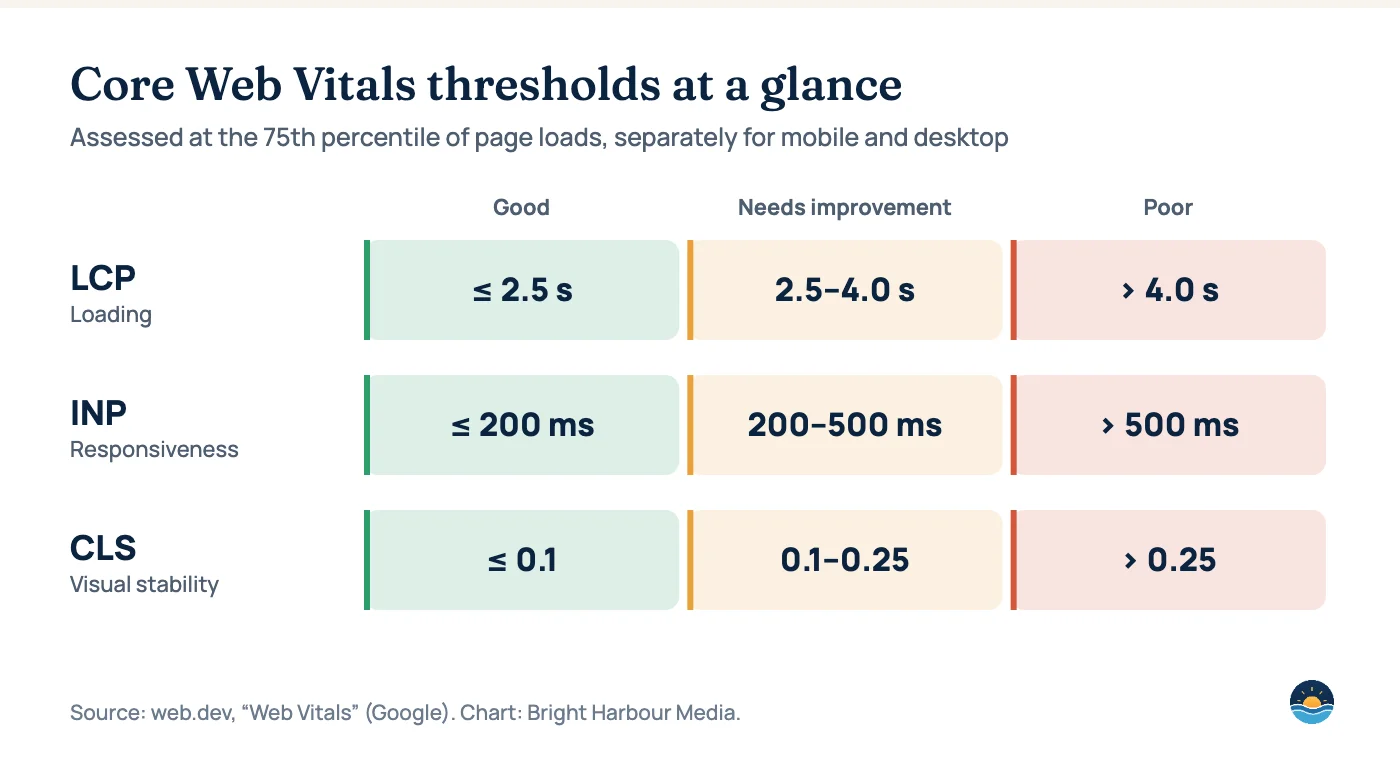
| Metric | What it measures | Good | Needs improvement | Poor |
|---|---|---|---|---|
| LCP — Largest Contentful Paint | How quickly the largest visible element (usually a hero image or heading) renders | ≤ 2.5 s | 2.5–4.0 s | > 4.0 s |
| INP — Interaction to Next Paint | How quickly the page responds visually after a click, tap or key press | ≤ 200 ms | 200–500 ms | > 500 ms |
| CLS — Cumulative Layout Shift | How much visible content moves unexpectedly while the page loads | ≤ 0.1 | 0.1–0.25 | > 0.25 |
INP replaced First Input Delay (FID) as a Core Web Vital in 2024. Unlike FID, which only measured the delay before the first interaction was processed, INP considers the responsiveness of interactions throughout the visit — which is why many sites that comfortably passed FID now struggle with INP on mobile.
How many websites actually pass?
The 2025 Web Almanac from HTTP Archive analyzed Chrome UX Report (CrUX) field data from July 2025 across millions of websites. The headline: fewer than half of mobile sites deliver a “good” experience on all three metrics.
| Metric | Mobile — good | Desktop — good | Gap |
|---|---|---|---|
| All three Core Web Vitals | 48% | 56% | 8 points |
| LCP | 62% | 74% | 12 points |
| INP | 77% | 97% | 20 points |
| CLS | 81% | 72% | Mobile ahead by 9 points |
What the data tells us
- Mobile LCP is the most common failure. With only 62% of mobile sites passing, slow hero images, heavy CSS and slow server responses are still the biggest drag on page experience.
- INP is a mobile problem. Desktop processors hide inefficient JavaScript; mid-range phones expose it. A 20-point gap between desktop and mobile INP is a strong signal to test on real devices.
- CLS is the one metric where mobile beats desktop. Desktop layouts often carry more ads, banners and embeds that shift content as they load.
What to fix first: a prioritized playbook
Because each metric has different root causes, fixes cluster neatly. Start with the column where your field data shows the most “poor” URLs in Search Console’s Core Web Vitals report.
Fix LCP
- Serve the hero image in a modern format (WebP/AVIF) at the right size
- Never lazy-load the LCP image; preload it and set
fetchpriority="high" - Reduce server response time with page caching and a CDN
- Inline critical CSS and defer non-critical CSS and JavaScript
Fix INP
- Break up long JavaScript tasks so the main thread can respond
- Audit and remove or delay third-party scripts (chat, tag managers, A/B tools)
- Keep event handlers light; move heavy work off the interaction path
- Avoid large DOM sizes on templates with many interactive elements
Fix CLS
- Set width and height (or aspect-ratio) on every image, video and embed
- Reserve space for ads, cookie banners and dynamic widgets
- Use
font-displaywith size-adjusted fallback fonts - Never insert content above content the user is already reading
Field data vs. lab data
Google’s assessment uses field data — measurements from real Chrome users collected over a rolling 28-day window in CrUX. Tools such as Lighthouse produce lab data from a single simulated load. Lab data is invaluable for debugging, but only field data tells you whether you pass. Expect a delay of several weeks between shipping a fix and seeing it fully reflected in Search Console.
| Field data | Lab data | |
|---|---|---|
| Where you see it | Search Console, PageSpeed Insights (top section), CrUX | Lighthouse, PageSpeed Insights (diagnostics), DevTools |
| Measures | Real visitors on real devices and networks | One simulated load on a fixed device profile |
| Includes INP? | Yes | No — use Total Blocking Time as a proxy |
| Best for | Judging pass/fail and tracking trends | Finding and verifying specific fixes |
A 30-day Core Web Vitals workflow
- Week 1 — Group: In Search Console, group failing URLs by template (product, article, location page). Fixes are almost always template-level.
- Week 2 — Diagnose: Run Lighthouse and DevTools traces on one representative URL per template to identify the LCP element, long tasks and shifting elements.
- Week 3 — Ship: Implement the highest-impact fixes per template, starting with mobile LCP.
- Week 4 — Validate: Click “Validate fix” in Search Console and monitor CrUX for the 28-day window to roll over.
Do Core Web Vitals affect rankings?
Page experience is one of many signals Google considers, and relevance still comes first. Our view: treat Core Web Vitals as a tie-breaker in competitive search results and as a conversion lever on every visit. The business case rarely depends on rankings alone — faster, more stable pages simply keep more of the visitors you already earn.
Frequently asked questions
What is a good LCP score?
2.5 seconds or less at the 75th percentile of page loads. Between 2.5 and 4.0 seconds “needs improvement”; above 4.0 seconds is “poor”.
What replaced First Input Delay?
Interaction to Next Paint (INP) became a Core Web Vital in 2024, replacing First Input Delay. A good INP is 200 milliseconds or less.
Why does PageSpeed Insights show a different score from Search Console?
The performance score in PageSpeed Insights comes from a lab test, while Search Console reports field data from real users over 28 days. Pass or fail is based on field data.
How long until fixes show up in Search Console?
Field data is aggregated over a rolling 28-day window, so expect several weeks before improvements are fully reflected.
Sources
- Web Vitals — web.dev (Google) — metric definitions and thresholds
- Performance — Web Almanac 2025 — HTTP Archive — CrUX pass rates, July 2025
Cite this article: Bright Harbour Media. “Core Web Vitals in 2026: Thresholds, Real-World Pass Rates and What to Fix First.” Bright Harbour Media Insights, October 2026. https://brightharbourmedia.com/core-web-vitals-guide/
You are welcome to reference the charts and frameworks in this article with a link back to this page.
Need help with failing templates? Our technical SEO team diagnoses Core Web Vitals issues and writes developer-ready fixes — or request an audit.