

An internal linking strategy is a deliberate plan for how the pages on your site link to each other — which pages get links, from where, and with what anchor text. Done well, it helps Google discover and understand your pages and helps visitors reach the pages that matter most to your business.
Key takeaways
- Google says “the vast majority of the new pages Google finds every day are through links” — internal links are how it finds pages on your site.
- Google can only crawl a link that is an
<a>element with anhrefattribute; buttons and script-only links may be invisible to it. - In 2025 the median page linked to 43 other pages on the same site on desktop and 39 on mobile (HTTP Archive Web Almanac).
- Descriptive anchor text passes Lighthouse’s test on about 92–93% of inner pages but only 85–87% of home pages.
- Search Console’s Links report shows your most-linked pages, but tables are limited to 1,000 rows and show a sample of links.
Why do internal links matter for SEO?
Internal links do three jobs at once. They help search engines discover pages, they give context about what a linked page is about through the anchor text, and they show visitors — and Google — which pages you consider important.
Discovery is the most basic. Google’s SEO Starter Guide says most new pages it finds are found through links from pages it has already crawled. Its link best practices put the rule simply: “Every page you care about should have a link from at least one other page on your site.” A page with no internal links pointing to it — an orphan page — can only be found through your sitemap or external links, and it gets none of the context that links provide.
Context comes from anchor text. Google describes link text as telling “users and Google something about the page you’re linking to.” A link that says “emergency plumbing in Cebu” carries far more meaning than one that says “click here.”
Priority comes from structure. Pages linked from your main navigation and from many relevant articles are easier to reach — for users and crawlers — than a page buried four clicks deep. That makes internal linking one of the few ranking-related levers you control completely.
How many internal links does a typical page have?
HTTP Archive’s Web Almanac measures links on millions of pages each year. In its 2025 SEO chapter, the median page linked to 43 pages on the same site on desktop and 39 on mobile. At the 90th percentile it rose to 174 and 161, which the authors suggest may reflect larger sites with mega-menus and dense footers. External links stayed modest: a median of six per page.
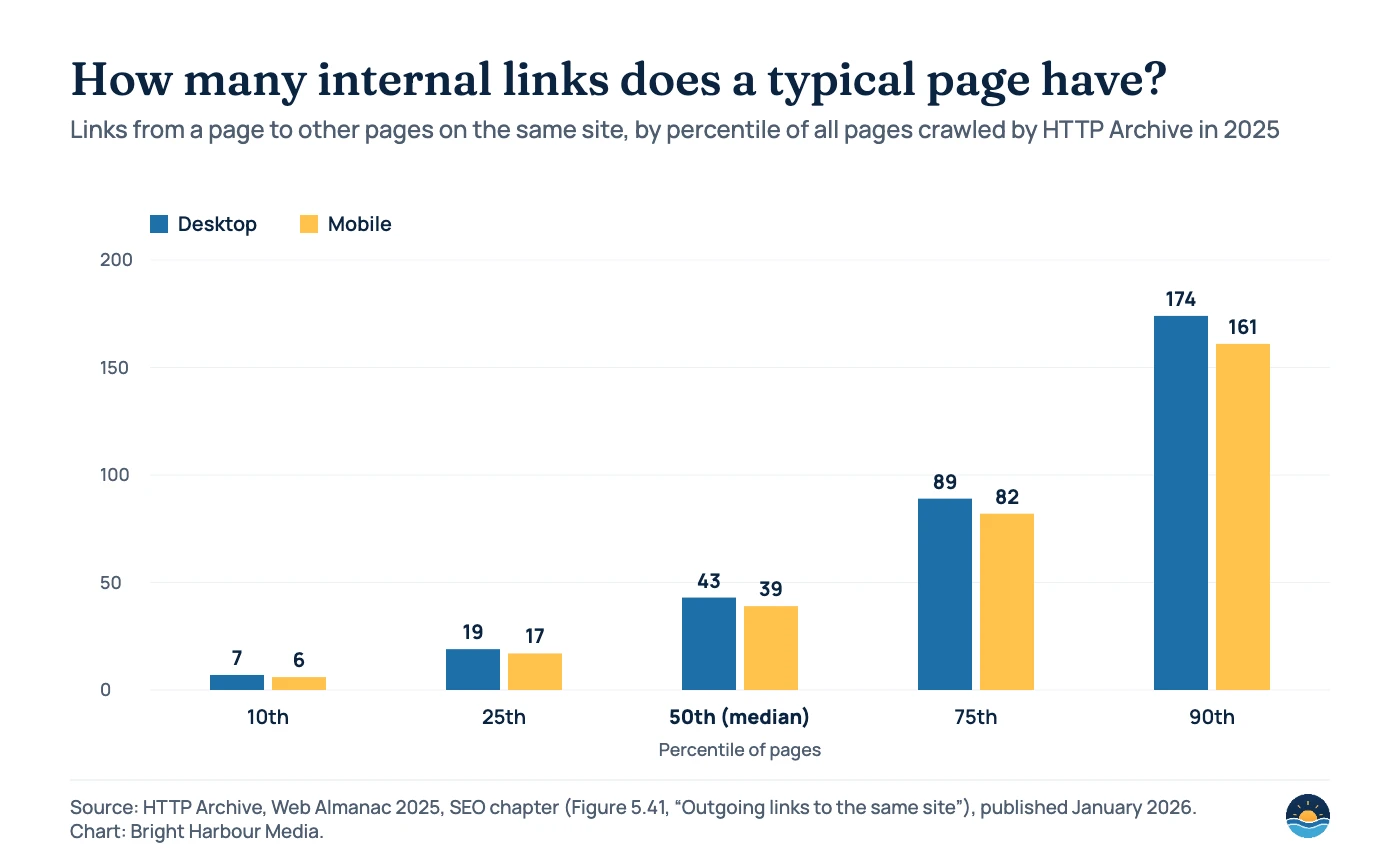
There is no ideal number to copy. Google’s guidance is about crawlable, descriptive links to every page you care about, not about hitting a count. What the data does show is that much of a page’s link total comes from navigation and footers that repeat on every page. The links that do the most strategic work are the contextual ones inside your content — and those are the ones most sites under-use.
The types of internal links, and what each is for
| Link type | Where it appears | Main job | Tip |
|---|---|---|---|
| Main navigation | Header menu on every page | Signals your most important pages; helps users orient | Keep it to core services and hubs; don’t list every article |
| Breadcrumbs | Above the page title | Shows hierarchy and gives a path back up | Mirror your real site structure |
| Contextual links | Inside body copy | Passes topical context through descriptive anchor text | Link where it genuinely helps the reader; vary the wording naturally |
| Related content | End of articles or sidebars | Connects pages on the same topic | Curate by topic rather than “latest posts” |
| Footer links | Bottom of every page | Utility pages and secondary navigation | Avoid stuffing it with keyword-rich links |
The hub-and-spoke model
For a service business, the simplest structure that works is hub and spoke. Each service page is a hub. Supporting articles — guides, how-tos, checklists and comparisons — are the spokes. Links flow in four directions:
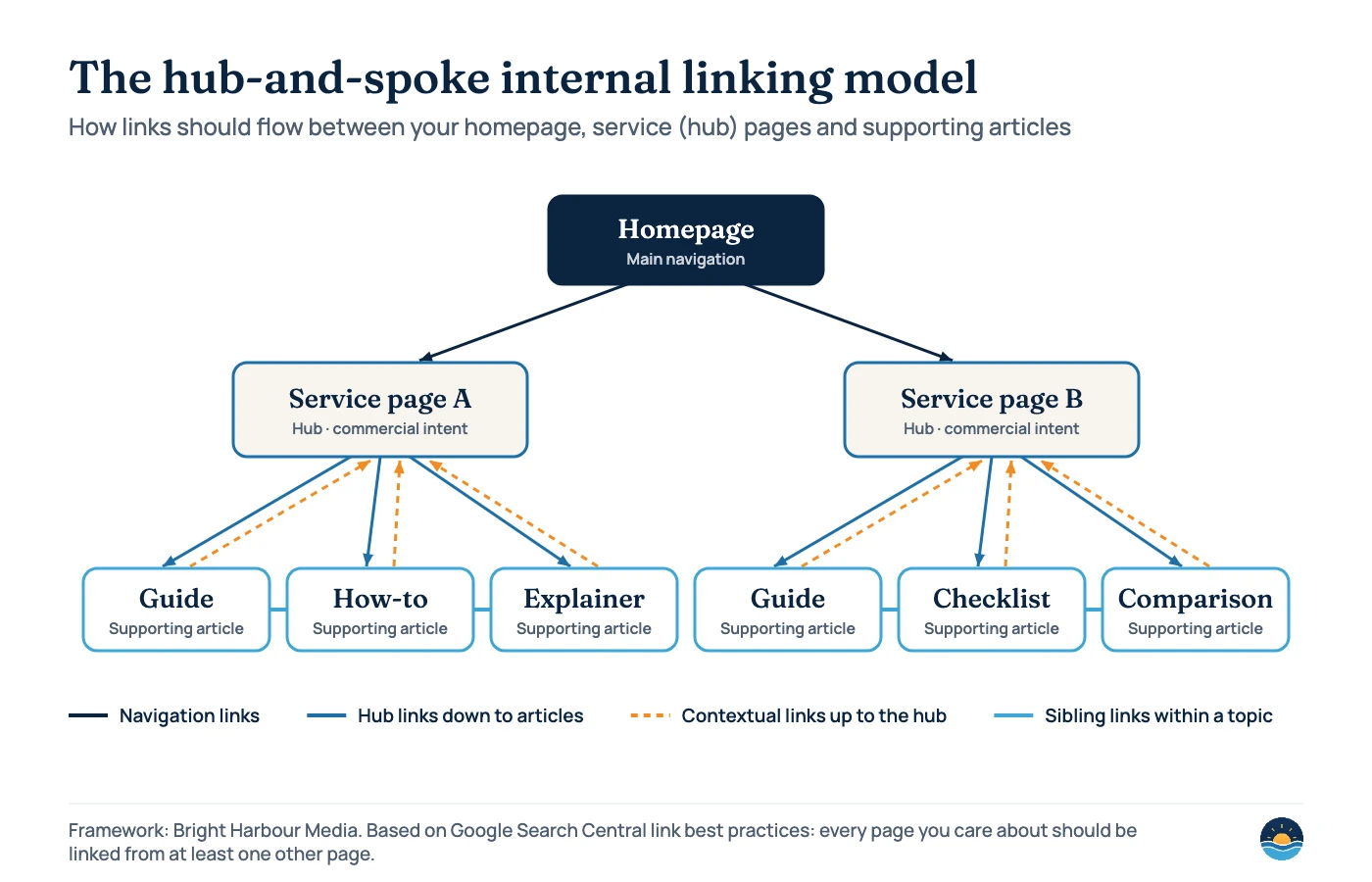
- Navigation down: the homepage and menu link to each hub.
- Hub to spoke: each service page links to its most useful supporting articles.
- Spoke to hub: every article links back to its service page with descriptive anchor text, where it fits the reader’s next step.
- Spoke to spoke: articles on the same topic link to each other when one answers a question the other raises.
This model works because it matches how people search. Someone reading a how-to article is often one step from needing the service; a contextual link turns that moment into an enquiry. It also keeps topics tidy, which pairs naturally with search intent mapping — each hub targets commercial intent, each spoke an informational question.
How to write anchor text Google and readers understand
Google’s link best practices give clear direction: anchor text should be descriptive, reasonably concise and relevant to the page it points to. It warns against generic text like “click here,” against keyword stuffing, and against overly long anchors. For image links, Google uses the image’s alt text as the anchor.
| Example anchor | Verdict | Why |
|---|---|---|
| “Click here” / “Read more” | Weak | Generic — says nothing about the destination (Google’s own bad example) |
| “list of cheese types” | Good | Google’s own example of descriptive, concise anchor text |
| “our guide to choosing an SEO agency” | Good | Describes the destination in natural language |
| “best cheap SEO agency SEO services SEO company” | Bad | Keyword stuffing — Google advises against it |
| A whole sentence or paragraph as the link | Weak | Too long to describe a single destination clearly |
The Web Almanac shows most sites already get the basics right on inner pages: 92.42% of desktop and 93.45% of mobile inner pages passed Lighthouse’s descriptive link text test in 2025. Home pages lag at 84.64% and 86.64%, which the authors suggest reflects vague calls to action and generic navigation. That makes your homepage and service pages a good place to start.
Technical rules that make internal links crawlable
Crawlable
<a href="https://example.com/"><a href="/services/local-seo/">- An
<a href>that also has anonclickhandler - Clean URLs updated with the History API in JavaScript apps
Not reliably crawlable
<a routerLink="services">with no href<span href="..."><a onclick="goto('...')">with no href- Content loaded via URL fragments (
#/services)
These examples come straight from Google’s documentation, which states that Google “can only crawl your link if it’s an <a> HTML element with an href attribute.” Its JavaScript SEO guide adds that single-page apps should not use fragments to load different content. Always link to the canonical version of a URL, too — internal links to parameter or redirecting URLs send mixed signals.
A 7-step internal linking process
- List your priority pages. Usually service pages, location pages and your best-converting content. These should receive the most relevant internal links.
- Group content into topics. Assign every article to one service hub. Articles that fit no hub may be candidates for refreshing, consolidating or pruning.
- Find orphan and weakly linked pages. Compare a crawl of your site with your XML sitemap; pages in the sitemap but not found by the crawl have no internal links.
- Check what Google sees. In Search Console, open Links → Internal links (“Top linked pages”) to see which pages are linked most. If a minor page outranks your services, rebalance.
- Add contextual links. Link each article up to its hub and across to two or three siblings, using descriptive anchor text written for the reader.
- Fix technical problems. Replace links to redirects, 404s and non-canonical URLs, and make sure navigation uses real
<a href>links. - Make it a habit. Every new article should link to its hub and receive at least one link from an existing related page on the day it is published.
| Audit check | Where to find it | Good result |
|---|---|---|
| Orphan pages | Crawler vs XML sitemap comparison | None — every indexable page has at least one internal link |
| Most-linked pages | Search Console → Links → Internal links | Service and hub pages near the top |
| Links to redirects or 404s | Site crawler | Zero; links point straight to the final 200 URL |
| Non-descriptive anchors | Lighthouse SEO audit or crawler | Generic “click here” / “read more” links replaced |
| Click depth | Site crawler | Priority pages reachable within a few clicks of the homepage |
| Script-only links | Rendered HTML check / URL Inspection | Navigation uses <a href> elements |
One caution on the Links report: Google says it “isn’t a comprehensive list of every link on your site.” It shows a sample, groups pages by canonical URL, merges duplicate links, and doesn’t say whether a link is nofollowed. Use it to spot patterns and a crawler for completeness. For larger sites, internal linking and XML sitemaps work together to help Google find new pages quickly.
Frequently asked questions
How many internal links should a page have?
There is no fixed number. Google’s guidance is to link every page you care about from at least one other page, with descriptive anchor text. For reference, the median page in HTTP Archive’s 2025 data had 43 internal links on desktop and 39 on mobile — much of it navigation.
Should I use exact-match keywords in internal anchor text?
Use descriptive text that matches what the destination page is about, written naturally for the reader. Google warns against keyword stuffing in anchor text, so avoid repeating long strings of keywords.
Should internal links be nofollow?
Generally no. Google’s guidance reserves nofollow for links you don’t trust or can’t vouch for, such as user-generated links in comments and forums. Your own internal links don’t need it.
What is an orphan page?
A page with no internal links pointing to it. Google may still find it through your sitemap or external links, but it misses the discovery and context that internal links provide. Fix it by linking from a relevant hub or article — or remove the page if it no longer serves a purpose.
Sources
- Link best practices for Google — Google Search Central (updated December 10, 2025) — crawlable links, anchor text, internal links
- SEO Starter Guide — Google Search Central (updated December 10, 2025) — how Google finds pages through links
- Understand JavaScript SEO basics — Google Search Central (updated March 2026) — links and fragments in JavaScript apps
- Links report — Search Console Help — internal links table, limits and counting
- Web Almanac 2025: SEO chapter — HTTP Archive, published January 15, 2026 — internal and external link counts, descriptive link text pass rates
Cite this article: Bright Harbour Media. “Internal Linking Strategy: How to Build Links That Help SEO.” Bright Harbour Media Insights, October 2026. https://brightharbourmedia.com/internal-linking-strategy/
You are welcome to reference the charts and frameworks in this article with a link back to this page.
Want a content plan where every article feeds your service pages? Our content strategy service maps topics, hubs and internal links for you — get in touch to start the conversation.