
Content refresh means substantially updating an existing page so it stays accurate and useful; content pruning means removing or merging pages that no longer serve readers. Both are maintenance decisions about individual pages — and Google is clear that neither one helps simply because it makes a site look “fresh”.
Key takeaways
- Google’s helpful content guidance lists changing dates without substantially changing content as a warning sign, and says adding or removing lots of content just to seem fresh won’t help rankings.
- Google runs “query deserves freshness” systems, so updates matter most for topics where searchers expect current information.
- A permanent redirect (301 or 308) tells Google to show the target URL in results; a 404 or 410 tells Google to drop the URL from its index.
- Google’s traffic-drop guide recommends comparing the last 3 months with the previous period or year over year, and viewing the last 16 months to spot seasonality.
- Every page in an inventory ends up in one of four buckets: keep, refresh, consolidate or remove.
What is the difference between refreshing and pruning content?
Most established sites have three kinds of pages: pages that still do their job, pages that could do their job if they were updated, and pages that no longer have a job. Refreshing deals with the second group. Pruning deals with the third — either by merging overlapping pages into one stronger page (consolidation) or by retiring pages entirely (removal).
The two are often discussed as tactics for “boosting” a site. That framing is misleading. Google’s ranking systems guide says its helpful content system became part of its core ranking systems in March 2024, and its people-first content guidance asks a pointed question: are you changing dates to make pages seem fresh when the content hasn’t substantially changed? The goal of both refreshing and pruning is a site whose pages are accurate, distinct and worth visiting — not a site that merely signals activity.
| Refresh | Consolidate | Remove | |
|---|---|---|---|
| What it is | Substantially update an existing page in place | Merge overlapping pages into the strongest one | Retire a page that serves no audience or business need |
| Typical trigger | Outdated facts, thin sections, intent has shifted | Two or more pages target the same intent | No traffic, no links, no purpose, no realistic fix |
| URL outcome | Same URL, same status (200) | Weaker URLs 301-redirect to the kept page | 404 or 410, or a 301 to a closely related page |
| Date handling | Update the visible “last updated” date and dateModified | Date the kept page when the merged version goes live | Not applicable |
| Main risk | Cosmetic edits passed off as updates | Merging pages that serve different intents | Removing pages that still earn links or conversions |
How does Google treat updated and removed pages?
It helps to know what each action actually signals, because the mechanics are well documented.
Freshness is query-dependent
Google’s guide to its ranking systems describes “query deserves freshness” systems designed to show fresher content where searchers would expect it. That is a narrower idea than “new content ranks better”. A page about this year’s regulations or prices needs to be current; a page explaining a stable concept may not need changes for years. Prioritise refreshes on pages where being out of date would genuinely mislead someone.
Dates must reflect real changes
Google’s byline date guidance recommends a visible date on the page (for example, “Last updated”) and, for articles, datePublished and dateModified in structured data — with the visible and structured dates kept consistent and no future dates. Pair that with the people-first warning about changing dates without substantial changes, and the rule is simple: only update the date when the content meaningfully changed. Our guide to structured data for service businesses covers the markup side.
Redirects and status codes tell Google what happened
| Response | What Google says it does | Use it when |
|---|---|---|
| 301 or 308 (permanent redirect) | Treats it as a strong signal that the redirect target should be canonical, and shows the target in results | You merged a page or moved it for good |
| 302 or 307 (temporary redirect) | Follows the redirect, but the indexing pipeline doesn’t use it as a canonical signal | The move is genuinely temporary |
| 404 or 410 | Removes a previously indexed URL from the index; crawl frequency gradually decreases | The page is gone and there is no close replacement |
| 200 with error or empty content | Search Console reports it as a soft 404 | Never — return a real 404 or 410 instead |
Google prefers server-side redirects because they are the most reliably interpreted, and suggests JavaScript redirects only when server-side or meta refresh redirects aren’t possible. Redirect only to a page that genuinely replaces the old one; sending every retired URL to the homepage doesn’t help visitors find what they were looking for.
A decision path for every page
Run each page in your content inventory through three questions, in order. The first question that leads to an action decides the outcome.
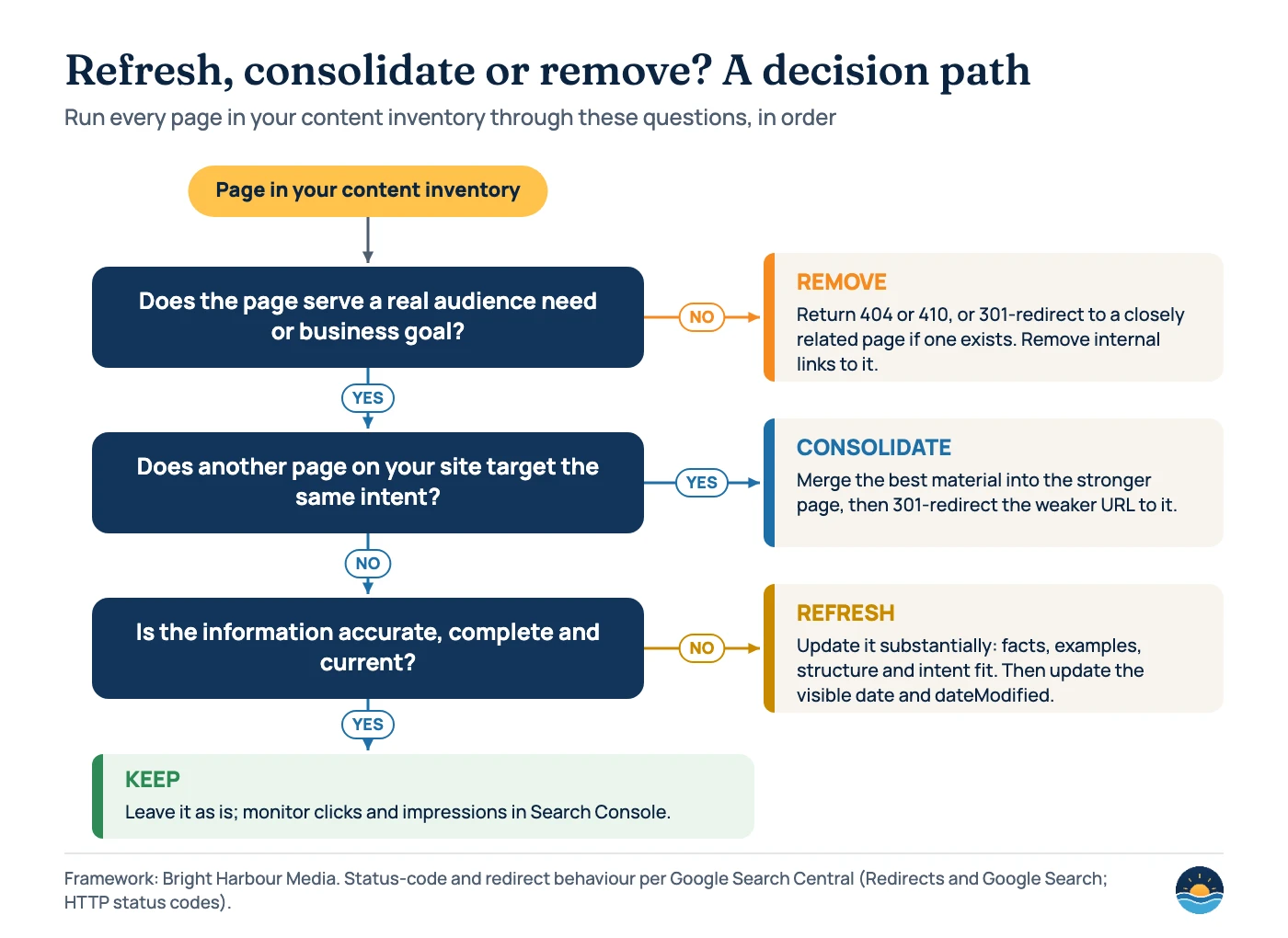
The second question is where most mistakes happen. Two pages can share keywords but serve different intents — a “pricing” page and a “how it works” page, for example — and merging them can make both worse. Map intent before you merge; our guide to search intent mapping shows how.
How to run a content refresh and pruning review
- Build the inventory. Export every indexable URL from your sitemap or a crawler, with its title, publish date, word count and primary topic.
- Add performance data. In Search Console’s Performance report, filter by page and pull clicks, impressions, CTR and average position. Google defines CTR as clicks divided by impressions, and average position as the average position of the topmost result from your site.
- Compare periods, not snapshots. Google’s traffic-drop guide suggests comparing the last 3 months to the previous period and year over year, and viewing the last 16 months to see seasonality before you call a page “declining”.
- Add business data. Note conversions, leads or assisted revenue from analytics, plus the number of external sites linking to each page.
- Classify each page. Apply the decision path above: keep, refresh, consolidate or remove. Record the reason, not just the label.
- Act in batches. Refresh the highest-value pages first, then consolidate, then remove. Update internal links so they point to final URLs rather than through redirects.
- Measure and repeat. Annotate the dates of changes and review the same pages again after a few months. Google notes some changes take effect in days and others take several months.
If you are starting from scratch, an SEO audit checklist is a good companion: it surfaces the technical issues — broken links, redirect chains, soft 404s — that a content review alone can miss.
What a real refresh looks like
A substantial refresh
- Corrects or replaces outdated facts, figures and screenshots
- Rewrites sections to match how searchers now phrase the question
- Adds missing steps, examples or comparisons readers need
- Cites current primary sources
- Updates the visible date and dateModified to match
A cosmetic refresh (avoid)
- Changes the date but not the content
- Swaps a few synonyms or the intro paragraph
- Adds filler length without new information
- Republishes old content as a “new” post
- Removes large numbers of pages only to look “fresh”
Signals that point to each outcome
| Signal | Likely outcome | Check before acting |
|---|---|---|
| Impressions steady, clicks falling | Refresh (title, snippet, content fit) | Whether a SERP feature or seasonality explains it |
| Facts, prices or rules now out of date | Refresh | Whether the page still has a clear audience |
| Two URLs swap rankings for the same queries | Consolidate | That both pages truly serve the same intent |
| Many near-duplicate posts on one topic | Consolidate into one comprehensive page | Which URL has the most links and conversions |
| No traffic, no links, no conversions, no purpose | Remove (404 or 410) | Whether it supports sales, support or legal needs |
| Retired product or service with a direct successor | 301 to the successor page | That the successor genuinely replaces it |
Low traffic on its own is not a reason to remove a page. Some pages exist for customers, compliance or sales teams rather than search. Google’s guidance on traffic drops also lists causes that have nothing to do with content quality — technical issues, security problems, seasonality and site moves — so rule those out before rewriting anything.
Frequently asked questions
Does updating the published date improve rankings?
Not on its own. Google’s people-first content guidance lists changing dates to make pages seem fresh, without substantial changes, as a warning sign. Update the date when the content has meaningfully changed.
Will deleting old content improve my site’s rankings?
Google says removing a lot of older content just to make a site seem fresh won’t help. Remove pages because they no longer serve readers or your business, and redirect them when a close replacement exists.
Should I use a 404 or a 410 for removed pages?
Google’s documentation says it treats 404 and 410 the same way for indexing: a previously indexed URL is removed and crawled less often over time. Choose whichever your platform supports cleanly.
How often should I review content?
It depends on how quickly your topics change. Pages on prices, rules or fast-moving topics need regular checks; evergreen explainers can be reviewed less often. A scheduled review, with Search Console data compared year over year, keeps the process consistent.
Sources
- Creating helpful, reliable, people-first content — Google Search Central — warning signs including date changes and adding or removing content to seem fresh
- A guide to Google Search ranking systems — Google Search Central — freshness systems; helpful content system part of core ranking since March 2024
- Influencing your byline dates in Google Search — Google Search Central — visible dates, datePublished and dateModified
- Redirects and Google Search — Google Search Central — permanent vs temporary redirects
- How HTTP status codes, and network and DNS errors affect Google Search — Google Search Central — 404, 410 and soft 404 handling
- Debugging drops in Google Search traffic — Google Search Central — causes of drops, date comparisons and the 16-month view
- Performance report (Search results) — Search Console Help — clicks, impressions, CTR and average position definitions
Cite this article: Bright Harbour Media. “Content Refresh vs Content Pruning: A Decision Guide.” Bright Harbour Media Insights, October 2026. https://brightharbourmedia.com/content-refresh-pruning/
You are welcome to reference the charts and frameworks in this article with a link back to this page.
Not sure which of your pages to keep, refresh or retire? Our content strategy and SEO content team runs this review end to end — request an audit to get started.