
A noindex tag is a robots rule, sent in a <meta name="robots"> tag or an X-Robots-Tag HTTP header, that tells Google not to show a page in search results. When Googlebot crawls the page and reads the rule, Google drops that page from Search entirely. It only works if Google is allowed to crawl the page, so a noindexed URL must not also be blocked in robots.txt.
Key takeaways
- Google says a page with noindex must not be blocked by robots.txt; if it is, the crawler “will never see the noindex rule” (Google Search Central, updated Dec 10, 2025).
- Removal is not instant: Google warns it “may take months for Googlebot to revisit a page” after you add the rule.
- Noindex in robots.txt has not worked since September 1, 2019, when Google retired support for unsupported robots.txt rules.
- If noindex is in the original HTML, Google “may skip rendering and JavaScript execution”, so removing it with JavaScript may not work (JavaScript SEO basics, updated Mar 4, 2026).
- In the Web Almanac 2025, 3.5% of desktop and 2.4% of mobile pages used a noindex rule, while the X-Robots-Tag header appeared on under 1% of pages.
What does the noindex tag actually do?
Noindex is an instruction about indexing, not crawling. Google still has to fetch the page to find the rule. Once it does, Google’s documentation says it “will drop that page entirely from Google Search results, regardless of whether other sites link to it.” That last part matters: unlike a robots.txt block, links pointing at the page do not keep it in the index.
There are two ways to send it, and Google says they “have the same effect”:
| Method | Where it goes | Best for | Example |
|---|---|---|---|
| Robots meta tag | In the HTML <head> of the page | Normal HTML pages you can edit or control through a CMS or SEO plugin | <meta name="robots" content="noindex"> |
| X-Robots-Tag header | In the HTTP response, set by the server or CDN | PDFs, images, video files and other non-HTML files; rules for whole folders or file types | X-Robots-Tag: noindex |
| Googlebot-only meta tag | In the HTML <head> | Keeping a page out of Google while leaving other search engines alone | <meta name="googlebot" content="noindex"> |
Google supports only two user-agent names in robots meta tags, googlebot and googlebot-news; it says “other values are ignored.” Other search engines may handle noindex differently, so if Bing traffic matters, use the generic robots name. Bing’s webmaster guidelines say that if pages contain a noindex robots meta tag, Bing will not add them to its index.
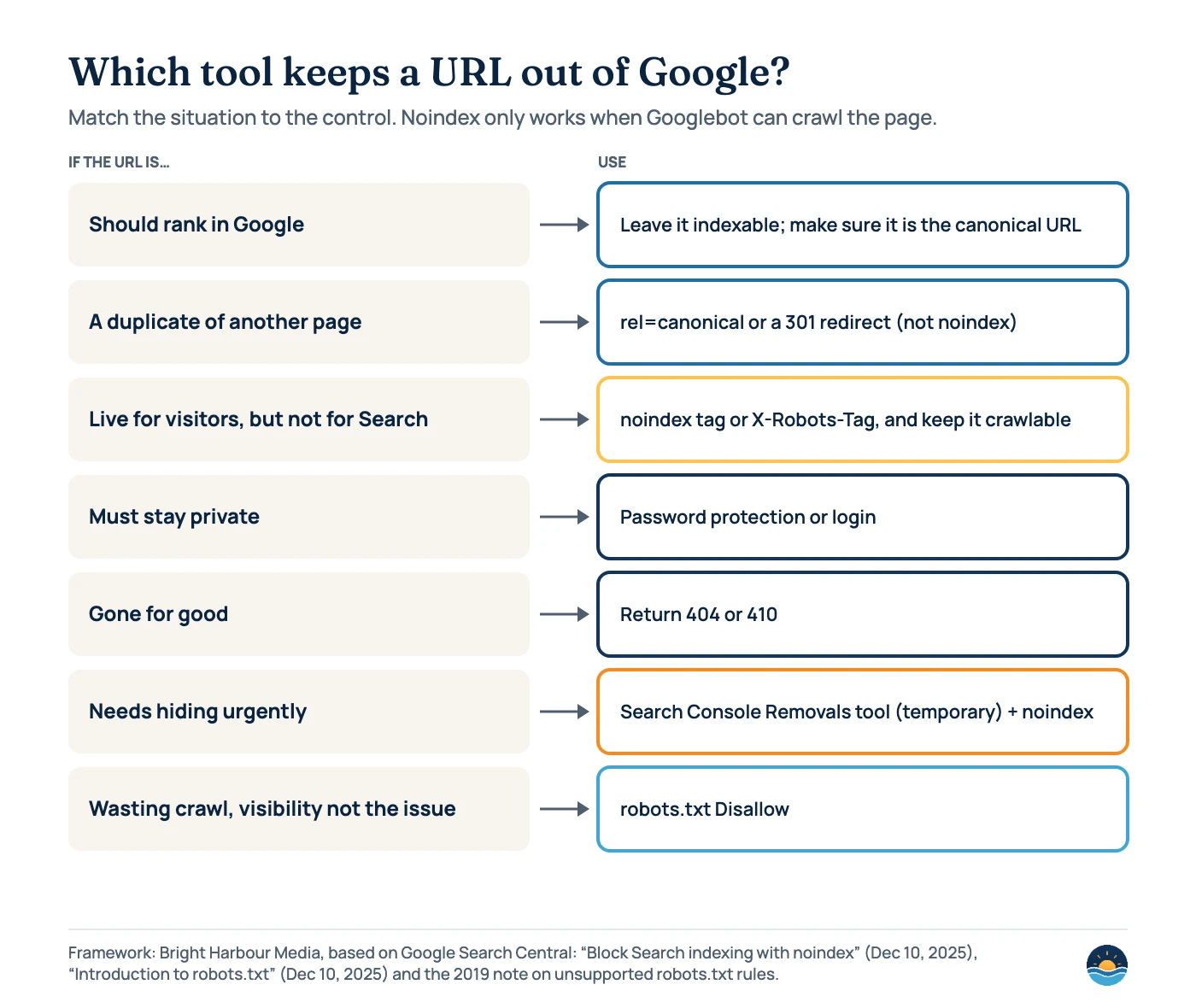
Noindex vs robots.txt: why the difference matters
A common noindex mistake is combining it with a robots.txt Disallow. It feels like belt and braces, but it cancels the noindex out. Google’s robots.txt introduction is direct: robots.txt “is not a mechanism for keeping a web page out of Google.” A blocked URL “can still appear in search results”, just without a description, if other pages link to it.
Search Console reflects this in its own wording. A URL that is blocked but still indexed shows as “Indexed, though blocked by robots.txt”, and Google’s help for the “URL blocked by robots.txt” status says: to keep a page out of the index, “remove the robots.txt block and use a ‘noindex’ directive.” We cover these statuses in more depth in our guide to the Page indexing report.
Use noindex when…
- the page should exist for visitors but not appear in Search (thank-you pages, internal search results, thin tag archives)
- you need a page removed from Google and you can still let Googlebot crawl it
- you want to keep a non-HTML file, such as a PDF, out of results (use the header)
Use robots.txt when…
- you want to stop crawling, for example endless filter or calendar URLs that waste crawl
- the content is not something you mind appearing as a bare URL
- you are managing load rather than visibility (see our robots.txt and AI crawlers guide)
How common is noindex? What the Web Almanac found
The HTTP Archive Web Almanac 2025 SEO chapter (published January 15, 2026) measured robots directives in the rendered HTML of millions of pages. Robots meta tags are widespread: 47.0% of desktop and 47.9% of mobile pages had one, up from 45.5% and 46.2% in 2024. The X-Robots-Tag header is rare by comparison at 0.6% and 0.7%, and only 0.4% of pages used both.
Most of those meta tags simply say index, follow, which Google treats as the default anyway. The chapter notes that popular plugins such as Yoast add index,follow by default. Restrictive rules are far less common:
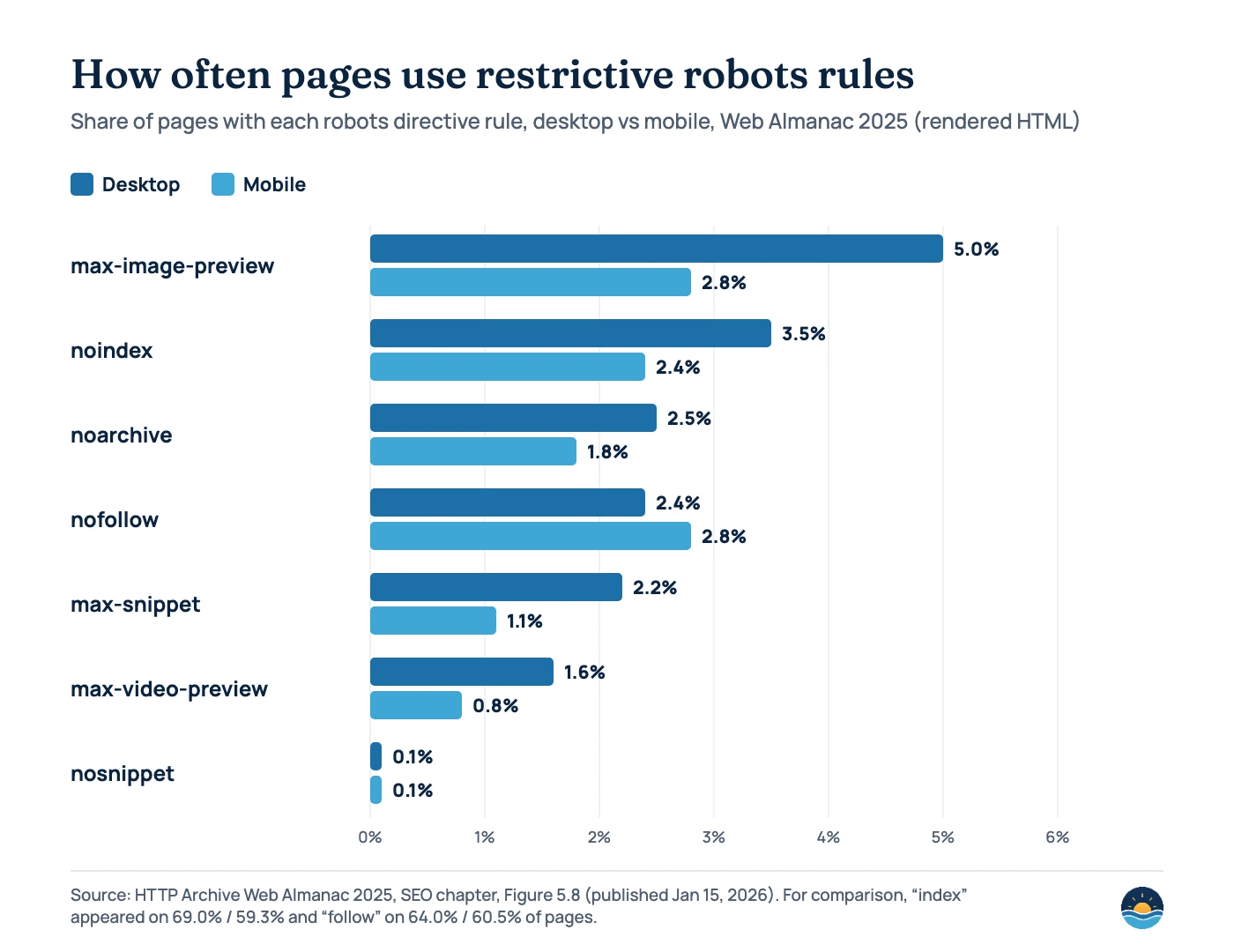
One caution when reading these numbers: the chapter’s prose gives slightly different figures for noindex and nofollow (2.8% desktop, 2.4% mobile) than its chart description. We have used the figure data, which is what the chart above plots. Note too that noarchive still appears on 2.5% of desktop pages even though Google now lists it as a rule it no longer uses, because the cached-page link “no longer exists.”
Which robots rules can you combine with noindex?
Noindex is one of several rules in Google’s robots meta tag specification. The ones you will meet most often are below. When rules conflict, Google says “the more restrictive rule applies”, and when you address several crawlers separately, Google uses “the sum of the negative rules.”
| Rule | What it does in Google | Notes |
|---|---|---|
noindex | Do not show the page in search results | Must be crawlable to be seen |
nofollow | Do not follow the links on the page | Often paired with noindex; see our guide to link rel values for link-level controls |
none | Equivalent to noindex, nofollow | Also accepted in X-Robots-Tag |
indexifembedded | Allows content embedded in another page via iframe to be indexed | Only works alongside noindex |
nosnippet / max-snippet | No text snippet, or a capped length | Also stops content being a direct input for AI Overviews and AI Mode |
noimageindex | Do not index images on the page | Without it, images on the page may be indexed and shown in results |
unavailable_after | Drop the page after a date and time | Google then “will decrease the crawl rate of the URL considerably” |
A worked example from Google’s specification: if a page has <meta name="robots" content="nofollow"> and <meta name="googlebot" content="noindex">, Googlebot reads the page as noindex, nofollow.
Does a long-term noindex also stop links being followed?
Google has said yes, eventually. In December 2017, John Mueller explained in a Webmaster Hangout (reported by Search Engine Roundtable on December 28, 2017) that over time “noindex and follow is essentially kind of the same as a noindex, nofollow.” Once Google stops crawling a long-noindexed page, it no longer sees the links on it.
The practical lesson: do not rely on noindexed pages, such as paginated archives or tag pages, as the only path to important content. Make sure key pages are linked from indexable pages too. Our internal linking strategy guide shows how.
Noindex and JavaScript: a trap for modern sites
Google processes JavaScript sites in a crawl, render and index pipeline. Its JavaScript SEO basics page (updated March 4, 2026) warns that “When Google encounters the noindex tag, it may skip rendering and JavaScript execution.” So a site that ships noindex in the initial HTML and plans to remove it with JavaScript after load may find the page never gets indexed. Google’s advice: “If you do want the page indexed, don’t use a noindex tag in the original page code.”
The reverse can be useful. Google suggests adding a noindex tag with JavaScript to error views in single-page apps, so empty “not found” states are not indexed as soft 404s. More on this in our JavaScript SEO guide.
How to add noindex in WordPress and on the server
Google notes that on platforms like WordPress, Wix or Blogger you may not be able to edit the HTML directly, so look for a search engine settings page. In WordPress, SEO plugins such as Rank Math and Yoast add a per-page “No Index” setting. For files, use the server. Google’s specification gives Apache and NGINX examples; this Apache rule noindexes every PDF:
<Files ~ "\.pdf$">
  Header set X-Robots-Tag "noindex, nofollow"
</Files>
One WordPress-specific warning: the “Discourage search engines from indexing this site” checkbox under Settings → Reading can easily be left on after a staging site goes live. Check it on every launch, along with the rest of our redesign checklist.
A seven-step noindex audit
- List what should not be indexed. Typical candidates: internal search results, thank-you and confirmation pages, cart and account pages, thin tag archives, staging copies and duplicate print views.
- Crawl the site and export robots rules. Use a crawler that reports meta robots and X-Robots-Tag values from both raw and rendered HTML.
- Compare against your list. Flag important pages carrying noindex by mistake, and low-value pages that are indexable.
- Check robots.txt for conflicts. Any URL you want removed with noindex must not be disallowed, or Google will never see the rule.
- Clean your XML sitemap. Google says to include the URLs you want to see in search results; its help also lists sitemaps that include noindexed or blocked URLs as a common cause of error spikes. See our XML sitemaps guide.
- Verify with Search Console. Use the URL Inspection tool to see the HTML Googlebot received and the “Indexing allowed?” field, then watch the “URL marked ‘noindex’” status in the Page indexing report.
- Speed up urgent removals properly. Request a recrawl for changed pages and use the Removals tool for temporary hiding while noindex takes effect. Never “fix” it by adding a robots.txt block.
Frequently asked questions
How long does it take for a noindex tag to remove a page from Google?
The page drops out the next time Googlebot crawls it and reads the rule. Google says this can take months for rarely crawled pages, so request a recrawl in the URL Inspection tool and use the Removals tool if you need it hidden sooner.
Can I put noindex in robots.txt?
No. Google stopped supporting noindex in robots.txt on September 1, 2019. Use a robots meta tag or an X-Robots-Tag header instead, and make sure the URL is not disallowed.
Should I noindex duplicate pages instead of using canonical tags?
Usually not. For duplicates of a page you do want ranking, a redirect or rel=canonical consolidates signals to the main URL. Noindex is better for pages that should not appear in Search at all. Our canonical tags guide covers the difference.
Does noindex hurt the rest of my site’s SEO?
Noindexing low-value pages does not penalise the site. The risk is accidental: a stray noindex on important templates, or relying on noindexed pages as the only internal path to key content, since Google may eventually stop following their links.
Sources
- Block Search indexing with noindex — Google Search Central, last updated Dec 10, 2025 — how noindex works, robots.txt conflict, timing, CMS note
- Robots meta tag, data-nosnippet, and X-Robots-Tag specifications — Google Search Central, last updated Mar 24, 2026 — rule list, conflicts, user agents, server examples
- Understand JavaScript SEO basics — Google Search Central, last updated Mar 4, 2026 — noindex and rendering
- Introduction to robots.txt — Google Search Central, last updated Dec 10, 2025 — robots.txt is not for keeping pages out of Google
- Page indexing report — Google Search Console Help — status names and fixes
- Build and submit a sitemap — Google Search Central, last updated Jul 8, 2026 — which URLs to include
- A note on unsupported rules in robots.txt — Google Search Central Blog, Gary Illyes, Jul 2, 2019 — robots.txt noindex retired Sep 1, 2019
- Google: Long Term Noindex Will Lead To Nofollow On Links — Search Engine Roundtable, Barry Schwartz, Dec 28, 2017 — John Mueller quote
- Web Almanac 2025: SEO chapter — HTTP Archive, published Jan 15, 2026 — robots directive usage data
- Bing Webmaster Guidelines — Microsoft Bing — noindex support
Cite this article: Bright Harbour Media. “Noindex Tag: How to Use It Without Hurting SEO.” Bright Harbour Media Insights, October 2026. https://brightharbourmedia.com/noindex-tag/
You are welcome to reference the charts and frameworks in this article with a link back to this page.
Not sure which of your pages are quietly noindexed, or blocked when they should not be? Our technical SEO service audits robots rules, sitemaps and indexing together. Get in touch for a review.