
Good URL structure for SEO means simple, readable, stable URLs: descriptive words separated by hyphens, as few parameters as possible, one consistent version of each URL, and no fragments used to load content. Google says keywords in URLs have very little ranking effect, so the main wins are clean crawling, clear signals and URLs you never need to change.
Key takeaways
- Google’s URL structure guide (updated October 21, 2026) recommends readable words over long ID numbers, and hyphens instead of underscores between words.
- Google treats URLs as case sensitive: /APPLE and /apple are “distinct URLs”. Under RFC 3986 only the scheme and host are case-insensitive.
- Keywords in the domain or URL path “alone have hardly any effect beyond appearing in breadcrumbs”, according to Google’s SEO Starter Guide (updated December 10, 2025).
- If you change URLs, Google advises permanent redirects kept “generally at least 1 year”, and expects “temporary fluctuation” in rankings during a move.
- Backlinko’s 11.8 million-result study found the average top-10 URL was 66 characters, but that is correlation only; Mueller says URL length “is not a ranking” factor.
Why does URL structure matter for SEO?
A URL is first an identifier. Google’s John Mueller put it plainly in 2021: “we treat URLs as identifiers of content.” A good structure helps in three practical ways, none of which depend on stuffing keywords into the path.
- Crawling. Google’s guide warns that overly complex URLs create “unnecessarily high numbers of URLs that point to identical or similar content”, so “Googlebot may consume much more bandwidth than necessary”.
- Clear signals. One consistent URL per page means links, internal links and Search Console data all point at the same address instead of being split across variants.
- People. Readable URLs are easier to trust, share and remember, and parts of the URL can be shown as breadcrumbs in search results.
What Google recommends for URLs
Google’s “URL structure best practices for Google Search” page (last updated October 21, 2026) is short and specific. The table below summarises its rules with Google’s own examples.
| Rule | Recommended | Not recommended |
|---|---|---|
| Use readable words, not long IDs | /wiki/Aviation | /index.php?topic=42&area=3a5ebc944f41daa6f849f730f1 |
| Separate words with hyphens | /summer-clothing/ | /summer_clothing/ or /greendress |
| Use the audience’s language | /lebensmittel/pfefferminz | English words on a German-language site |
| Percent-encode non-ASCII characters | /gem%C3%BCse | /gemüse (unencoded) |
| Use = and & for parameters | ?category=dresses&sort=low-to-high | ?[category:dresses][sort:price-low-to-high] |
| Use as few parameters as you can | Trim “parameters that don’t change the content” | Referral, sorting and session ID parameters |
| Don’t use fragments to change content | Use the History API | https://example.com/#/potatoes |
| Keep case consistent | All lowercase if your server ignores case | Mixed /APPLE and /apple for one page |
Two points deserve emphasis. On hyphens, Google explains that underscores join concepts (as in format_date), “whereas hyphens clearly signal a word boundary”. On case, Google says its “URL handling is case sensitive” and that if your server treats upper and lower case the same, you should “convert all text to the same case so it’s easier for Google” to see that the URLs are one page.
The anatomy of a URL
Each part of a URL follows different rules. The underlying standard is IETF RFC 3986 (STD 66, January 2005), which Google says it follows.
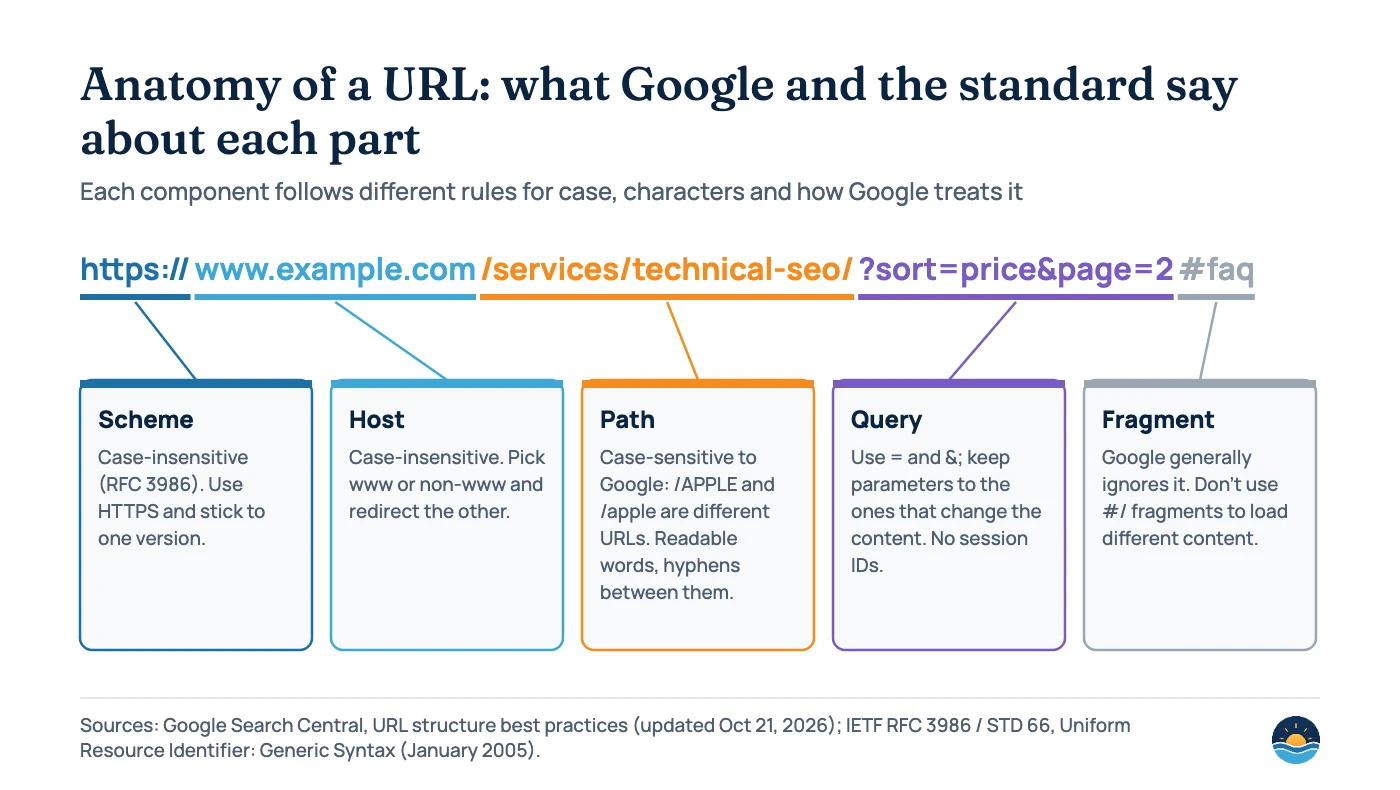
RFC 3986 says “the scheme and host are case-insensitive and therefore should be normalized to lowercase”, while other components “are assumed to be case-sensitive unless specifically defined otherwise”. That is why HTTPS://Example.com/ and https://example.com/ are the same address, but /Services/ and /services/ may not be. Fragments (everything after #) are handled by the browser; Google’s JavaScript SEO guide (updated March 4, 2026) says “don’t use fragments to load different page content” and to use the History API instead.
Do keywords in URLs help rankings?
Very little, and Google has said so consistently for a decade. The SEO Starter Guide still recommends including “words in the URL that may be useful for users”, because a URL like /pets/cats.html tells people what to expect. But it is blunt about rankings: keywords in the domain or URL path “alone have hardly any effect beyond appearing in breadcrumbs.”
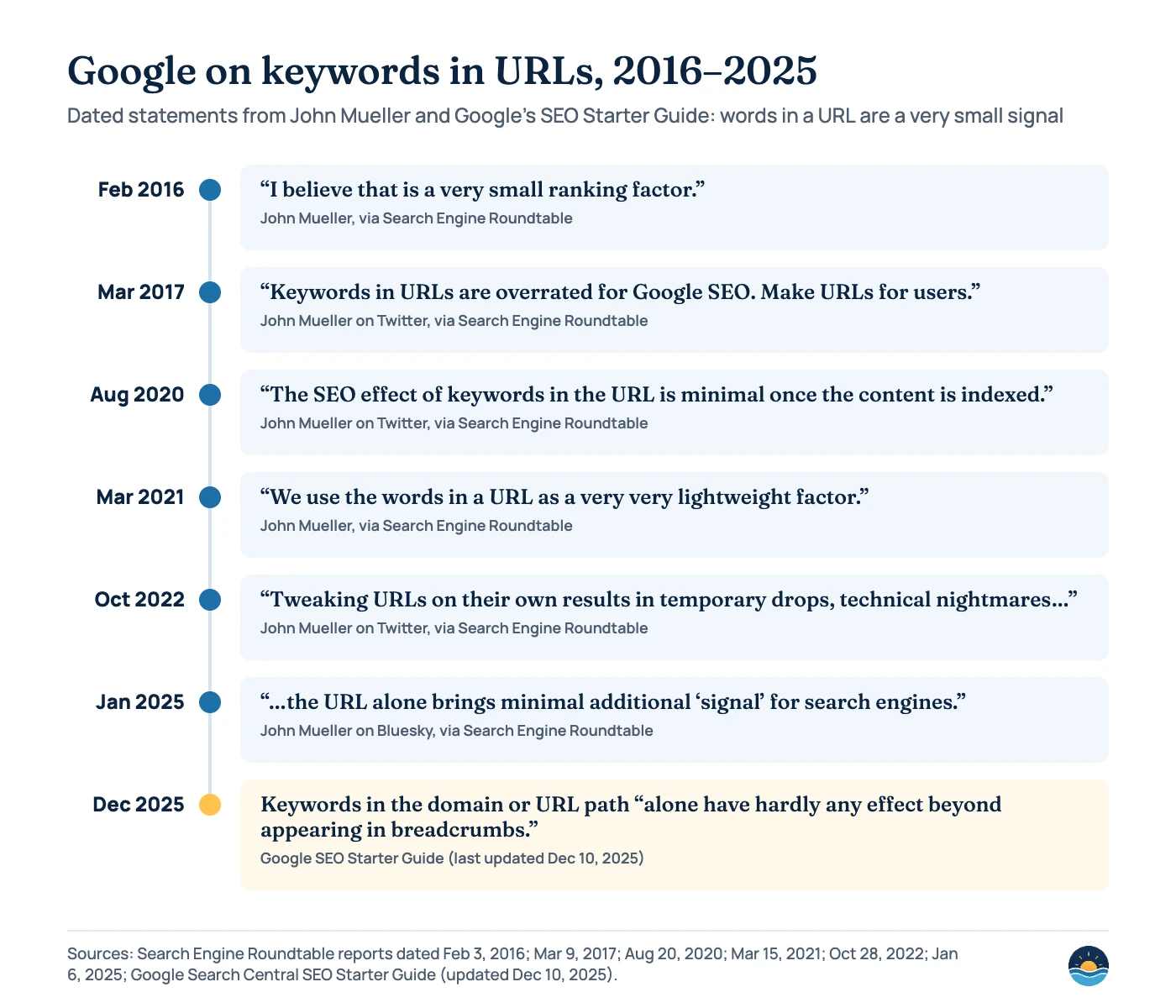
Mueller has also addressed language and length. In August 2020 he said “French URLs are fine; there’s no SEO advantage from using English URLs.” On length, he wrote in February 2020 that “URL length is not a ranking fraction” (sic), and in September 2021 that Google uses “URL length very lightly for canonicalization”, picking a shorter, cleaner URL when two versions show the same content.
That explains a well-known correlation. Backlinko’s analysis of 11.8 million Google results (page last updated April 14, 2025) found that “URLs at position #1 are on average 9.2 characters shorter” than URLs at position #10, and that “the average URL length for a top 10 result in Google is 66 characters.” The study itself notes it is a correlation study. Short URLs tend to come with clean site architecture, not cause rankings.
| Question | Google’s answer | Source |
|---|---|---|
| Does URL length affect rankings? | No: “URL length is not a ranking” factor; used lightly for canonicalization | John Mueller, Feb 2020 and Sep 2021, via Search Engine Roundtable |
| Does URL depth (number of slashes) matter? | “Google does not count the number of slashes in your URLs” | John Mueller, March 2021, via Search Engine Journal |
| Subdomains or subfolders? | “Google web search is fine with using either subdomains or subdirectories” | John Mueller, January 2018, via Search Engine Roundtable; SEO Starter Guide: “do whatever makes sense for your business” |
| Trailing slash or not? | /foo/ and /foo are separate URLs; a slash after the hostname is irrelevant; “be consistent and only use one version” | Google Search Central Blog, April 21, 2010; Mueller, Dec 2017 and July 2019 |
| Should I group pages in folders? | Yes for large sites: “Group topically similar pages in directories” so Google can crawl them at different frequencies | SEO Starter Guide, updated Dec 10, 2025 |
URL patterns that create crawl problems
Most URL problems on real sites are not about keywords. They come from systems that generate far more URLs than there are pages. Google’s guide lists the common causes.
Infinite URL spaces
- Additive filtering: combinable filters make “the number of URLs (views of data)” explode
- Calendars: endless next/previous date links; Google suggests nofollow on links to dynamically created future pages
- Broken relative links: parent-relative links can create bogus URLs; use root-relative links
Irrelevant parameters
- Referral and tracking parameters that don’t change the content
- Sorting parameters that reorder the same items
- Session IDs: “avoid the use of session IDs in URLs and consider using cookies instead”
Google’s suggested fixes are to block problematic dynamic URLs (internal search results, calendars, ordering and filtering) with robots.txt, and to manage faceted navigation URLs deliberately. For duplicates that must stay accessible, a canonical tag tells Google which version to index.
Should you change existing URLs for SEO?
Usually not. Mueller said in October 2022: “Tweaking URLs on their own results in temporary drops, technical nightmares, and if you’re lucky, it’ll end up in the same place.” In January 2025 he added that “Even changing from ?id=12345 to /cheese wouldn’t be a big/noticable thing on its own.” When planning a new structure, his 2022 advice was to “pick a structure that makes maintenance & tracking easier for you, and that you can keep for 5-10 years.”
Change URLs when there is a real reason: a platform migration, a broken architecture, session IDs or parameters creating duplicates, or URLs that genuinely mislead users. When you do, Google’s site move guide (updated August 20, 2026) is clear:
- “Use server side permanent redirects if technically possible” (301 or 308), and redirect straight to the final destination rather than through chains.
- “Keep the redirects for as long as possible, generally at least 1 year.”
- “Expect temporary fluctuation in site ranking during the move.”
- Update internal links, canonical tags and sitemaps to the new URLs so Google isn’t sent through redirects. See our guide to HTTP status codes and our domain migration guide for the details.
A seven-step URL structure checklist
- Pick one canonical host and protocol. HTTPS, with or without www, and redirect every other version to it.
- Set a casing and trailing-slash rule. Lowercase paths and one slash convention, enforced with redirects so variants don’t multiply.
- Design the folder structure around how users browse. Group related pages (for example
/services/,/insights/) and keep it stable; depth itself doesn’t matter to Google. - Write readable slugs. Short, descriptive words in the audience’s language, separated by hyphens. Drop stop words only if the slug stays clear.
- Control parameters. Use = and &, strip tracking and session parameters, and block or canonicalise sort and filter combinations.
- Keep fragments client-side. Never rely on
#URLs to load distinct content that should be indexed. - Audit with Search Console. Check the Page indexing report for duplicates and “Alternate page with proper canonical tag”, and use the URL Inspection tool to confirm which URL Google selected. Our breadcrumbs guide covers how paths appear in results.
Frequently asked questions
Are hyphens or underscores better in URLs?
Hyphens. Google recommends hyphens to separate words because they “clearly signal a word boundary”, while underscores tend to join words into one concept. Joined words like /greendress are also not recommended.
Are URLs case sensitive for Google?
Yes, for the path and query. Google treats /APPLE and /apple as distinct URLs. Only the scheme and host are case-insensitive under RFC 3986, so use lowercase paths and redirect uppercase variants.
Does a shorter URL rank better?
Not directly. Google says URL length is not a ranking factor and is used only lightly to pick between duplicate URLs. Studies showing shorter URLs at the top of results are correlation, not cause.
Should I remove dates or IDs from old URLs?
Only if there is another strong reason to change them. Google’s John Mueller has said changing URLs on their own causes temporary drops and rarely helps. If you do change them, use permanent redirects and keep them for at least a year.
Sources
- URL Structure Best Practices for Google Search — Google Search Central, last updated October 21, 2026 — readable words, hyphens, encoding, parameters, case, crawl problems
- SEO Starter Guide: The Basics — Google Search Central, last updated December 10, 2025 — keywords in URLs, directories, subdomains, breadcrumbs
- Site Moves and Migrations — Google Search Central, last updated August 20, 2026 — redirects, one year, ranking fluctuation
- Redirects and Google Search — Google Search Central, last updated April 14, 2026 — permanent redirects
- Understand JavaScript SEO Basics — Google Search Central, last updated March 4, 2026 — History API instead of fragments
- RFC 3986: Uniform Resource Identifier (URI): Generic Syntax — IETF, January 2005 — case rules, reserved characters, fragments
- To slash or not to slash — Google Search Central Blog, April 21, 2010 — trailing slashes
- Google: Keywords In URLs A Small Ranking Factor — Search Engine Roundtable, February 3, 2016
- Google Says Keywords In URLs Are An Overrated SEO Factor — Search Engine Roundtable, March 9, 2017
- Google Says Keywords In URLs Have Minimal Impact After Content Is Indexed — Search Engine Roundtable, August 20, 2020
- Google Says Words In A URL A Very Light Weight Factor But Less So After Page Indexed — Search Engine Roundtable, March 15, 2021
- Google Says You’d Be Lucky To End Up In The Same Place After Changing URLs — Search Engine Roundtable, October 28, 2022
- Google Says URLs Provide Minimal Additional Signals For Search Engines — Search Engine Roundtable, January 6, 2025
- Google Says URL Length Is Not A Ranking Factor — Search Engine Roundtable, February 5, 2020
- Google Says URL Length Is A Light Signal For Canonicalization — Search Engine Roundtable, September 27, 2021
- Google: No Benefit to An Artificially Flat URL Structure — Search Engine Journal, March 28, 2021
- Google Says Deep Subfolders In URLs Doesn’t Matter For SEO — Search Engine Roundtable, January 26, 2022
- SEOs Fight With Google Over How Google Treats Subdomains vs Subdirectories — Search Engine Roundtable, January 24, 2018
- Google Says Be Consistent By Using Either Slash Or No Slash After URL, Not Both — Search Engine Roundtable, July 11, 2019
- Google Explains Trailing Slashes & How It Impacts SEO — Search Engine Roundtable, December 19, 2017
- We Analyzed 11.8 Million Google Search Results. Here’s What We Learned About SEO — Backlinko, last updated April 14, 2025 — URL length correlation
Cite this article: Bright Harbour Media. “URL Structure for SEO: What Google Recommends.” Bright Harbour Media Insights, November 2026. https://brightharbourmedia.com/url-structure-seo/
You are welcome to reference the charts and frameworks in this article with a link back to this page.
Planning a new site structure or untangling parameter and duplicate URLs? Our technical SEO service designs URL rules that crawl cleanly and stay stable. Get in touch to talk about your site.