

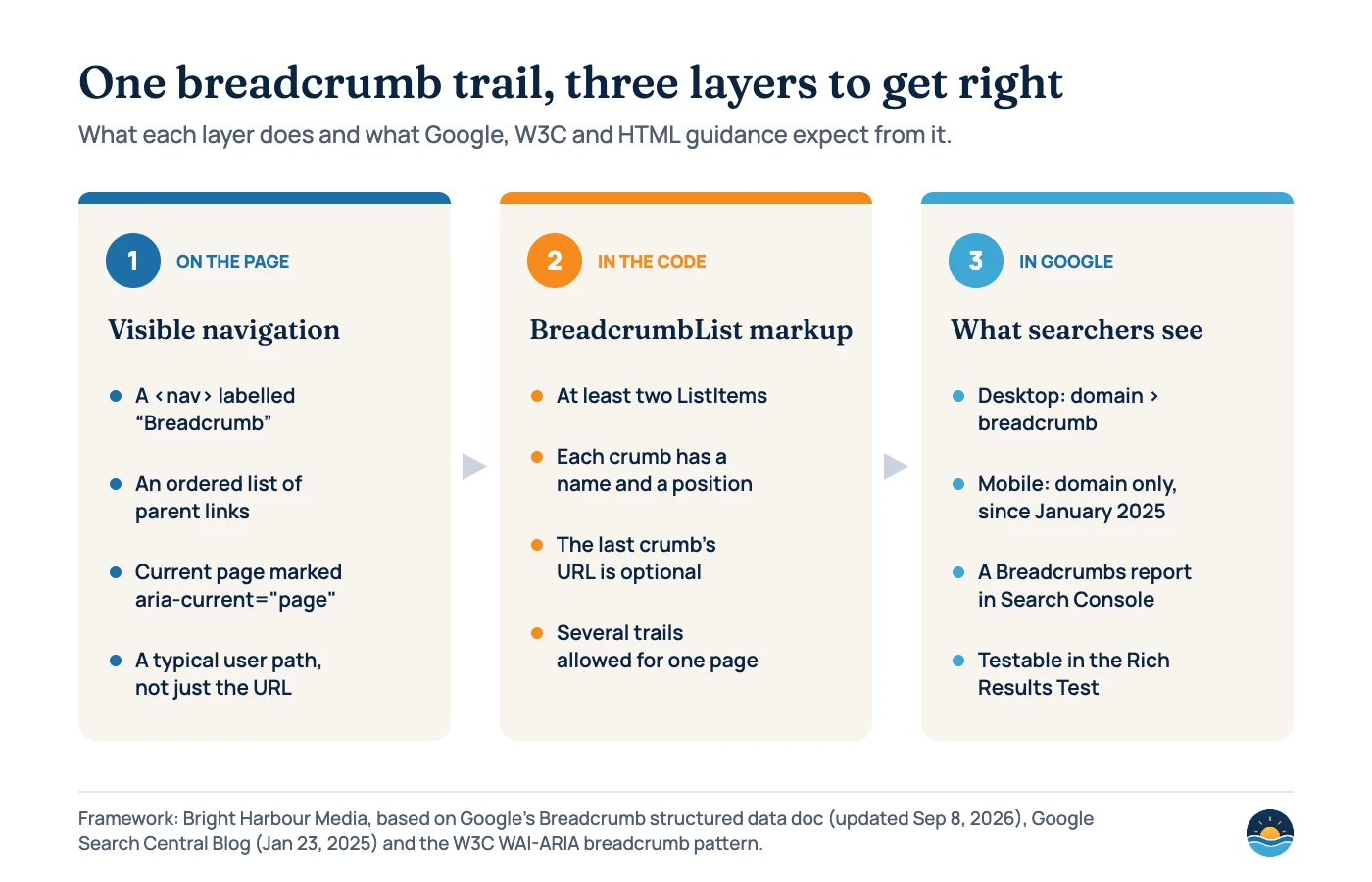
Breadcrumbs are a short trail of links, such as Home › Services › Technical SEO, that shows where a page sits in a website’s structure. For SEO they do three jobs: they add helpful internal links, they can be described to Google with BreadcrumbList structured data, and on desktop Google can show them in the search result’s URL line.
Key takeaways
- Google says breadcrumbs “may help users understand and explore a site effectively” and uses breadcrumb markup “to categorize the information from the page in search results”.
- Since January 23, 2025, Google shows breadcrumbs on desktop results only; on mobile the visible URL is simplified to the domain.
- BreadcrumbList markup needs at least two ListItems, each with a name and position; the last item’s URL is optional (Google doc, updated Sep 8, 2026).
- Google recommends a “typical user path to a page, instead of mirroring the URL structure,” and allows more than one trail per page.
- BreadcrumbList appears on 21% of home pages and 27–28% of inner pages (HTTP Archive Web Almanac 2025).
What are breadcrumbs and why do they matter for SEO?
A breadcrumb trail lists the parent pages of the current page in order, starting near the home page. Google’s documentation describes it as indicating “the page’s position in the site hierarchy”, so a visitor can move up one level at a time. Nielsen Norman Group, which has recommended breadcrumbs since 1995, notes they offer real benefits to users at very little cost to the interface.
The SEO value is mostly indirect but practical. Every breadcrumb is a crawlable internal link from a deeper page to its parent category, which helps search engines discover and understand how sections fit together. That complements, rather than replaces, the contextual links in your content; our internal linking strategy guide covers how the two work together. Breadcrumbs can also shape how a result looks in Google on desktop, which we cover below.
What breadcrumbs are not is a ranking shortcut. Google’s SEO Starter Guide says keywords in a domain or URL path “have hardly any effect beyond appearing in breadcrumbs.” Treat breadcrumbs as structure and usability work that makes the rest of your SEO easier.
How do breadcrumbs appear in Google search results?
Google’s visual elements gallery explains that a result’s visible URL has two parts: the domain and the breadcrumb, which is “the trail that shows the page’s position within the site’s hierarchy.” Google can work this out on its own: the SEO Starter Guide says it “learns breadcrumbs automatically based on the words in the URL”, and you can influence it with structured data.
In January 2025 Google changed where that trail appears. The changelog entry dated January 22, 2025 and a Search Central blog post published January 23, 2025 explain that breadcrumbs were removed from mobile results in all languages and regions because, on smaller screens, they get cut off and the feature “isn’t as useful to people who are searching on mobile.” On mobile, “the visible URL will be simplified to the domain only.” Desktop results still show domain plus breadcrumb.
| Where | What Google shows | What you control |
|---|---|---|
| Desktop results | Domain › breadcrumb trail | BreadcrumbList markup and your URL and site structure |
| Mobile results (since Jan 2025) | Domain only | Your site name and favicon matter more here |
| Search Console | Breadcrumbs rich result report under Enhancements | Fix errors and warnings in your markup |
| Rich Results Test | Whether a page’s breadcrumb markup is valid | Test templates before and after release |
Google was clear that nothing needs to change: “If you’re using breadcrumb markup, there’s nothing you need to do,” and the breadcrumb report in Search Console and the Rich Results Test continue. With breadcrumbs gone from mobile URLs, the site name and favicon carry more of the identity in mobile results; our guide to site names and favicons explains how to control them.
How do you add BreadcrumbList structured data?
Google supports breadcrumb markup in JSON-LD, Microdata and RDFa, and its documentation has examples of each. The rules are short. A BreadcrumbList must contain “at least two ListItems.” Each ListItem needs a name (“the title of the breadcrumb displayed for the user”) and a position, where position 1 is the start of the trail, plus an item URL. The last crumb is the exception: if item is left out, Google uses the URL of the page itself. You also do not need a ListItem for the home page or for the current page.
<script type="application/ld+json">
{
  "@context": "https://schema.org",
  "@type": "BreadcrumbList",
  "itemListElement": [
    { "@type": "ListItem", "position": 1, "name": "Services",
      "item": "https://example.com/services/" },
    { "@type": "ListItem", "position": 2, "name": "Technical SEO" }
  ]
}
</script>
Two points from Google’s guidance are worth highlighting. First, it recommends breadcrumbs that represent “a typical user path to a page, instead of mirroring the URL structure.” If your URLs are flat but your navigation has categories, follow the navigation. Second, “If there are multiple ways to navigate to a page on your site, you can specify multiple breadcrumb trails for a single page.” Google’s example is a book reachable through both “Books › Science Fiction › Award Winners” and “Literature › Award Winners.”
Old data-vocabulary.org breadcrumb markup is no longer eligible for Google rich result features, so replace it if you find it during an audit. Our structured data audit guide walks through testing templates and monitoring Search Console reports.
| Property | Required? | What it does |
|---|---|---|
| BreadcrumbList › itemListElement | Yes | An ordered array of ListItems; at least two |
| ListItem › name | Yes | The crumb label shown to users |
| ListItem › position | Yes | Order in the trail; 1 is the start |
| ListItem › item | Yes, except the last crumb | The crumb’s URL; for the last crumb Google uses the page URL if omitted |
| Home page and current page crumbs | No | Optional in the markup, though users still benefit from them on the page |
How common is breadcrumb markup?
The HTTP Archive Web Almanac measures structured data across millions of pages. In its 2025 SEO chapter (published January 15, 2026), BreadcrumbList appears on 21% of desktop and mobile home pages and on 28% of desktop and 27% of mobile inner pages. On home pages that is up from 18% in 2022 and 20% in 2024. Inner pages, where breadcrumbs are more useful, were first measured in 2024 at 30%, when BreadcrumbList was the second most popular schema type on inner pages.
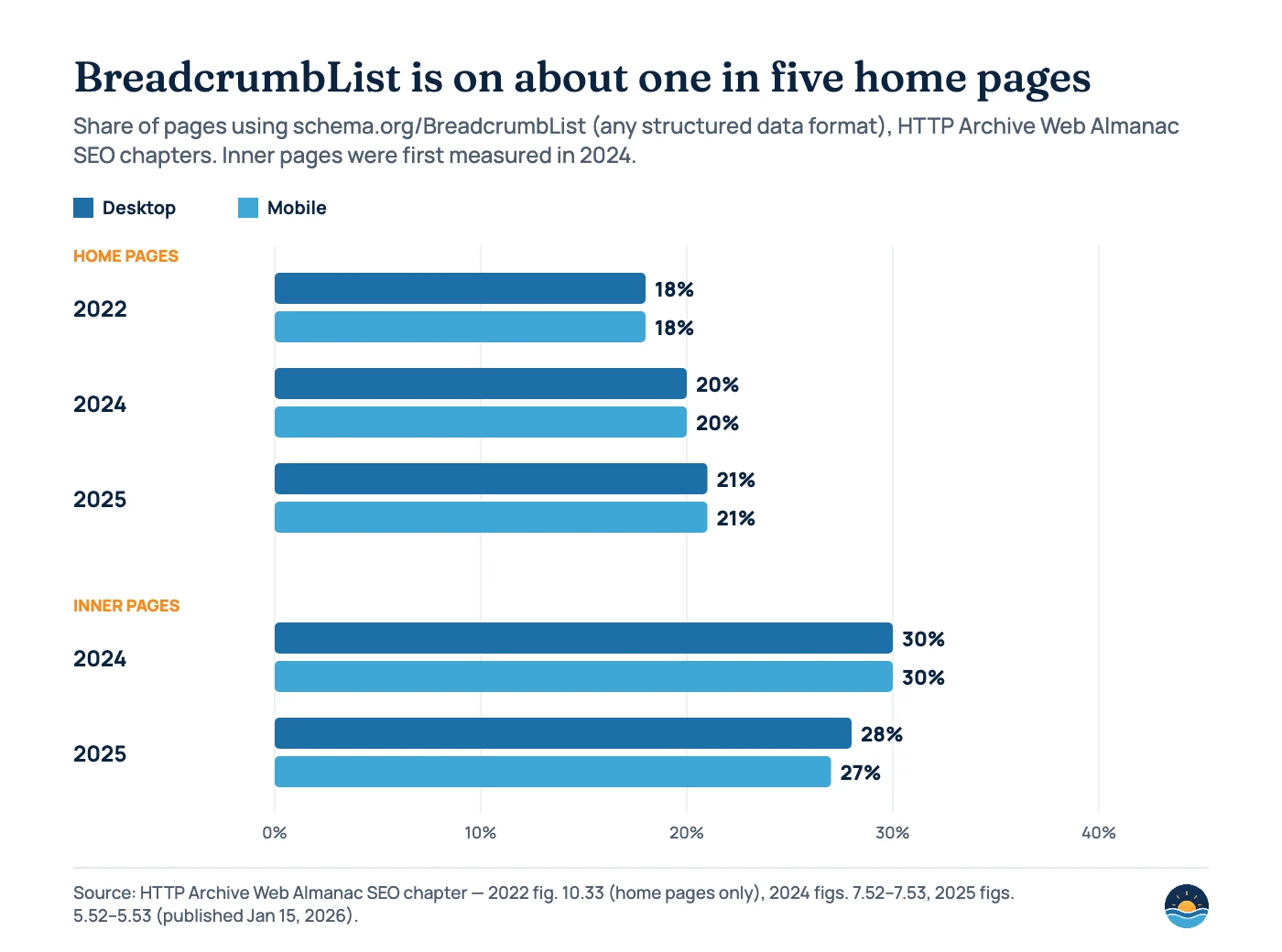
Because these are crawls of different years with slightly different samples, read the trend as broadly stable rather than as precise growth. The Almanac’s separate Structured Data chapters count only JSON-LD and give lower figures, so do not mix the two series.
What makes a good breadcrumb trail for users?
Breadcrumbs that help people tend to help search engines too. The W3C WAI-ARIA breadcrumb pattern puts the trail inside a navigation landmark labelled with aria-label (for example “Breadcrumb”), uses an ordered list, and sets aria-current="page" on the link to the current page. Separators are best added with CSS so screen readers do not read them aloud.
<nav aria-label="Breadcrumb">
  <ol>
    <li><a href="/">Home</a></li>
    <li><a href="/services/">Services</a></li>
    <li><a href="/services/technical-seo/" aria-current="page">Technical SEO</a></li>
  </ol>
</nav>
Do
- Show location in the site hierarchy, not the visitor’s click history
- Start with a link to the home page
- Include the current page as the last item
- Keep the trail on one line on mobile; shorten it to the last levels if needed
Avoid
- Using breadcrumbs instead of your main navigation
- Linking the current page to itself
- Adding breadcrumbs to flat sites only one or two levels deep
- Markup that does not match the visible trail
These points follow Nielsen Norman Group’s “Breadcrumbs: 11 Design Guidelines for Desktop and Mobile” (2018, last reviewed September 2026). One nuance: NN/g recommends showing a single pathway on the page even when a page sits in several categories, while Google allows multiple trails in the markup. In practice, show one trail to users and only add extra trails in the markup if they reflect real routes through your navigation.
How do you add breadcrumbs in WordPress?
Most WordPress SEO plugins can output both the visible trail and the markup. Rank Math’s breadcrumbs are enabled under Rank Math SEO › General Settings › Breadcrumbs (with the Schema module on and Advanced Mode enabled) and are added with the shortcode, which block themes can place with a Shortcode block. Yoast offers a Yoast Breadcrumbs block, the shortcode, and says its breadcrumbs output JSON-LD. Rank Math also notes that WooCommerce adds visible breadcrumbs by default but “does not add Breadcrumb Schema out of the box.” Whichever you use, check that only one tool outputs BreadcrumbList so pages do not carry conflicting trails.
A seven-step breadcrumb audit
- Map your hierarchy. List your main sections and categories, and decide the single trail users should see for each template.
- Check the visible trail. On each template, confirm the breadcrumb starts at the home page, ends with the current page, and is not a link to itself.
- Check accessibility. Look for a labelled
nav, an ordered list andaria-current="page". - Inspect the markup. Run a sample of each template through the Rich Results Test and look for missing names, positions or URLs.
- Remove duplicates and old formats. Make sure only one plugin or theme outputs BreadcrumbList, and remove data-vocabulary.org markup.
- Match markup to the page. The names and order in the markup should match what users see.
- Monitor Search Console. Review the Breadcrumbs report under Enhancements after releases and fix new errors.
Frequently asked questions
Do breadcrumbs help SEO rankings?
Google does not describe breadcrumbs as a ranking factor. They help through structure: crawlable internal links to parent pages, clearer site hierarchy for users and search engines, and a more informative URL line in desktop results.
Does Google still show breadcrumbs in search results?
Yes, on desktop. Since January 2025 Google no longer shows breadcrumbs on mobile results, where the visible URL is just the domain. Google says sites using breadcrumb markup do not need to change anything.
Should breadcrumbs match my URL structure?
Not necessarily. Google recommends breadcrumbs that represent a typical user path to the page rather than mirroring the URL. If your navigation groups pages differently from your URLs, follow the navigation.
Can a page have more than one breadcrumb trail?
In structured data, yes: Google allows multiple trails when a page can be reached in different ways. On the page itself, usability guidance from Nielsen Norman Group suggests showing users a single trail.
Sources
- Breadcrumb (BreadcrumbList) structured data — Google Search Central, last updated Sep 8, 2026 — purpose, properties, multiple trails, desktop availability
- Simplifying the visible URL element on mobile search results — Google Search Central Blog, Jan 23, 2025 — breadcrumbs removed from mobile results
- Latest Google Search documentation updates — Google Search Central changelog, Jan 22, 2025 entry; Oct 30, 2020 data-vocabulary.org entry
- Visual elements gallery — Google Search Central, last updated Feb 4, 2026 — visible URL: domain and breadcrumb
- SEO Starter Guide — Google Search Central, last updated Dec 10, 2025 — breadcrumbs learned from URLs; URL keywords
- Rich result report overview — Search Console Help — Breadcrumbs report under Enhancements
- Web Almanac 2025: SEO — HTTP Archive, Jan 15, 2026 — BreadcrumbList on home and inner pages (figs. 5.52–5.53)
- Web Almanac 2024: SEO — HTTP Archive, Dec 2, 2024 — figs. 7.52–7.53
- Web Almanac 2022: SEO — HTTP Archive, Sep 26, 2022 — fig. 10.33, home pages
- Breadcrumb Pattern — W3C WAI-ARIA Authoring Practices Guide — nav landmark, aria-current
- Breadcrumbs: 11 Design Guidelines for Desktop and Mobile — Nielsen Norman Group, Dec 23, 2018, last reviewed Sep 1, 2026 — usability guidelines
- BreadcrumbList — Schema.org — type definition
- How to Enable Breadcrumbs on Your Website With Rank Math SEO — Rank Math knowledge base — settings, shortcode, WooCommerce note
- How to implement Yoast SEO breadcrumbs — Yoast help — block, shortcode, JSON-LD output
Cite this article: Bright Harbour Media. “Breadcrumbs and SEO: Navigation, Markup and What Google Shows.” Bright Harbour Media Insights, November 2026. https://brightharbourmedia.com/breadcrumbs-seo/
You are welcome to reference the charts and frameworks in this article with a link back to this page.
Not sure whether your site structure, breadcrumbs and markup line up? Our technical SEO service audits navigation, internal links and structured data together. Get in touch to talk about your site.