
Google Trends shows how interest in a search term or topic changes over time and across places, as a relative score from 0 to 100 rather than a search count. For SEO, it is most useful for timing content around seasonal demand, comparing how people phrase a subject, and spotting rising questions early. It is a planning signal, not a volume tool.
Key takeaways
- Trends scores are relative: each data point is divided by total searches for that place and time, then scaled 0–100 (Google Trends Help).
- Google’s own advice is to publish “a little before people are searching for it” and not to write about something “just because it’s trending” (Search Central, updated Dec 10, 2025).
- “Breakout” in Rising queries means a search grew by more than 5,000%; Top and Rising lists only cover dates at least a week old.
- Trends is a sample. In a 2020 study, up to 35% of repeated identical requests failed a consistency test, and short timespans were least stable.
- Trending Now refreshes about every 10 minutes and was relaunched in August 2024; a Trends API with consistently scaled 5-year data has been in limited alpha since July 2025.
What does Google Trends actually measure?
Google describes Trends data as “a largely unfiltered sample of actual search requests” that is anonymised, categorised and aggregated. Because Google handles billions of searches a day, it uses a sample rather than every query.
The key thing to understand is the scaling. According to Google’s FAQ, “Each data point is divided by the total searches of the geography and time range it represents”, and the results are “scaled on a range of 0 to 100 based on a topic’s proportion to all searches on all topics.” A score of 100 is the peak share of search interest in the chart you are looking at, not 100 searches. Two regions with the same score can have very different absolute volumes.
Google also filters the data. Very low-volume searches appear as 0, repeated searches from the same person over a short period are removed, queries with apostrophes and some special characters are excluded, and the FAQ now lists “internal searches made by AI Mode and AI Overviews” as excluded too. Google adds a little statistical noise to protect privacy, which is most noticeable on low-interest queries. Its own summary is blunt: “Google Trends is not a scientific poll”, and the data “should always be considered as one data point among others”.
| Tool | What the number means | Best SEO use | Watch out for |
|---|---|---|---|
| Google Trends | Relative interest, 0–100, for the place and time range selected | Seasonality, comparing phrasings, rising questions, regional differences | Not search volume; sampled; low-volume terms show as 0 |
| Google Ads Keyword Planner | Average monthly searches for a keyword and close variants, averaged over 12 months by default | Rough absolute demand and keyword ideas | Volumes are rounded; close variants are grouped |
| Search Console Performance report | Your own clicks, impressions, CTR and average position from Google Search | What already brings people to your site | Only shows queries you appear for; up to 16 months in the report |
That last point matters for reporting. Google’s Trends help page says it is “a different data source from Google Ads. Please do not cite these sources together.” Use Trends for direction and timing, and Keyword Planner or Search Console for the size of the opportunity, but keep them separate when you present numbers.
Search terms vs topics: which should you compare?
Trends lets you compare a literal search term (for example “running shoes”) or a topic, which Google builds from the Knowledge Graph so it groups related spellings and languages. Search terms do not include misspellings, synonyms, or plural and singular versions. Google’s recommendation is to select “a topic whenever one is available” when you want the full picture of interest in a brand, person or concept.
Use a topic when…
You want total interest in a concept, brand or product, across spellings and languages. It is the better choice for seasonality and for comparing your brand with a competitor’s.
Use a search term when…
You are choosing between specific phrasings for a title, heading or page, such as “SEO audit” vs “website audit”. Here the exact words are the point, so the literal match is what you want.
You can compare several terms at once; Google’s help page currently allows up to 8 groups of up to 50 terms in the new Explore view, while older Google guides mention 5. Compare like with like: topics with topics, terms with terms, and the same location and time range. If you are mapping phrasings to pages, our guide to search intent mapping shows how to decide which wording belongs on which page.
How do you use Trends for content timing?
Seasonality is where Trends earns its place in an SEO plan. Google’s Search Central guide gives the example of the topic Brie, which “spikes twice a year” in the US but “once a year” in the UK, and recommends having “high quality content available on your site a little before people are searching for it.” New and updated pages need time to be crawled and indexed, so publishing at the peak is usually too late.
Set the time range to the past 5 years so a single unusual year does not mislead you, then use the newer Quick comparisons chips. They add a historical reference line, comparing for example the past year “vs. preceding year” or the past month with the same period the previous year. That makes it easier to see whether this year’s rise is normal or unusual.
Seasonality also tells you when to refresh existing pages. If a guide peaks every March, review and update it in January rather than writing a new one; our content refresh and pruning guide covers how to decide between refreshing, consolidating and removing.
How do Related topics and Related queries help keyword research?
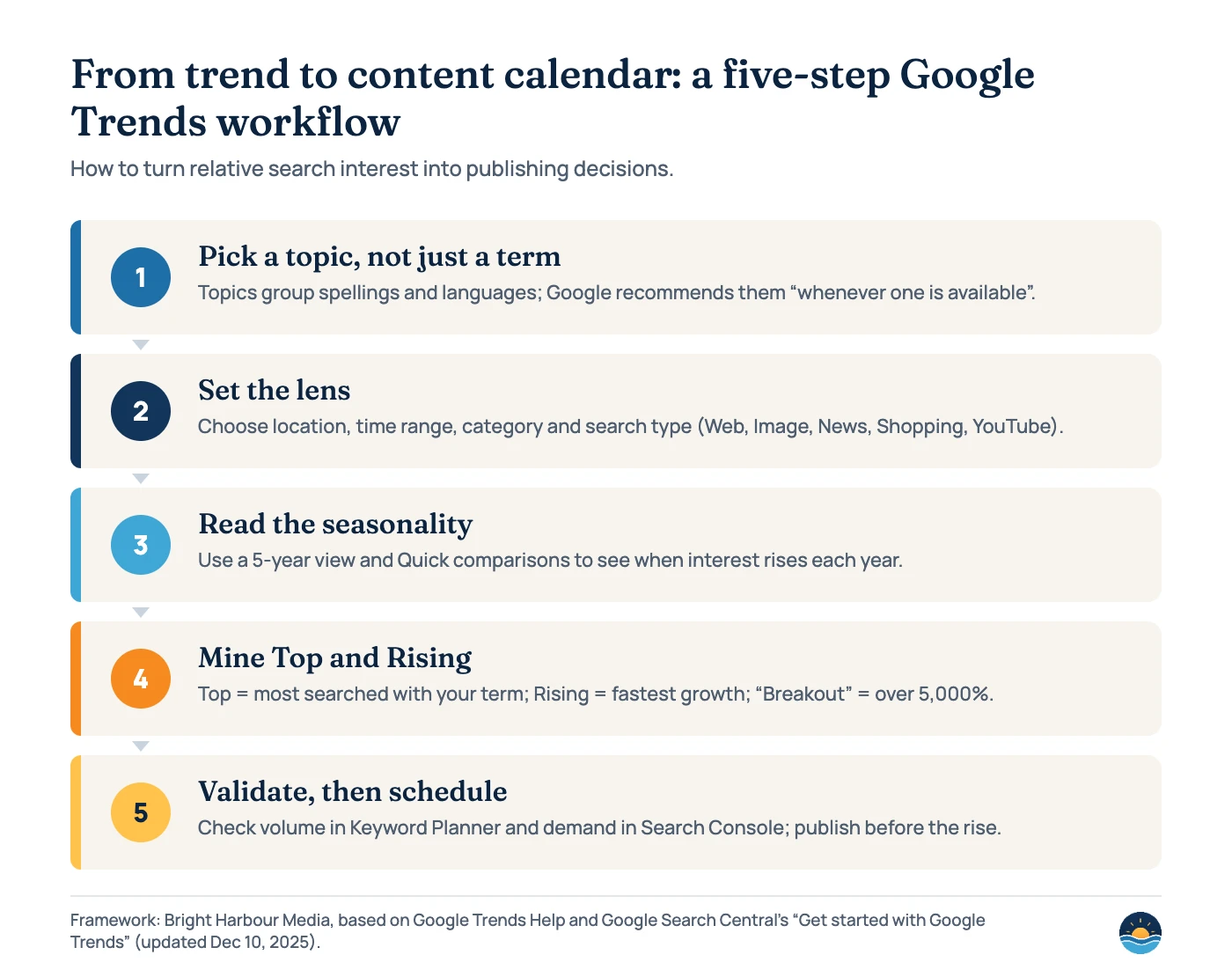
Below the chart, Trends lists related topics and queries in two views. Top shows the searches most often made with your term in the same session. Rising shows those with the most significant growth, and a “Breakout” label means a search “grew by more than 5000%.” Google notes that Top and Rising lists are only available for dates at least a week in the past.
Google’s Search Central guide suggests Rising terms “might point you to relevant terms that are still less known (and consequently less competitive).” In practice, Rising queries are a good source of new FAQ questions, sections for existing guides and, occasionally, a new page. Check each one against a real search before acting: the results page tells you what kind of content Google already shows. Our keyword research process explains how to score and prioritise what you find.
| Setting | What it changes | SEO tip |
|---|---|---|
| Location | Country, region or city (where available) | Match the markets you serve; local businesses should check their own region |
| Time range | From the past hour back to 2004 | Use 5 years for seasonality, 30 or 90 days for brand monitoring |
| Category | Narrows ambiguous words (Google’s example is “jaguar”) | Pick a category when a term has several meanings |
| Search type | Web, Image, News, Google Shopping or YouTube search | Check YouTube or Shopping if you plan video or product content |
| Top vs Rising | Most frequent vs fastest-growing related searches | Rising for new angles; Top for core subtopics to cover |
Should you chase trending searches?
Trending Now, relaunched in August 2024, shows searches that are surging right now. Google said the new engine “detects 10 times as many emerging trends as before” and refreshes every 10 minutes on average, and it launched in 125 countries (the current help page says “100+”). Its chart is exact-match, while the Explore chart is broad-match, so the two will not always agree.
Trending searches can suit news publishers, but for most service businesses they are a distraction. Google’s own guidance is clear that “you shouldn’t write about something just because it’s trending.” A useful test: would this page still help your customers in six months? If not, it probably belongs on social media or in a newsletter rather than on your site. If you do publish timely content, our guide to Google Discover covers where that kind of traffic tends to come from.
How reliable is Google Trends data?
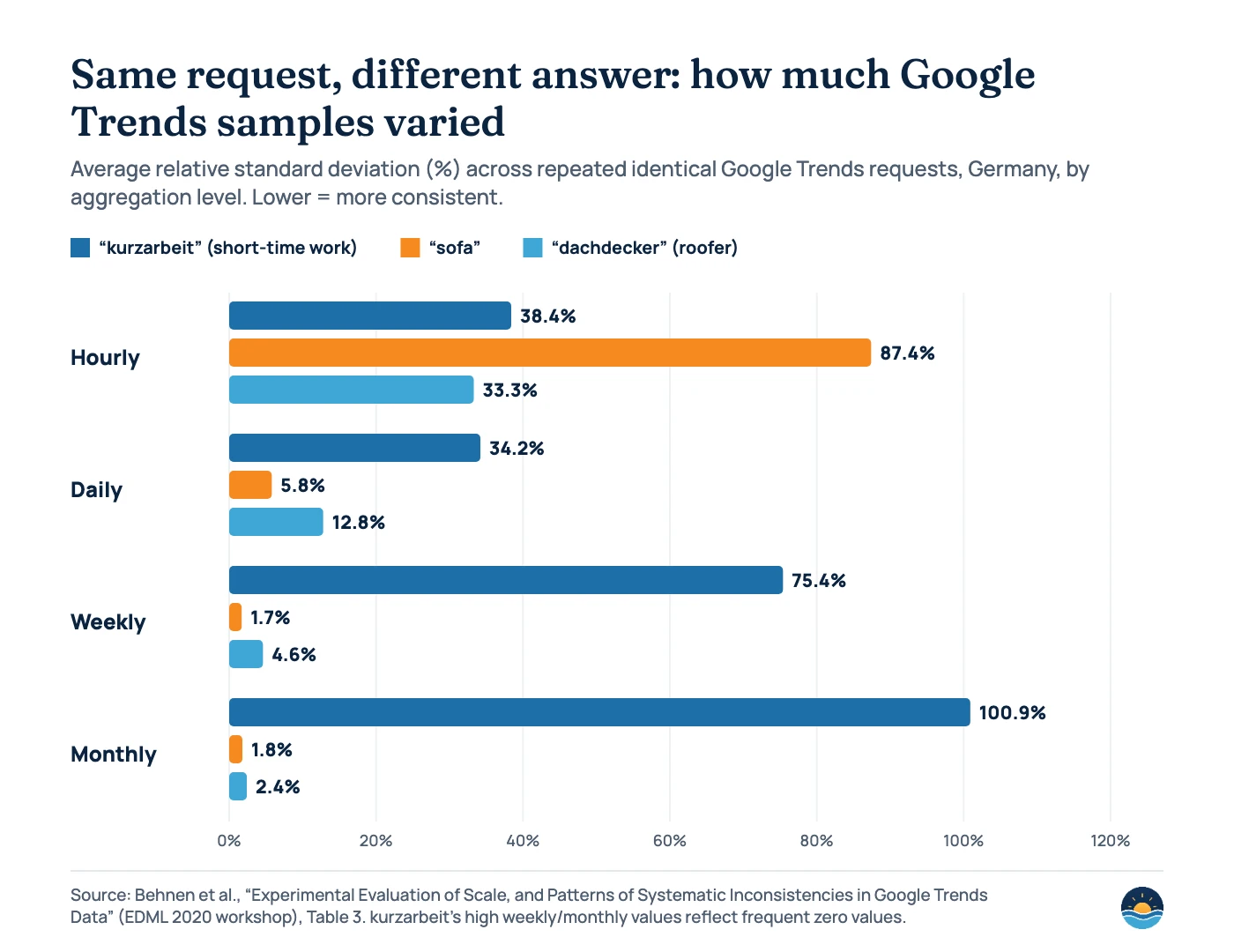
Because Trends is a sample, the same request can return slightly different numbers on different days. Behnen and colleagues tested this in a 2020 workshop paper by repeating identical requests for German keywords over several weeks. They found that “requests for the same term and period at different times can return very different results”, that the inconsistencies were systematic and particularly large for timespans of about eight months or less, and that depending on timespan and keyword, “up to 35 % of the compared sample pairs” failed their consistency test.
Economists have reached similar conclusions. Eichenauer and colleagues, writing in Economic Inquiry (2022), found raw Trends data “frequency‐inconsistent” — daily data fail to capture long-run trends — and that “sampling noise can be substantial.” That has not stopped Trends being useful: Google’s Hyunyoung Choi and chief economist Hal Varian showed in 2009 that it can help “improve forecasts of the current level of activity” for things like car and home sales.
For SEO planning, the practical lessons are simple. Prefer longer time ranges and weekly or monthly views, compare terms in the same request rather than across separate downloads, treat small differences as noise, and be cautious with low-volume terms. If a decision matters, pull the same view twice on different days and see whether the conclusion holds.
What about the Google Trends API?
In July 2025 Google announced a Google Trends API in alpha. It offers “consistently scaled search interest data, going back 1800 days (5 years)”, with daily, weekly, monthly and yearly aggregation, region and sub-region filters, and data up to “just 2 days ago.” Unlike the website, which rescales every chart to 0–100, API results can be compared across requests. Google said it would be available “only to a very limited number of testers”, and as of November 2026 its developer page still says Google is accepting applications for alpha testers. For most teams, the website remains the tool to use.
A seven-step Google Trends routine for content planning
- List your core topics. Start with the services or products you want to be found for, and look each one up as a topic where Trends offers one.
- Set the lens. Choose your country or region, the past 5 years, a category if the word is ambiguous, and the right search type.
- Mark the peaks. Note the months when interest rises and falls, and check this year against the last with Quick comparisons.
- Work backwards. Schedule new pages several weeks before each rise, and refreshes of existing pages before that.
- Mine Related queries. Export Top and Rising lists and turn relevant ones into sections, FAQs or new briefs.
- Size the opportunity elsewhere. Check volumes in Keyword Planner and existing impressions in Search Console, keeping the sources separate in reports.
- Review quarterly. Re-run the same views, compare with the previous pull, and adjust the calendar if patterns change.
Frequently asked questions
Does Google Trends show search volume?
No. It shows relative interest on a 0–100 scale, where each point is divided by total searches for that place and time. For absolute estimates, use Google Ads Keyword Planner, and use Search Console for your own clicks and impressions.
Why does a term show 0 in Google Trends?
Google shows very low-volume searches as 0. It also removes repeated searches by the same person over a short period and excludes some queries with special characters, so niche terms often look flat even when people do search for them.
What does “Breakout” mean in Google Trends?
Breakout appears in the Rising view of related queries and topics. It means the search grew by more than 5,000% over the period selected, compared with the period before.
How far ahead should I publish seasonal content?
Google recommends having content live “a little before people are searching for it.” Use a 5-year view to see when the rise usually starts, and plan to publish several weeks before that so the page has time to be crawled and indexed.
Sources
- FAQ about Google Trends data — Google Trends Help, no date shown — sampling, 0–100 scaling, filtering, statistical noise, “not a scientific poll”
- Get started with Google Trends — Google Search Central, updated Dec 10, 2025 — seasonality (Brie example), Rising terms, publishing ahead of demand
- Compare search terms and topics — Google Trends Help — terms vs topics, search types
- Compare Trends search terms — Google Trends Help — comparison limits, what terms exclude
- Find related searches — Google Trends Help — Top, Rising and Breakout (over 5,000%)
- Troubleshooting Google Trends — Google Trends Help — Top and Rising only for dates at least a week old
- Compare search interest over time with quick comparisons — Google Trends Help — comparison chips
- Trending now — Google Trends Help — 10-minute refresh, exact-match vs broad-match charts
- 3 Trending Now updates in Google Trends — Google, Aug 14, 2024 — relaunch, 10 times as many trends, 125 countries
- Introducing the Google Trends API (alpha) — Google Search Central Blog, Jul 24, 2025 — 1,800 days, aggregations, limited testers
- Cite, export and embed Trends data — Google Trends Help — citation format; do not cite with Google Ads data
- About Keyword Planner forecasts — Google Ads Help — averaged monthly searches, rounding
- Performance report (Search results) — Search Console Help — clicks, impressions, CTR, position
- Advanced Google Trends — Google News Initiative — time ranges back to 2004, search types
- Experimental Evaluation of Scale, and Patterns of Systematic Inconsistencies in Google Trends Data — Behnen et al., EDML 2020 workshop — repeated-request consistency, Table 3
- Obtaining consistent time series from Google Trends — Eichenauer et al., Economic Inquiry 60(2), 2022 — frequency inconsistency, sampling noise
- Predicting the Present with Google Trends — Google Research, Apr 2, 2009 (Choi & Varian) — forecasting current activity
Cite this article: Bright Harbour Media. “How to Use Google Trends for SEO and Content Planning.” Bright Harbour Media Insights, November 2026. https://brightharbourmedia.com/google-trends-seo/
You are welcome to reference the charts and frameworks in this article with a link back to this page.
Want a content calendar built around when your customers actually search? Our content strategy service combines Trends, Search Console and keyword data into a publishing plan you can follow. Get in touch to talk it through.