
Google Discover is the part of Google Search that shows people content related to their interests, based on their Web and App Activity, without them typing a query. There is no special markup to “get into” Discover: any indexed page that meets Discover’s content policies is eligible, and Google rewards clear headlines, large high-quality images and timely, original content.
Key takeaways
- No special tags needed: Google says content is automatically eligible once it is indexed and meets Discover’s content policies (Get on Discover, last updated Mar 9, 2026).
- Large images matter: Google recommends images at least 1,200 px wide, more than 300,000 pixels, 16:9, enabled with
max-image-preview:large. Only 5.0% of desktop and 2.8% of mobile pages use that directive (Web Almanac 2025). - February 2026 Discover core update: launched Feb 5, 2026 for English-language users in the US and took 21 days, 17 hours to roll out; it favours local relevance, less clickbait and topic-by-topic expertise.
- People can follow you: since Sep 17, 2025, users can follow publishers and creators in Discover, which also shows posts from X, Instagram and YouTube Shorts.
- Plan for volatility: Google calls Discover traffic “less predictable or dependable” than search traffic and advises treating it as supplemental.
For publishers and content-led businesses, Discover can send large bursts of visits to a single article. It can also go quiet overnight. This guide sets out what Google actually documents about Discover, what changed in 2025 and 2026, and a content process that improves your odds without chasing clicks.
What is Google Discover and how does content get in?
Google’s “Get on Discover” documentation (last updated Mar 9, 2026) describes Discover as part of Google Search. Unlike classic search results, people do not type a query; Google shows content it expects them to find interesting, based on their activity. Three points from that page shape any Discover strategy:
- Eligibility is automatic. “No special tags or structured data are required.” A page needs to be indexed and to follow Discover’s content policies.
- Eligibility is not a guarantee. Google says being eligible “is not a guarantee of appearing,” and older content can appear if it is helpful and relevant to someone’s interests.
- It uses Search’s quality systems. Discover “makes use of many of the same signals and systems used by Search” to judge helpful, people-first content.
That last point is why Discover work overlaps so much with content quality work. Clear authorship and expertise signals, covered in our guide to E-E-A-T and author pages, help with both.
What changed in Discover in 2025 and 2026?
Two announcements changed how Discover works for publishers, and Google’s documentation was revised in March 2026. The timeline below lists what we verified on Google’s own pages.
| Date | Change | What it means for content teams |
|---|---|---|
| Sep 17, 2025 | Users can follow publishers and creators in Discover; more posts from X, Instagram and YouTube Shorts, with “more platforms to come” | Your social posts and videos can sit alongside your articles; followers may see more of your content |
| Feb 5, 2026 | February 2026 Discover core update released for English-language users in the US; Google said it would expand to all countries and languages “in the months ahead” | More locally relevant content, less sensationalism and clickbait, more in-depth and original content from sites with topic expertise |
| From Feb 5, 2026 | Rollout recorded on Google’s Search Status Dashboard: 21 days, 17 hours | Compare Discover data from before Feb 5 with data after the rollout ended, not during it |
| Mar 9, 2026 | “Get on Discover” documentation last updated | The current source for image specifications, clickbait guidance and why traffic changes |
The core update is worth reading closely. Google said its systems now identify expertise “on a topic-by-topic basis”, giving the example of a local news site with a dedicated gardening section that could have established gardening expertise, while a movie review site that wrote a single gardening article “would likely not.” For a business blog, the lesson is to build depth in the topics you serve rather than publishing one-off articles on whatever is trending.
How should you set up images for Discover?
Images are the most concrete part of Google’s Discover guidance, and the easiest to get wrong. Google recommends “compelling, high-quality images,” especially large images, “that are more likely to generate visits from Discover.”
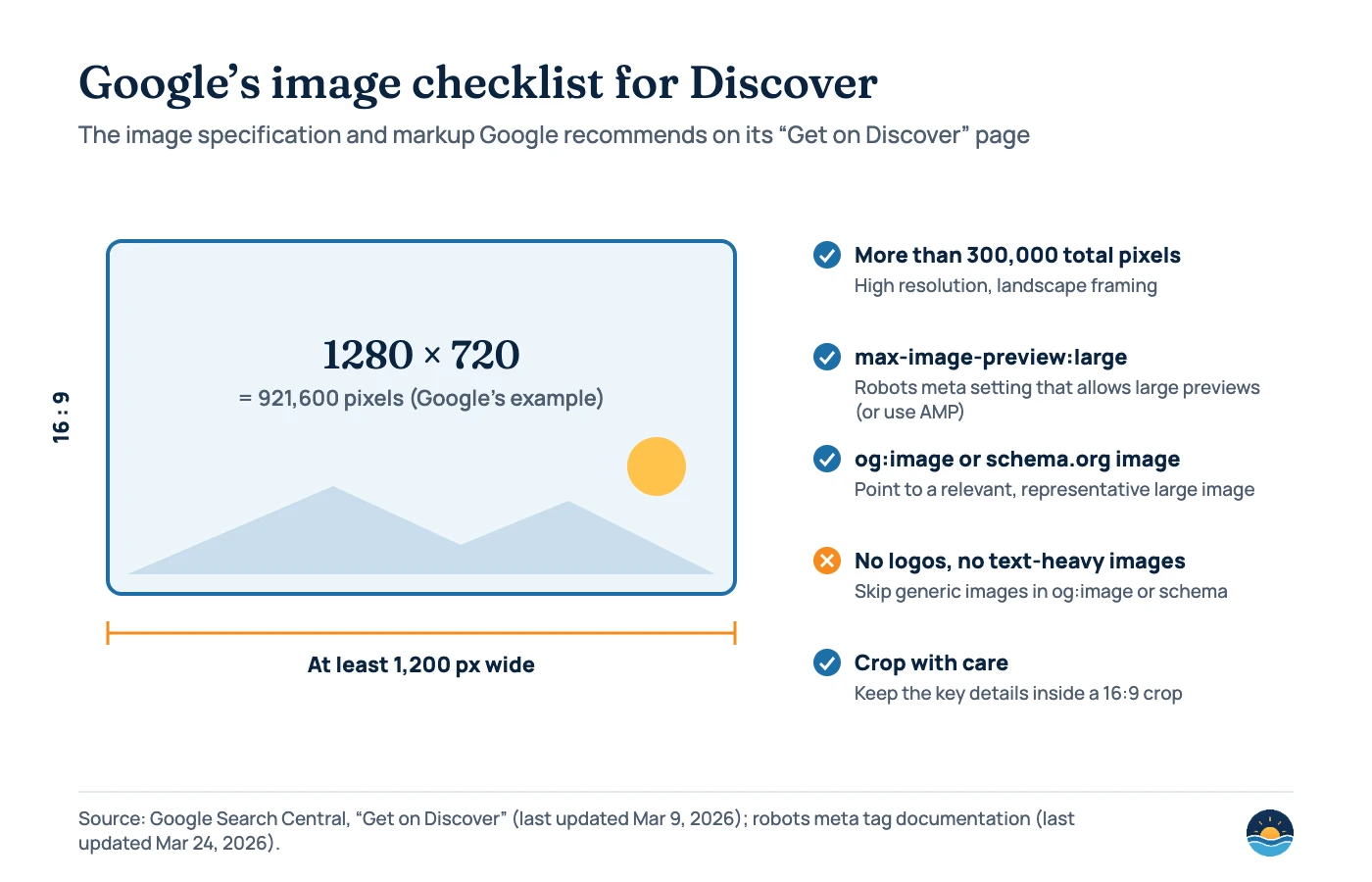
The step most sites miss is the preview setting. Google’s robots meta tag documentation (updated Mar 24, 2026) explains that max-image-preview:large allows “a larger image preview, up to the width of the viewport” and applies to all forms of search results, including Discover. If no value is set, Google “may show an image preview of the default size.” The tag looks like this: <meta name="robots" content="max-image-preview:large">.
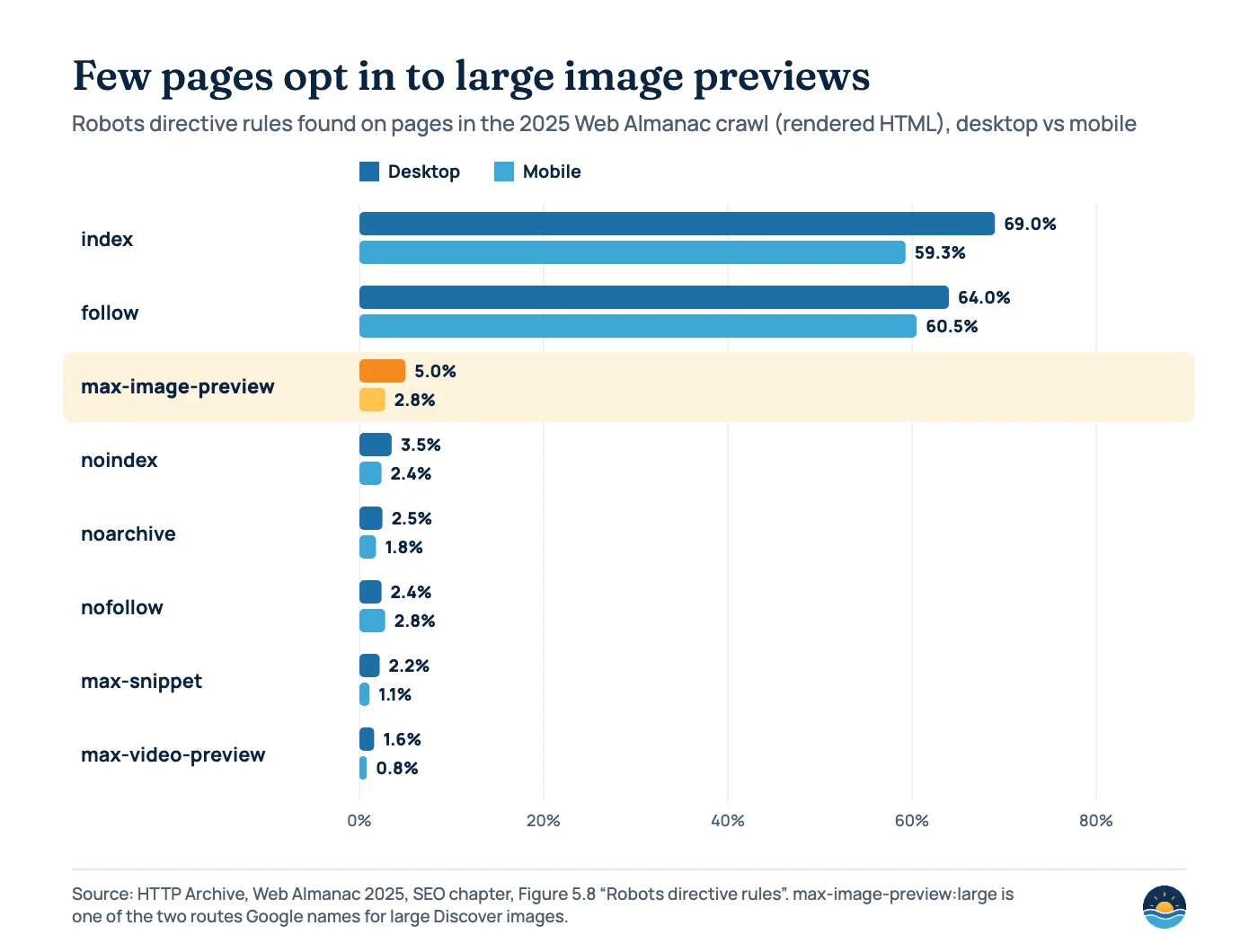
The HTTP Archive’s Web Almanac 2025 shows how rarely this is set. The directive appeared on 5.0% of desktop and 2.8% of mobile pages in its crawl, against 69.0% and 59.3% for the redundant index rule. It is worth checking your own page source rather than assuming it is set. Our image SEO guide covers file formats, alt text and how Google picks a preferred image.
Which content does Discover reward, and what does it filter out?
Google’s guidance pairs a short list of things to do with a firm line on clickbait. It asks for page titles and headlines “that capture the essence of the content,” and warns against misleading or exaggerated preview content and against withholding “crucial information required to understand what the content is about.”
What Google recommends
- Titles and headlines that capture the essence of the page
- Timely content, strong storytelling or unique insights
- Large, relevant, high-quality images
- A good overall page experience
- People-first content, as judged by Search’s systems
What Google warns against
- Clickbait: misleading or exaggerated titles, snippets or images
- Withholding key information to force a click
- Sensationalism that plays on morbid curiosity, titillation or outrage
- Generic images such as your logo in og:image
- Content unsuited to a feed, such as forms or petitions
Discover also has its own content policies on top of Google Search’s overall and spam policies. The feature-specific ones are summarised below.
| Discover policy | What Google says | Practical check |
|---|---|---|
| Ads and sponsored content | Ads and paid material “should not exceed your content”; sponsorship should be clearly disclosed | Label sponsored posts and keep ad density low on articles you want in Discover |
| Misleading content | No preview content that promises details “which aren’t reflected in the underlying content” | Make sure the headline and image match what the article delivers |
| Transparency | Clear dates and bylines; information about authors, publication and publisher; contact information | Add bylines, author pages, an About page and contact details |
| Search features policies | Dangerous, deceptive, harassing, hateful, manipulated media, medical, sexually explicit, violent and vulgar content rules apply | Review sensitive topics before publishing |
| Enforcement | Content may be removed; repeated or egregious violations can make a site ineligible; manual actions show in Search Console | Check Security & Manual actions after any sudden drop |
Headline writing deserves particular care. The same habits that help title links in Search, such as being specific and accurate, apply here; see our guide to title tags and meta descriptions.
How do you measure Discover traffic?
Search Console has a dedicated Performance report for Discover. It only appears once a property reaches a minimum number of Discover impressions, and it covers the last 16 months. A few details from Google’s help page change how you read it:
- Impressions count when an item is scrolled into view, once per result per session.
- Clicks count only when someone clicks the item, not when they share it.
- Data is assigned to the canonical URL, so duplicate URLs show zero.
- Rows under the impression threshold are hidden from the table but still included in totals.
- You can group by page, country, appearance type and day; the default range is the last three months.
Because Discover traffic is “less predictable,” judge it over weeks, not days, and compare like with like. If Discover clicks fall sharply, check the timing against Google’s Search Status Dashboard before changing anything. Our Google traffic drop guide sets out a triage process that applies here too.
A 7-step Discover content plan
- Confirm the basics. Make sure key articles are indexed and that no Discover manual action appears in Search Console.
- Turn on large previews. Check that
max-image-preview:largeis present in the page source of your articles. - Fix your images. Use a relevant 16:9 image at least 1,200 px wide (more than 300,000 pixels) and point og:image or schema.org image markup to it, not your logo.
- Choose topics where you have depth. Google now identifies expertise topic by topic, so build clusters around the subjects you serve.
- Write honest, specific headlines. Capture the essence of the article; drop teaser phrasing and exaggeration.
- Show who is behind the content. Dates, bylines, author pages, publisher information and contact details, as Discover’s transparency policy asks.
- Measure monthly and treat Discover as a bonus. Track the Discover report by page, and plan your core traffic around search queries you can rank for.
Frequently asked questions
Do I need structured data to appear in Google Discover?
No. Google says content is automatically eligible if it is indexed and meets Discover’s content policies, and “no special tags or structured data are required.” Image markup (og:image or schema.org) still helps Google choose a good thumbnail.
What image size does Google Discover need?
Google recommends images at least 1,200 px wide, with more than 300,000 total pixels and a 16:9 aspect ratio, enabled by the max-image-preview:large setting or by using AMP. Its own example is 1280 × 720, which is 921,600 pixels.
Why did my Discover traffic drop?
Google lists changing user interests, changes in the types of content Discover shows, and Search updates such as the February 2026 Discover core update. It also notes traffic can change for reasons unrelated to content quality, so check the timing and your Search Console reports before rewriting anything.
Can small business websites get Discover traffic?
Yes, if they publish timely, original content with strong images in topics where they show real expertise. Google’s February 2026 update aims to show more locally relevant content and to judge expertise topic by topic, which can favour focused specialist sites.
Sources
- Get on Discover — Google Search Central, last updated Mar 9, 2026 — eligibility, image specifications, clickbait guidance, why traffic changes
- Google’s February 2026 Discover core update — Google Search Central Blog, Feb 5, 2026 — goals, topic-by-topic expertise, US English launch
- History for Ranking — Google Search Status Dashboard — Google — February 2026 Discover update, 21 days, 17 hours
- Updates to Discover in Search: More content from creators and publishers — Google Keyword blog, Sep 17, 2025 — follow feature and social posts
- Discover content policies — Google Search Help — feature-specific policies and enforcement
- Robots meta tag specifications — Google Search Central, last updated Mar 24, 2026 — max-image-preview values
- Performance report (Discover) — Search Console Help — metrics, thresholds and canonical attribution
- Web Almanac 2025: SEO chapter — HTTP Archive, 2025 — robots directive rules (Figure 5.8)
Cite this article: Bright Harbour Media. “Google Discover SEO: How to Earn a Place in the Feed.” Bright Harbour Media Insights, October 2026. https://brightharbourmedia.com/google-discover-seo/
You are welcome to reference the charts and frameworks in this article with a link back to this page.
Want content that earns visibility in Search and Discover? Our content strategy and SEO content service plans topic depth, headlines and imagery around what Google documents. Get in touch to plan your next quarter of content.