

Image SEO is the work of making your images easy for Google to find, understand and load quickly, so they can appear in Google Images and other search features without slowing the page down. In practice it comes down to four things: using real <img> elements, choosing an efficient supported format, writing useful alt text and filenames, and loading images in a way that protects Core Web Vitals.
Key takeaways
- Google finds images in the
srcattribute of<img>elements (including inside<picture>). It does not index CSS background images. - Google Images supports seven formats: BMP, GIF, JPEG, PNG, WebP, SVG and AVIF. On mobile, the median WebP used 1.3 bits per pixel versus 2.0 for JPEG (Web Almanac 2024).
- Google calls alt text “the most important” image metadata attribute. Yet on the median page only 60% of images have an
altattribute (Web Almanac 2025). - An image was responsible for Largest Contentful Paint on 68% of mobile pages, and 9.5% of those LCP images were lazy-loaded, which slows them down (Web Almanac 2024).
- An image sitemap can list up to 1,000 images per page URL. The caption, title, geo_location and license tags are deprecated.
What is image SEO, and why does it matter?
Images do three jobs in search. They can rank in their own right in Google Images. They give Google a preferred image to show next to your page in results. And because they are usually the heaviest files on a page, they decide how fast the page feels. Google’s own guide puts it plainly: images are often the largest contributor to page size, so optimising them is part of the job, not a nice extra.
The scale is large. The HTTP Archive Web Almanac 2025 found the median home page carries 20 images on desktop and 19 on mobile, rising to 85 and 80 at the 90th percentile. Every one of those images is either helping or hurting discovery, accessibility and speed. If you have not looked at speed yet, our Core Web Vitals guide explains the thresholds images most often break.
How does Google find and index images?
Google’s image SEO best practices (last updated 2 March 2026) are specific about markup. Google parses the src attribute of <img> elements, including those inside a <picture> element. A hero image set as a CSS background-image on a div is listed as the bad example, because Google does not index CSS images.
Responsive images are fine, but always keep a fallback src, because some browsers and crawlers do not understand srcset or <picture>. Inline data URIs are allowed too, though Google warns they can cut requests while substantially increasing page size.
| Situation | Do this | Avoid this |
|---|---|---|
| Content images | <img src="…" alt="…"> in the HTML | Important images set as CSS background-image (not indexed) |
| Responsive images | srcset/sizes or <picture> with a fallback src | Markup with no plain src fallback |
| Formats | BMP, GIF, JPEG, PNG, WebP, SVG or AVIF, with matching file extensions | Extensions that don’t match the real file type |
| Images on a CDN | List them in an image sitemap and verify the CDN domain in Search Console | Leaving CDN crawl errors invisible |
| Reused images | Reference the same image URL on every page | Copies of one image at many URLs (wastes cache and crawl budget) |
| Inline data URIs | Use sparingly for tiny images | Large Base64 images that bloat the HTML |
Which image format should you use?
Any of Google’s seven supported formats can be indexed, so format is mainly a speed decision. The Web Almanac 2024 Media chapter measured how much data each format spends per pixel. On mobile, the median WebP used 1.3 bits per pixel and the median AVIF 1.4, against 2.0 for JPEG, 3.8 for PNG and 6.7 for GIF. Lower is better: fewer bits for the same pixels means a smaller file.
Adoption is moving slowly. JPEG fell from 40% of images in 2022 to 32.4% in 2024, while WebP reached 12% and AVIF about 1%. AVIF usage was almost four times higher than two years earlier, from a small base.
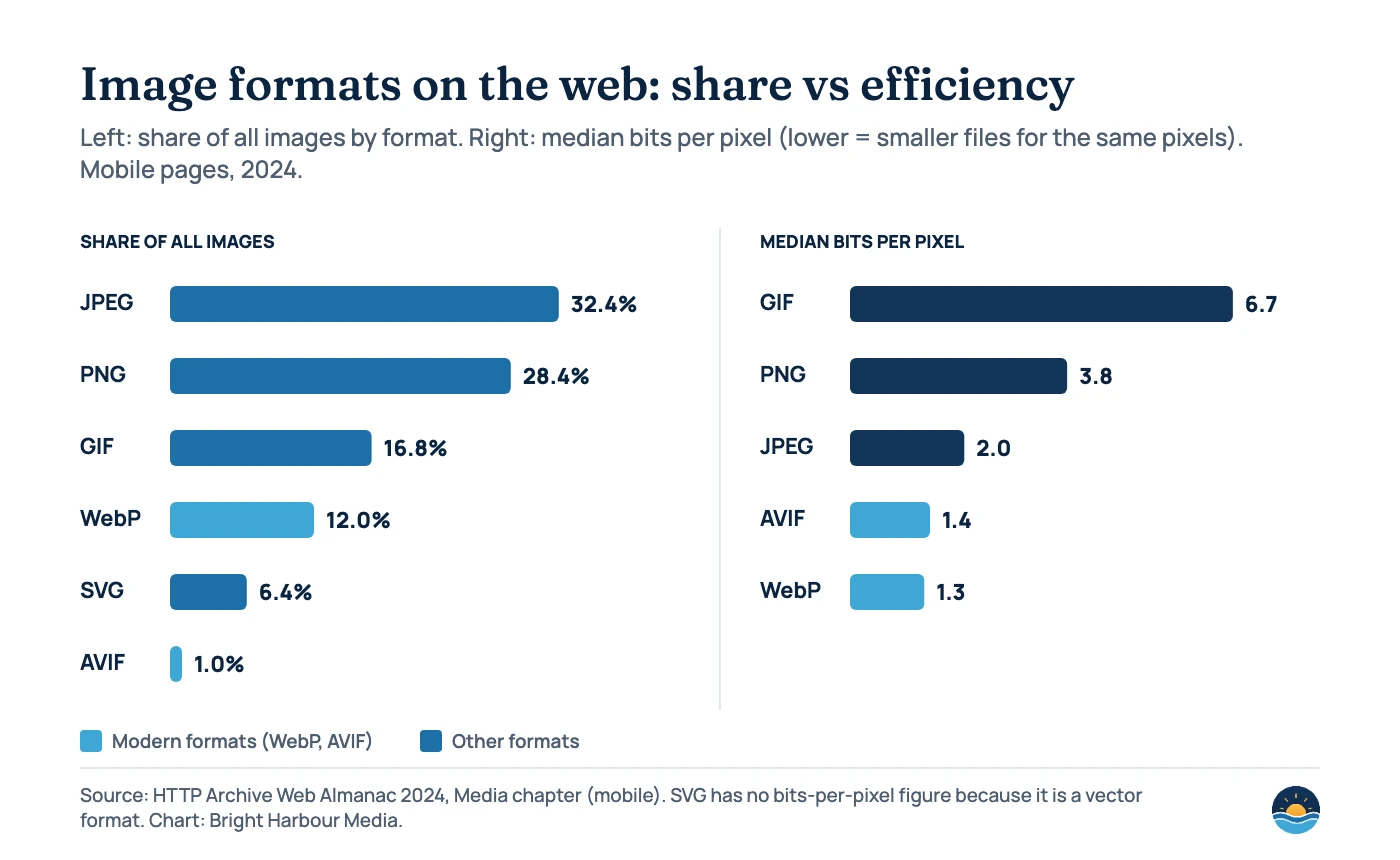
| Format | Share of web images (mobile, 2024) | Median bits per pixel | Typical use |
|---|---|---|---|
| JPEG | 32.4% | 2.0 | Photos where a modern format isn’t available |
| PNG | 28.4% | 3.8 | Graphics that need lossless quality or transparency |
| GIF | 16.8% | 6.7 | Rarely the best choice; use video for animation |
| WebP | 12% | 1.3 | Default for photos and graphics on most sites |
| SVG | 6.4% | n/a (vector) | Logos, icons and simple illustrations |
| AVIF | 1.0% | 1.4 | Photos where you want the smallest files |
How should you write alt text and filenames?
Google calls alt text “the most important” metadata attribute for images. It helps Google understand the image, it is read aloud by screen readers, and it acts as anchor text when the image is a link. Google’s example moves from no alt text and a keyword-stuffed list (both bad) to “puppy” (better) to “Dalmatian puppy playing fetch” (best). Stuffing alt attributes with keywords can be treated as spam.
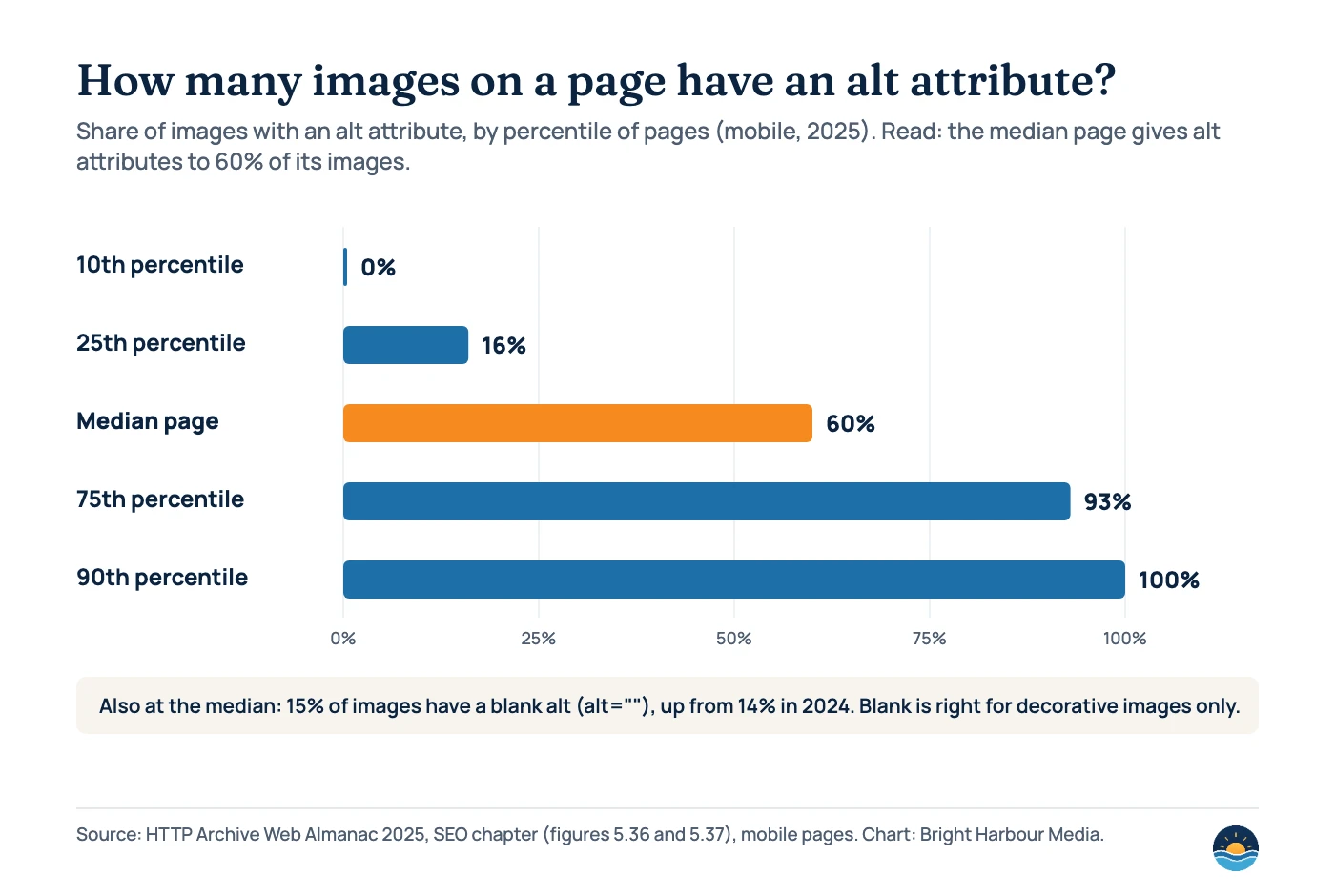
The web is improving but uneven. In the Web Almanac 2025, the median mobile page had an alt attribute on 60% of its images, up from 58% in 2024. But the median page also had 15% of images with a blank alt, and the authors note a shift from “missing” to “blank”. A blank alt is correct for purely decorative images; it is a missed opportunity on product photos, charts and diagrams.
Good alt text and filenames
- Describes what the image shows in context: “Dalmatian puppy playing fetch”
- Explains the point of a chart, including its key numbers
- Short, descriptive filenames such as
my-new-black-kitten.jpg - Translated filenames for localised images (URL-encode special characters)
- Images placed near the text they illustrate
Avoid
- Missing alt on meaningful images
- Lists of keywords in alt attributes
- Camera filenames such as
IMG00023.JPGor genericimage1.jpg - Important text that only exists inside an image
- Alt text written for decorative spacers and borders (leave those blank)
For inline SVG, Google recommends a <title> element to give the graphic an accessible name.
How do images affect page speed and Core Web Vitals?
Images are usually what users wait for. The Web Almanac 2024 found that the element responsible for Largest Contentful Paint contained an image on 68% of mobile pages. So the way images load directly shapes your LCP score.
Native lazy loading (loading="lazy") delays off-screen images until the user scrolls near them. It saves a lot of data, but it hurts when applied to the main above-the-fold image. In the Web Almanac 2024, 9.5% of LCP images on mobile were lazy-loaded, which the authors call an anti-pattern. The 2025 edition found that around 68% of images have no loading attribute at all, about 26% are lazy-loaded and only 4–5% are explicitly set to eager.
Google’s web.dev team tested this on WordPress in 2022. On archive pages, switching lazy loading off made LCP 13% faster on desktop and 15% faster on mobile, because the first images were no longer delayed. But lazy loading also roughly halved image bytes. Their recommended fix keeps both benefits: load images above the fold eagerly and lazy-load the rest.
| Image position | Recommended loading | Why |
|---|---|---|
| Hero or main image (likely LCP) | No loading="lazy"; consider fetchpriority="high" | Lazy loading the LCP image delays the most important paint |
| Other images in the first screen | Load eagerly (default) | They are visible immediately |
| Images further down the page | loading="lazy" | Saves bytes for users who never scroll that far |
| Iframes (maps, videos) below the fold | loading="lazy" | Third-party embeds are heavy; the 2025 Almanac found explicit iframe lazy loading on only about 13% of pages |
How do you control which image Google shows for a page?
Google lets you state a preferred image for a page in three ways: schema.org primaryImageOfPage, an image property on the page’s main entity, or the og:image meta tag. Google’s advice is to pick an image that is relevant and representative, and to avoid generic images such as your logo, images containing text, and extreme aspect ratios. High resolution helps.
Structured data also matters for rich results. Google notes that the image property is required for an image to be eligible for badges and rich results in Google Images. Our guide to structured data for service businesses covers which types are worth adding first.
If you license photos, you can make them eligible for the Licensable badge in Google Images. Google’s image metadata documentation (updated 10 December 2025) accepts either structured data or IPTC metadata embedded in the file. If the two conflict, Google uses the structured data.
| Method | What you add | Required for the Licensable badge | Where it lives |
|---|---|---|---|
| Structured data (ImageObject) | contentUrl plus license; recommended acquireLicensePage, creator, creditText, copyrightNotice | license | On every page where the image appears |
| IPTC photo metadata | Web Statement of Rights; recommended Licensor URL, Copyright Notice, Creator, Credit Line, Digital Source Type | Web Statement of Rights | Embedded once in the image file |
Do you need an image sitemap?
An image sitemap helps Google find images it might not discover otherwise, such as images loaded by JavaScript or hosted on a CDN. Unlike regular sitemap URLs, <image:loc> can point to another domain. Google’s documentation (updated 10 December 2025) lists only two tags: <image:image> and <image:loc>. Each page URL can list up to 1,000 images. The older caption, title, geo_location and license tags have been deprecated.
<url>
  <loc>https://example.com/services/</loc>
  <image:image>
    <image:loc>https://cdn.example.com/team-at-work.webp</image:loc>
  </image:image>
</url>
Most sites with standard <img> markup do not need a separate image sitemap; Google finds those images when it crawls the page. For how sitemaps fit with crawling in general, see our guide to XML sitemaps and crawl budget.
A 7-step image SEO audit
- Inventory your images. Crawl the site and export every image URL with its page, file size, format, dimensions, alt text and loading attribute.
- Find invisible images. Flag important images delivered as CSS backgrounds or injected without an
<img>element, and move them into HTML. - Fix alt text where it matters. Start with product photos, charts, diagrams and linked images. Leave decorative images with an empty alt.
- Convert and resize. Serve WebP or AVIF where your stack supports it, at the dimensions actually displayed, with
srcsetfor different screens. - Correct loading behaviour. Remove
loading="lazy"from the LCP image on key templates and lazy-load images further down. - Set preferred images and metadata. Check
og:imageand structured data on templates, and add licensing metadata if you license photos. - Measure. Use PageSpeed Insights for LCP, and filter the Search Console Performance report by search type “Image” to track image clicks and impressions.
Frequently asked questions
Does Google index CSS background images?
No. Google’s image SEO guide says it finds images in the src attribute of img elements and does not index CSS images. If an image should appear in Google Images, put it in the HTML with an img element.
Is WebP or AVIF better for SEO?
Both are supported by Google Images, so neither is better for indexing. The benefit is speed: in the Web Almanac 2024 the median WebP used 1.3 bits per pixel and the median AVIF 1.4, against 2.0 for JPEG.
Should I lazy-load every image?
No. Lazy-load images below the fold, but load the main above-the-fold image eagerly. The Web Almanac 2024 found 9.5% of mobile LCP images were lazy-loaded, which delays the most important paint.
Do image filenames still matter?
Yes, a little. Google recommends short, descriptive filenames such as my-new-black-kitten.jpg over names like IMG00023.JPG, but alt text and the surrounding page content carry much more weight.
Sources
- Image SEO best practices — Google Search Central, last updated 2 March 2026. Used for markup, formats, alt text, filenames, preferred images and responsive images.
- Image sitemaps — Google Search Central, last updated 10 December 2025. Used for required tags, the 1,000-image limit and deprecated tags.
- Image metadata in Google Images — Google Search Central, last updated 10 December 2025. Used for Licensable badge requirements.
- Web Almanac 2025: SEO chapter — HTTP Archive, published 15 January 2026, updated 9 June 2026. Used for alt attribute, loading attribute and images-per-page data.
- Web Almanac 2024: Media chapter — HTTP Archive, published 29 December 2024. Used for format share, bits per pixel, LCP images and lazy-loaded LCP images.
- The performance effects of too much lazy loading — web.dev (Felix Arntz and Rick Viscomi), last updated 31 March 2022. Used for the WordPress lazy-loading A/B test.
Cite this article: Bright Harbour Media. “Image SEO: How to Optimise Images for Google Search.” Bright Harbour Media Insights, October 2026. https://brightharbourmedia.com/image-seo/
You are welcome to reference the charts and frameworks in this article with a link back to this page.
Images slowing your pages down or missing from Google Images? Our technical SEO service audits image markup, formats and loading across your templates. Get in touch to talk it through.