
A Google traffic drop is a fall in the clicks your site gets from Google Search. Diagnosing one means working out whether the cause is an algorithm update, a technical or security problem, a spam issue, seasonality or simply a reporting glitch — before changing anything on the site.
Key takeaways
- Google’s own debugging guide (updated December 10, 2025) lists six main causes of traffic drops, plus data anomalies in Search Console reporting.
- Since 2024, Google’s confirmed core updates have taken a median of about 16.75 days to roll out, ranging from just over 6 days to 45 days, according to the Search Status Dashboard.
- Google advises waiting at least a week after an update finishes, then comparing that week with the week before it began.
- Use a 16-month date range in Search Console to see whether the same dip happened last year.
- A site-wide, sharp decline usually points to a site-wide issue; a gradual drop on a group of pages usually points to a page-level one.
Don’t change anything yet
When traffic falls, the instinct is to start rewriting pages. Google’s guide to debugging drops in Google Search traffic takes a calmer line: first find out what kind of drop it is. Some causes need urgent fixes, some need patience, and some aren’t real drops at all.
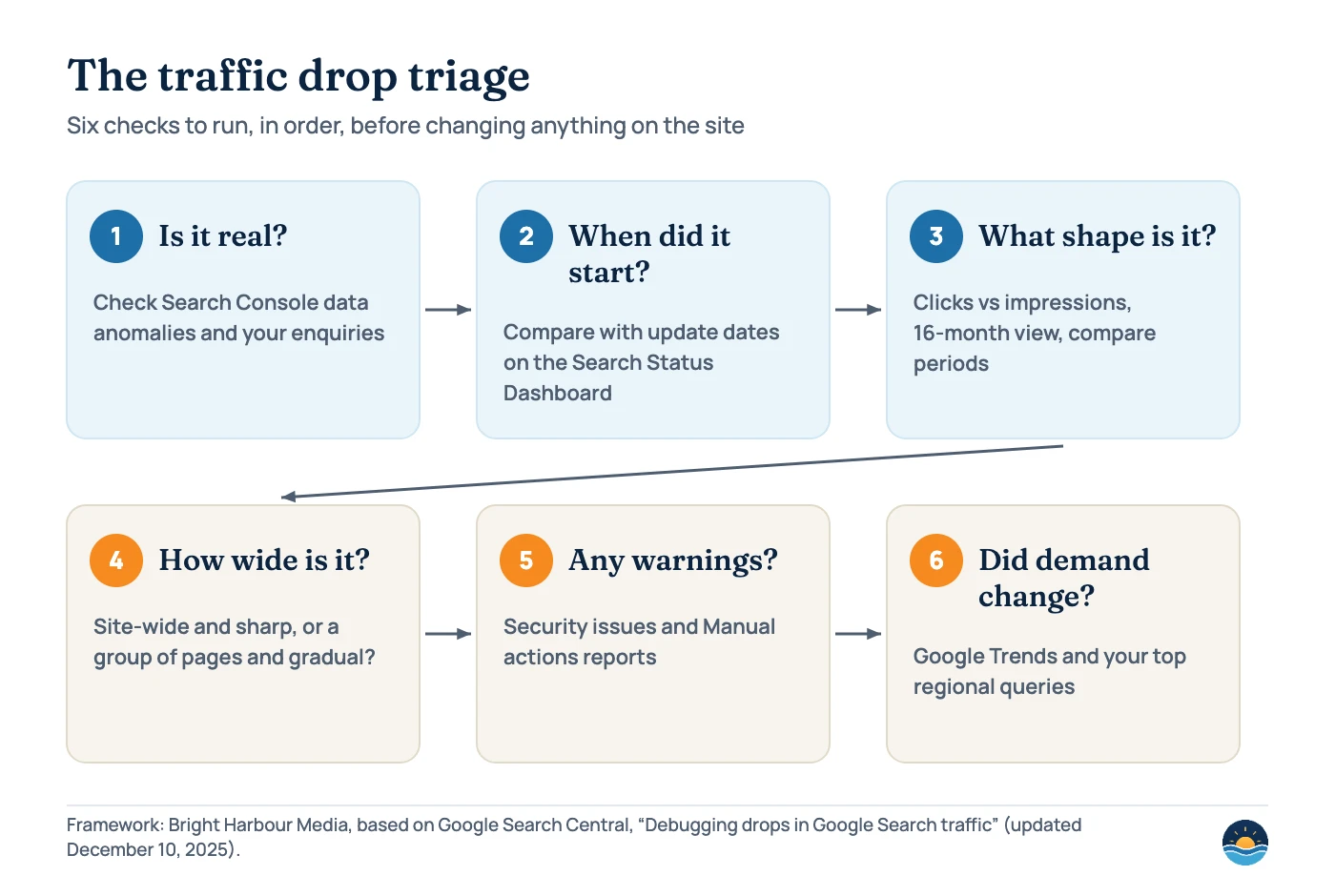
This article turns that guidance into a repeatable audit. It uses the tools every site owner already has — Search Console, the Google Search Status Dashboard and Google Trends — and ends with a triage process you can run in under an hour.
The main causes of a Google traffic drop
Google’s debugging guide names these causes. Each leaves a different fingerprint in your data, which is what makes diagnosis possible.
| Cause | What it usually looks like | Where to check |
|---|---|---|
| Algorithmic update (core or smaller updates) | Position and traffic changes that line up with a confirmed update | Search Status Dashboard; Performance report around the rollout dates |
| Technical issues | Drops tied to server errors, robots.txt fetch problems or “not found” errors | Crawl stats report; Page indexing report; URL Inspection |
| Security issues | Users warned before they reach the site, so clicks fall | Security issues report |
| Spam issues | Pages ranking lower or not appearing at all | Manual actions report; Google’s spam policies |
| Seasonality and changing interests | Demand falls across the topic, not just for your site | Performance report (16 months); Google Trends |
| Site moves and migrations | Fluctuations while Google recrawls changed URLs | Page indexing report; redirects |
| Data anomalies | Sudden dip that doesn’t match real-world enquiries | Search Console’s data anomalies list |
Step 1: Rule out a reporting glitch
Before you investigate the site, check that the drop is real. Search Console publishes a list of data anomalies — logging errors and other changes that cause dips or spikes in its reports without any change in how a site performs. Recent entries include logging errors that reduced Discover clicks and impressions on several dates in 2026, and a note that from May 7, 2026 FAQ rich results stopped appearing in Google Search, so reported FAQ impressions dropped.
Then sense-check against the rest of the business. If phone calls, form fills and sales are steady, a dip in one report may be a measurement issue rather than lost customers. Our guide to SEO reporting and KPIs explains how Search Console and Google Analytics count differently.
Step 2: Check the timing against Google updates
Google announces core updates and spam updates on the Google Search Status Dashboard, with a start date and duration for each rollout. If your drop began during a rollout, an update is a strong suspect — but not proven.
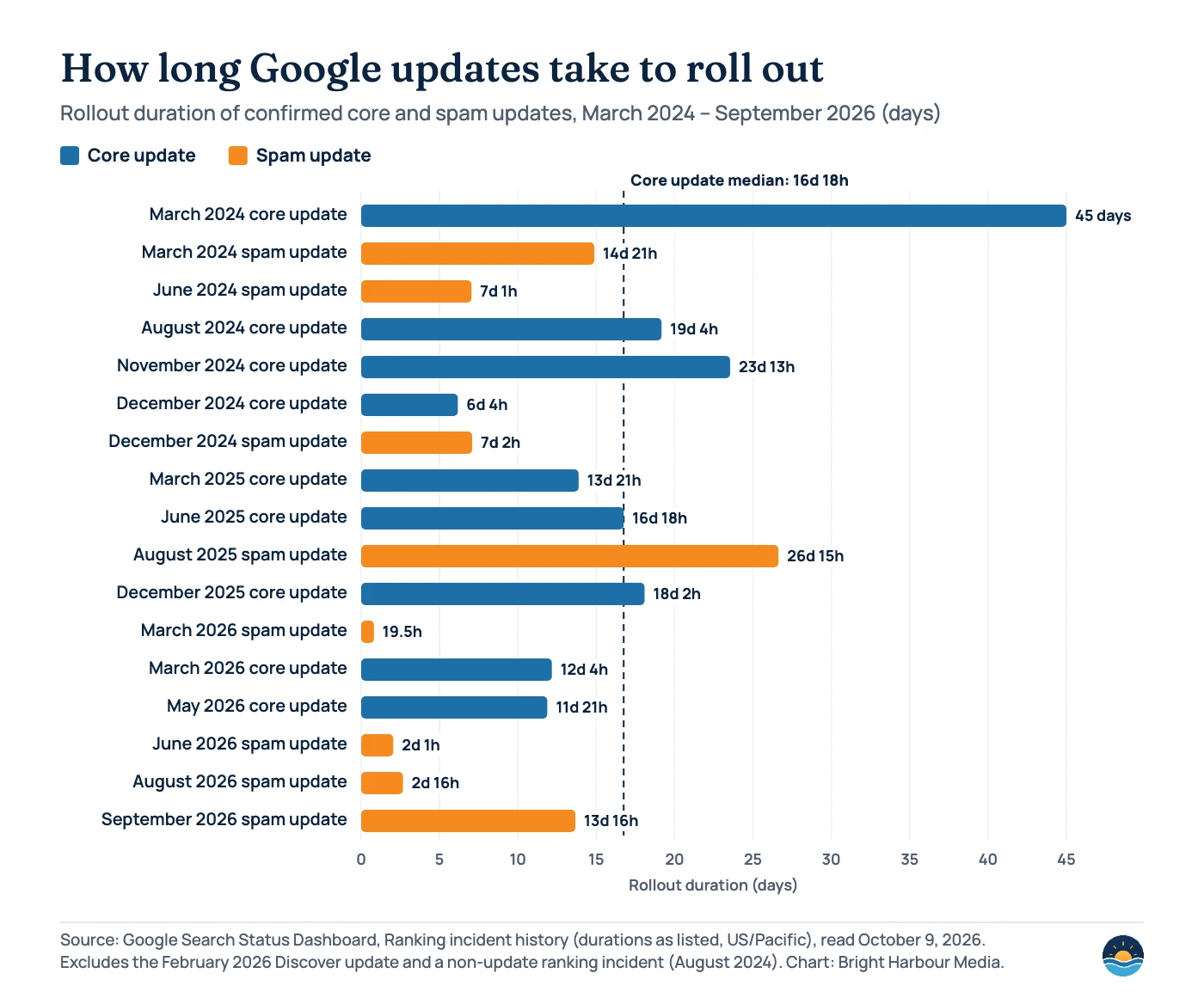
Rollouts are not instant. Across the nine core updates listed since March 2024, rollout times ranged from 6 days 4 hours (December 2024) to 45 days (March 2024), with a median of 16 days 18 hours. Spam updates were often shorter: the eight listed since 2024 ranged from 19.5 hours (March 2026) to 26 days 15 hours (August 2025), with a median of about 7 days.
| Update | Started | Rollout duration |
|---|---|---|
| March 2026 spam update | March 24, 2026 | 19 hours, 30 minutes |
| March 2026 core update | March 27, 2026 | 12 days, 4 hours |
| May 2026 core update | May 21, 2026 | 11 days, 21 hours |
| June 2026 spam update | June 24, 2026 | 2 days, 1 hour |
| August 2026 spam update | August 18, 2026 | 2 days, 16 hours |
| September 2026 spam update | September 24, 2026 | 13 days, 16 hours |
Google’s page on core updates and your website (updated December 10, 2025) gives a specific method: confirm the rollout has finished, wait at least a week after it completes, then compare that week with the week before the update began. Comparing mid-rollout data will mislead you. Google also says core updates “don’t target specific sites or individual web pages”, and the debugging guide adds that after an update “there might not be anything fundamentally wrong with your content.”
Step 3: Read the Performance report the way Google suggests
The debugging guide recommends starting with the shape of the drop in Search Console’s Performance report, which shows clicks, impressions, click-through rate and average position.
| Pattern | What it suggests | Next check |
|---|---|---|
| Clicks and impressions both down | The site is being shown less — one of the main causes is likely | Work through steps 4–6 |
| Impressions steady, clicks down | Your title or snippet may be less appealing, or competitors may have stronger rich results | Compare titles and the search results page for affected queries |
| Same dip at the same time last year | Seasonality | 16-month view; Google Trends |
| Drop limited to one search type | The change affects Images, Video or News rather than web results | Filter by search type |
| Small position change only | Normal fluctuation; Google advises against radical changes | Monitor; don’t rewrite pages that still perform |
Three settings do most of the work:
- Date range of 16 months. Google’s guide uses this to show a drop that “happened exactly as it did the previous year”.
- Compare mode. Compare the last three months with the previous period, or year over year, and check every tab — queries, pages, countries, devices and search appearance — because a drop is often concentrated in one of them.
- Sort pages by “Clicks Difference”. This shows which URLs lost the most traffic, which tells you whether the problem is site-wide or limited to a group of pages.
Don’t over-read average position. Google says you “shouldn’t focus too much on your absolute position”; clicks and impressions are the measures that matter. A large, persistent position drop is still a signal to review the affected content honestly.
Step 4: Separate site-wide from page-level problems
Google’s guide draws a useful line. Site-wide issues — downtime, a site-wide security problem or a site-wide manual action — usually show as a broad, sharp decline across most pages. Page-level issues, such as a misplaced noindex tag on a template, usually affect a group of pages or one important page, and the decline can be gradual because Google has to recrawl each page before it notices.
For a site-wide drop, go to the Page indexing report and Crawl stats report and look for a spike in errors that lines up with the date. For a group of pages, use URL Inspection on a few affected URLs. Our walkthrough of the Page indexing report explains each status and what to do about it.
Step 5: Check security and spam reports
These checks take two minutes and rule out the most serious causes. Open the Security issues report: if Google has detected malware or phishing it may warn users before they reach your site, which cuts clicks sharply. Then open the Manual actions report. Google’s spam policies (last updated August 28, 2026) say violations are found through “automated systems and, as needed, human review”, and that sites that violate the policies “may rank lower in results or not appear in results at all.” Manual actions are reported in the Manual actions report, but the spam policies don’t describe any notice for problems caught by automated systems — so an empty report doesn’t rule out every spam-related cause.
Step 6: Check demand and the wider market
Sometimes nothing is wrong with the site — people are simply searching less. Filter the Performance report to your biggest losing queries one at a time and look them up in Google Trends. If interest in the topic fell by a similar amount, the drop is about demand, not rankings. Google’s guide also suggests checking that queries important to your region still appear in your data; if they’re missing, confirm the related pages are crawled and indexed.
Changes to the results page itself can matter too. If impressions held but clicks fell, look at what now appears above your listing for those queries. Our article on AI Overviews and SEO covers one of the bigger recent changes.
Act quickly when you find
- Server errors or robots.txt fetch failures
- A noindex tag or redirect added by mistake
- A security issue in Search Console
- A manual action notice
- Broken redirects after a migration
Be patient when you find
- An update that is still rolling out
- A small drop in average position
- The same dip at this time last year
- Falling interest across the whole topic
- A known Search Console data anomaly
Step 7: Recover deliberately
If the evidence points to a core update and a large, lasting drop, Google’s advice is to self-assess the site as a whole — is it helpful, reliable and written for people first? — and look closely at the pages that lost most. It advises against quick fixes based on rumours, and treats deleting content as a last resort. Our guide to content refresh and pruning gives a decision path for each page.
Set expectations with the timeline. Google says some changes can take effect within days, but confirming a site-wide improvement can take several months, and in some cases the next core update is when gains show. There’s no guarantee that changes will produce a recovery, and Google notes that results are dynamic, so rankings can move with no change on your side.
Frequently asked questions
How long should I wait before reacting to a core update?
Google’s advice is to wait until the rollout has finished, then wait at least another week before comparing performance with the week before the update began. Since 2024, core update rollouts on the Search Status Dashboard have taken between about 6 and 45 days.
My impressions are steady but clicks have dropped. What does that mean?
Google’s debugging guide says this can mean your title or snippet has become less appealing, or that competitors now have more attractive results such as rich results. Look at the live results page for your main affected queries.
Will Google tell me if my site has been penalised?
Manual actions are shown in Search Console’s Manual actions report. Google’s documentation doesn’t describe a notice for ranking changes caused by updates or automated spam systems, which is why timing and pattern analysis matter.
How long does recovery take after a core update drop?
Google says some changes can show within days, while confirming a site-wide improvement can take several months — sometimes until the next core update. There is no guaranteed recovery time.
Sources
- Debugging drops in Google Search traffic — Google Search Central (updated December 10, 2025) — causes, Performance report method, site-wide vs page-level
- Google Search’s core updates and your website — Google Search Central (updated December 10, 2025) — assessment timing and recovery
- Ranking incident history — Google Search Status Dashboard — update start dates and rollout durations (read October 9, 2026)
- Data anomalies in Search Console — Google Search Console Help — known reporting issues
- Performance report (Search results) — Google Search Console Help — metric definitions and dimensions
- Spam policies for Google web search — Google Search Central (last updated August 28, 2026) — detection and consequences
Cite this article: Bright Harbour Media. “How to Diagnose a Google Traffic Drop: A Step-by-Step Audit.” Bright Harbour Media Insights, October 2026. https://brightharbourmedia.com/google-traffic-drop/
You are welcome to reference the charts and frameworks in this article with a link back to this page.
Lost Google traffic and not sure why? Our SEO audit service works through every one of these causes and gives you a prioritised fix list. Get in touch to talk it through.