

Service area business SEO is the work of getting a business that travels to its customers — a plumber, cleaner, mobile mechanic or landscaper — to show up in local search without a public storefront. Google defines a service-area business as one that “visits or delivers to customers directly but doesn’t serve customers at their business address”, and it has its own rules for how those businesses appear on Google Maps and Search.
Key takeaways
- Google lets a service-area business set up to 20 service areas, defined by cities, postal codes or other areas — not by a radius.
- The overall area shouldn’t extend more than about 2 hours of driving time from where the business is based.
- If you don’t serve customers at your address, Google says to remove it from your Business Profile; hybrid businesses can show an address and a service area.
- A business without a storefront is allowed one service-area Business Profile; P.O. boxes, remote mailboxes and unstaffed virtual offices aren’t acceptable.
- Google’s spam policies list “pages targeted at specific regions or cities that funnel users to one page” as an example of doorway abuse (policies last updated August 28, 2026).
What counts as a service-area business?
Google Business Profile splits local businesses into three types. The type you choose decides whether your address is shown, whether you set a service area and how your profile is verified, so it is worth getting right before you touch anything else.
A storefront business serves customers at its address — a café, dental clinic or shop. A service-area business (SAB) goes to its customers or delivers to them and doesn’t receive them at its premises. A hybrid business does both: customers can visit, and staff also travel or deliver. According to Google’s service area help page, a business without permanent on-site signage isn’t eligible to be listed as a storefront and should be listed as a service-area business instead.
| Type | Serves customers at its address? | Address shown on Google | Service area | Typical examples |
|---|---|---|---|---|
| Storefront | Yes | Yes, with permanent signage | Optional for hybrids only | Café, clinic, retail shop |
| Service-area business | No | No — Google says to remove or hide it | Yes, up to 20 areas | Plumber, house cleaner, mobile dog groomer |
| Hybrid | Yes, and also travels or delivers | Yes | Yes | Restaurant with delivery, garden centre that installs |

If you’re unsure which applies, ask one question: do customers come to you during your stated hours, to premises that carry your business name? If not, you are a service-area business, even if you have an office or workshop.
The Google Business Profile rules for service-area businesses
Several of the most common SAB mistakes are eligibility problems rather than optimisation problems: a home address shown publicly, a virtual office used as a “location”, or a service area drawn far wider than the business really covers. Google’s guidelines for representing your business are explicit on each of these.
| Rule | What Google says | What to do |
|---|---|---|
| Hide your address | “If you’re a service-area business, you should hide your business address from customers.” | Remove the address from the profile if customers don’t visit you |
| Number of service areas | “You can set up to 20 service areas based on the cities, postal codes, or other areas you serve.” | Pick the areas you actually want work from, not every town on the map |
| Size of service area | Boundaries “shouldn’t be more than about 2 hours of driving time” from where the business is based | Draw the area around your real base, not your biggest target city |
| No radius | “You can’t set your service area as a radius distance around your business.” | Use named cities, postcodes or regions |
| One profile | Businesses without a storefront are “allowed one service-area Business Profile” | Don’t create extra profiles for each town you serve |
| Real location only | P.O. boxes or mailboxes at remote locations “aren’t acceptable”; a virtual office isn’t eligible unless staffed during business hours | Verify at the place your business really operates from |
| Business name | Including unnecessary information, such as service or location details, “isn’t permitted” and may lead to suspension | Use your real-world name, with no keywords or towns added |
| Age-restricted products | Businesses selling alcohol, cannabis or weapons aren’t permitted as SABs without a storefront | These businesses need a storefront profile |
Two details are easy to miss. First, service area edits can take up to 48 hours to appear after they are approved, so don’t panic if a change doesn’t show straight away. Second, Google notes that a business with more than one location, each with its own service area and staff, can have one profile for each location. That is a different situation from a single business trying to cover several towns — our guide to multi-location SEO covers it in detail.
How do service-area businesses rank in local results?
Google’s help page on local ranking says local results are based mainly on three things: relevance (“how well a Business Profile matches what someone is searching for”), distance (“how far each business is from the customer who’s searching”) and prominence (“how well-known a business is”).
That page doesn’t explain how distance is calculated for a business whose address is hidden, and it doesn’t mention service areas at all. You will find plenty of confident theories online, but Google hasn’t documented the mechanics, so we don’t build strategy on them. What Google does say is practical: businesses with complete and accurate information are “more likely to show up in local search results”, verified businesses are more likely to appear, and “more reviews and positive ratings can help your business’s local ranking.” We cover those levers in our article on local SEO ranking factors.
The honest implication for a SAB is that you can’t make your profile appear everywhere inside your service area just by listing those towns. You can make it as relevant and prominent as possible — and build a website that earns visibility in the areas where the profile alone won’t.
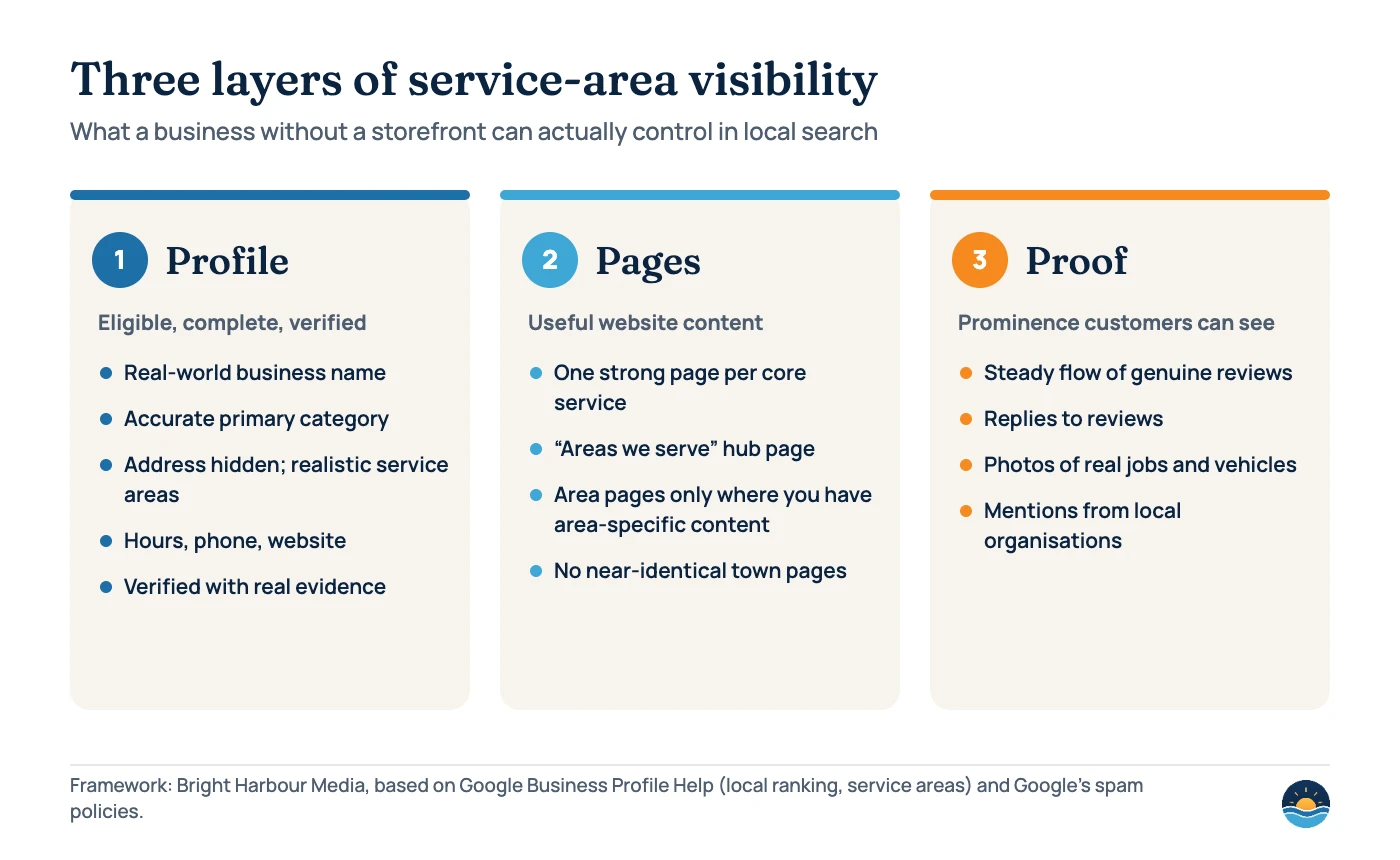
What strengthens a SAB’s visibility
- A complete, verified profile with the right primary category
- Accurate hours, including special hours
- A steady flow of genuine reviews, with replies
- Real photos of jobs, vehicles and the team
- A website with useful, specific service pages
- Mentions and links from local organisations you work with
What puts a SAB at risk
- Showing a home address customers can’t visit
- Using a virtual office or mailbox as a “location”
- Adding services or town names to the business name
- Creating a second profile to cover another town
- Near-identical “plumber in [town]” pages
- A service area far bigger than the business really covers
Verifying a service-area business
Verification confirms that you are authorised to manage the business, and Google says verified businesses are more likely to show up in results. Google’s verification help page lists phone or text, email, live video call, postcard and video recording methods — but which ones you’re offered depends on the business.
The help page doesn’t include instructions specific to service-area businesses. For live video calls, it asks you to be ready to show your location (outside signs, nearby businesses or a street sign), your business or equipment (branded equipment, marketing materials or the tools you use to serve customers) and proof of management (such as non-sensitive business documents or keys to your premises). For a SAB, branded vehicles, tools and paperwork are usually the strongest evidence. Google says reviews of these submissions can take “up to 5 business days”. Postcard codes mostly arrive within 14 days and expire after 30 days — and you shouldn’t edit your business name, address or category while you wait for one.
Service area pages: helpful or doorway?
Because a SAB’s profile is tied to one base, many businesses build a page for each town they serve. That can work well, or it can be exactly what Google’s spam policies warn against. The spam policies (last updated August 28, 2026) define doorway abuse as sites or pages “created to rank for specific, similar search queries”, and give as an example “having multiple domain names or pages targeted at specific regions or cities that funnel users to one page”. The same policies describe scaled content abuse as many pages “generated for the primary purpose of manipulating search rankings and not helping users”.
The test is whether each page would be useful to a customer in that area if search engines didn’t exist.
| Element | Useful area page | Doorway-style page |
|---|---|---|
| Content | Specific to the area: jobs done there, local conditions, access, response times | Same text with the town name swapped |
| Reason to exist | You genuinely work there and have something different to say | Only to rank for “[service] [town]” |
| Proof | Photos, project notes or reviews from customers in that area | Stock photos and generic claims |
| Navigation | Linked from a clear “Areas we serve” hub and relevant service pages | Orphaned pages or a footer stuffed with town links |
| Number of pages | Matches the areas you can really serve well | Dozens of towns, many outside your real range |
If you can only write something genuinely different for a handful of towns, build a handful of pages and cover the rest on a single “Areas we serve” page. Fewer, stronger pages are safer — and easier to keep genuinely useful — than a large set of thin ones.
Structured data for businesses without a storefront
Google’s LocalBusiness structured data documentation (last updated September 8, 2026) lists name and address as required properties for eligibility, and describes address as “the physical location of the business”. It doesn’t mention service-area businesses or the areaServed property.
Schema.org’s areaServed property — “the geographic area where a service or offered item is provided” — can be used on an Organization (which includes LocalBusiness) or a Service. It is a valid way to describe your coverage in markup, but Google hasn’t said it uses it for local rankings, so treat it as accurate labelling rather than a ranking lever. Whatever you mark up must match what is visible on the page; if you hide your street address on Google, decide deliberately whether to publish it on your website. Our guide to structured data for service businesses has a full example.
A 7-step setup for service-area business SEO
- Confirm your business type. Decide whether you are a service-area business or a hybrid, using the “do customers come to you?” test above.
- Clean up the profile basics. Use your real-world business name, choose the most accurate primary category, add your phone number, website and hours, and remove the address if customers don’t visit.
- Set realistic service areas. Add up to 20 cities, postcodes or regions you genuinely want work from, all within about 2 hours’ drive of your base.
- Verify with real evidence. Prepare branded vehicles, tools and business documents in case you’re asked for a video.
- Build the website around services first. One strong page per core service, then an “Areas we serve” hub, then individual area pages only where you have area-specific content.
- Earn prominence. Ask every satisfied customer for a review, reply to reviews, add job photos and build relationships with local organisations — see our guide to Google review management.
- Review quarterly. Check the profile for suggested edits, confirm the service areas still reflect where you work, and look at which area pages bring enquiries in Search Console.
Frequently asked questions
Can I show my home address on Google if I work from home?
Only if customers visit you there during your stated hours. Google’s guidelines say a service-area business should hide its address from customers, and a business without permanent signage isn’t eligible as a storefront.
How many service areas can I add to my Business Profile?
Up to 20, based on cities, postal codes or other areas. Google says the overall area shouldn’t extend more than about 2 hours of driving time from where the business is based, and you can’t use a radius.
Will adding a town to my service area make me rank there?
Not on its own. Google’s help page says local results are based mainly on relevance, distance and prominence, and it doesn’t document how service areas affect ranking. Service areas tell customers where you work; a strong profile, reviews and useful website content do the heavy lifting.
Can I create a separate profile for each town I serve?
No. A business without a storefront is allowed one service-area Business Profile. Separate profiles are only appropriate for genuinely separate locations, each with its own service area and staff.
Sources
- Manage your business’s service area — Google Business Profile Help — 20 service areas, 2-hour limit, no radius, hybrid businesses
- Guidelines for representing your business on Google — Google Business Profile Help — address, virtual offices, business names, one profile per business
- Tips to improve your local ranking on Google — Google Business Profile Help — relevance, distance and prominence
- Verify your business on Google — Google Business Profile Help — verification methods and timing
- Spam policies for Google web search — Google Search Central (last updated August 28, 2026) — doorway and scaled content abuse
- Local business (LocalBusiness) structured data — Google Search Central (last updated September 8, 2026) — required and recommended properties
- areaServed — Schema.org — property definition and expected types
Cite this article: Bright Harbour Media. “Service Area Business SEO: How to Rank Without a Storefront.” Bright Harbour Media Insights, October 2026. https://brightharbourmedia.com/service-area-business-seo/
You are welcome to reference the charts and frameworks in this article with a link back to this page.
Not sure your Business Profile and service pages are set up the way Google expects? Our local SEO service sorts out eligibility, service areas and area pages for businesses that travel to their customers. Get in touch to talk it through.