
Multi-location SEO is the work of helping every branch of a business show up in local search for the area it serves. In practice that means one verified Google Business Profile per real location, one useful page per location on your website, and the same business details on both.
Key takeaways
- Google requires every location of a chain to use the same business name, unless the real-world branding consistently differs from place to place.
- Each location needs a phone number or website that represents that individual location — Google asks businesses to avoid central call centres.
- Businesses with 10 or more locations can add and verify profiles in bulk; service-area businesses and agencies managing several businesses can’t bulk verify.
- A service area shouldn’t extend farther than about 2 hours’ driving time from where the business is based.
- City pages that funnel visitors to one page are listed as doorway abuse in Google’s spam policies (page updated August 28, 2026).
How does local ranking work when you have several locations?
Google says local results are based mainly on three factors: relevance (“how well a Business Profile matches what someone is searching for”), distance (“how far each business is from the customer who’s searching”) and prominence (“how well-known a business is”). We cover each in depth in our guide to local SEO ranking factors.
For a multi-location business, distance changes the whole picture. Each branch competes mostly in its own neighbourhood, against its own local competitors. A strong head office profile does little for a branch across town. That is why multi-location SEO is really a set of local campaigns that share a brand, a website and a set of standards.
Google is also clear that “there’s no way to request or pay for a better local ranking on Google.” The levers are the same for every location: complete and accurate profile information, real reviews and replies, photos, and a website that backs it all up.
Google Business Profile rules for businesses with multiple locations
Google’s guidelines for representing your business include specific rules for chains and brands. Breaking them is one of the most common reasons multi-location profiles get suspended or edited by Google, so it is worth knowing them exactly.
| Rule | What Google says | What it means in practice |
|---|---|---|
| Business name | All locations must have the same name unless the real-world branding consistently varies by location | Don’t add city names or keywords to each branch’s name unless the signage really says so |
| Primary category | All locations must share the one category that best represents the business | Keep the primary category consistent; sub-brands can follow their own group |
| Address and signage | Each location needs a precise, accurate address and/or service area; businesses showing an address should have permanent signage | No P.O. boxes or remote mailboxes; the address must be a real, signed location |
| Phone and website | Provide a phone number or website that represents the individual location; use a local phone number | Give each branch its own local number and link its profile to its own location page |
| One profile per location | Do not create more than one page for each location of your business | Find and merge or remove duplicate profiles before adding new ones |
| Service areas | The overall service area shouldn’t extend farther than about 2 hours’ driving time from the base | Set realistic areas per branch instead of covering a whole country from one office |
| Virtual offices | Virtual offices and co-working spaces are generally not eligible unless staffed, signed and receiving customers | Don’t create profiles for addresses where you have no real presence |
If you are new to profiles, start with our Google Business Profile fundamentals, then come back to apply them location by location.
Managing profiles at scale: business groups and bulk verification
Google offers two tools for multi-location brands. Business groups provide “a more secure way to manage and share access to your Business Profiles with co-workers.” Owners and managers of a group can create, edit and delete profiles inside it, and Google recommends creating the group first, then adding and verifying locations within it. Brands with several sub-brands can run a separate group for each.
Bulk management kicks in at 10 locations. Google’s help centre says: “If your business has 10 or more locations you can add, verify, and manage them in bulk” by uploading a spreadsheet. Bulk verification has its own conditions.
Fewer than 10 locations
- Add and verify each profile individually
- Use a business group to share access with staff or an agency
- Expect per-location verification steps, which may include video
10 or more locations
- Add locations by spreadsheet upload
- Request bulk verification for the whole group
- Keep the spreadsheet complete — Google wants every location you manage
| Bulk verification requirement | Detail from Google |
|---|---|
| Minimum size | The spreadsheet must have 10 or more profiles from the same business (duplicate, suspended or disabled profiles don’t count) |
| Who can apply | Business owners or authorised representatives — agencies with more than one business in one account can’t bulk verify |
| Business types | Service-area businesses can’t use bulk verification |
| Completeness | Include all the profiles you manage, with no omissions |
| Existing profiles | Profiles can’t already be verified by someone else |
| Extra checks | Video verification may be required, with an authorised representative at the location |
Location pages: the website half of multi-location SEO
Your profiles need somewhere useful to send people. Google’s guidelines ask for a website “that represents your individual business location,” and its LocalBusiness structured data documentation recommends a url property with “the fully-qualified URL of the specific business location.” The cleanest way to satisfy both is a location hub with one page for each real branch.
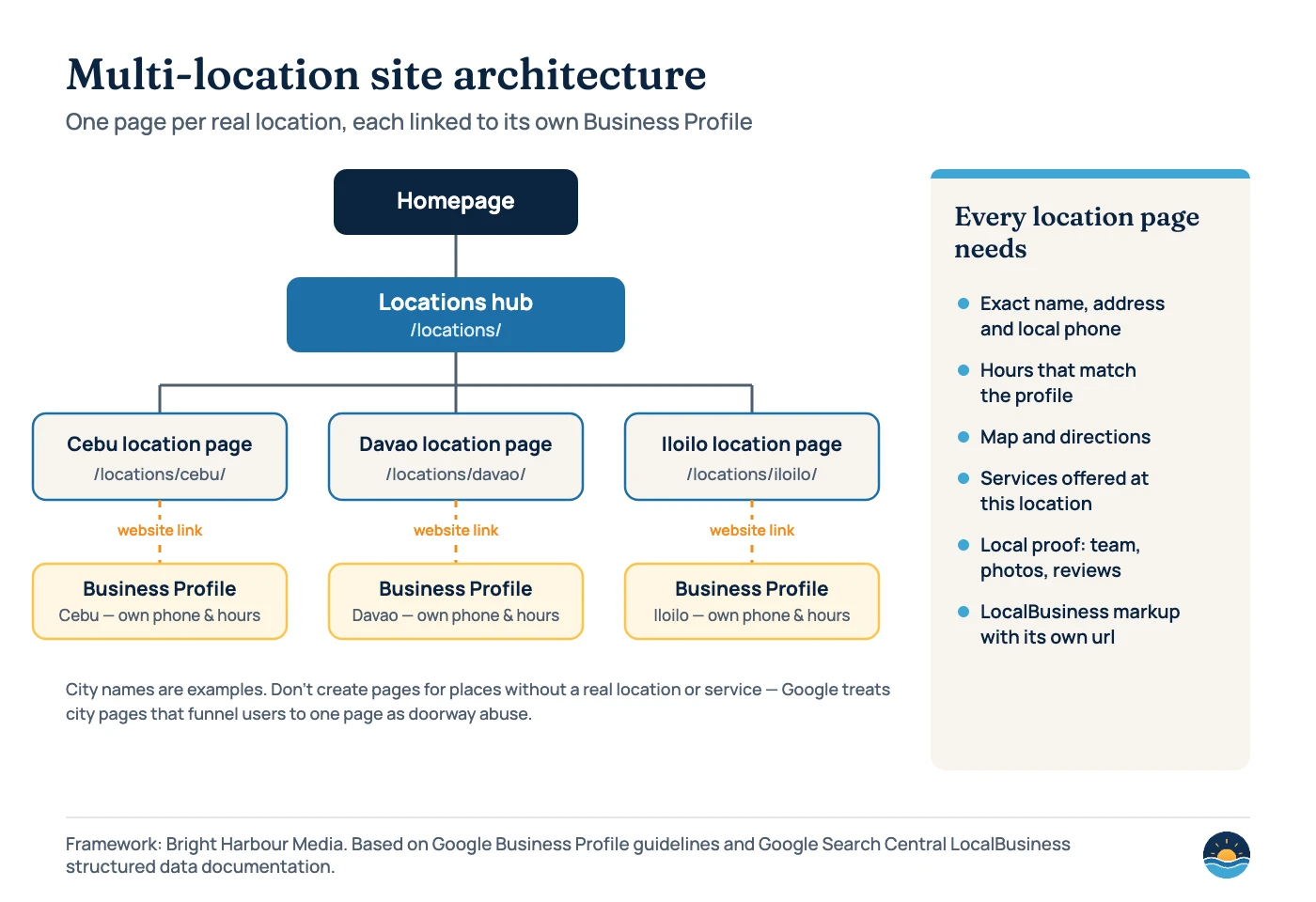
One warning before you build: these pages must be for real locations. Google’s spam policies define doorway abuse as pages “created to rank for specific, similar search queries,” and give the example of “having multiple domain names or pages targeted at specific regions or cities that funnel users to one page.” The same policies list scaled content abuse — many pages generated mainly to manipulate rankings — as a separate violation. A page per real branch, with genuinely local information, is the opposite of that.
| Element | Why it matters | Tip |
|---|---|---|
| Exact name, address and local phone | Matches the profile and gives customers a direct line to that branch | Use the same format as the Business Profile, character for character |
| Opening hours | Mismatched hours frustrate customers and undermine trust | Update the page and profile together, including holiday hours |
| Map and directions | Helps people actually find the branch | Embed a map and add parking or landmark notes |
| Services at this location | Not every branch offers everything | List what this branch does, and link to the main service pages |
| Local proof | Shows the branch is real and active | Team photos, branch photos and reviews from this location |
| LocalBusiness structured data | Helps Google understand the location’s details | Required: name and address; recommended: telephone, url, geo and openingHoursSpecification |
Google’s documentation adds two details worth knowing. Geo coordinates should have at least five decimal places of precision, and businesses with departments (a pharmacy inside a store, for example) can use the department property, naming each one in the format “{store name} {department name}.” For a fuller walkthrough with a JSON-LD example, see our guide to structured data for service businesses.
Keeping every location consistent
With one location, keeping details accurate is easy. With ten, things drift: a branch changes its phone number, a holiday closure is updated on the profile but not the page, or a manager creates a duplicate profile. Inconsistent details confuse customers, and Google’s guidance on local ranking asks businesses to keep their hours accurate and their information complete.
Reviews need the same per-location discipline. Each branch earns its own reviews on its own profile, and replies should come from someone who knows that location. Our guide to Google review management covers how to ask for reviews without breaking Google’s policies.
A 7-step multi-location SEO process
- Build a location inventory. One row per real location: name as signed, address, local phone, hours, services, manager and any existing profile URL.
- Check eligibility. Remove virtual offices or unstaffed addresses, and decide which locations are storefronts and which are service-area businesses.
- Set up a business group. Create it first, then add or transfer profiles so access is owned by the business, not an individual.
- Clean up and verify profiles. Merge or remove duplicates, then verify each location — in bulk if you have 10 or more eligible storefront locations.
- Build the location hub and pages. One page per location, with the elements in the table above and links to relevant service pages.
- Connect profiles and pages. Set each profile’s website link to its own location page, and add LocalBusiness markup to each page.
- Monitor each location separately. Track calls, direction requests, reviews and rankings per branch so a weak location doesn’t hide behind a strong one.
Frequently asked questions
Should each location have its own website?
Usually not. One website with a page for each location is easier to manage and builds authority in one place. Google’s guidelines only ask for a website that represents the individual location, which a dedicated location page does.
Can I create a Business Profile in a city where I don’t have an office?
No. Profiles must represent a real location or a real service-area business. Google says a service area shouldn’t extend farther than about 2 hours’ driving time from where the business is based, and virtual offices are generally not eligible.
Can different locations use different names?
Only when the real-world branding differs. Google requires all locations to share the same name unless the business’s real-world representation consistently varies — for example a distinct sub-brand on the signage.
Do I need bulk verification?
Only if you manage 10 or more locations of the same business and they are not service-area businesses. Below that, verify each profile individually. Agencies managing several different businesses in one account can’t use bulk verification.
Sources
- Guidelines for representing your business on Google — Google Business Profile Help — chains, names, categories, addresses, phone and website rules
- Tips to improve your local ranking on Google — Google Business Profile Help — relevance, distance and prominence
- Verify your business in bulk — Google Business Profile Help — bulk verification eligibility
- Bulk location management overview — Google Business Profile Help — managing 10 or more locations
- About business groups — Google Business Profile Help — sharing access to multiple profiles
- Local business (LocalBusiness) structured data — Google Search Central — required and recommended properties, departments
- Spam policies for Google web search — Google Search Central (updated August 28, 2026) — doorway abuse, scaled content abuse
Cite this article: Bright Harbour Media. “Multi-Location SEO: Google Business Profile & Location Pages.” Bright Harbour Media Insights, October 2026. https://brightharbourmedia.com/multi-location-seo/
You are welcome to reference the charts and frameworks in this article with a link back to this page.
Running several branches and not sure which ones Google can actually see? Our local SEO service audits every location’s profile and page and builds a plan branch by branch — get in touch to talk it through.