

Google review management is the ongoing work of earning reviews on your Google Business Profile, replying to them, and reporting the ones that break Google’s policies. Google says more reviews and positive ratings can help a business’s local ranking — but how you ask for those reviews is tightly controlled by Google’s own policies and, in the US, by the Federal Trade Commission.
Key takeaways
- Google lists reviews under prominence, one of its three local ranking factors, and says more reviews and positive ratings “can help your business’s local ranking.”
- 97% of US consumers read reviews for local businesses and 89% expect owners to respond to them (BrightLocal, 2026).
- 74% of consumers look for reviews written in the last three months, so a steady flow of reviews matters more than a one-off push.
- Google prohibits offering incentives for reviews and selectively asking happy customers; the FTC’s rule on fake reviews has been in effect in the US since October 21, 2024.
- Report a review only when it breaks policy: Google says evaluation typically takes several days, and you get a one-time appeal.
Why do Google reviews matter for local SEO?
Google’s own help documentation names three main factors for local results: relevance, distance and prominence. Prominence is “how well-known a business is,” and Google says it is based partly on “how many reviews you have,” adding that “more reviews and positive ratings can help your business’s local ranking.” Google also says that replying to reviews “shows that you value their feedback.” We cover the other two factors in our guide to local SEO ranking factors.
Reviews also shape the decision after someone finds you. BrightLocal’s 2026 survey of 1,002 US adults shows how much weight consumers put on them — and how specific their expectations have become.
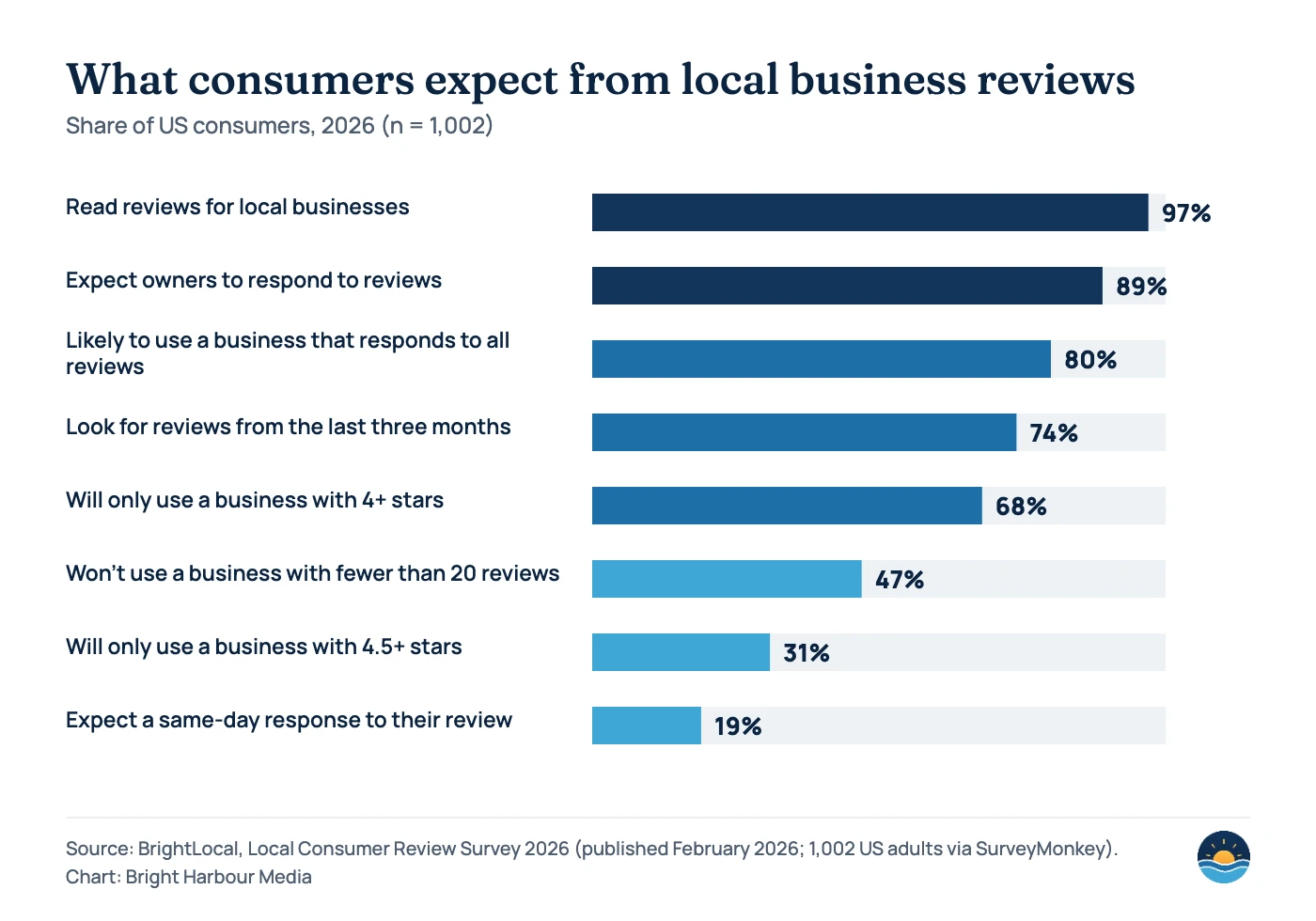
A few shifts stand out in the 2026 data. The share of consumers who will only use a business rated 4.5 stars or higher rose to 31%, up from 17% the year before. The share expecting a same-day reply to their review rose to 19%, from 6%. And while Google is still the leading place people read reviews, BrightLocal reports its share dipped from 83% in 2025 to 71% in 2026 — a reminder that reviews on other platforms matter too.
What Google and the FTC allow — and what they don’t
Most review problems come from well-meaning shortcuts: a discount for a review, a feedback form that only sends happy customers to Google, or staff posting reviews. Google’s Maps policy and the FTC’s rule overlap, but they are not identical. Google’s policy applies to every Business Profile worldwide; the FTC rule applies to businesses operating in the US.
| Practice | Google Maps content policy | FTC rule (US) |
|---|---|---|
| Asking every customer for an honest review via a link or QR code | Allowed — Google suggests a review link or QR code | Allowed |
| Offering a discount, freebie or prize for a review | Prohibited — Google calls it fake and misleading content that is “strictly prohibited” | Not banned by the rule unless the incentive is tied to a positive (or negative) sentiment; undisclosed incentives can still breach the FTC Act |
| Only asking customers you expect to be happy (review gating) | Prohibited — businesses may not “selectively solicit positive reviews” | Not specifically banned by the rule, but the FTC says it “could violate the FTC Act” |
| Reviews by owners, employees or their relatives | Prohibited as a conflict of interest | Restricted — insider reviews must clearly disclose the connection |
| Buying reviews or posting fake ones, including AI-written reviews | Prohibited as fake engagement | Prohibited |
| Pressuring customers to review while on your premises | Prohibited | Not specifically addressed |
| Threatening or intimidating reviewers to remove a negative review | Prohibited (incentives to remove negative reviews are banned) | Prohibited as review suppression |
The practical rule: follow the stricter standard. Google’s policy is tighter than the FTC rule on incentives, and Google says reviews “removed for policy violations won’t be restored.” A review programme built on discounts or gating can disappear overnight — taking the ranking benefit with it.
How to get more Google reviews the compliant way
The goal is a steady, unfiltered flow of reviews from real customers. This six-step process works for most service businesses:
- Get your review link or QR code. Google suggests asking customers “to visit a Google link or scan a QR code.” Use the link from your Business Profile so customers land directly on the review form.
- Ask everyone, at the same moment. Pick a consistent trigger — job completed, invoice paid, appointment finished — and send the request to every customer, not just the ones you expect to be happy.
- Keep the ask short and neutral. One sentence, one link, and a request for an honest review. Never suggest a star rating.
- Remove friction. Customers need a Google Account to post; Google notes they can create one with a non-Gmail email address.
- Build a rhythm, not a campaign. With 74% of consumers looking for reviews from the last three months, a few reviews every week beat a burst once a year.
- Track it monthly. New reviews, average rating, share of reviews replied to and time to reply are enough to spot problems early.
A good ask
- “Thanks for choosing us. If you have a minute, we’d really value an honest review on Google: [link]”
- Sent to every customer after the job
- Same wording for everyone
- No reward, no rating suggested
Avoid
- “Leave us 5 stars and get 10% off your next visit”
- Sending the Google link only after a positive survey score
- Handing customers a tablet at the counter
- Asking staff, friends or family to post reviews
How should you reply to Google reviews?
Google’s guidance on replies is simple: be professional and polite, keep it short, and be “conversational, not promotional.” For positive reviews, Google suggests going beyond repetitive thank-yous by sharing a helpful update or answering a question. For negative reviews, acknowledge the issue, apologise when appropriate and respond promptly. Speed matters to customers too: in BrightLocal’s 2026 survey, 19% expected a reply the same day and 81% within a week.
| Review type | How to reply | Watch out for |
|---|---|---|
| Positive, detailed | Thank them for something specific they mentioned; add a useful detail or update | Copy-paste replies that read as automated |
| Positive, star rating only | A short, personal thank-you | Stuffing replies with keywords or promotions |
| Mixed (3 stars) | Acknowledge what went well, address the issue, offer a direct contact | Arguing with the reviewer’s experience |
| Negative, genuine | Acknowledge, apologise where appropriate, explain what you have changed, invite them to continue offline | Sharing customer details or blaming the customer publicly |
| Suspected fake or off-topic | Optionally reply briefly and factually, then report it | Accusations or threats — they can count as review suppression |
Google checks replies against its content policies too. It says replies usually take up to 10 minutes to be reviewed, but sometimes up to 30 days.
When — and how — should you report a review?
Only report reviews that break Google’s policies — for example spam, conflicts of interest, off-topic content or profanity. Google is explicit: “Do not report a review just because you disagree with it or dislike it.” To report one, open your Business Profile, select Read reviews, choose the report icon next to the review, pick the violation and send the report. You can also use Google’s Reviews Management Tool.
| Status in the Reviews Management Tool | What it means | Your next step |
|---|---|---|
| Decision pending | Google has not evaluated the report yet | Wait — Google says evaluation typically takes several days |
| Report reviewed – no policy violation | Google decided the review does not break policy | You can submit a one-time appeal |
| Escalated – check your email for updates | The appeal has gone forward for a final decision | Watch your email for the result |
If a review stays up, a calm, factual reply is often the best remedy: future customers read the response as much as the complaint. Keep a simple log of reported reviews and outcomes so you can spot patterns, such as a burst of fake reviews.
Reviews on your own website
Testimonials on your site help conversions, but they are a separate matter from Google reviews. Google’s review snippet guidelines say that when a business controls the reviews about itself, its pages using LocalBusiness or Organization structured data are ineligible for review stars — and that includes embedding a Google reviews widget. We explain the details in our guide to structured data for service businesses. Focus your effort on the Business Profile, and keep it complete and up to date as described in our Google Business Profile fundamentals.
Frequently asked questions
How many Google reviews does a business need?
Google does not publish a target. Consumer expectations give a guide: in BrightLocal’s 2026 survey, 47% of consumers said they won’t use a business with fewer than 20 reviews. Recency matters as much as volume, because 74% look for reviews from the last three months.
Can I offer a discount in exchange for a Google review?
No. Google says offering incentives such as free or discounted goods or services in exchange for reviews is fake and misleading content and is strictly prohibited — even if you don’t ask for a positive review.
Is it OK to send only happy customers to Google?
No. Google’s policy prohibits selectively soliciting positive reviews. In the US, the FTC says the practice is not specifically banned by its review rule but could violate the FTC Act.
Can I get a negative Google review removed?
Only if it breaks Google’s content policies. Report it from your Business Profile or the Reviews Management Tool; if Google finds no violation, you can submit one appeal. Otherwise, reply professionally and show how you resolved the issue.
Sources
- How to improve your local ranking on Google — Google Business Profile Help — relevance, distance, prominence and reviews
- Getting and managing customer reviews — Google Business Profile Help — review links, QR codes, incentives and reply tips
- Prohibited and restricted content — Google Maps user-contributed content policy — fake engagement, incentives, conflicts of interest
- Read and reply to reviews — Google Business Profile Help — reply review times
- Report inappropriate reviews on your Business Profile — Google Business Profile Help — reporting, status and appeals
- About missing or delayed reviews — Google Business Profile Help
- Review snippet structured data — Google Search Central — self-serving review guidelines
- Federal Trade Commission announces final rule banning fake reviews and testimonials — FTC, August 14, 2024
- Consumer Reviews and Testimonials Rule: Questions and Answers — FTC business guidance — effective date, review gating and incentives
- Local Consumer Review Survey 2026 — BrightLocal, February 2026 (1,002 US adults)
Cite this article: Bright Harbour Media. “Google Review Management: Get More Reviews Within the Rules.” Bright Harbour Media Insights, October 2026. https://brightharbourmedia.com/google-review-management/
You are welcome to reference the charts and frameworks in this article with a link back to this page.
Want a review programme that grows your profile without putting it at risk? Our local SEO service covers Google Business Profile optimisation and review strategy — get in touch to talk it through.