
Google ranks local results — the map pack and Google Maps listings — using three factors: relevance (how well a Business Profile matches the search), distance (how far the business is from the searcher) and prominence (how well-known the business is). Google states that there is no way to request or pay for a better local ranking.
Key takeaways
- Google names three local ranking factors: relevance, distance and prominence.
- You have high control over relevance, medium control over prominence and very little control over distance.
- Google says businesses with complete and accurate information are more likely to show up in local results, and that more reviews and positive ratings can help.
- Paid ads can appear above local results, but organic local ranking cannot be bought.
- The most reliable local programme combines a complete profile, strong location pages and a steady stream of genuine reviews and mentions.
The three factors, in Google’s own words
Google’s Business Profile Help Center describes local ranking in plain terms. Relevance is how well a Business Profile matches what someone is searching for. Distance is how far each business is from the location used in the search. Prominence is how well-known a business is — informed by information Google has from across the web, such as links, articles and directories, as well as review count and ratings.
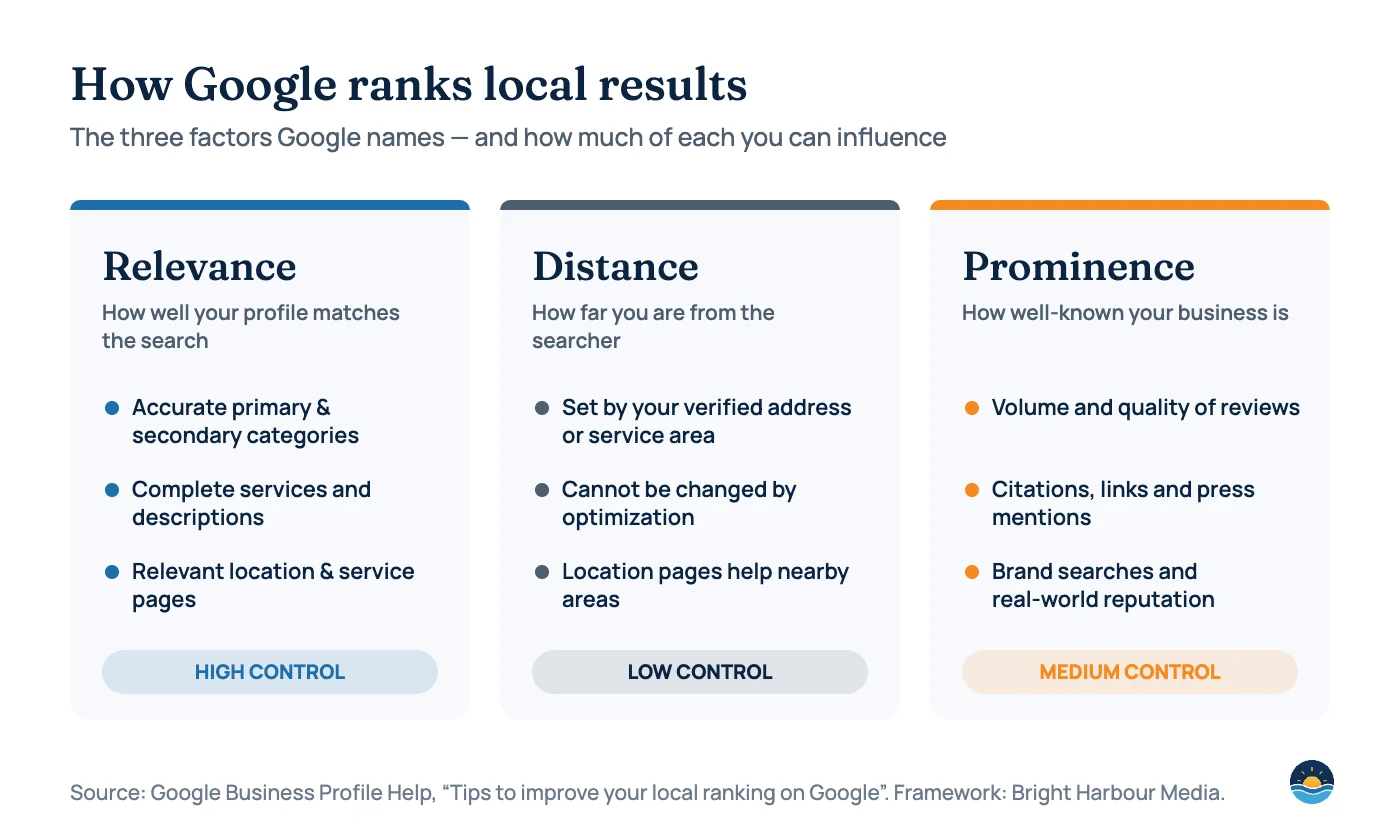
| Factor | What Google measures | How much you control it | Main levers |
|---|---|---|---|
| Relevance | How well your profile matches the search | High | Categories, services, descriptions, attributes, location and service pages |
| Distance | How far you are from the searcher or the location in the query | Low | Accurate address or service area; dedicated pages for areas you genuinely serve |
| Prominence | How well-known and well-regarded your business is | Medium | Reviews and ratings, citations, local links, press coverage and brand reputation |
Relevance: help Google understand exactly what you do
Relevance is where most businesses leave easy wins on the table. Google can only match your profile to a search if your profile clearly describes the service being searched for.
- Primary category: choose the single category that best describes your core business. It is one of the strongest relevance signals you control.
- Secondary categories: add only those that genuinely apply. More is not better if they are inaccurate.
- Services and products: list each one with a short, specific description in customer language.
- Business description: explain what you do, who you serve and where — without keyword stuffing.
- Website alignment: link your profile to the most relevant page (often a location page), and make sure that page clearly covers the same services.
Distance: what you can and cannot change
Distance is calculated from your verified location and the searcher’s location or the place named in their query. Optimization cannot move your business closer. What you can do is make sure your address or service area is accurate, and create genuinely useful pages for each area you actually serve so your website can rank in organic results beyond the map pack.
Do
- Keep your address or service area accurate and verified
- Build unique location pages for areas you genuinely serve
- Earn local links and mentions in each area
Don’t
- Use virtual offices or addresses you don’t operate from
- Create duplicate profiles for the same location
- Publish near-identical “city + service” doorway pages
Prominence: build a reputation Google can see
Prominence reflects how well-known your business is, online and offline. Google’s guidance specifically notes that more reviews and positive ratings can help a business’s local ranking, and that prominence draws on information from across the web.
| Prominence signal | What good looks like | Practical next step |
|---|---|---|
| Reviews | A steady flow of recent, genuine reviews with detail | Ask every satisfied customer, with a direct review link |
| Review responses | Prompt, professional replies to positive and negative reviews | Set a weekly routine to respond to every new review |
| Citations | Consistent name, address and phone across key directories | Audit and correct your top directory listings |
| Local links and press | Mentions from local media, associations, partners and sponsors | Pursue genuine local partnerships and community coverage |
| Brand demand | People searching for your business by name | Invest in service quality and offline marketing that builds recognition |
Google’s own improvement checklist
Google’s Help Center lists practical steps to improve local visibility. We have added how we apply each in client work:
| Google’s recommendation | How to apply it |
|---|---|
| Verify your business | Complete verification so your profile can appear and be managed fully |
| Keep information complete and accurate | Check hours, holiday hours, phone, website, categories and services quarterly |
| Respond to reviews | Reply to every review; acknowledge problems and explain how you resolved them |
| Add photos and videos | Upload real, current images of your premises, team and work regularly |
| Add products (where eligible) | Keep product or service listings up to date with clear descriptions |
A 30-day local SEO plan
- Week 1 — Audit: review your profile, categories, citations, reviews and the competitors in your map pack.
- Week 2 — Relevance: fix categories, complete services and descriptions, and align your location page.
- Week 3 — Prominence: launch a review request process and correct your most important citations.
- Week 4 — Measure: track calls, website clicks, direction requests and map-pack visibility across your service area.
Frequently asked questions
Can I pay Google to rank higher in local results?
No. Google states there is no way to request or pay for a better local ranking. Local Services Ads and search ads are paid placements shown separately from organic local results.
How important are reviews for local SEO?
Google says more reviews and positive ratings can help local ranking. Reviews also strongly influence whether searchers choose you, so they matter twice.
Do I need a physical address to rank locally?
Service-area businesses can hide their address and define service areas, but Google requires a genuine location for verification and its guidelines must be followed.
Why does my ranking change depending on where I search from?
Distance is one of the three factors, so results are personalised to the searcher’s location. Track visibility across a grid of locations rather than a single point.
For the setup basics, see our guide to Google Business Profile fundamentals.
Sources
- Tips to improve your local ranking on Google — Google Business Profile Help
Cite this article: Bright Harbour Media. “How Google Ranks Local Businesses: Relevance, Distance and Prominence Explained.” Bright Harbour Media Insights, October 2026. https://brightharbourmedia.com/local-seo-ranking-factors/
You are welcome to reference the charts and frameworks in this article with a link back to this page.
Want more calls from local search? Explore our local SEO services or request an audit of your map-pack visibility.