

A structured data audit checks that the schema markup on your site is valid, eligible for the Google features you want, consistent with Google’s guidelines and still working after each deployment. It uses four tools in sequence: the Schema Markup Validator, Google’s Rich Results Test, the URL Inspection tool and Search Console’s rich result reports.
Key takeaways
- 50% of home pages used structured data in 2025, and JSON-LD appeared on 43% (HTTP Archive Web Almanac 2025).
- Google stopped showing FAQ rich results in Search from May 7, 2026, after deprecating HowTo results on Sept 13, 2023 and dropping six more features from Search Console reporting on Sept 9, 2025.
- Leftover markup for retired features is not harmful: Google says structured data that isn’t used “does not cause problems for Search”.
- A structured data manual action removes rich result eligibility but, according to Google, “doesn’t affect how the page ranks”.
- Search Console rich result reports show a sample of items, not pages, and fix validation “typically takes up to about two weeks”.
What does a structured data audit check?
Structured data is code, usually JSON-LD, that describes a page in the schema.org vocabulary so search engines can understand it and, for supported types, show rich results such as product details, review stars or breadcrumbs. Google’s introduction to structured data (updated Dec 10, 2025) says all three formats, JSON-LD, Microdata and RDFa, are “equally fine for Google” when valid, but recommends JSON-LD because it is easiest to maintain at scale.
An audit has to look at more than syntax. Markup can parse perfectly and still be ineligible, against Google’s guidelines, or broken by a template change months after launch. We think of it as four layers, each catching problems the one before it can’t.
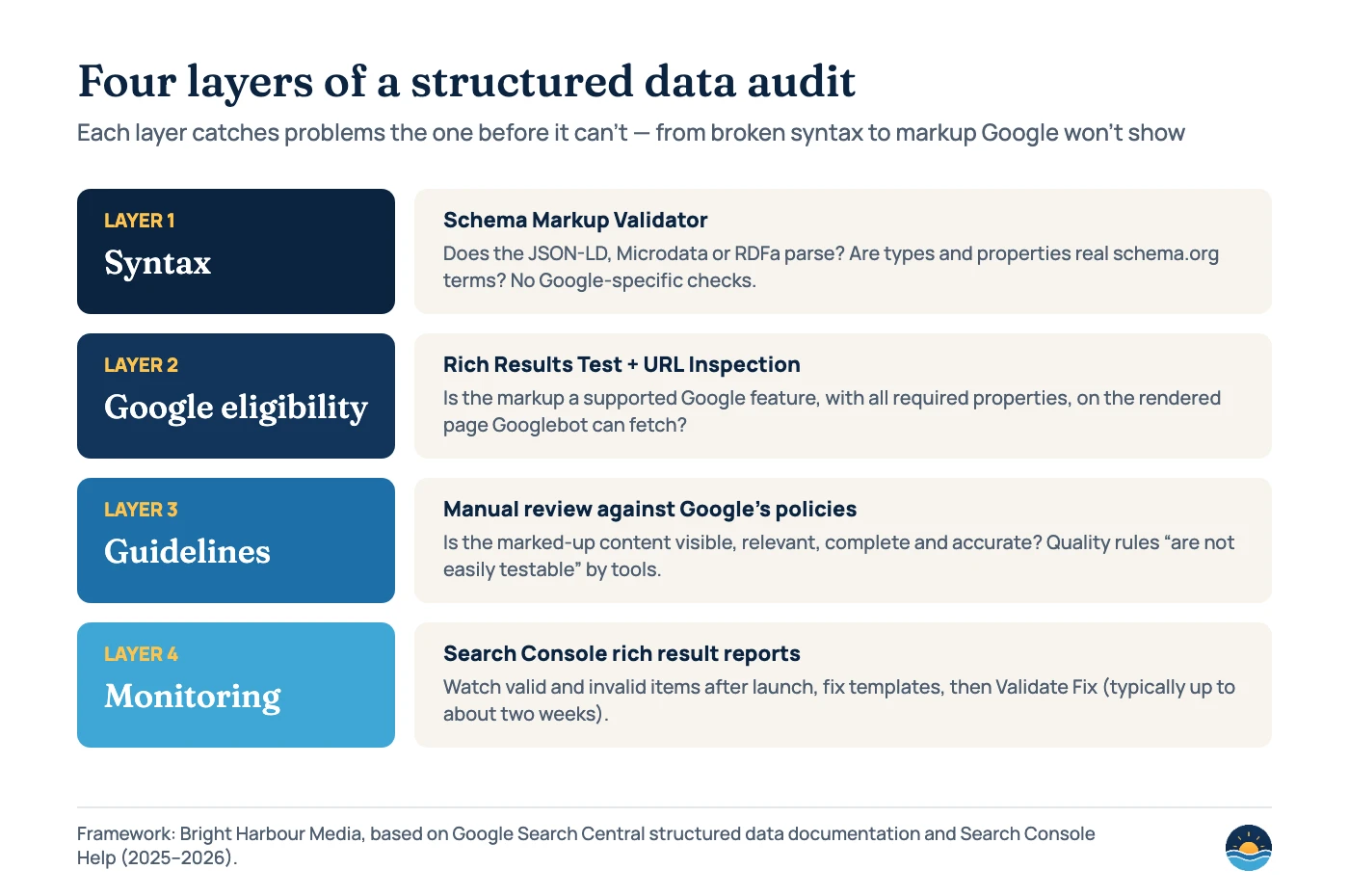
| Tool | What it checks | What it can’t tell you |
|---|---|---|
| Schema Markup Validator | Extracts JSON-LD, RDFa and Microdata, shows the parsed graph and flags syntax mistakes for any schema.org type | Whether Google supports the type or what Google requires; it “does not try to check your content against the information needs of specific services” |
| Rich Results Test | Which Google rich results a URL or code snippet can generate, with errors and warnings; uses the rendered page and a smartphone user agent by default | Whether Google will actually show a rich result, or whether the content follows the quality guidelines |
| URL Inspection tool | How Googlebot sees the live or indexed page, including detected rich result items | Site-wide patterns; it checks one URL at a time |
| Search Console rich result reports | Valid and invalid items across the site for supported types, with issue trends and fix validation | Unsupported types, and every item: reports show a sample |
Google is explicit that passing the test is not the finish line: it “does not guarantee that your structured data will show up in search results, even if your page is marked up correctly according to the Rich Results Test.” That is why layer three, a human review against the general structured data guidelines (updated Jul 10, 2026), matters.
How common is structured data?
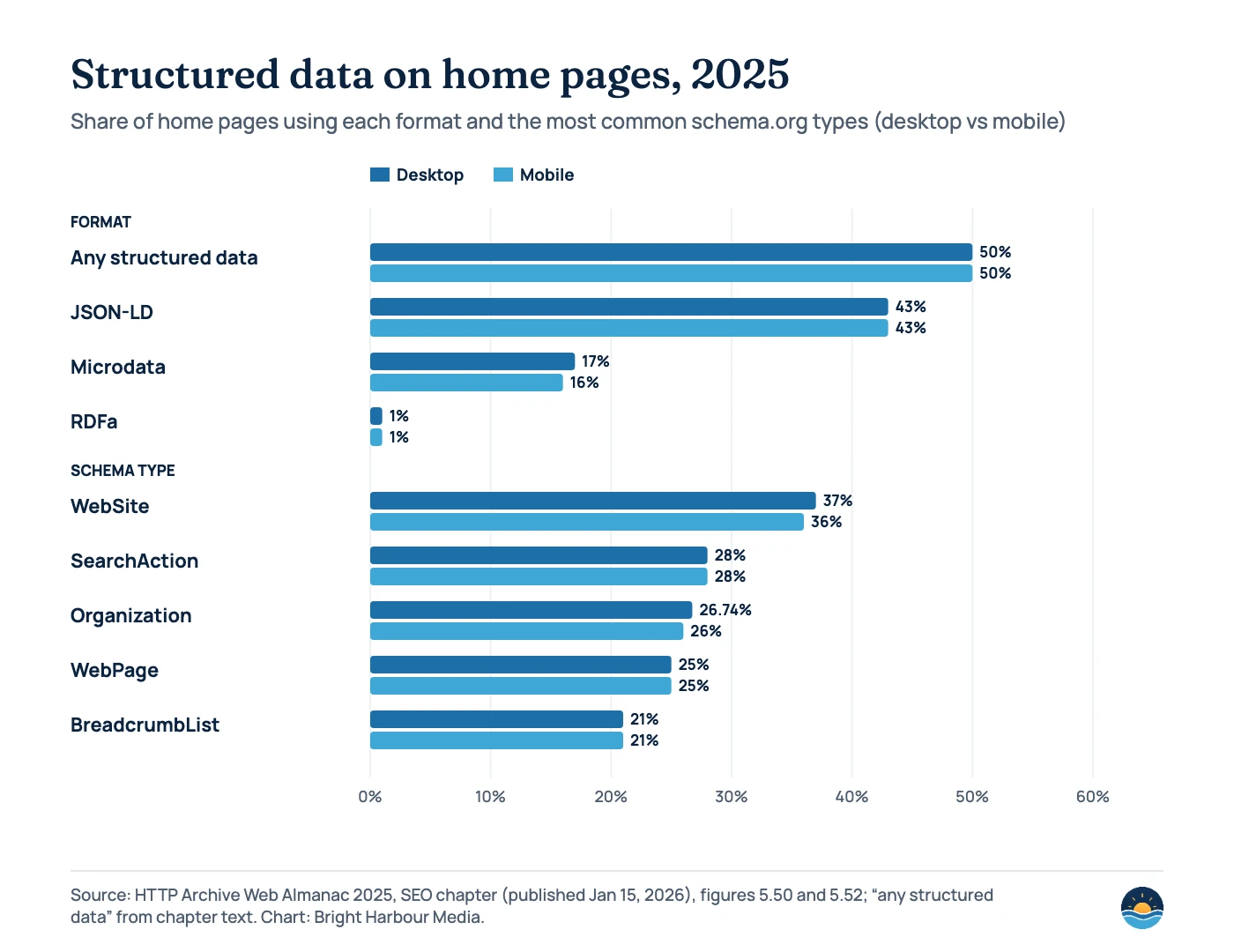
The 2025 Web Almanac SEO chapter (published Jan 15, 2026) found structured data on 50% of desktop and mobile home pages, up from 48% and 49% in 2024. JSON-LD led at 43%, with Microdata at 17% on desktop and 16% on mobile. Only 2% of crawls had structured data added by JavaScript; the rest was in the raw HTML.
The most common types are sitewide basics such as WebSite, Organization, WebPage and BreadcrumbList, which most SEO plugins add automatically. SearchAction still appears on 28% of home pages even though Google retired the sitelinks search box in November 2024. The Almanac notes there was “no need to remove” that markup, which is a good reminder that an audit should separate harmless leftovers from real problems.
Which markup still earns rich results in 2026?
Google has been trimming rich result types since 2023. Before fixing anything, check that the feature still exists. Google’s search gallery (updated Oct 16, 2026) lists the supported features, including Article, Breadcrumb, Dataset, Discussion forum, Event, Image metadata, Job posting, Local business, Organization, Product, Profile page, Q&A, Recipe, Review snippet, Software app and Video. FAQ, HowTo, ClaimReview and Practice problem are no longer listed.
| Feature | What changed | Date |
|---|---|---|
| HowTo rich results | No longer shown on desktop and deprecated | Sept 13, 2023 |
| Sitelinks search box | Documentation removed; no longer shown in Search | Nov 29, 2024 |
| Breadcrumbs | Shown on desktop results only, not mobile | Jan 22, 2025 |
| Course info, Claim review, Estimated salary, Learning video, Special announcement, Vehicle listing | Phased out from June 2025; removed from Search Console reports and the Rich Results Test | Sept 9, 2025 |
| Dataset | Used only by Dataset Search, not Google Search | Nov 5, 2025 |
| Practice problem | Search Console and Rich Results Test support removed; docs removed Jan 6, 2026 | January 2026 |
| FAQ rich results | No longer appear in Google Search; documentation removed June 15, 2026 | May 7, 2026 |
You don’t need to rush to delete markup for retired features. When HowTo and FAQ results were cut back in 2023, Google wrote that “there’s no need to proactively remove it. Structured data that’s not being used does not cause problems for Search, but also has no visible effects in Google Search.” Clean it up when you next touch the template, and stop adding it to new pages unless another platform uses it. Our guide to structured data for service businesses covers which types are still worth implementing.
What problems should the audit look for?
| Problem | How to spot it | Fix |
|---|---|---|
| Syntax errors | Rich Results Test reports “Structured data with syntax errors detected”; Schema Markup Validator flags the line | Fix the JSON-LD (often a missing comma or bracket). Remove comments, which the Rich Results Test ignores. |
| Missing required properties | Errors in the Rich Results Test or “Why items are invalid” in Search Console | Add the property. Items missing required properties “are not eligible for rich results.” |
| Missing recommended properties | Warnings under “Improve item appearance” | Add accurate values where you have them; Google prefers “fewer but complete and accurate” properties. |
| Markup for hidden or irrelevant content | Compare the markup with what a visitor can see | Mark up only visible content that truly represents the page (Google’s example: a woodworking site labelling instructions as recipes). |
| Self-serving reviews | LocalBusiness or Organization review stars about your own business | Remove them; Google’s review snippet guidelines make these ineligible. |
| Blocked or unrendered markup | URL Inspection shows no detected items, or robots.txt/noindex blocks the page | Unblock the page; for JavaScript markup, test with the URL input rather than code input. |
| Inconsistent duplicates | Markup only on the canonical page | Place the same structured data on all duplicates, as Google’s guidelines advise. |
Pages built with JavaScript need extra care. Google’s JavaScript structured data guide (updated Dec 10, 2025) confirms it can process markup that is in the DOM after rendering, but warns that dynamically generated Product markup “can make Shopping crawls less frequent and less reliable.” If your site relies on client-side rendering, our JavaScript SEO guide explains how to check what Googlebot renders.
The most serious finding is a manual action. Search Console’s Manual actions report lists a “Structured data issue” for markup on hidden content, irrelevant or misleading content, or other manipulative behaviour, with examples such as “Company marked as product” and “Review written by the site or person providing the service”. Google’s guidelines say this costs the page its rich result eligibility but “doesn’t affect how the page ranks in Google web search.” See our guide to Google manual actions for the reconsideration process.
How do you read Search Console’s rich result reports?
After launch, the rich result reports are your monitoring layer. Google’s introduction recommends the Rich Results Test during development and the reports after deployment, because markup “might break after deployment due to templating or serving issues.” Three details trip people up:
- They show a sample. The reports “aren’t a comprehensive list of all detected items”, and example tables are limited to 1,000 rows.
- They count items, not pages. One product page can contain several items, so totals rarely match your page count.
- Only supported types appear. A report only exists when Google finds valid markup for a supported rich result type, so a missing report can mean no valid items at all.
Invalid items have at least one critical issue and are listed under “Why items are invalid”. Warnings appear under “Improve item appearance” and don’t stop an item being valid. When you click Validate Fix, Search Console checks a few pages immediately, then recrawls only URLs with known instances of the issue. Validation “typically takes up to about two weeks, but in some cases can take much longer.” If the cause is a template, fixing the template fixes every page that uses it.
Fix now
- Errors on supported features you rely on (Product, Review snippet, Event, Job posting)
- Any structured data manual action
- Markup that doesn’t match visible content
- Pages blocked from Googlebot that carry key markup
Can wait
- Leftover FAQ, HowTo or SearchAction markup
- Warnings for optional recommended properties
- Types Google doesn’t use, if another platform needs them
- Minor differences between validators on unsupported types
A seven-step structured data audit
- Inventory the markup by template. Crawl the site and group pages by template (home, service, article, product, location). Note which schema types each template outputs and whether a plugin, theme or tag manager adds them.
- Check syntax on one URL per template. Run each in the Schema Markup Validator and fix parse errors first.
- Test Google eligibility. Run the same URLs through the Rich Results Test using the URL input, and confirm detected items with the URL Inspection tool.
- Compare against the search gallery. Drop plans for retired features, and make sure required properties are present for the features you still want.
- Review against the guidelines. Check that every marked-up fact is visible, accurate and specific, that review markup isn’t self-serving and that images in the markup are crawlable.
- Fix templates, not pages. Correct the source of the markup, deploy, retest, then click Validate Fix in each affected Search Console report.
- Monitor monthly. Review rich result reports and the Manual actions report after every release, and measure impact with before-and-after tests in the Performance report, as Google suggests.
Frequently asked questions
Does structured data improve rankings?
Google presents structured data as a way to help it understand pages and make them eligible for rich results, not as a ranking boost. Even a structured data manual action, by Google’s account, affects rich result eligibility rather than ranking. The benefit usually shows up in click-through rate when a rich result appears.
Should I remove FAQ schema now that FAQ rich results are gone?
There is no urgency. Google has said unused structured data “does not cause problems for Search”. Remove it when you next update the template if no other platform uses it, and focus audit time on features that still produce rich results.
Why does the Rich Results Test pass but no rich result appears?
Google doesn’t guarantee rich results even for correct markup. The page may not be indexed yet, the content may not meet the quality guidelines, or Google may decide a rich result isn’t useful for that query. Check indexing with URL Inspection and review the guidelines.
Is the Schema Markup Validator enough on its own?
No. It checks schema.org syntax and vocabulary for any type but deliberately skips Google-specific requirements. Use it alongside the Rich Results Test, which checks Google feature eligibility, and Search Console reports for site-wide monitoring.
Sources
- Introduction to structured data markup in Google Search — Google Search Central, last updated Dec 10, 2025
- General structured data guidelines — Google Search Central, last updated Jul 10, 2026
- Structured data markup that Google Search supports — Google Search Central, last updated Oct 16, 2026
- Test your structured data — Google Search Central; Rich Results Test and Schema Markup Validator
- Review snippet (Review, AggregateRating) structured data — Google Search Central, last updated Sep 8, 2026; self-serving review rule
- Generate structured data with JavaScript — Google Search Central, last updated Dec 10, 2025
- Latest documentation updates — Google Search Central, last updated Oct 26, 2026; FAQ, practice problem, Dataset and breadcrumb changes
- Simplifying the search results page — Google Search Central Blog, Jun 12, 2025 (updated Sept 8, 2025)
- Here’s an update on our efforts to simplify the search results page — Google Search Central Blog, Nov 5, 2025
- Changes to HowTo and FAQ rich results — Google Search Central Blog, Aug 8, 2023 (updated Sept 14, 2023)
- Rich Results Test — Search Console Help
- Rich result report overview — Search Console Help
- Validation details — Search Console Help
- Manual actions report — Search Console Help; structured data issue
- SEO chapter, Web Almanac 2025 — HTTP Archive, published Jan 15, 2026; figures 5.50–5.52
- Schema.org Markup Validator — schema.org
Cite this article: Bright Harbour Media. “Structured Data Audit: How to Test, Fix and Monitor Schema.” Bright Harbour Media Insights, November 2026. https://brightharbourmedia.com/structured-data-audit/
You are welcome to reference the charts and frameworks in this article with a link back to this page.
Not sure whether your schema is helping or quietly broken? Our SEO audits include a full structured data review by template, with a prioritised fix list. Contact us to book one.