
A Google manual action is a penalty applied after “a human reviewer at Google has determined that pages on the site are not compliant with Google’s spam policies.” Affected pages can be ranked lower or removed from results. You find it in Search Console’s Manual actions report, fix every affected page, then ask Google to review the site.
Key takeaways
- Search Console’s Manual actions report lists 16 types of manual action (our count, Oct 22, 2026). The newest is back button hijacking, a spam policy enforced from June 15, 2026.
- Google says fixing only some pages “will not earn you a partial return to search results.” Fix every affected page before you ask for a review.
- Most reconsideration reviews take “several days or weeks,” and link-related requests can take longer. Don’t resubmit while one is pending.
- From August 30, 2026, site reputation policy manual actions no longer affect results shown to users in the European Economic Area (EEA).
- In 2019 Google sent about 4.3 million Search Console messages related to manual actions, down from more than 6 million in 2017.
What is a manual action?
Google detects spam in two ways. Its spam policies (last updated Aug 28, 2026) say violations are found “through automated systems and, as needed, human review that can result in a manual action.” Most spam is handled automatically. The Manual actions report itself says “in most cases we automatically discover it.” A manual action is the human-review route, and it is the only one that comes with a notice telling you what went wrong.
That difference matters when traffic drops. An automated demotion, a core update or a tracking problem won’t appear in the Manual actions report, so the first audit step is to rule a manual action in or out. Our guide to diagnosing a Google traffic drop covers the other causes.
| Manual action | Automated demotion | Security issue | |
|---|---|---|---|
| Who decides | A human reviewer at Google | Google’s automated systems | Google detects hacking or harmful content |
| Where you see it | Manual actions report and Search Console messages | No report; you see it as lost visibility | Security issues report |
| What it covers | Attempts to manipulate the index, “not necessarily dangerous for users” | Spam and quality issues found automatically | Hacked content, malware and unwanted software, social engineering |
| Effect | Pages ranked lower or omitted, with no label shown to users | Pages ranked lower or not shown | Warning labels in results or browser interstitial warnings |
| How it ends | Fix, then request a review; Google revokes the action | Fix the cause; systems reassess over time | Fix, then request a review (a few days to a few weeks) |
How do you know if your site has a manual action?
Google says it will notify you “in the Manual actions report and in the Search Console message center.” Open Search Console, go to Security & Manual Actions → Manual actions. If there is nothing to fix, the report shows a green check mark. If there is an action, it shows the type, a short description and the scope.
Read the scope carefully. A manual action can cover “a subset of your site, or the entire site.” An entry marked “Affects all pages” applies site-wide. A partial match names a pattern, such as every URL under one directory. That tells you where to start and how large the clean-up is. If you have bought a domain, check this report before anything else. Google asks new owners to fix the issues and say in the request “that you recently acquired the site.”
How often does Google send manual action notices?
Google used to publish annual webspam reports with these numbers. In 2017 it sent 45 million messages to site owners, and more than 6 million related to manual actions. In 2018 it generated over 186 million messages, about 4 million of them about manual actions. In 2019 it generated more than 90 million, of which about 4.3 million were about manual actions.
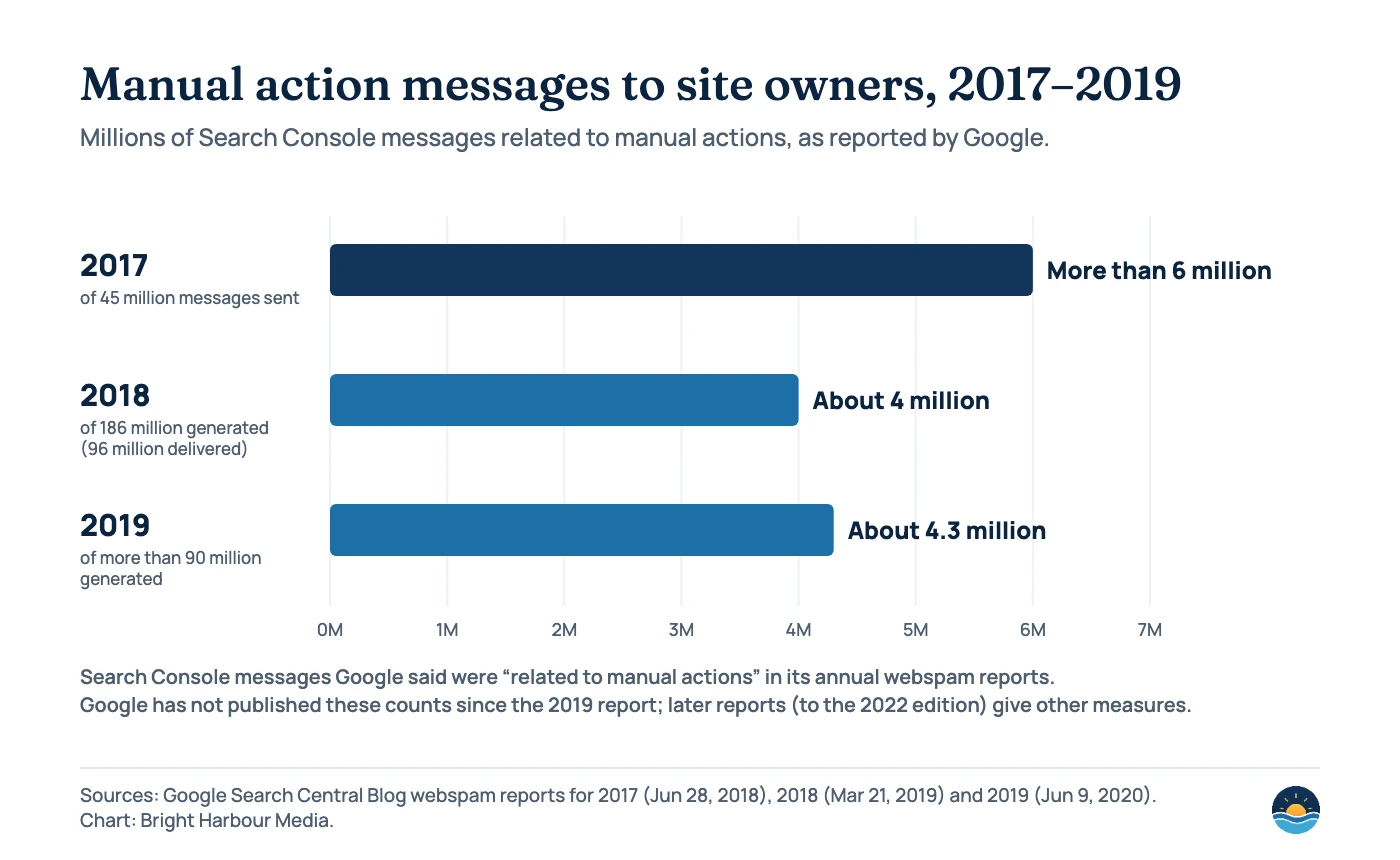
Google stopped publishing these counts after the 2019 report. The later reports, up to the 2022 edition published April 11, 2023, describe automated detection instead. For example, the 2020 report says Google discovered 40 billion spammy pages every day. So manual actions are a small, targeted share of Google’s anti-spam work, but they still number in the millions.
What are the types of manual action, and how do you fix each?
| Manual action type | What Google found | How to fix it |
|---|---|---|
| Back button hijacking | The site manipulates browser history to interfere with navigation | Remove the code or third-party scripts responsible |
| Site abused with third-party spam | Spam on forums, guestbooks, uploads, free hosting or internal search pages | Find the entry points, remove the spam, block abuse, use rel=”ugc” |
| User-generated spam | Spam posted by visitors in comments, forums or profiles | Remove spam posts and accounts; add moderation and anti-spam tools |
| Spammy free host | A large share of sites on a free hosting service are spam | Remove spammy accounts; work with the host’s technical team |
| Structured data issue | Markup that breaks Google’s structured data guidelines | Correct the markup or remove it |
| Unnatural links to your site | A pattern of manipulative links pointing to the site | Remove or nofollow the links; disavow the rest; document the work |
| Unnatural links from your site | Paid or exchanged outbound links that pass ranking credit | Remove them or qualify them with rel=”sponsored” or “nofollow” |
| Thin content with little or no added value | Thin affiliate pages, scraped content, low-quality guest posts, doorways | Improve or remove the pages so the site adds real value |
| Cloaking and/or sneaky redirects | Users see different pages from Google | Compare views in URL Inspection; remove conditional redirects |
| Major spam problems | Aggressive spam such as scaled content abuse or repeated violations | Clean up the whole site; show examples of what changed |
| Cloaked images | Images shown to Google differ from those shown to users | Serve the same images to both |
| Hidden text and/or keyword stuffing | Text hidden with colour or CSS, or repeated keywords | Remove hidden text and stuffed keywords |
| AMP content mismatch | AMP page content differs from the canonical page | Align the content; the canonical shows in Search meanwhile |
| Sneaky mobile redirects | Mobile users are redirected to content crawlers don’t see | Check for hacks; remove ad or third-party scripts one by one |
| News and Discover policy violations | Content breaks a News or Discover content policy | Fix or remove it and show changed editorial practices |
| Site reputation policy | Third-party content using the host site’s ranking signals | Move it to a new domain, noindex it, make it first-party, or remove it |
Two of these overlap with link building. For unnatural links to your site, Google wants a real clean-up first: “Blindly adding all backlinks to the disavow file is not considered a good-faith effort.” Our guide to disavowing links explains when a disavow file helps. For site reputation issues, our article on guest posting and Google’s policies covers where third-party content crosses the line.
What changed in 2024–2026?
| Date | Change | Why it matters |
|---|---|---|
| Mar 5, 2024 | New spam policies for expired domain abuse, scaled content abuse and site reputation abuse | Broader grounds for manual actions on content made at scale |
| May 5, 2024 | Site reputation abuse enforcement begins | Affected sites notified in Search Console |
| Nov 19, 2024 | Policy clarified: first-party involvement doesn’t exempt third-party content | White-label sections can still be actioned |
| Apr 13, 2026 | Back button hijacking added to spam policies (enforced from Jun 15, 2026) | New manual action type in the report |
| Apr 14, 2026 | Docs updated: spam reports may now be used to take manual action | User spam reports can lead to manual review |
| Aug 28, 2026 | Policy renamed “site reputation policy”; EEA enforcement changes from Aug 30 | Manual action impact no longer applies to EEA results |
The EEA change is unusual. Google’s August 28, 2026 post says that for users outside the EEA, a site reputation manual action “will directly affect search results for the portion of the site affected.” For users inside the EEA, “the impact of the manual action won’t apply.” Instead, the section may be separated so that it “ranks independently from the rest of the site.” Google’s spam policies also describe a new reconsideration process for EEA cases, with a commitment to answer “within a short timeframe,” and eligible sites can take disputes to mediation.
How do you fix a manual action and request a review?
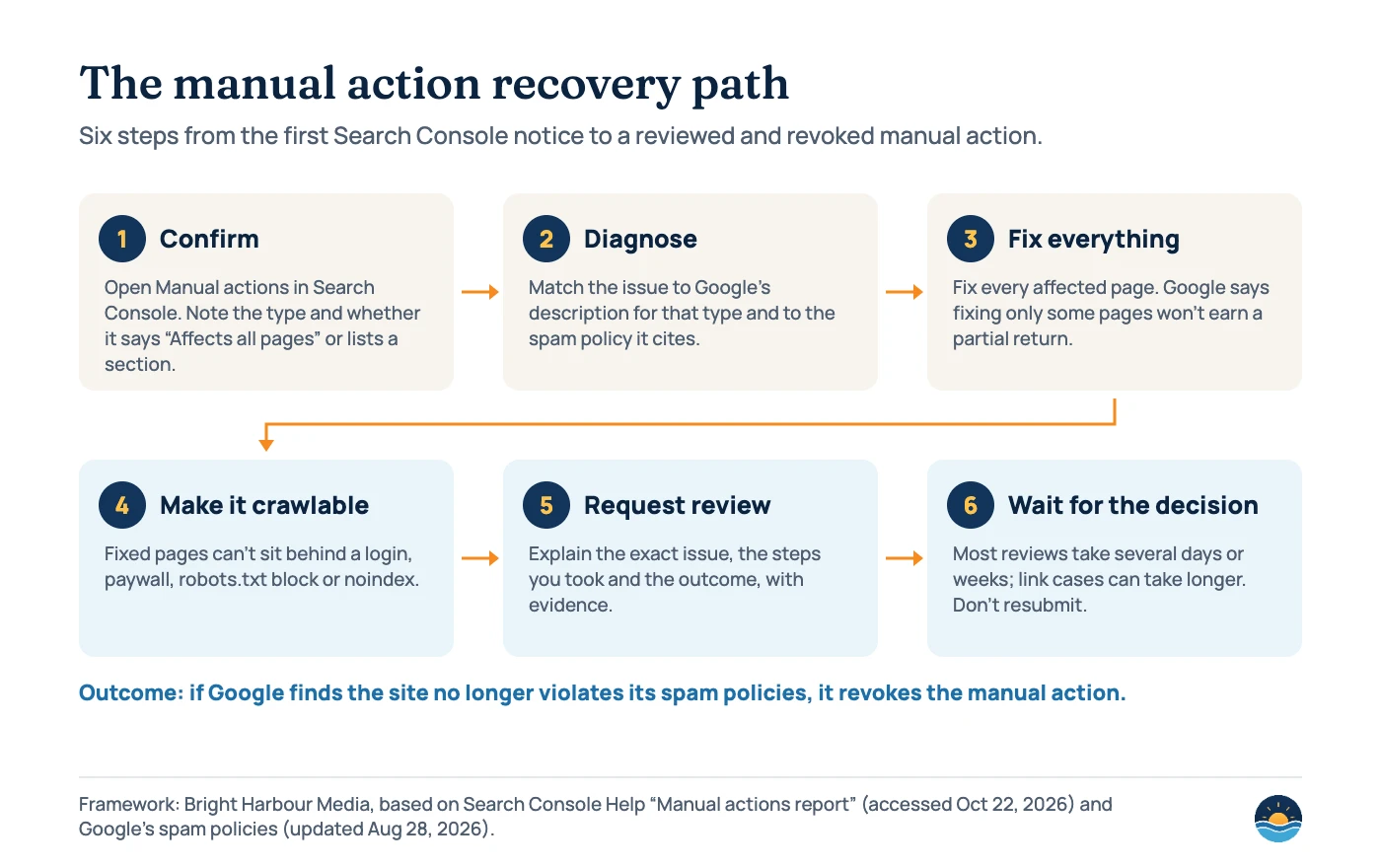
Before you request a review, make sure Google can see the fixes. Google says the fixed pages can’t sit behind a login or paywall, or be blocked by robots.txt or a noindex directive. Spot-check a sample with the URL Inspection tool. If you chose noindex as the fix for site reputation content, Google still wants a reply: “You still need to reply to the manual action in Search Console and explain that the content has been noindexed.”
A good reconsideration request does three things, according to Google. It “explains the exact quality issue on your site,” “describes the steps you’ve taken to fix the issue,” and “documents the outcome of your efforts.” In practice, we write it like this:
- Name the action and scope. Quote the type and the affected URLs or sections exactly as the report shows them.
- Explain the cause in plain words. Say what happened, such as an old link campaign, an unmoderated forum or a plugin that injected redirects, without blaming Google.
- List the fixes. Give counts: pages removed or improved, links removed, domains disavowed, scripts taken out.
- Show evidence. Link to a shared spreadsheet of removals and outreach attempts, or before-and-after examples of improved pages.
- Describe prevention. Explain the moderation, editorial or vendor rules that stop it happening again.
- Submit once and wait. Google emails when it receives the request and when the review is done, and asks you not to resubmit before a final decision.
- If it is rejected, read the reply. Fix what is still wrong, then submit a new request with fresh evidence.
Helps a request
- Fixing every affected page, not a sample
- Real link removals and outreach before a disavow
- Specific counts, examples and a shared evidence file
- Telling Google you recently bought the site, if you did
Hurts a request
- Disavowing every backlink “blindly”
- Moving problem content to a subdomain or subfolder
- Fixed pages blocked by robots.txt, noindex or a login
- Resubmitting while a review is pending
What happens after approval? Google’s help page says that if the site is “no longer in violation of our spam policies, we’ll revoke the manual action.” It doesn’t promise that rankings return to their earlier level. Visibility that came from the violating pages or links won’t come back, so set expectations with stakeholders and plan the content or link work that replaces it.
Frequently asked questions
Can a manual action affect only part of my site?
Yes. Google says a manual action can apply to a subset of the site or the entire site. The report shows either “Affects all pages” or the specific URL pattern or section affected.
How long does a reconsideration request take?
Google says most reconsideration reviews take several days or weeks, and link-related requests can take longer. You get an email when the request is received and when the review is finished.
Is a drop after a core update a manual action?
No. Core updates and other automated systems don’t create entries in the Manual actions report. If the report shows a green check mark, look at updates, technical issues and tracking instead.
Do site reputation manual actions apply in the EEA?
Not since August 30, 2026. Google says the impact of these manual actions doesn’t apply to results shown to users in the European Economic Area, though the affected section may be separated so it ranks independently. Outside the EEA, the action still affects results for that part of the site.
Sources
- Manual actions report — Search Console Help, accessed Oct 22, 2026. Definition, types, fixes, scope, reconsideration requests and timing
- Spam policies for Google Web Search — Google Search Central, last updated Aug 28, 2026. Automated vs manual enforcement, site reputation policy
- Security issues report — Search Console Help, accessed Oct 22, 2026. Security issues vs manual actions, review times
- Update to the Site Reputation Policy — Google Search Central Blog, Aug 28, 2026. Rename and EEA enforcement from Aug 30, 2026
- Introducing a new spam policy for “back button hijacking” — Google Search Central Blog, Apr 13, 2026. Enforcement from Jun 15, 2026
- Updating our site reputation abuse policy — Google Search Central Blog, Nov 19, 2024. First-party involvement; noindex FAQ
- What web creators should know about our March 2024 core update and new spam policies — Google Search Central Blog, Mar 5, 2024
- Latest Google Search documentation updates — Google Search Central, accessed Oct 22, 2026. Spam report change (Apr 14, 2026)
- How we fought webspam: Webspam Report 2017 — Google Search Central Blog, Jun 28, 2018. 45 million messages; more than 6 million about manual actions
- This year in search spam: Webspam Report 2018 — Google Search Central Blog, Mar 21, 2019. About 4 million manual action messages
- How we fought Search spam on Google: Webspam Report 2019 — Google Search Central Blog, Jun 9, 2020. About 4.3 million manual action messages
- How we fought Search spam on Google in 2020 — Google Search Central Blog, Apr 29, 2021. 40 billion spammy pages discovered per day
Cite this article: Bright Harbour Media. “Google Manual Actions: How to Find, Fix and Request a Review.” Bright Harbour Media Insights, October 2026. https://brightharbourmedia.com/google-manual-actions/
You are welcome to reference the charts and frameworks in this article with a link back to this page.
Found a manual action, or not sure why your traffic fell? Our SEO audit service diagnoses the cause, plans the clean-up and helps you write the reconsideration request. Contact us to get started.