
To disavow links is to ask Google not to take specific backlinks into account when it assesses your site, by uploading a list of URLs or domains to the disavow links tool in Search Console. Google calls it an advanced feature and says most sites never need it.
Key takeaways
- Google says that “in most cases” it can assess which links to trust on its own. Disavow only when you have a considerable number of spammy, artificial or low-quality links that have caused — or will likely cause — a manual action.
- Remove bad links at the source first. Google warns that blindly disavowing every backlink “is not considered a good-faith effort” in a reconsideration request.
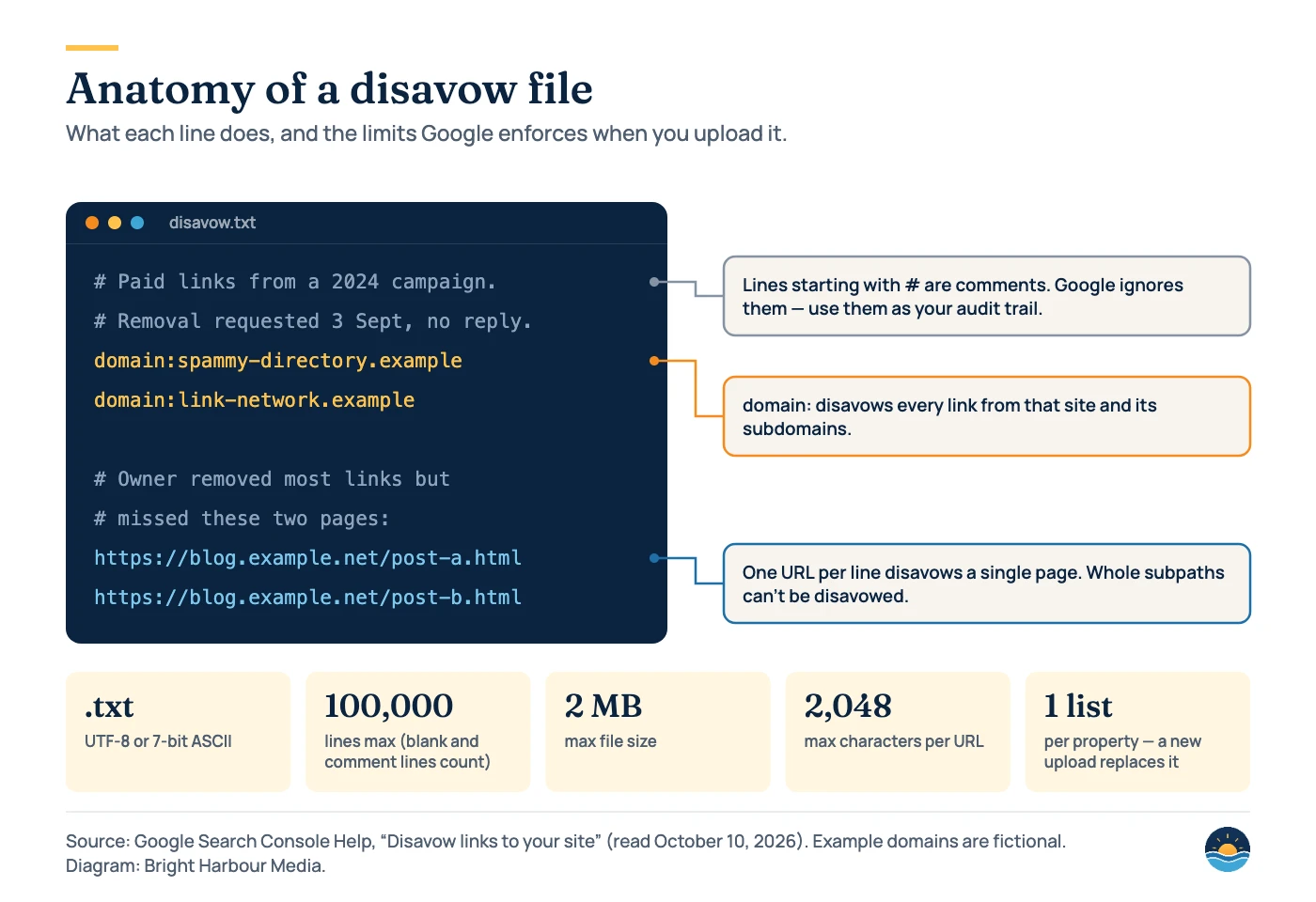
- A disavow file is a .txt file of up to 100,000 lines and 2 MB, with URLs up to 2,048 characters. Each property has one list, and a new upload replaces it.
- The tool doesn’t support Search Console Domain properties, and changes can take a few weeks to take effect.
- Since the December 2022 link spam update, Google says it uses its AI-based SpamBrain system to neutralise unnatural links.
What the disavow tool actually does
Google launched the disavow links tool on October 16, 2012 for one main group of site owners: those who had received a manual action for “unnatural links” pointing to their site. Its launch post was blunt: if you hadn’t received that notification, the tool “generally isn’t something you need to worry about.”
That position hasn’t changed. Google’s current help page, Disavow links to your site, describes the tool as “an advanced feature” that “should only be used with caution,” and warns that if it is used incorrectly it “can potentially harm your site’s performance in Google Search results.” Disavowed links also stay visible in Search Console’s Links report, so the report alone won’t tell you what you have disavowed.
When should you disavow links?
Google sets two conditions, and both have to be true:
- You have a considerable number of spammy, artificial or low-quality links pointing to your site, and
- those links have caused a manual action, or likely will.
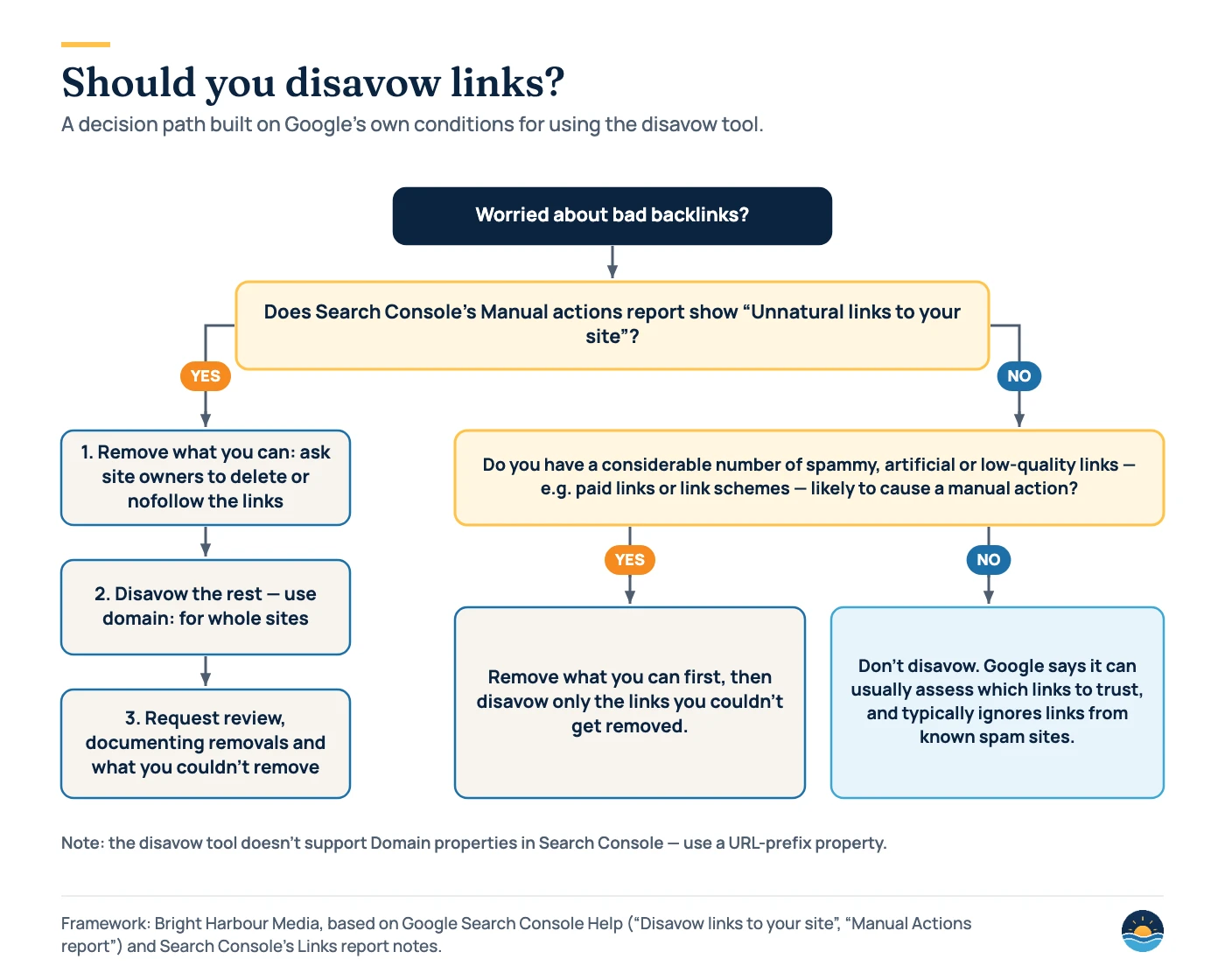
In practice, the second condition usually means links that someone built deliberately to manipulate rankings — paid links, link networks or large-scale exchanges — often by a previous agency or an earlier owner of the domain. Random low-quality links that you never asked for are a different matter.
Disavowing is reasonable when
- Search Console shows a manual action for unnatural links to your site
- You (or a past supplier) bought links or joined a link scheme, and they can’t be removed
- A large batch of paid or exchanged links is likely to trigger a manual action
- You have already asked site owners to remove the links
Leave the tool alone when
- Your backlinks include the usual scraper and directory noise you didn’t build
- Traffic dropped but there is no manual action — diagnose the cause first
- A third-party tool flags links as “toxic” but they don’t match Google’s link spam examples
- You simply don’t like the look of a linking site
If your traffic has fallen and you are tempted to disavow as a fix, work through our Google traffic drop audit first. Disavowing is not a general-purpose recovery tool.
What Google counts as link spam
Google’s spam policies define link spam as links intended to manipulate rankings. These are the examples it gives, with the remedy we would normally start with:
| Link spam example (Google) | Typical first remedy |
|---|---|
| Buying or selling links for ranking purposes — including money, goods or services, or free products in exchange for a link | Ask for removal, or for rel=”sponsored” or rel=”nofollow” |
| Excessive link exchanges, or partner pages built only for cross-linking | Remove the exchange pages and reciprocal links |
| Using automated programs or services to create links to your site | Stop the service; disavow what can’t be removed |
| Requiring a link in terms of service or a contract without letting the site owner qualify it | Change the terms; allow qualified links |
| Text ads or text links that don’t block ranking credit | Add rel=”sponsored” or rel=”nofollow” |
| Advertorials or guest posts with paid links or keyword-rich anchor text | Ask publishers to qualify or remove the links |
| Low-quality directory or bookmark site links | Ask for removal; disavow if there are many and they were built deliberately |
| Keyword-rich, hidden or low-quality links in widgets, footers or templates distributed across many sites | Update the widget or template; qualify the links |
| Forum comments with optimised links in the post or signature | Remove where possible |
| Low-value content created mainly to manipulate linking and ranking signals | Remove the content or the links |
Google adds that buying and selling links isn’t a violation when the links are qualified with rel=”nofollow” or rel=”sponsored”. Our guide to nofollow, sponsored and UGC links explains which value to use.
How Google handles spammy links today
Much of the case for routine “link clean-up” comes from a time when Google’s systems were less able to discount bad links. In its December 2022 link spam update (announced December 14, 2022), Google said it was “leveraging the power of SpamBrain to neutralize the impact of unnatural links,” and that SpamBrain could now detect both sites buying links and sites used to pass outgoing links. Credit passed by those links, it said, would be lost.
Search Console’s Links report documentation makes a similar point at a smaller scale: for known spam sites, “Google typically will ignore the links.” That is why disavowing every odd-looking domain is usually wasted effort — and why Google reserves the tool for deliberate, large-scale problems.
How to build a disavow file
| Rule | Detail |
|---|---|
| File type | Plain text (.txt), encoded in UTF-8 or 7-bit ASCII |
| One entry per line | A single URL, or a whole site using the domain: prefix (which also covers its subdomains) |
| No subpaths | You can disavow a page or a domain, but not a folder such as /blog/ |
| Comments | Lines starting with # are ignored |
| Size limits | 100,000 lines (blank and comment lines count) and 2 MB; URLs up to 2,048 characters |
| Property type | URL-prefix properties only — Domain properties aren’t supported; you must be a property owner |
| http vs https | Each needs its own list; a list also applies to child properties such as an m. subdomain |
| One list per property | Uploading a new file replaces the old one; if the file has errors, the old list is kept |
| Timing | A few weeks to take effect, as Google recrawls; cancelling disavowals also takes a few weeks |
Because each upload replaces the previous list, keep a master copy of your disavow file in version control or a shared drive and always edit that copy. Uploading a short “new” file by mistake removes everything you disavowed before.
A 6-step disavow process (when you genuinely need one)
- Confirm the need. Check Search Console’s Manual actions report. If there is no manual action, make sure the links really match Google’s link spam examples and were built at scale.
- Export your links. Google suggests downloading them from the Links report — by linking site (Top linking sites → Export) or by date (Export external links → Latest links). The report is a sample and its tables are limited to 1,000 rows, so add third-party backlink data for larger sites.
- Classify the links. Compare each linking site with the spam policies. On a large list, Google suggests starting with the sites that link to you most, or links created in the last few months.
- Ask for removal. Contact site owners and ask them to remove the links or qualify them with rel=”nofollow”. Log every request and reply — this becomes your evidence.
- Disavow what remains. Use
domain:for sites where every link is a problem, and individual URLs where only some are. Don’t include organic links. Upload the file to a URL-prefix property. - Request a review (if there was a manual action). Explain the issue, what you removed, what you couldn’t and why. Google says most reviews take several days or weeks, link reviews can take longer, and you shouldn’t resubmit before you get a decision.
Throughout, remember Google’s warning in its manual actions guide: “Simply disavowing all backlinks without attempting to remove them might lead to rejection of your request.” If you are rebuilding a link profile afterwards, focus on earning links rather than buying them — our comparison of link building and digital PR covers the safer options.
Mistakes to avoid
| Mistake | Why it hurts | Better approach |
|---|---|---|
| Disavowing every backlink | Can discard links that help you; Google says it isn’t a good-faith effort | Disavow only links that match the spam policies |
| Uploading a partial list | The new file replaces the old one, so earlier disavowals are lost | Edit and re-upload a single master file |
| Using a Domain property | The tool doesn’t support Domain properties | Verify a URL-prefix property for the version your site uses |
| Trying to disavow a folder | Subpaths can’t be disavowed | List the individual URLs or use domain: |
| Expecting overnight results | Google says changes take a few weeks | Record the upload date and review a month later |
| Disavowing to fix a traffic drop with no manual action | Links may not be the cause at all | Diagnose the drop first |
Frequently asked questions
Will disavowing links improve my rankings?
Not on its own. Google built the tool to help sites address unnatural-link problems, mainly manual actions. Its help page warns that incorrect use can harm a site’s performance, and says that in most cases Google can already assess which links to trust.
Can spammy links from other sites hurt me if I didn’t build them?
Google’s Links report documentation says that for known spam sites, Google typically ignores the links, and its December 2022 update used SpamBrain to neutralise unnatural links. If you see a manual action, though, deal with it using the process above.
How long does a disavow take to work?
Google says a successful upload can take a few weeks to take effect, because it needs to recrawl and reprocess the pages. Removing disavowals takes a similar amount of time.
How do I undo a disavow?
Select the property in the disavow tool and click Cancel Disavowals. To change the list instead, upload a new complete file — it replaces the existing one.
Sources
- Disavow links to your site — Google Search Console Help — when to disavow, file format, limits, property rules, timing
- Manual Actions report — Google Search Console Help — unnatural links actions and reconsideration requests
- Links report — Google Search Console Help — export options, 1,000-row limit, handling of known spam sites
- Spam policies for Google web search — Google Search Central (last updated August 28, 2026) — link spam examples
- December 2022 link spam update releasing for Google Search — Google Search Central Blog (December 14, 2022) — SpamBrain neutralising unnatural links
- A new tool to disavow links — Google Search Central Blog (October 16, 2012) — the tool’s original purpose
Cite this article: Bright Harbour Media. “Disavowing Links: When to Use Google’s Disavow Tool.” Bright Harbour Media Insights, October 2026. https://brightharbourmedia.com/disavow-links/
You are welcome to reference the charts and frameworks in this article with a link back to this page.
Inherited a link profile you’re worried about? Our link building and digital PR service starts with an honest backlink review — and only recommends a disavow when Google’s conditions are met. Get in touch to talk it through.