
Video SEO is the work of making a video easy for Google to find, understand and show in its video features. In practice, Google only indexes a video when it is embedded on an indexed watch page (a page whose main purpose is to show that one video) with a valid thumbnail and clear metadata.
Key takeaways
- Google’s Video SEO guide (updated Dec 18, 2025) says the watch page must be indexed and “performing well in Search” before its video is considered for indexing.
- Since December 4, 2023, Google’s Video mode only shows pages where video is the main content. Blog posts that merely embed a video can still appear as text results.
- Google indexes only one video per page. Thumbnails must be at least 60×30 pixels, in one of seven image formats, at a stable URL.
- VideoObject markup needs just three properties (name, thumbnailUrl, uploadDate). Key moments need a video of at least 30 seconds.
- Only 6.7% of mobile pages contain a <video> element, and just 3% of video elements set a poster image (HTTP Archive Web Almanac 2024).
What is video SEO, and why does it matter now?
Video can show up in several places in Google: the main results (with a thumbnail), the Videos tab and Video mode, Google Images with a video badge, and rich features such as key moments, video previews and the LIVE badge. Each needs Google to do three things: find the video, understand what it is about, and fetch a usable thumbnail (and ideally the video file itself).
Google reads video information from three places: structured data, video sitemaps and Open Graph tags. Those signals only help if the page itself is set up the way Google expects. Many video problems sit in the page rather than the markup: the video is a small embed on a long article, it loads only after a click, or the page it sits on isn’t indexed.
The video rules build on ordinary indexing, so it helps to have the basics in place first. If you are unsure which of your pages are indexed, start with our guide to the Page indexing report.
What changed: Google now favours dedicated watch pages
Over 2023, Google narrowed which pages it treats as video results. In April 2023 it announced that video thumbnails would only appear next to search results “when the video is the main content of a page.” On December 4, 2023 it applied the same rule to Video mode and warned site owners to expect “a decrease in the number of pages with indexed videos.” The Search Console Video indexing report swapped several older error reasons for one new one, which the help page now calls “Video isn’t on a watch page.”
| Date | Change | What it means for you |
|---|---|---|
| Apr 13, 2023 | Video thumbnails beside results only when the video is the main content of the page | Pages with a small embedded video lose the thumbnail |
| Jun 12, 2023 | Video indexing report adds prominence reasons (outside the viewport, too small, too tall) | Early signal of the watch-page rule; these reasons were later merged |
| Dec 4, 2023 | Video mode only shows pages where video is the main content; new “not the main content” reason | Fewer pages with indexed videos for most sites |
| May 16, 2024 | GoogleOther-Video crawler documented | Another Google user agent may fetch video files |
| Aug 23, 2024 | Video SEO docs overhauled with a new watch page section | Google’s current definition of a watch page |
| Sep 24, 2026 | VideoObject docs add the creator property and document interactionStatistic types | Newer, optional ways to describe who made the video and how people engage with it |
What counts as a watch page?
Google’s definition is short: “A watch page’s main purpose is to show users a single video.” The video should be prominent, loaded with the page, and not hidden behind other elements. The same video can also sit on other pages. Those pages can still appear as normal text results, or in Google Images with a video badge, but they won’t be indexed as the video result.
Usually a watch page
- A video landing page built around one video
- A TV episode or news video page
- A sports highlight or event clip page
- A how-to page where the video is the main content and the text supports it
Usually not a watch page
- A blog post that reviews or embeds a video lower down
- A product page with a 360° product video
- A category page with several videos of equal prominence
- A movie review page with a trailer
For a service business this changes the plan. If a video matters for search, give it its own page with a descriptive title, a short summary or transcript, and the player at the top. Then link to that page from the related service page or article, rather than hoping a video halfway down a long post gets picked up.
How does Google decide whether to index a video?
We think of it as five gates. A video has to pass each one in order. When a gate fails, you usually still get something, just not the video result.
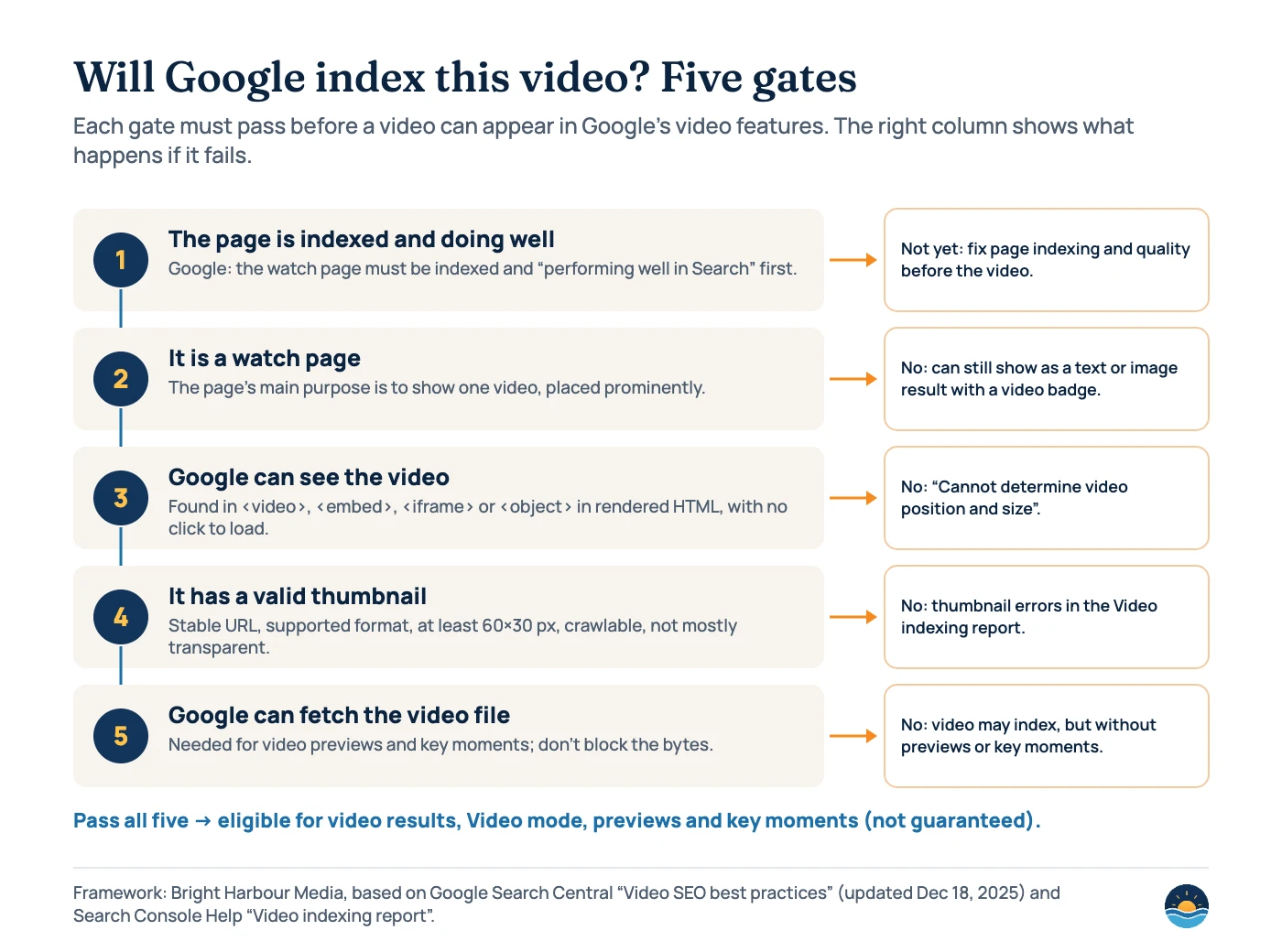
Gate three trips up a lot of sites. Google finds videos referenced by a <video>, <embed>, <iframe> or <object> element. It tells site owners not to “rely on user actions (such as swiping, clicking, or typing) to load the video.” A static image with a play icon that swaps in the player on click is exactly that pattern. If your player is injected with JavaScript, check the rendered HTML with the URL Inspection tool.
How much video is on the web, and how long is it?
Video is still rare on web pages compared with images, which is one reason a well-built watch page can stand out. HTTP Archive’s 2024 crawl found at least one <video> element on 6.7% of mobile pages and 7.7% of desktop pages. The mobile figure was up 32% in relative terms from 2022. Most of those videos are short: “Nine out of ten videos are less than two minutes long.”
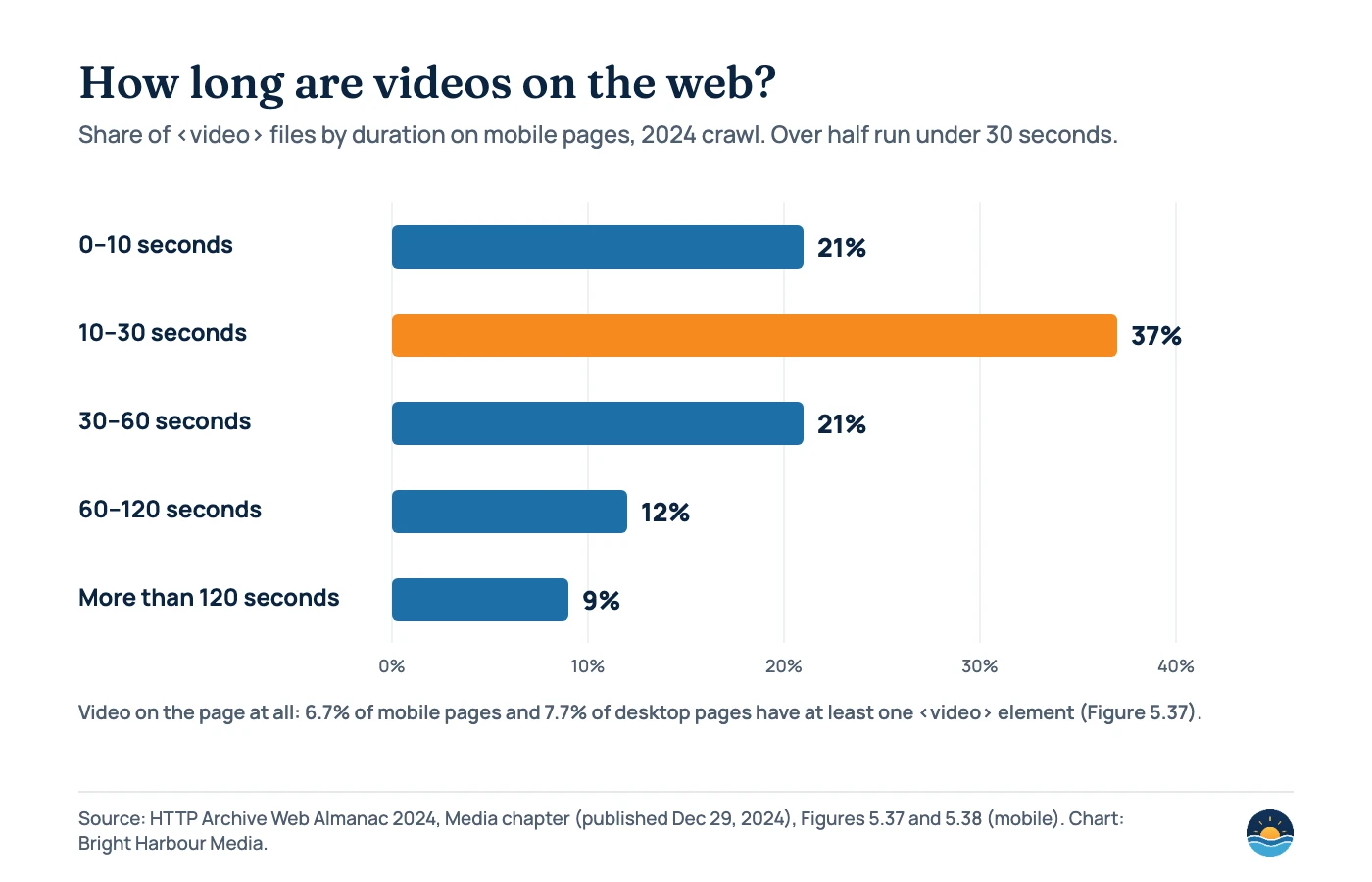
Two details matter for SEO. First, many of these are short decorative loops rather than content videos: autoplay appears on 23% of video elements. Second, only 3% of video elements use the poster attribute, one of the ways to give Google a thumbnail. Google’s key moments features also need a video of at least 30 seconds, which rules out most of the short clips counted here.
Which metadata does Google need?
Structured data is the most detailed signal. Google’s video structured data guide (updated Sep 24, 2026) needs only three properties, but the recommended ones are where most of the value is. In particular, contentUrl is “the most effective way for Google to fetch your video content files.”
| VideoObject property | Status | Notes |
|---|---|---|
| name | Required | The video’s title. Keep it the same as the title in your sitemap and on the page |
| thumbnailUrl | Required | One stable URL per video; use the same one everywhere |
| uploadDate | Required | ISO 8601 date. Adding time and timezone is recommended |
| contentUrl / embedUrl | Recommended | contentUrl points to the video file; embedUrl to the player |
| description, duration | Recommended | Description has been optional since May 4, 2023 |
| expires | Recommended | Only if the video really expires; a past date removes it from video results |
| hasPart (Clip) / SeekToAction | Recommended | Key moments; the video must be at least 30 seconds long |
| publication (BroadcastEvent) | Recommended | Livestreams; enables the LIVE badge with isLiveBroadcast, startDate, endDate |
| regionsAllowed / ineligibleRegion | Recommended | Regional restrictions |
| creator, interactionStatistic | Recommended | Documented on Sep 24, 2026 (creator added; WatchAction, LikeAction and other types listed) |
Video sitemaps are the second signal, and Google recommends them (mRSS feeds also work). The required tags are video:thumbnail_loc, video:title, video:description (up to 2,048 characters) and either video:content_loc or video:player_loc. Neither of those two can be the same as the page URL. The sitemap documentation lists video:category, video:gallery_loc, video:price and video:tvshow as deprecated, so drop them from older templates. If you are setting up sitemaps for the first time, our XML sitemaps guide covers the basics.
Thumbnails: the small detail that blocks a lot of videos
A video without a usable thumbnail won’t be indexed. Google’s requirements are specific:
- Format: BMP, GIF, JPEG, PNG, WebP, SVG or AVIF.
- Size: “Minimum 60×30 pixels, larger preferred.”
- Access: crawlable by Googlebot and Googlebot-Image, so not blocked by robots.txt or behind a login.
- Transparency: at least 80% of the pixels need an alpha value above 250, so the image can’t be mostly see-through.
- Consistency: a single, stable URL per video, used in the poster attribute, structured data, sitemap and og:video:image alike.
Thumbnails are images, so the usual image rules apply too. Our image SEO guide covers formats, file names and alt text.
What the Video indexing report tells you
Search Console’s Video indexing report shows two statuses, “Video indexed” and “No video indexed,” with a reason for each page that failed. It covers only indexed, canonical pages, and Google indexes only one video per page. After you fix an issue and start validation, Google says it “typically takes up to about two weeks.”
| Reason in the report | What it usually means | Fix |
|---|---|---|
| Video isn’t on a watch page | The video isn’t the main content of the page | Give the video its own page, place the player high in the HTML, check the rendered page |
| Cannot determine video position and size | The player loads late or only after a click | Load the player at its real size and position when the page loads |
| No thumbnail URL provided | No thumbnail in markup, sitemap or feed | Add thumbnailUrl or video:thumbnail_loc and keep it consistent |
| Invalid thumbnail size / Unsupported thumbnail format | Image too small or wrong type | Use a supported format, at least 60×30 px |
| Thumbnail blocked by robots.txt / could not be reached | Googlebot can’t fetch the image | Unblock it, remove login protection, fix broken URLs |
| Thumbnail is transparent | Too many transparent pixels | Use an opaque image |
| Video not processed yet | Google hasn’t finished processing | Use stable URLs and check back in a few days |
| Video not found on host service | The embed points to a missing video | Correct the video ID or URL |
Key moments, previews and third-party players
Key moments let people jump to a section of a video from the search result. You can define them with Clip markup (supported in all languages), or let Google find them with SeekToAction, which works in 12 languages. If your video is on YouTube, timestamps in the YouTube description also work. Both methods need the video to be at least 30 seconds long and to support deep links to a timestamp. SeekToAction also needs Google to be able to fetch the video file.
Video previews and key moments both depend on Google fetching “the actual bytes of a video file.” Don’t block video files with robots.txt or noindex if you want these features. If you embed a YouTube or Vimeo player, Google “may index the video both on your web page and on the third-party platform’s equivalent page.” That is fine. Just make your own watch page the more useful of the two, with a summary, transcript and links to related services.
To remove a video, return a 404 or noindex on the page, or set an expiry date. Be careful with expiry dates. Google warns that “it’s easy to accidentally set the date to the past,” which quietly takes the video out of video results.
A seven-step video SEO process
- Pick the videos worth ranking. Choose videos that answer a real search, such as a how-to, a walkthrough or an explainer, rather than decorative loops.
- Give each one a watch page. One video per page, player at the top, a descriptive title, a short summary and a transcript.
- Load the player with the page. Use a standard embed and avoid click-to-load placeholders. Confirm the rendered HTML in URL Inspection.
- Add VideoObject markup. Include name, thumbnailUrl and uploadDate, plus contentUrl or embedUrl, duration and description.
- Fix the thumbnail. Use one stable, crawlable, opaque image in a supported format, well above 60×30 px.
- List videos in a video sitemap. Keep titles, thumbnails and URLs identical across the sitemap, markup and page.
- Check the Video indexing report monthly. Fix the top reason first, validate, and track the Videos search appearance in the Performance report.
Frequently asked questions
Do I need a separate page for every video?
Only for videos you want to appear as video results. Google indexes a video when it sits on a watch page whose main purpose is to show that one video. Videos embedded in other pages can still help those pages, and the page can appear as a text result, but it won’t be indexed as the video.
Is it better to host videos on YouTube or on my own site?
Both can work. Google may index the video on your page and on the YouTube page. If you want the click to land on your site, build a strong watch page around the embed, with markup, a summary and a transcript.
Why does Search Console say “No video indexed” when the page is indexed?
The most common reason is that the video isn’t the main content of the page. Other common causes are a player that loads only after a click and a missing or blocked thumbnail. The Video indexing report gives a reason for each affected page.
How do I get key moments for my video?
Add Clip markup with a name, start offset and URL for each section, or use SeekToAction so Google can find key moments automatically. The video must be at least 30 seconds long, support deep links to a timestamp, and for SeekToAction, Google must be able to fetch the video file.
Sources
- Video SEO best practices — Google Search Central, last updated Dec 18, 2025. Watch page rules, embedding, thumbnails, key moments, previews, removal
- Video (VideoObject, Clip, BroadcastEvent) structured data — Google Search Central, last updated Sep 24, 2026. Required and recommended properties, Clip and SeekToAction rules
- Video sitemaps and alternatives — Google Search Central, last updated May 20, 2026. Required, optional and deprecated tags
- Video indexing report — Search Console Help, accessed Oct 22, 2026. Statuses, reasons, fixes and validation time
- Simplifying video presentation on Google Search Results — Google Search Central Blog, Apr 13, 2023
- Improving prominence reporting in the Search Console video indexing report — Google Search Central Blog, Jun 12, 2023
- Video mode now only shows pages where video is the main content — Google Search Central Blog, Dec 4, 2023
- Latest Google Search documentation updates — Google Search Central, accessed Oct 22, 2026. Dates of 2023–2026 video documentation changes
- Web Almanac 2024: Media chapter — HTTP Archive, published Dec 29, 2024. Video adoption, durations and attribute usage
Cite this article: Bright Harbour Media. “Video SEO: How to Get Your Videos Indexed in Google.” Bright Harbour Media Insights, October 2026. https://brightharbourmedia.com/video-seo/
You are welcome to reference the charts and frameworks in this article with a link back to this page.
Want your videos to work as hard as your written content? Our content strategy service plans watch pages, transcripts and markup around the searches your customers make. Get in touch to talk it through.