
Google Business Profile performance is the report Google gives verified businesses showing how many people viewed their profile on Search and Maps, which search terms surfaced it, and what those people did next: calls, website clicks, direction requests, bookings and messages. It measures visibility and intent, not sales, so it works best alongside your analytics and lead records.
Key takeaways
- Performance data is “available only for verified Business Profiles” and includes activity from both organic results and Google Ads.
- A person is counted as a profile view at most once a day; the API counts repeat impressions by one user in a day as a single impression.
- The Searches metric updates at the start of each month and “might take up to 5 days to show up.”
- Business Profile chat ended on July 31, 2024; Google added a new messaging-clicks metric (e.g. WhatsApp, text) to the Performance API on October 14, 2026.
- In Birdeye’s 2026 data, website visits were 47% of profile actions, direction requests 38% and calls 15%.
Where do you find Business Profile performance data?
There are three places to get it, and they don’t show quite the same thing:
- On Google Search or Maps. Search for your business while signed in and click Performance, or in the Google Maps app open Business and tap See more next to Performance. Google notes that “only metrics that apply to your business appear.”
- In Business Profile Manager. Select one or more profiles, open Insights from the actions menu, choose a timeframe and download a spreadsheet. This is the practical option for multi-location businesses.
- Through the Business Profile Performance API. Daily metrics split by device and platform, plus monthly search keywords. Agencies and reporting tools use this.
One point people often miss: Google says the report “includes views, searches, and actions from both organic search results and Google Ads.” If you run Local Services Ads or location extensions, Performance numbers are not a pure measure of organic local SEO.
What does each metric mean?
Here is what Google’s help page and API documentation say each metric counts, with the detail that matters when you read it.
| Metric | What it counts | Watch out for |
|---|---|---|
| Views | “How many people viewed your Business Profile on Search and Maps.” Unique visitors. | “A person can only be counted once a day.” Counts profile views, “not the overall views of your business on Google.” |
| Searches | “The search terms people used to find your business.” | Updated at the start of each month, up to 5 days late. Low-volume terms are shown as a threshold in the API, not an exact number. |
| Calls | Times “a customer clicked on the call button.” | Clicks, not connected calls. Needs a phone number on the profile. |
| Website clicks | Times people “clicked on the website link.” | Will not match GA4 sessions exactly (see below). |
| Directions | “How many people asked for directions.” | Google adjusts for multiple taps, cancelled requests and spam. |
| Bookings | Completed bookings through a booking provider. | Only applies if a supported provider is connected. |
| Menu / products / offers | Menu clicks per user per day; product and offer views. | Only shown for eligible business types. |
| Interactions | “A summary of all your total interactions.” | A total of different actions, not a count of people. |
How does the API break the numbers down?
The Performance API splits impressions into four metrics: desktop Maps, desktop Search, mobile Maps and mobile Search. Each one counts “multiple impressions by a unique user within a single day” as one. Action metrics include CALL_CLICKS, WEBSITE_CLICKS, BUSINESS_DIRECTION_REQUESTS, BUSINESS_BOOKINGS, BUSINESS_FOOD_MENU_CLICKS and, since October 14, 2026, MESSAGING_CLICKS for clicks on a message or chat button such as WhatsApp or text message.
Search keywords come from a separate monthly endpoint. Each row is the lower-cased search term and either the number of unique users who used it that month or “a threshold that indicates that the actual value is below this threshold.” In other words, long-tail terms are masked. Treat the list as directional.
What has changed in Business Profile metrics?
Several metrics have been added, retired or renamed in the last few years. If you compare year-on-year reports, check this list first so a product change isn’t mistaken for a performance drop.
| Date | Change | Effect on reporting |
|---|---|---|
| Mar 30, 2023 | Direct/indirect query split and photo metrics removed from the old API, with no replacement | Older reports with these metrics can’t be continued |
| May 30, 2023 | Business Calls API deprecated | Call history data no longer available via that API |
| Jul 31, 2024 | Business Profile chat and call history features ended; BUSINESS_CONVERSATIONS deprecated (removal Jan 31, 2026) | Message counts stop; calls still arrive at your own number |
| Oct 22, 2025 | BUSINESS_FOOD_ORDERS deprecated, removal Apr 22, 2027, “no replacement” | Restaurants lose an orders metric |
| Nov 3, 2025 | My Business Q&A API discontinued | Q&A can’t be managed or reported via API |
| Oct 14, 2026 | MESSAGING_CLICKS added to the Performance API | New way to count WhatsApp/text contact clicks |
Which actions do customers take most?
Google doesn’t publish benchmarks for these metrics, so the best available comparisons come from platform vendors. Birdeye’s “State of Google Business Profile 2026” reports the share of actions across its brand customers. Treat it as a rough guide: the page describes the data as coming from large brands using Birdeye and doesn’t publish the sample size or date range.
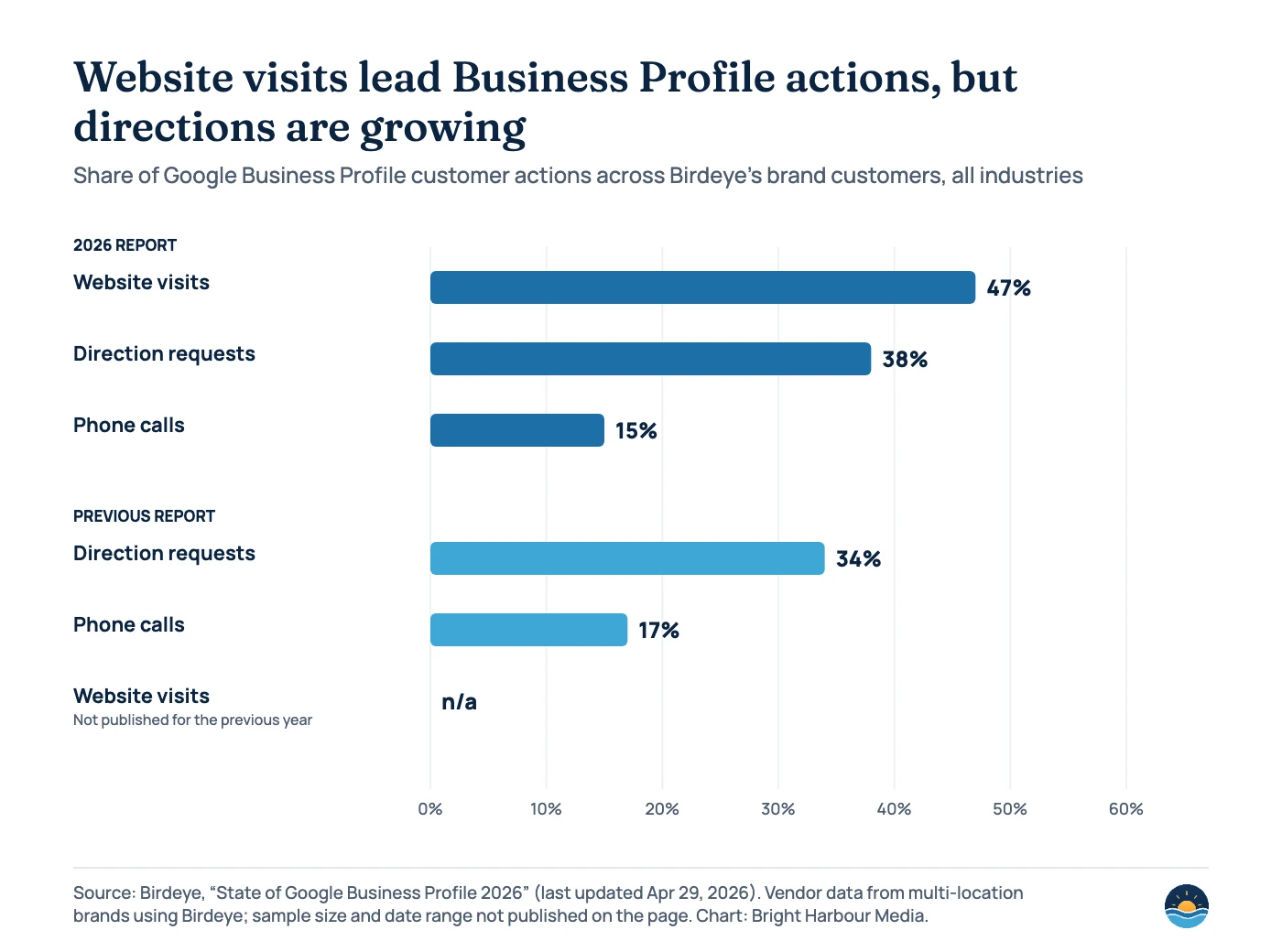
Birdeye also reports that 86% of profile impressions came from category-based rather than branded searches, and that impressions per location fell 53.8% while customer actions fell only about 5%. If your views are falling but actions are steady, you’re not alone, and actions are the better health check. The action mix also varies by industry in Birdeye’s data: calls were 36% of actions in healthcare, while directions were 57% in retail.
Read these as signals
- Trends in calls, website clicks and directions month on month
- The mix of actions, and how it shifts after profile changes
- Category-style search terms rising or falling
- Differences between locations on the same date range
Don’t read these as
- Leads or sales: a call click isn’t a booked job
- Pure organic results: ads activity is included
- Exact keyword volumes: low numbers are thresholds
- Website sessions: GA4 counts differently
How do you connect Business Profile clicks to leads?
Business Profile metrics stop at the click. To see what happens next, tag the website link on your profile and track what visitors do in Google Analytics 4. Google’s Analytics help says “you should always use utm_source, utm_medium, and utm_campaign,” and warns that values are case-sensitive, so use lowercase.
A common pattern is to set the profile’s website URL to something like https://example.com/?utm_source=google&utm_medium=organic&utm_campaign=gbp. Keeping the medium as organic matters: GA4’s Organic Search channel rule includes traffic where the medium “exactly matches organic,” so tagged profile clicks stay in Organic Search while the campaign value lets you separate them from other organic visits. For multi-location brands, add the location to utm_content.

Calls need their own record, because the call metric only counts button clicks. A call log or CRM closes the gap. If you use a tracking number, keep your main business number consistent everywhere else (see our guide to local citations and NAP). For how these numbers roll up into a client report, see SEO reporting KPIs and measuring SEO ROI.
A seven-step monthly Business Profile review
- Pull the same date range each month. Download Performance data for every location from Business Profile Manager, or the API, after the first week of the month so Searches data has landed.
- Note product changes first. Check the change table above and Google’s change log before you explain any sudden jump or drop.
- Read actions before views. Calls, website clicks and directions show intent; views are noisier and, in Birdeye’s data, falling across the board.
- Review search terms. Look for category terms you want to rank for and terms that suggest the wrong category. Our guide to profile categories covers the fix.
- Match website clicks to GA4. Compare profile website clicks with UTM-tagged sessions and key events. Expect gaps; watch the trend, not the exact match.
- Match call clicks to real calls. Compare with your call log or CRM so you know roughly how many clicks become conversations.
- Act on one thing. Pick a single change for next month (photos, services, reviews, hours, categories) and note it, so next month’s numbers have context.
Frequently asked questions
Why don’t profile website clicks match my Google Analytics numbers?
They measure different things. Business Profile counts clicks on the website link; GA4 counts sessions that load your tracking, which can be blocked by consent choices, ad blockers or people leaving before the page loads. Use UTM tags to see the trend in GA4 rather than expecting an exact match.
Does the Performance report include Google Ads?
Yes. Google’s help page says the report includes views, searches and actions from both organic results and Google Ads, so paid activity can lift the numbers.
Why did my Messages metric disappear?
Google ended Business Profile chat on July 31, 2024, and deprecated the conversations metric in the API. For eligible accounts, customers can now contact businesses by text or WhatsApp, and the API added a messaging-clicks metric on October 14, 2026.
Why can’t I see performance data for my profile?
Performance data is only available for verified Business Profiles, and only metrics that apply to your business are shown. If a profile was verified only recently, check the report again after a few weeks of activity.
Sources
- Understand your Business Profile performance & insights — Google Business Profile Help: metric definitions, counting rules, Searches timing, download
- Changes to Google Business Profile chat and call history — Google Business Profile Help: chat and call history ended Jul 31, 2024; text/WhatsApp contact
- DailyMetric (Business Profile Performance API) — Google for Developers, last updated Oct 16, 2026: impression and action metrics
- Business Profile Performance API change log — Google for Developers, last updated Oct 16, 2026: MESSAGING_CLICKS, deprecations
- locations.searchkeywords.impressions.monthly.list — Google for Developers: monthly search keywords and threshold values
- Deprecation schedule (Business Profile APIs) — Google for Developers, last updated Aug 28, 2026: removed metrics, Q&A API discontinued Nov 3, 2025
- URL builders: Collect campaign data with custom URLs — Google Analytics Help: UTM parameters, lowercase values
- [GA4] Default channel group — Google Analytics Help: Organic Search rule (medium exactly matches organic)
- State of Google Business Profile 2026 — Birdeye, last updated Apr 29, 2026: action shares, category vs branded impressions, impression and action trends
Cite this article: Bright Harbour Media. “Google Business Profile Performance: What the Metrics Mean.” Bright Harbour Media Insights, October 2026. https://brightharbourmedia.com/google-business-profile-performance/
You are welcome to reference the charts and frameworks in this article with a link back to this page.
Want your Business Profile numbers tied to real leads? Our local SEO service sets up tracking, monthly reviews and profile improvements for every location. Get in touch to talk it through.