
Google Business Profile categories tell Google and customers what kind of business you are. You choose one primary category, the most specific option that describes the whole business, plus a few additional categories for departments or core lines. Google says the categories you select affect your local ranking.
Key takeaways
- Google’s help centre states that the categories you select affect your local ranking, and gives the example of a “Pizza restaurant” showing for searches like Restaurants, Italian Restaurants or Pizza.
- In Whitespark’s 2026 Local Search Ranking Factors survey (47 experts, 187 factors), the primary category ranked #1 for local pack/Maps rankings (score 227) and additional categories ranked #8 (173).
- The same experts ranked an incorrect primary category #2 of 42 negative factors, just behind being marked permanently closed.
- Google’s guidelines say to use as few categories as possible, choose ones that complete “This business IS a”, and never use categories as keywords.
- Adding or editing a category may trigger re-verification, so plan changes rather than experimenting weekly.
What are Google Business Profile categories?
Categories are labels you pick from Google’s fixed list to describe your business. You can’t create your own. Every profile has exactly one primary category and can add additional categories. Google’s help page explains that the primary category affects which searches show your business, and that categories may also be used to assign a label to your business.
Categories also drive what your profile can do. Google lists category-specific features such as class ratings and amenities for hotels, menu and reservation links for restaurants, and booking buttons and service lists for health and beauty businesses. Service businesses in some categories can list services, with suggested options tailored to the business type (Google’s example: a plumber might see “Install faucet” or “Repair toilet”).
Google says local results are based mainly on relevance, distance and prominence (its help page now also uses the word “popularity”). Categories sit squarely in relevance: how well your profile matches what someone searched for. We cover the other two in our guide to local SEO ranking factors.
How much do categories matter for rankings?
Google doesn’t publish weights for local ranking signals, so the best available evidence is structured expert opinion. Whitespark’s Local Search Ranking Factors report, published November 6, 2025, asked 47 local search specialists to score 187 factors. None of them has inside access to Google’s algorithm, which the report states openly. Still, the result is striking: the primary category came first for local pack and Maps rankings.

The picture changes by context. Categories matter most in the map pack, much less for traditional organic rankings, and somewhere in between for AI search visibility. Getting the category wrong is treated as one of the most damaging mistakes a business can make.
| Whitespark 2026 list | Category factor | Rank |
|---|---|---|
| Local pack/Maps ranking | Primary GBP category | #1 |
| Local pack/Maps ranking | Additional GBP categories | #8 |
| Negative ranking factors (42) | Incorrect primary category | #2 |
| Negative ranking factors (42) | Other profiles in the same category at the same address (“the filter”) | #3 |
| Negative ranking factors (42) | Category confusion (unrelated additional categories) | #9 |
| Conversion factors | Primary GBP category | #12 |
| AI search visibility | Primary GBP category | #34 |
| Local organic ranking | Primary GBP category | #85 |
| Local Services Ads ranking | Primary category | #9 |
How should you choose your primary category?
Google’s guidelines give a clear test: pick categories that complete the statement “This business IS a” rather than “this business HAS a”. The goal is to describe the business as a whole, not to list everything it sells or every amenity it offers.
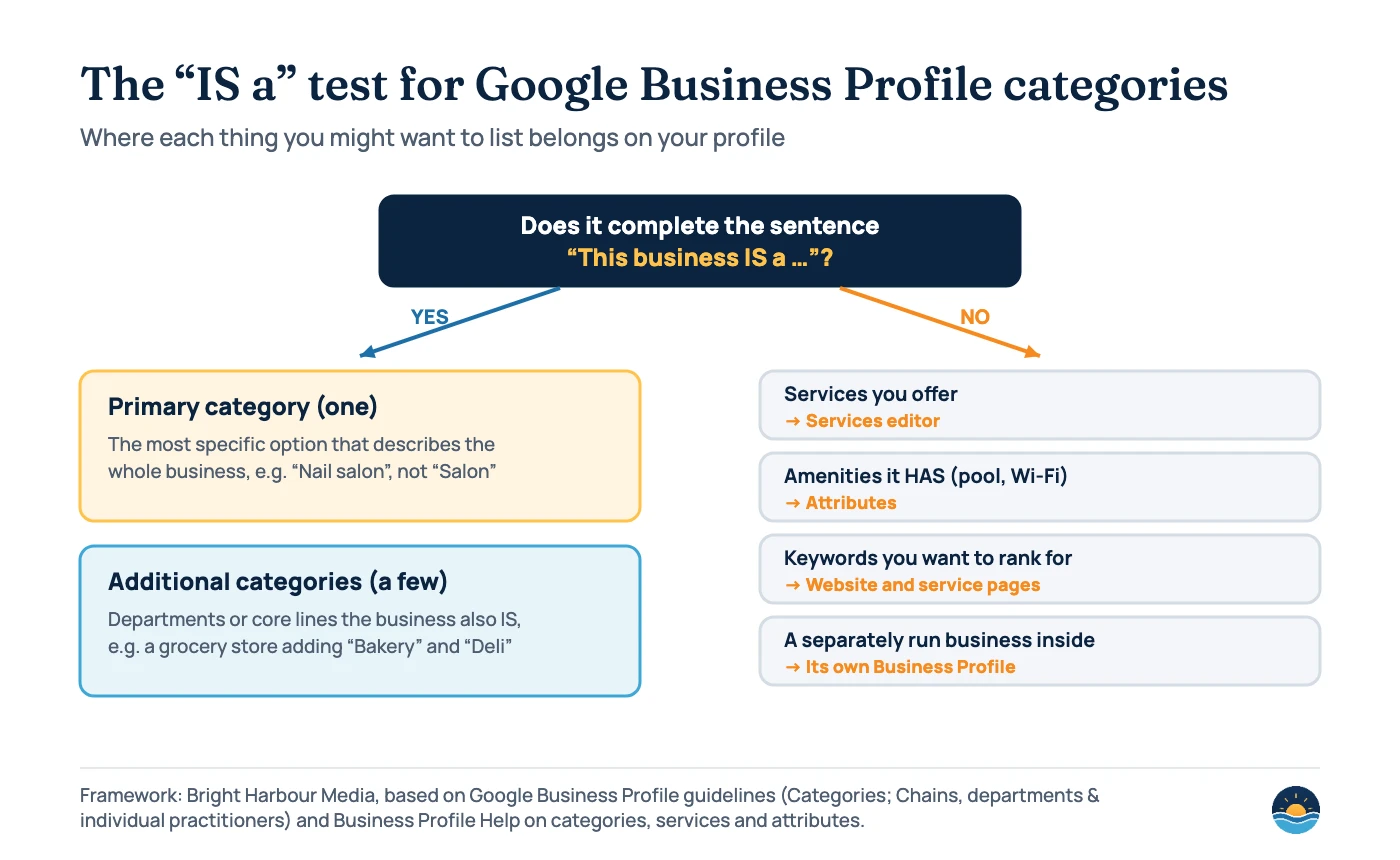
Three rules from Google do most of the work:
- Be as specific as possible. Choose “Nail salon” rather than “Salon”. Google says that when you pick a specific category such as “Golf Resort”, it implicitly includes broader ones like “Resort Hotel”, “Hotel” and “Golf Course”, so you can skip the redundant general options.
- Fall back to a general category only when needed. If no specific category fits, choose a more general one.
- Describe your core business. The primary category should be the one that best describes the business overall, not your most profitable service or your favourite keyword.
Google’s own examples show how fine the distinctions are:
| Business (Google’s example) | Correct categories | Incorrect categories |
|---|---|---|
| Papa John’s: pizza takeout and delivery, no dining in | Pizza Delivery; Pizza Takeout | Delivery Restaurant; Takeout Restaurant |
| Navy Federal Credit Union | Federal Credit Union | Bank |
| Super 8: a motel with an onsite pool | Motel | Hotel; Swimming Pool |
| 24-Hour Fitness | Health Club | Gym; Swimming Pool |
| A1 Check Cashing | Check Cashing Service | Banking and Finance |
| Wendy’s: fast food burgers with some desserts | Fast Food Restaurant; Hamburger Restaurant | Dessert Restaurant |
To find the right option, type candidate terms into the category field and look at what Google suggests, then check which categories competitors who rank well in your area use. Whitespark’s category guide (January 19, 2026) also recommends checking for new categories about every six months, because Google updates the list often.
When should you add additional categories?
Additional categories are for genuine extra lines of business. Google’s example is a grocery store with a bakery and deli: “Grocery store” as primary, with “Bakery” and “Deli” as additional categories. Google is equally clear that you shouldn’t add a category for every product or service. Use a few.
Whitespark’s guide says a profile can add up to nine additional categories. Treat that as a ceiling, not a target. The 2026 experts ranked “category confusion” (adding categories from unrelated industries) as the #9 negative factor and #18 suspension risk.
Good reasons to add one
- A real department customers come for, such as a bakery inside a grocery store
- A core line the business also IS, like Wendy’s being both a fast food and a hamburger restaurant
- A category that unlocks relevant services in the services editor
Reasons to leave it out
- It describes something you HAVE, like a pool, Wi-Fi or parking (use attributes)
- It is really a service or product (use the services editor and your website)
- It belongs to a separately owned business inside your premises
That last point matters for shared premises. Google’s guidelines say a business that contains another business it doesn’t own and operate should only use its own categories. Starbucks inside Barnes and Noble is a “Coffee Shop”; the bookshop shouldn’t add that category. Separately operated, public-facing departments get their own profiles with their own categories.
Categories for multi-location and service-area businesses
For chains, Google requires consistency: all locations that provide the same service must share the same category, and the rule applies within each sub-group if you have different types of location (for example retail stores and a distribution centre). Google’s example is that every “Goodyear Auto Service Center” uses “Tire Shop” and also “Auto Repair Shop”. Our multi-location SEO guide covers the rest of the chain rules.
Service-area businesses follow the same category rules. Seasonal businesses are a common edge case: Whitespark suggests switching the primary category with the season (for example heating versus air conditioning). If you do this, remember Google’s warning that category edits may trigger re-verification, and keep the change consistent with what your website and real-world signage say. See our service-area business guide for more.
A six-step category review
- Write down what the business IS. One sentence, in the customer’s words. Ignore services and amenities for now.
- Find the most specific matching category. Search the category field for that phrase and its variants, and pick the narrowest accurate option as your primary.
- Check competitors. Look at the primary and additional categories used by businesses that rank well for your main searches in your area.
- Add only genuine extras. Keep additional categories to real departments or core lines that pass the “IS a” test.
- Move everything else. Put services in the services editor, features in attributes, and keyword-rich detail on dedicated service pages on your website.
- Align your website and citations. Google says it can detect category information from your website and mentions across the web, so make sure your home page, service pages and listings describe the same type of business (see our local citations guide).
Then leave it alone and measure. Compare Business Profile performance and local rankings over the following weeks before considering another change.
Frequently asked questions
How many categories can a Google Business Profile have?
One primary category plus additional categories. Google’s guidelines don’t give a number and say to use as few as possible; Whitespark’s guide says up to nine additional categories can be added. Most businesses need far fewer.
Can I create a custom category?
No. Google says you can’t create your own category. If no specific category fits, choose a more general one from the list, and describe your specialism in your services, description and website.
Will changing my category affect my profile?
It can. Google warns that adding or editing a category may require you to verify your business again. Ranking changes are also possible, since Google says categories affect local ranking, so make changes deliberately and track the results.
Should I add categories for every service I offer?
No. Google says not to add a category for every product or service. Use the services editor for individual services and build a dedicated page for each important service on your website.
Sources
- Manage your business category — Google Business Profile Help — primary and additional categories, local ranking, category-specific features, re-verification
- Guidelines for representing your business on Google — Google Business Profile Help — category rules, “IS a” test, correct/incorrect examples, chains and departments
- Manage your services on your Business Profile — Google Business Profile Help — services editor and service categories
- Tips to improve your local ranking on Google — Google Business Profile Help — relevance, distance and prominence
- Local Search Ranking Factors 2026 — Whitespark, Darren Shaw, published Nov 6, 2025 — expert survey of 47 specialists and 187 factors; category factor ranks
- Choosing the Right Google Business Profile Categories — Whitespark, Claire Carlile, Jan 19, 2026 — up to nine additional categories, seasonal changes, six-monthly checks
Cite this article: Bright Harbour Media. “Google Business Profile Categories: How to Choose Them.” Bright Harbour Media Insights, October 2026. https://brightharbourmedia.com/google-business-profile-categories/
You are welcome to reference the charts and frameworks in this article with a link back to this page.
Want a second opinion on your categories and the rest of your profile? Our local SEO service starts with a full Google Business Profile review. Get in touch to book yours.