

Faceted navigation is the set of filters and sort options on a listing page (colour, size, price, brand, “sort by”) that change which items are shown. For SEO, the problem is that each filter combination can create its own URL, and Google’s own documentation warns that this “can generate infinite URL spaces” that crawlers waste time on.
Key takeaways
- Google says faceted navigation is “by far the most common source of overcrawl issues” site owners report (Search Central Blog, Dec 17, 2024).
- In Google’s 2025 review of crawl issue reports, faceted navigation made up close to 50% and action parameters close to 25% (Search Off the Record, Feb 3, 2026).
- Google’s two options: stop crawling filter URLs you don’t need indexed (robots.txt or URL fragments), or make the ones you do need follow best practices.
- Google calls rel=canonical and nofollow “generally less effective in the long term” than robots.txt or fragments for controlling crawl.
- Empty, duplicate or nonsensical filter combinations should return an HTTP 404 at that URL, not redirect to a generic error page.
What is faceted navigation, and why does it matter for SEO?
Most online shops, directories, property sites and job boards let visitors narrow a list. Pick “red”, then “size 9”, then “under $100”, and the page reloads with fewer items. Each choice is a facet. Google’s documentation describes faceted navigation as a feature that “allows its visitors to change how items (for example, products, articles, or events) are displayed on a page.”
The SEO issue isn’t the filters themselves. It’s how they are written into URLs. A typical implementation adds parameters such as ?color=red&size=9&sort=price. Every combination is a new URL to a crawler, and the combinations multiply quickly. Google’s URL structure guide calls this “additive filtering”: when filters combine, “the number of URLs (views of data) in the sites explodes.”
Google lists two harms in its faceted navigation guide (last updated December 18, 2025):
- Overcrawling. Crawlers “will typically access a very large number of faceted navigation URLs” before they can tell the URLs are useless.
- Slower discovery. While Googlebot is busy with filter URLs, “the crawlers have less time to spend on new, useful URLs.”
If you’ve read our guide to XML sitemaps and crawl budget, this is the most common real-world way crawl budget gets wasted.
How common is the problem?
Google answered this directly. In December 2024, Gary Illyes wrote on the Search Central Blog that faceted navigation “is by far the most common source of overcrawl issues site owners report to us,” and that in most cases the issue could have been avoided by following best practices.
In February 2026, Illyes and Martin Splitt went further on Google’s Search Off the Record podcast, walking through the crawl issue reports Google received in 2025 after his team had validated and categorised them. The breakdown below is how Illyes described it on the episode. These are approximate figures, spoken rather than published in a table, and they describe reports sent to Google, not all crawling on the web.

Two things stand out. First, faceted navigation and action parameters (URLs such as add-to-cart or add-to-wishlist links) together account for roughly three-quarters of reports. Both are created by site templates, not by content teams. Second, the problem is often baked into platforms: Search Engine Journal reported that Google’s crawl team filed a bug with WooCommerce over add-to-cart parameters, which WooCommerce fixed. One line from Illyes explains why Google can’t simply skip these URLs on its own: Googlebot “cannot make a decision about whether that URL space is good or not unless it crawled a large chunk of that URL space.”
How fast do filter URLs multiply?
A small catalogue can still produce a huge URL space. The table below is simple arithmetic for a single category page, not data from a study, but it shows why Google talks about “near-infinite” URLs.
| Filters on one category page | Possible URLs | How it’s calculated |
|---|---|---|
| 4 filters, each with 5 single-choice values (or none) | 1,296 | 6 × 6 × 6 × 6 |
| The same, plus 4 sort orders | 5,184 | 1,296 × 4 |
| One multi-select colour filter with 10 colours | 1,024 | 210 on/off combinations |
| Same filters in a different order in the URL | Multiplies again | ?size=9&color=red and ?color=red&size=9 are different URLs |
Only a handful of those views are worth showing in search. Google’s URL structure guide makes the same point with a hotel example: Googlebot “only needs to see a small number of lists” to find every item.
Which filter URLs should Google crawl?
Google’s guidance gives you two paths. If you don’t need the filtered URLs indexed, “prevent crawling of these URLs.” If you do need them indexed, follow the best practices for crawlable facets, and accept that crawling them “tends to cost sites large amounts of computing resources.” In practice, most sites need a mix: a few valuable facets indexed and the rest blocked.
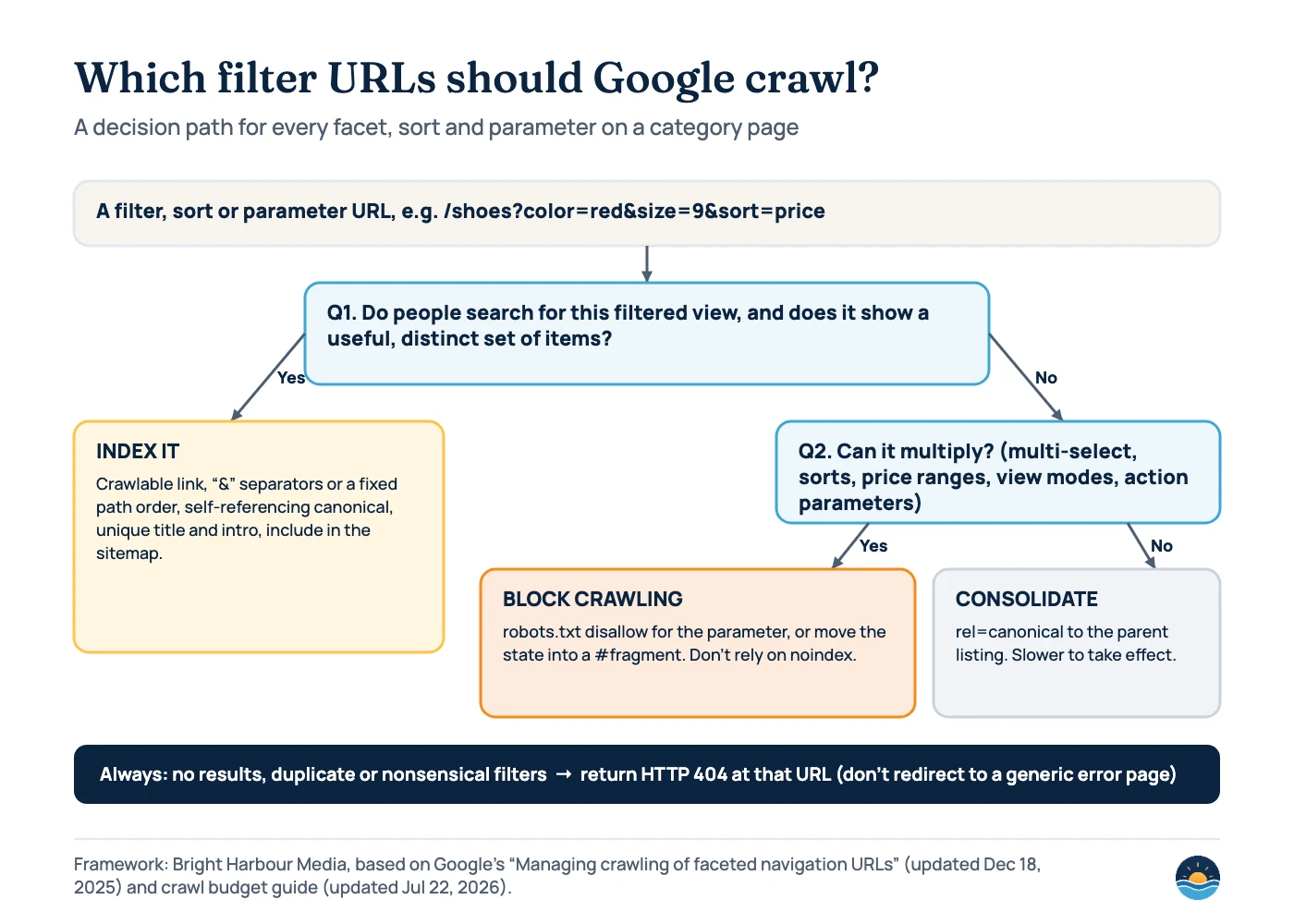
Usually worth indexing
- A brand or type filter that matches real searches, such as “trail running shoes”
- A location filter on a directory, such as “plumbers in Leeds”
- Facets with enough items to make a useful page
Usually worth blocking
- Sort orders (price, newest, popularity)
- Price sliders, multi-select combinations and view modes
- Action URLs: add-to-cart, wishlist, compare
- Tracking and session parameters
Which controls actually stop the crawling?
Not every SEO control does the same job. Some stop Googlebot requesting a URL; others only tell Google which version to index after it has crawled it. That difference matters when the problem is crawl volume.
| Control | Stops crawling? | What Google says |
|---|---|---|
robots.txt disallow | Yes | Recommended for filter URLs you don’t need indexed. The crawl budget guide also recommends robots.txt for “differently sorted versions of the same page.” |
URL fragments (#color=red) | Yes | “Google Search generally doesn’t support URL fragments in crawling and indexing,” so fragment-based filters aren’t crawled as separate URLs. |
rel="canonical" | Partly, over time | May “over time, decrease the crawl volume of non-canonical versions”; the blog post notes it “takes time to get picked up.” |
rel="nofollow" on filter links | Only if universal | Works only if every link pointing to the URL, internal and external, carries it. |
noindex | No | The crawl budget guide says not to use it for this: Google “will still request, but then drop the page.” |
For the canonical side of the story, including how Google weighs canonical signals, see our guide to canonical tags and duplicate content.
How do you block filter URLs in robots.txt?
Google supports two wildcards in robots.txt: * for “0 or more instances of any valid character” and $ for “the end of the URL.” Google’s faceted navigation guide uses them in this example, which blocks three filter parameters while leaving the unfiltered “all products” view open:
user-agent: Googlebot
disallow: /*?*products=
disallow: /*?*color=
disallow: /*?*size=
allow: /*?products=all$
Three cautions. Paths are case-sensitive. When rules conflict, Google uses the most specific rule by path length and, if they are equally specific, “the least restrictive rule.” And robots.txt is not a temporary lever: Google’s crawl budget guide says blocking pages won’t shift the freed budget elsewhere “unless Google is already hitting your site’s crawl capacity limit.” Test new rules against real URLs from your logs before you deploy them.
What if you need filter pages indexed?
For facets you want in search, Google’s guide lists best practices that keep the URL space small and predictable:
| Best practice | Why it helps |
|---|---|
Use the standard & separator between parameters | Google calls it the “industry standard”; commas, semicolons and brackets are hard for crawlers to recognise as separators. |
| Keep filters in a fixed, logical order | Stops the same view existing under several URLs, especially for path-based filters like /products/fish/green/tiny. |
| Don’t allow duplicate filters | Prevents URLs such as ?color=red&color=red. |
| Return 404 for empty or nonsensical combinations | Google: “Return an HTTP 404 status code when a filter combination doesn’t return results.” The same goes for nonexistent pagination. |
| Serve the 404 at the URL itself | Don’t “redirect to a common ‘not found’ error page”; single-page apps are the exception Google allows for. |
| Use as few parameters as you can | From Google’s URL structure guide; use cookies rather than session IDs in URLs. |
Then treat each indexable facet like a real landing page: a unique title and heading, a short introduction, a self-referencing canonical, crawlable <a href> links from the parent category, and a place in your XML sitemap.
A seven-step faceted navigation audit
- List every parameter. Export crawled URLs from a site crawler and group them by parameter name (colour, size, sort, page, utm_, add-to-cart).
- Check what Googlebot actually requests. Use the Crawl Stats report or, better, server logs. Our log file analysis guide shows how to isolate verified Googlebot hits by parameter.
- Check what Google indexed. In the Page indexing report, look for filter URLs under “Crawled – currently not indexed”, “Duplicate without user-selected canonical” and “Discovered – currently not indexed”. See our Page indexing report guide.
- Decide per facet. Run each parameter through the decision path above: index, block or consolidate. Use keyword data to justify every indexed facet.
- Fix the templates. Enforce the
&separator and a fixed filter order, remove duplicate filters, return 404 for empty results, and move sorts and view modes into fragments or non-link controls where your platform allows. - Deploy robots.txt rules carefully. Block the parameters you chose, keep the unfiltered listing and indexable facets open, and test with real URLs.
- Measure for 4–8 weeks. Watch crawl requests by parameter, the share of crawl going to product and category pages, and how quickly new pages get crawled.
Frequently asked questions
Is faceted navigation bad for SEO?
No. Filters help users, and some filtered views make good landing pages. The problem is uncontrolled URL generation, which Google says is the most common source of overcrawl issues reported to it.
Should I noindex filter pages?
Not if your goal is to save crawl. Google’s crawl budget guide says Google will still request noindexed pages and then drop them, which wastes crawling time. Use robots.txt or URL fragments to stop crawling, and keep noindex for pages that must stay crawlable but out of search.
Is rel=canonical enough for filter URLs?
It helps with consolidation, but Google calls canonical and nofollow “generally less effective in the long term” than robots.txt or fragments for crawl control, and says canonicals take time to be picked up.
Does a small site need to worry about faceted navigation?
Google’s crawl budget guide is aimed at sites with 10,000+ pages changing daily or 1 million+ pages changing weekly. But even a small shop can generate thousands of filter URLs from a few categories, so check your logs and Page indexing report before assuming you’re safe.
Sources
- Managing crawling of faceted navigation URLs — Google for Developers, last updated Dec 18, 2025: definition, harms, robots.txt example, canonical/nofollow, best practices
- Crawling December: Faceted navigation — Google Search Central Blog, Gary Illyes, Dec 17, 2024: “most common source of overcrawl issues”
- Crawling Challenges: What the 2025 Year-End Report Tells Us — Google Search Off the Record podcast, Feb 3, 2026 (transcript): 2025 crawl issue report breakdown
- Optimize your crawl budget — Google for Developers, last updated Jul 22, 2026: robots.txt vs noindex, site sizes, freed budget
- URL structure best practices for Google Search — Google Search Central, last updated Dec 10, 2025: additive filtering, separators, parameters
- How Google interprets the robots.txt specification — Google for Developers, last updated Aug 31, 2026: wildcards, rule precedence
- Google’s Crawl Team Filed Bugs Against WordPress Plugins — Search Engine Journal, Feb 3, 2026: WooCommerce add-to-cart parameter fix
Cite this article: Bright Harbour Media. “Faceted Navigation SEO: How to Stop Filter URLs Wasting Crawl.” Bright Harbour Media Insights, October 2026. https://brightharbourmedia.com/faceted-navigation-seo/
You are welcome to reference the charts and frameworks in this article with a link back to this page.
Filters creating more URLs than products? Our technical SEO service maps every parameter on your site and fixes crawl waste at the template level. Get in touch to book a crawl review.