
Log file analysis for SEO means reading your web server’s raw access logs to see every request search engine crawlers actually made: which URLs Googlebot fetched, how often, and what status code your server returned. It is the only first-hand record of crawling, so it shows problems that crawling tools and Search Console reports can only estimate.
Key takeaways
- Google says that for most sites Googlebot “shouldn’t access your site more than once every few seconds on average”, so sudden spikes or long silences in your logs are worth a look.
- Fake “Googlebot” requests are common: verify them with a reverse and forward DNS lookup (hostnames ending in googlebot.com, google.com or googleusercontent.com) or against Google’s published IP range files, which moved to a new location on 11 February 2026.
- Googlebot crawls only the first 2MB of a supported file (64MB for a PDF), measured uncompressed, according to Google’s Googlebot page (updated 3 February 2026).
- Search Console’s Crawl Stats report is the free starting point, but Google says it is “aimed at advanced users”, works only on root-level properties, shows sample URLs and may differ slightly from your logs.
- Googlebot accounted for more than 28% of verified bot traffic on Cloudflare’s network in 2025, and search crawlers 40%: plenty of noise to filter before you draw conclusions.
What is a server log file, and what does it tell you?
Every time a browser or a bot requests a URL, your web server can write one line to an access log. On Apache, the widely used “Combined Log Format” records the client IP address, the time, the request line (method, path and protocol), the status code, the response size, the referrer and the user agent. Nginx, IIS, load balancers and CDNs record similar fields in their own formats.
For SEO, those few fields answer questions no other tool can answer with certainty: did Googlebot actually request this page, when did it last do so, and what did it receive? A crawler such as Screaming Frog shows what could be crawled. Search Console shows what Google chose to report. The logs show what happened.
| Log field (Apache Combined) | Example | What it tells an SEO |
|---|---|---|
%h client IP | 66.249.66.1 | Which machine made the request. Needed to verify that “Googlebot” really is Google. |
%t time | [10/Oct/2026:13:55:36 +0800] | Crawl frequency, last-crawled date per URL, and spikes after releases. |
%r request line | GET /services/ HTTP/1.1 | The exact URL and parameters requested, including ones you never meant to expose. |
%>s status | 200, 301, 404, 503 | Whether bots hit errors, redirects or healthy pages. |
%b bytes | 24310 | Response size; unusually small 200 responses can hint at empty or soft-404 pages. |
| User-Agent | Googlebot/2.1 (Smartphone) | Which crawler it claims to be. Can be faked, so never trust it alone. |
Why bother when Search Console has a Crawl Stats report?
Start with Crawl Stats: it is free and already filtered to Google. It shows total crawl requests, total download size and average response time, with breakdowns by response, file type, crawl purpose (discovery of new URLs versus refresh of known ones) and Googlebot type. Its host status panel flags robots.txt fetching, DNS resolution and server connectivity problems over the past 90 days.
Google is open about its limits, though. The report is available only for Domain properties or URL-prefix properties at the root, the example URLs are “representative samples”, some requests may go uncounted, and Google says its figures “can differ slightly from your server logs”. Google also says sites with fewer than 1,000 pages generally don’t need it. Logs fill the gaps: every URL, every request, every bot, for as long as you keep them.
| Question | Crawl Stats report | Server logs |
|---|---|---|
| Did Googlebot request this exact URL, and when? | Only if it appears in the sample | Yes, every request |
| Which parameters or old URLs is Google wasting time on? | Partly (sample URLs) | Yes, full list |
| How do other bots (Bingbot, AI crawlers, scrapers) behave? | No, Google only | Yes |
| Are robots.txt, DNS or connectivity failing? | Yes, host status for 90 days | Partly; DNS failures never reach your server |
| How far back can I look? | Fixed reporting window | As long as you retain logs |
| Effort and cost | Free, no setup | Needs log access, storage and a tool or script |
On large sites, Google’s own crawl budget guide says crawl management matters most for sites with 1 million+ unique pages changing about weekly, 10,000+ pages changing daily, or a large share of URLs marked “Discovered – currently not indexed”. If that sounds like your site, logs are close to essential. For smaller sites, read our guide to XML sitemaps and crawl budget first; you may not need a full log project.
How do you know a “Googlebot” request is really Google?
Anyone can put “Googlebot” in a user-agent string, and Google warns that other crawlers often do. Cloudflare’s 2025 Radar Year in Review shows how crowded bot traffic has become: search engine crawlers made up 40% of verified bot traffic and AI crawlers 20%, with Googlebot alone above 28%. Unverified bots sit on top of that. If you analyse unverified lines, your “Googlebot” numbers will be wrong.

Google documents two ways to verify a request (page updated 20 March 2026):
One-off check: DNS lookups
Run a reverse DNS lookup on the IP, for example host 66.249.66.1. Confirm the hostname ends in googlebot.com, google.com or googleusercontent.com. Then run a forward lookup on that hostname and confirm it returns the same IP.
At scale: IP range files
Match IPs against Google’s JSON files, such as common-crawlers.json (Googlebot), special-crawlers.json (for example AdsBot) and the user-triggered fetcher files. Google moved them to developers.google.com/static/crawling/ipranges/ on 11 February 2026; the old location still works.
Keep the user-agent too. Googlebot Smartphone and Googlebot Desktop share one robots.txt token but send different user-agent strings, and because Google mainly indexes the mobile version of most sites, Google says most crawl requests come from the smartphone crawler.
What should you look for in the logs?
Once you have verified Googlebot lines, group them by status code, site section (folder or template), file type and crawler type. Then compare them with three other lists: a full crawl of your site, your XML sitemaps, and Search Console’s indexing data. The interesting findings live in the differences.
| What you see in the logs | Likely cause | What to do |
|---|---|---|
| Important pages never or rarely requested | Weak internal links, orphan pages, not in sitemaps | Link to them from relevant hubs; add to sitemaps; check they aren’t blocked |
| Many requests to parameter, filter or session URLs | Faceted navigation or tracking parameters creating near-infinite URLs | Consolidate with canonicals, stop linking to them, or block crawling of genuinely useless patterns |
| Googlebot keeps hitting old redirected or 404 URLs | Internal links, sitemaps or external links still point to them | Update internal links and sitemaps; keep important redirects in place |
| 200 responses that are tiny or identical | Soft 404s or empty templates | Return a real 404/410 or add content; Google says soft 404s “continue to be crawled” |
| Clusters of 5xx or 429 responses | Server strain, rate limiting or a WAF blocking Google | Fix capacity; Google lowers its crawl rate when it sees 5xx or 429 |
| Large HTML or JS files | Bloated pages or bundles | Keep key content within the first 2MB Googlebot fetches per file |
Two warnings. First, Crawl Stats counts each redirect hop as a separate request, and your logs do too, so redirect chains inflate crawl numbers fast. Second, if you ever need to slow Google down in an emergency, Google recommends temporarily returning 500, 503 or 429 to crawl requests, but not “for a long period of time (meaning, longer than 1-2 days)”, because URLs that keep returning errors can drop out of the index. Google added Retry-After header guidance to that page on 6 October 2026.
If your site relies on client-side rendering, check that Googlebot also requests the JavaScript and API URLs your pages need. Our JavaScript SEO guide covers how rendering affects what Google indexes.
A seven-step log file analysis process
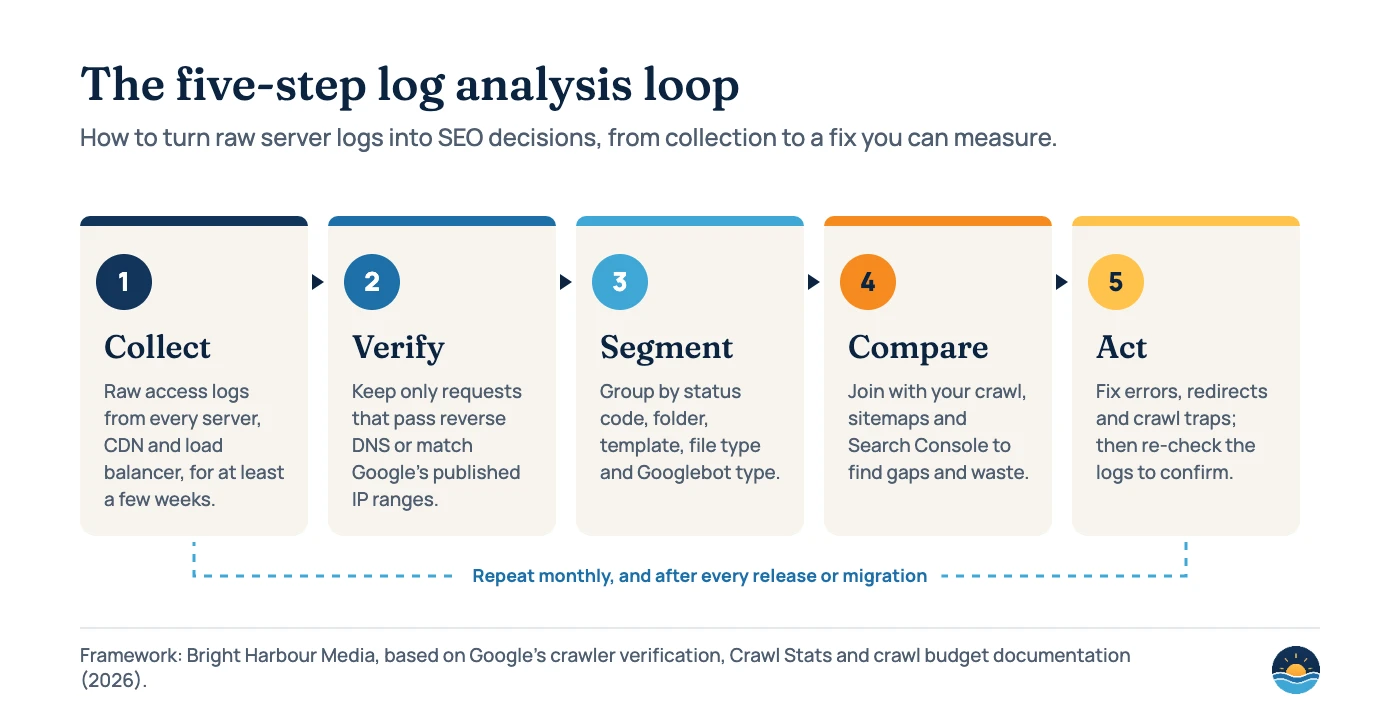
- Get the right logs. Ask your host or developer for raw access logs from every origin server, plus CDN and load balancer logs if they answer requests before your server does. Many hosts rotate logs after a few days, so arrange retention first.
- Pick a window. A few weeks gives a fair picture for most sites; include a period before and after any recent release.
- Parse and clean. Load the logs into a log analyser, a spreadsheet for small sites, or a script. Normalise URLs (hosts, trailing slashes, case) so the same page isn’t counted twice.
- Verify crawlers. Keep only Googlebot requests that pass DNS verification or match Google’s IP ranges. Do the same for Bingbot using Microsoft’s own method if you care about Bing.
- Segment. Break requests down by status code, folder or template, file type, Googlebot type and day. Note the share of requests going to URLs you don’t want indexed.
- Compare. Join the log URLs with your site crawl, sitemaps and the Page indexing report. List important URLs with no Googlebot hits, and crawled URLs that aren’t in your crawl or sitemaps.
- Fix and re-check. Prioritise errors on important templates, wasteful URL patterns and redirect chains. Re-run the same analysis after the fix ships to confirm crawling changed.
Log analysis fits naturally into a wider technical review; it sits alongside the checks in our SEO audit checklist.
Frequently asked questions
Do small websites need log file analysis?
Usually not as a routine task. Google says sites with fewer than 1,000 pages generally don’t need the Crawl Stats report, and the same logic applies to logs. They become useful on small sites when you are debugging a specific problem, such as pages that never get indexed or a suspected server issue.
How can I get my server logs?
On most hosting control panels there is a raw access log download; otherwise ask your host or developer. If you use a CDN, its logs may hold requests your server never saw. Check how long logs are kept before you need them.
Can I trust the user-agent string to identify Googlebot?
No. Google says other crawlers often fake Googlebot’s user agent. Verify requests with a reverse DNS lookup followed by a forward lookup, or by matching the IP against Google’s published IP range files.
Do log files show AI crawlers too?
Yes. Any bot that requests a page from your server appears in the logs with its IP and user agent. Cloudflare’s 2025 data put AI crawlers at 20% of verified bot traffic, so logs are also the best way to see how AI crawlers treat your site.
Sources
- What is Googlebot — Google Search Central, last updated 3 Feb 2026: crawl frequency, 2MB/64MB limits, smartphone vs desktop, spoofing.
- Verify requests from Google crawlers and fetchers — Google, last updated 20 Mar 2026: DNS verification steps and IP range files.
- Google’s crawling documentation changelog — Google: IP range location change (11 Feb 2026), Retry-After guidance (6 Oct 2026).
- Crawl Stats report — Google Search Console Help: metrics, breakdowns, host status, limitations.
- Crawl budget management for large sites — Google, last updated 22 Jul 2026: who needs it, crawl capacity and demand, soft 404s.
- Reduce Google crawl rate — Google: emergency 500/503/429 guidance and the 1–2 day warning.
- Log Files — Apache HTTP Server 2.4 documentation: Combined Log Format fields.
- The 2025 Cloudflare Radar Year in Review — Cloudflare, 15 Dec 2025: verified bot traffic shares, 1 Jan – 2 Dec 2025.
Cite this article: Bright Harbour Media. “Log File Analysis for SEO: See What Googlebot Really Crawls.” Bright Harbour Media Insights, October 2026. https://brightharbourmedia.com/log-file-analysis/
You are welcome to reference the charts and frameworks in this article with a link back to this page.
Want to know what Googlebot really does on your site? Our SEO audits include log file analysis for sites where crawling is the bottleneck. Get in touch to talk it through.