A site name is the name Google shows above a search result to identify the website, and a favicon is the small icon beside it. Google chooses both automatically from your home page, but you can influence them: WebSite structured data is the most important signal for the site name, and a crawlable rel="icon" link on the home page sets the favicon.
Key takeaways
- Google’s site names documentation (updated Dec 10, 2025) says it reads og:site_name, the
<title>, headings and home page text, “However, WebSite structured data is most important.” - Site names work for domains and subdomains in every language Google Search supports, but not for subdirectories such as example.com/news.
- Favicons must be square and at least 8x8px; Google recommends larger than 48x48px. Supported formats are BMP, GIF, ICO, PNG, JPEG, PPM and TIFF.
- Changes to either can take “several days to several weeks” to appear, and Google “can’t manually change automatically selected site names.”
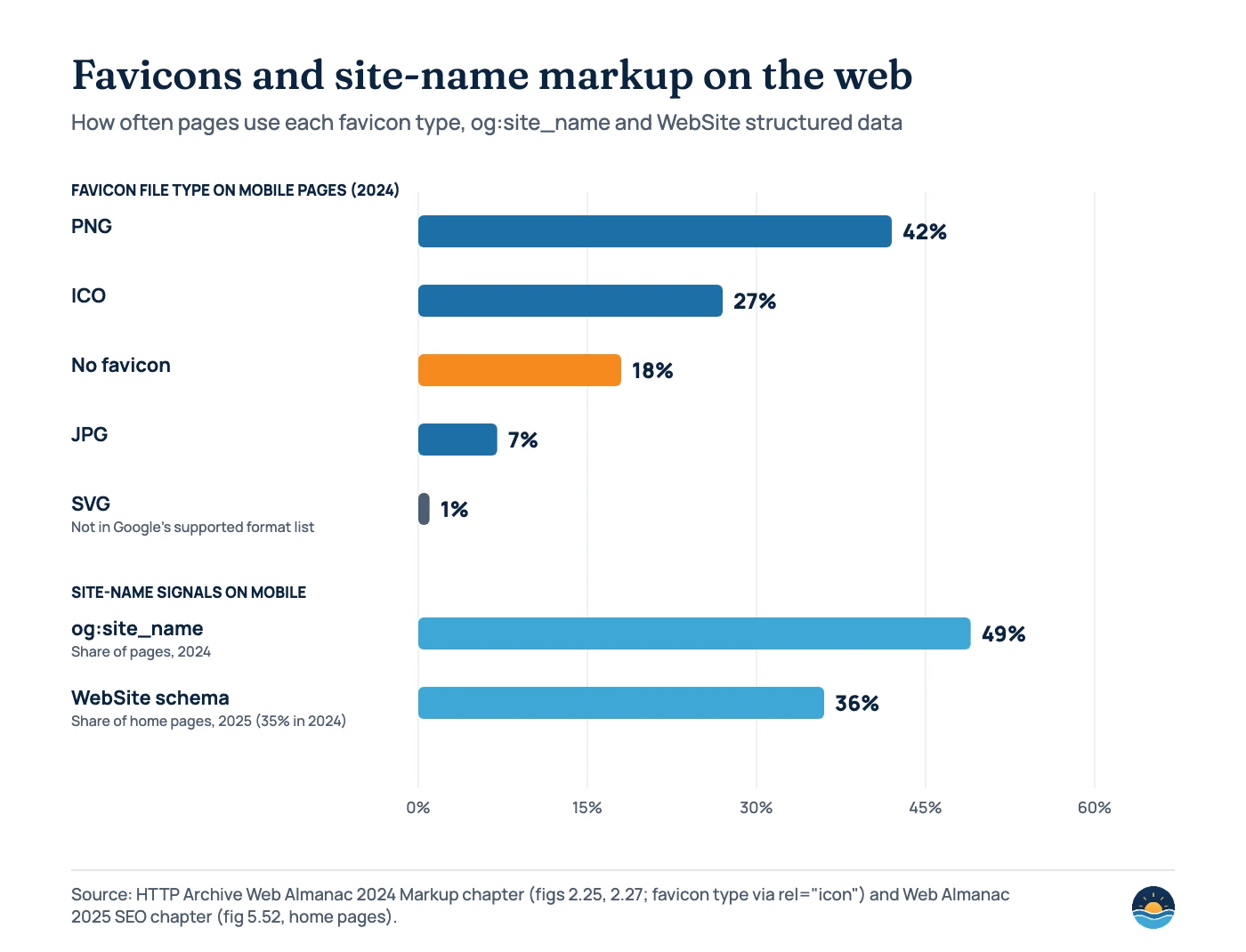
- HTTP Archive’s Web Almanac found 18% of mobile pages had no favicon in 2024, and only 36% of mobile home pages used WebSite structured data in 2025.
What are site names and favicons in Google Search?
On Google’s results pages, each result starts with a short identity line: an icon, the site name and the URL. Google added the website name and icon to the top of mobile results in May 2019, and introduced “site names” as a separate feature on October 14, 2022. By September 7, 2023, site names were available on mobile and desktop in all languages where Google Search is available.
These elements don’t change rankings, but they shape how people recognise you before they click. A small business shown as “brightharbourmedia.com” with a generic globe icon looks less established than one shown with its real brand name and logo mark. They also affect your titles: Google’s title link documentation says that, for domain-level site names, it “may omit the site name from the title link, if it’s repetitive with the site name that’s already shown.” Our guide to title tags and meta descriptions covers the title side.
How does Google choose a site name?
Google says its site name process is “completely automated and takes into account content from a site’s home page and references to it that appear on the web.” It considers og:site_name, the <title> element, heading elements and other home page text, “However, WebSite structured data is most important, if you want to specify a preference.”
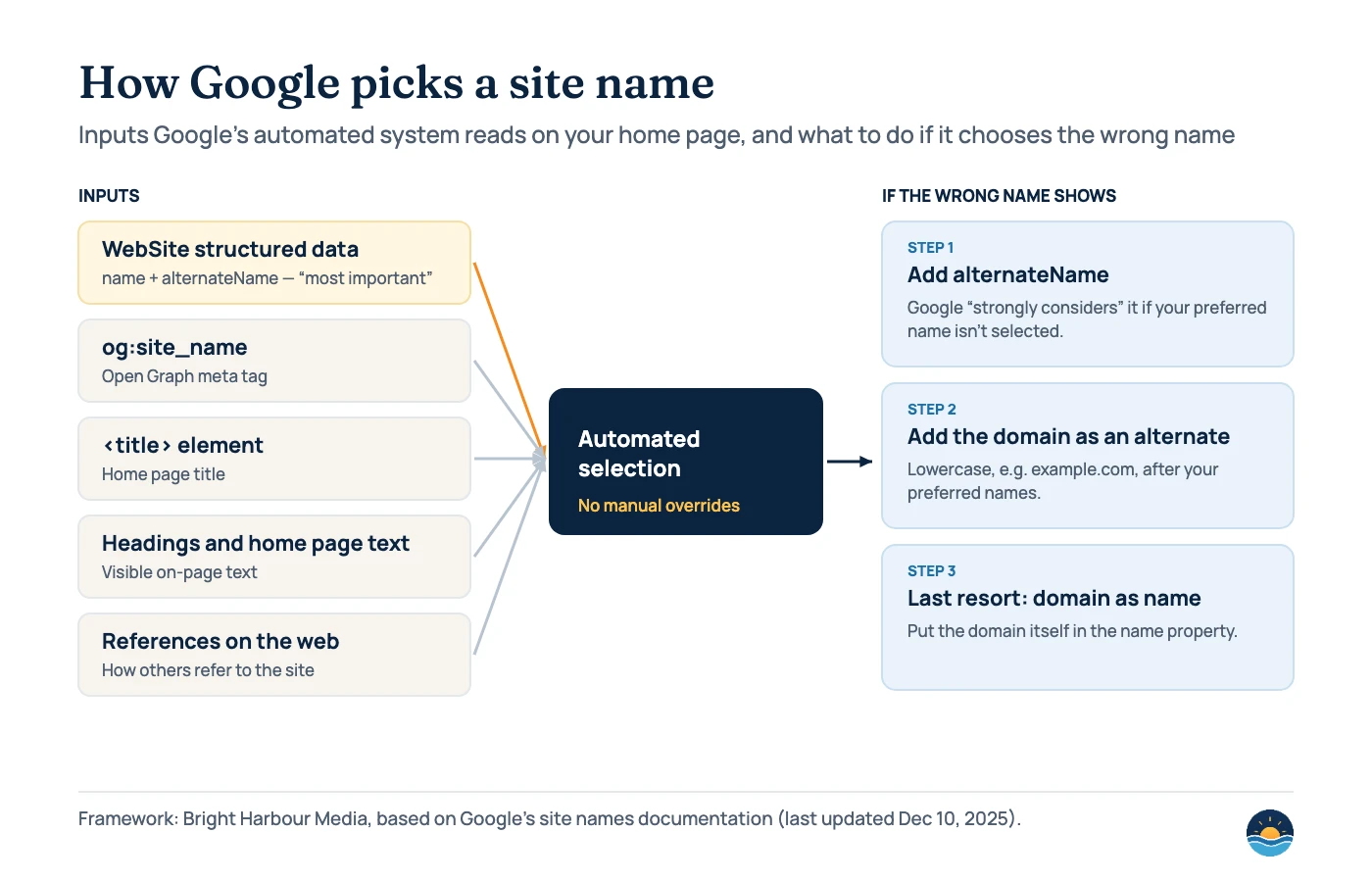
The markup is short. It must be on the home page, use the WebSite type, and include name and url (the canonical home page). alternateName is optional but recommended: list alternatives in order of preference, such as an acronym or a shorter version of the brand.
<script type="application/ld+json">{"@context":"https://schema.org","@type":"WebSite","name":"Bright Harbour Media","alternateName":["Bright Harbour","brightharbourmedia.com"],"url":"https://brightharbourmedia.com/"}</script>
If your home page already outputs a WebSite node (many SEO plugins do), add the properties to that node rather than creating a second one. Google also asks you to use the same structured data on duplicate versions of the home page, not only the canonical. For other schema types worth adding, see structured data for service businesses.
| Requirement | What Google’s documentation says |
|---|---|
| Where | On the home page of the site (domain or subdomain level) |
| Required properties | name and url on a WebSite item; JSON-LD, RDFa or microdata |
| Subdomains | Supported. If a subdomain home page has no markup, the domain-level site name may be used |
| Subdirectories | “Google Search does not support site names at the subdirectory level” |
| www and m. | “Generally considered as being equivalent” to the root domain |
| Good names | Unique, concise, commonly recognised, not generic, consistent with the home page; long names may be truncated |
| Testing | Not supported in the Rich Results Test; use the Schema Markup Validator and URL Inspection |
| Timing | Crawling and processing “can take anywhere from several days to several weeks” |
What if Google shows the wrong site name?
Google can’t change an automatically selected site name by hand, but it documents a sequence of fixes. First, check that the WebSite markup is on the home page and matches the name used in the title, headings and og:site_name. Then add your preferred name as an alternateName; Google says its system “will strongly consider using it if your preferred name isn’t selected.” Next, add your domain in lowercase (example.com, not Example.com) as a later alternate. As a last-resort workaround, Google suggests putting the domain itself in the name property.
Two other causes are worth ruling out. If the domain redirects, “the site name will reflect the redirect target.” And internal pages need to be recrawled before they show the new name, which is why changes appear gradually across a site.
What are Google’s favicon requirements?
Google’s favicon documentation was last updated on Oct 27, 2026. Its requirements are short, and most problems come from the crawl rules rather than the image.
| Rule | Detail |
|---|---|
| Markup | A <link> in the home page header with rel="icon" (also accepted: shortcut icon, apple-touch-icon, apple-touch-icon-precomposed) |
| Size and shape | Square (1:1) and at least 8x8px; Google recommends larger than 48x48px |
| Formats | BMP, GIF, ICO, PNG, JPEG, PPM and TIFF (list made explicit Aug 28, 2026; Google says supported formats didn’t change) |
| Crawling | Googlebot must be able to crawl the home page, and Googlebot-Image must be able to crawl the favicon file |
| Hosting | The href can be relative or absolute and doesn’t need to be on your site (a CDN is fine) |
| Scope | One favicon per hostname; subdomains can have their own, subdirectories can’t |
| Stability | Keep the favicon URL stable; don’t change it frequently |
| Content | Inappropriate favicons, including pornography or hate symbols, are replaced with a default icon |
| Guarantee | “A favicon isn’t guaranteed to appear” even if all guidelines are met |
Note what is missing from the format list: SVG. Many modern sites use an SVG favicon for browsers. Keep it if you like, but also link a PNG or ICO version so Google has a supported file. Google’s changelog shows the old “multiple of 48px” wording was replaced on Oct 24, 2024 by the current 8x8px minimum with 48x48px or larger recommended. Our image SEO guide covers the crawl rules for other images.
How common are favicons and site-name markup?
HTTP Archive’s Web Almanac measures millions of pages. Its 2024 Markup chapter found PNG was the most common favicon type on mobile pages (42%), followed by ICO (27%), with about 18% of pages having no favicon, down from 22% in 2021. SVG accounted for 1%. The same chapter found og:site_name on 49% of mobile pages. The 2025 SEO chapter found WebSite structured data on 36% of mobile home pages, up from 35% in 2024 and 30% in 2022.
Controls you have
- WebSite structured data with name and alternateName
- A consistent brand name in the title, headings and og:site_name
- A square, crawlable favicon in a supported format
- A stable favicon URL
Things you can’t force
- Manual changes to an automatically chosen site name
- A site name for a subdirectory
- Showing a favicon, even when all guidelines are met
- Faster processing than Google’s crawl allows
A seven-step site name and favicon check
- Search for your brand. Note the site name, favicon and URL Google shows today on mobile and desktop.
- Check the home page markup. Confirm there is one WebSite node with name, url and alternateName, and that it validates in the Schema Markup Validator.
- Align the name everywhere. Use the same brand name in the title, the main heading and og:site_name.
- Check the favicon link. Make sure the home page links a square PNG or ICO of 48x48px or larger with rel=”icon”.
- Test crawling. Confirm robots.txt doesn’t block the home page or the favicon file, and inspect the home page with the URL Inspection tool.
- Request indexing of the home page. Google suggests this after favicon changes; then allow several days to several weeks.
- Escalate in order. If the wrong name persists, add alternateName, then the lowercase domain as an alternate, then the domain as the name as a last resort.
Frequently asked questions
How long does it take for a new site name or favicon to show?
Google says crawling and processing can take several days to several weeks for both. Requesting indexing of the home page in Search Console can help Google see the change sooner.
Can I set a site name for a section of my site?
Only at the domain or subdomain level. Google does not support site names for subdirectories, so example.com/blog uses the same site name as example.com.
Does Google support SVG favicons?
SVG is not in the list of supported favicon formats in Google’s documentation (BMP, GIF, ICO, PNG, JPEG, PPM and TIFF). Link a PNG or ICO version as well.
Do site names and favicons affect rankings?
Google’s documentation doesn’t describe them as ranking factors. They affect how your result looks and how easily people recognise your brand.
Sources
- Provide a site name to Google Search — Google Search Central, last updated Dec 10, 2025 — selection, requirements, fixes
- Define a favicon to show in search results — Google Search Central, last updated Oct 27, 2026 — favicon guidelines
- Influencing your title links in search results — Google Search Central, last updated Dec 10, 2025 — site name and title links
- Latest Google Search documentation updates — Google Search Central — favicon changes Oct 24, 2024 and Aug 28, 2026
- Introducing site names on Google Search — Google Search Central Blog, Oct 14, 2022
- Site names now available for all languages — Google Search Central Blog, Sep 7, 2023
- A new look for Google Search — Google, The Keyword, May 22, 2019 — names and icons in mobile results
- Web Almanac 2024: Markup — HTTP Archive — favicon types and og:site_name
- Web Almanac 2025: SEO — HTTP Archive — WebSite structured data usage
Cite this article: Bright Harbour Media. “Site Names and Favicons in Google Search: How to Control Them.” Bright Harbour Media Insights, November 2026. https://brightharbourmedia.com/site-names-favicons/
You are welcome to reference the charts and frameworks in this article with a link back to this page.
Not sure your brand shows up correctly in Google? Our technical SEO service checks structured data, favicons and crawl rules as part of every engagement. Get in touch for a review.