

A hacked website, in Google’s words, contains “content placed on a site without permission, due to vulnerabilities in a site’s security.” Recovering your SEO means removing that content, closing the security hole that let it in and asking Google to review the site through Search Console, which is what removes the warnings and lets affected pages return to search.
Key takeaways
- Google’s Security issues report groups problems into hacked content, malware and unwanted software, and social engineering. Fixing only some pages “will not earn you a partial return to search results.”
- Google publishes review times: phishing about a day, malware a few days, sites hacked with spam up to several weeks. Once a site is clean, warnings are removed within 72 hours.
- Sucuri found SEO spam on 422,741 websites in 2024, which was 38.4% of the 1,176,701 infected sites its SiteCheck scanner detected across 70.8 million scans.
- Patchstack counted 11,334 new vulnerabilities in the WordPress ecosystem in 2025, up 42% on 2024. 91% were in plugins and only 6 were in WordPress core.
- Sites that repeatedly switch between clean and harmful can be labelled Repeat Offenders and cannot request a review for 30 days.
How do you know if your website has been hacked?
Often you don’t, at least not straight away. Google’s hacked-sites guide on web.dev notes that “hacks are often invisible to users,” and the Search Console help page explains that “many hackers make changes that are visible only to Google machines”, such as spam links that only appear when Googlebot requests the page. That is why a hacked site is frequently discovered through search rather than by looking at the home page.
Google also warns that you may not see a warning yourself, because Safe Browsing shows warnings based on browsing context. Its advice is to “rely on the Security Issues report as the source of truth.” These are the signs worth checking:
| Warning sign | Where to check | What it suggests |
|---|---|---|
| “This site may be hacked” under your result | Google Search results | Google found spam injected by a hacker |
| “This site may harm your computer” or a red browser warning | Search results, Chrome and other browsers | Malware or unwanted software was detected |
| An issue listed in the Security issues report | Search Console → Security & Manual Actions | Google has flagged hacked content, malware or social engineering |
| Pages you never created, often in Japanese or full of keywords | site:yourdomain.com searches, the Page indexing report and the Performance report | URL (page) injection, such as the Japanese keyword or gibberish hack |
| Unusual traffic spikes from unrelated search terms | Search Console Performance report | Spam pages are ranking for queries unrelated to your business |
| Owners, users or admin accounts you don’t recognise | Search Console Users and permissions; your CMS user list | An attacker has gained access and may be trying to get spam indexed |
A quick test from Google’s help page is to search your own site for common spam words, for example site:example.com pharmacy, and to inspect suspicious URLs with the URL Inspection tool, which shows the page as Google sees it.
What kinds of hacks affect SEO?
Google’s spam policies describe four types of hacked content, and the Search Console report uses slightly different names for some of them. The report also covers malware and social engineering, which trigger browser warnings rather than search spam.
| Type | What the attacker does | Typical SEO effect |
|---|---|---|
| Code injection | Adds code that, for example, redirects visitors to a malicious site or runs cryptocurrency mining software | Warning labels; visitors bounced to other sites |
| Content injection | Adds spammy links or text, often hidden from visitors (Google cites pharmaceutical terms as an example) | Your pages rank for, or link to, spam topics |
| URL injection (called “page injection” in the spam policies) | Creates new pages, often containing spammy words or links | Thousands of junk URLs indexed under your domain |
| Redirects | Sends users who click from Google to a suspicious page, while direct visits look normal | Traffic from search lost to the attacker’s site |
| Malware and unwanted software | Installs software that harms visitors’ devices | “Dangerous” warnings in the browser and in search |
| Social engineering | Deceptive pages, such as phishing forms that trick users into revealing information | Interstitial warnings that stop most visitors |
Three spam hacks are common enough that Google wrote separate clean-up guides for them:
Japanese keyword hack
Creates new pages with autogenerated Japanese text in randomly named directories, usually monetised with affiliate links to stores selling fake branded goods. Google notes the hacker “will typically add themselves as a property owner in Search Console.”
Gibberish hack
Creates many pages of nonsensical, keyword-filled sentences designed to rank for those terms. Visitors who click are often redirected to an unrelated page.
Cloaked keywords hack
Adds spam pages that may reuse your site’s template so they look like they belong. The attacker sells links on them. Visiting the URL yourself may show a 404, but Google’s advice is “Don’t be fooled!”

Sucuri’s figures come from remote scans of public pages, so they show what its scanner could detect, not every hack that happened. Even so, they give a sense of scale: in its 2024 data, malware and malicious redirects together accounted for 74.7% of infections, and SEO spam for 38.4%.
Is it a security issue or a manual action?
Both appear under “Security & Manual Actions” in Search Console, but they work differently. Google describes manual actions as “mostly attempts to manipulate our search index”, while security issues are problems that put users at risk.
| Security issue | Manual action | |
|---|---|---|
| Why it happens | Your site was hacked or is harming visitors | A human reviewer found a spam policy violation |
| What users see | A warning label in search results or an interstitial warning in the browser | Usually nothing: pages are ranked lower or omitted without any visual indication |
| Hack-related example | Hacked: Content injection, Hacked: URL injection, Hacked: Malware | “Site abused with third-party spam”, which affects only the pages with spammy content |
| How to fix | Clean every affected page, then select Request Review | Fix every affected page, then request reconsideration |
| Review time | From a few days to a few weeks | Several days or weeks |
If you have a manual action rather than a security issue, our guide to Google manual actions walks through the reconsideration process.
How do you recover a hacked website? A seven-step process
Google’s hacked-sites guide sets out the recovery in stages. Here is the same process, condensed for a small or medium business site:
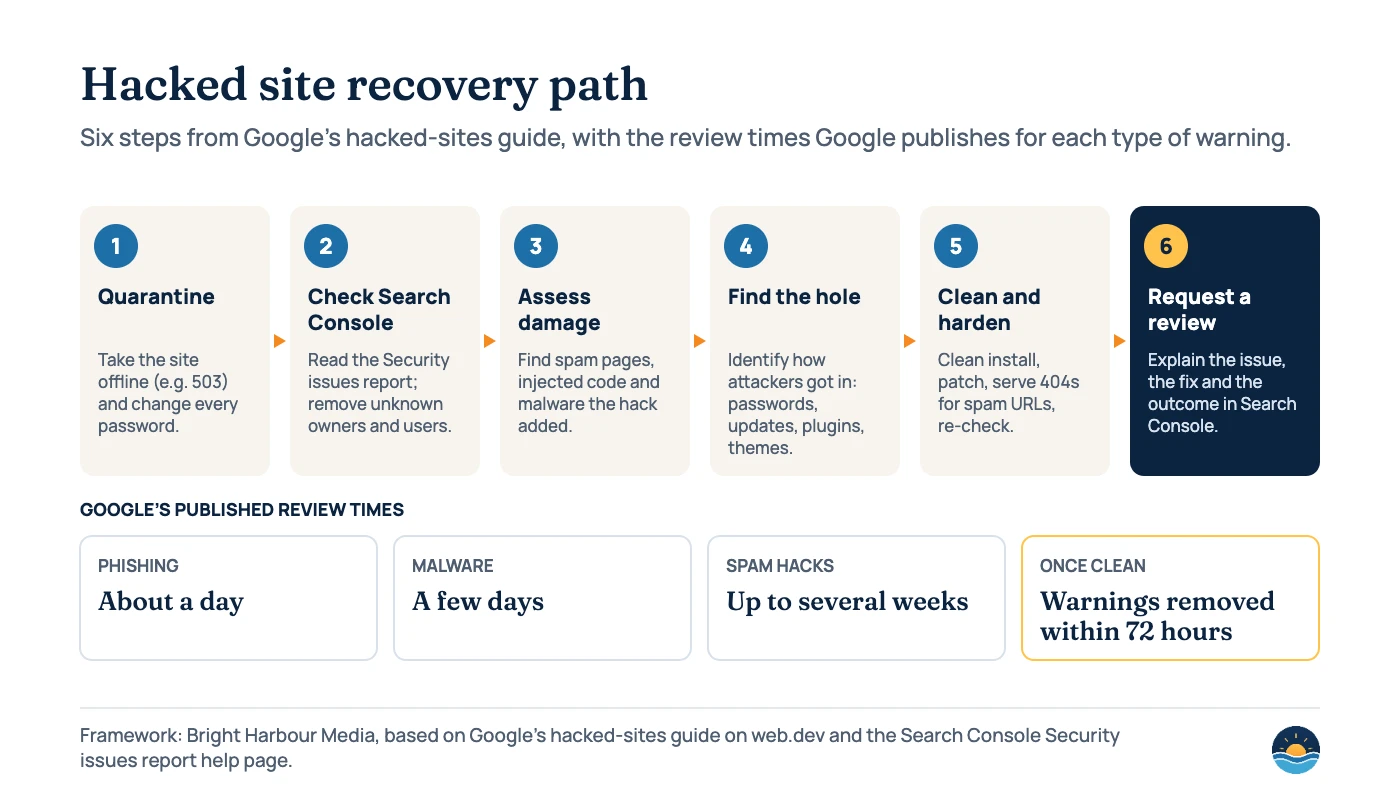
- Quarantine the site. Ask your host to take it offline, for example by serving a 503 from a different server, so visitors are protected while you work. A robots.txt disallow is not enough because it “only blocks search engine crawlers.” Change every password: CMS, hosting, FTP and database. Google says it is unlikely that taking a site offline temporarily during recovery “will affect future ranking.”
- Check Search Console. Read the Security issues report and the Manual actions report. In Users and permissions, remove any owners or users you don’t recognise. Also check the Removals and Change of Address tools for requests you didn’t make.
- Assess the damage. Run
site:searches for spam words, inspect sample URLs with the URL Inspection tool, and search your files for suspicious functions Google mentions, such aseval,base64_decodeandunescape. - Find how the attacker got in. Google lists the usual routes: compromised passwords, missed security updates, insecure themes and plugins (“a major source of vulnerabilities”), social engineering, gaps in security policies and data leaks.
- Clean and harden. Google recommends “a clean installation, not just an upgrade,” because upgrades can leave infected files behind. Return a 404 for pages the hacker created; use the Removals tool only for those pages and never for “previously good pages.” Turn on two-factor authentication and keep core, plugins and themes updated.
- Request a review. In the Security issues report, select Request Review and describe the problem, the steps you took and the result. Make sure cleaned pages are not “roboted out or blocked from indexing,” and don’t request a review before everything is fixed.
- Monitor the recovery. Watch the Security issues report for the review result, then use the Performance report to compare traffic before and after the hack, as described in our guide to diagnosing a Google traffic drop.
How long does it take to recover from a hack?
The review itself is quick for some issue types and slower for spam. Google’s web.dev guide gives these processing times:
| Situation | What Google says |
|---|---|
| Phishing review | About a day (phishing reviews can also be requested through Safe Browsing’s report page) |
| Malware review | A few days |
| Spam hack review | Up to several weeks, because spam reviews can involve manual investigation |
| After a successful review | Warnings in browsers and search results are removed within 72 hours |
| Search Console Help (all security issue types) | A review can take from a few days to a few weeks |
| Repeat Offender status | Lasts 30 days, during which reviews cannot be requested |
Rankings are a separate question. Google doesn’t promise that traffic returns to its previous level on a fixed date. Spam URLs still need to drop out of the index, and pages that served spam to Googlebot need to be recrawled. Requesting a review while the problem remains “will only prolong the period of time that your site is flagged as dangerous,” so it pays to be thorough the first time.
Why do WordPress sites get hacked so often?
Most of the risk on a WordPress site sits in third-party add-ons rather than in WordPress itself. Patchstack’s annual reports show how quickly that risk is growing:
| Measure | 2024 (Patchstack 2025 report) | 2025 (Patchstack 2026 report) |
|---|---|---|
| New vulnerabilities in the WordPress ecosystem | 7,966 | 11,334 (up 42%) |
| Share found in plugins | 96% | 91% |
| Share found in themes | 4% | 9% |
| Vulnerabilities in WordPress core | 7 | 6 |
| Not fixed in time for public disclosure | 33% | 46% |
Patchstack also reports that, weighted by how heavily they were attacked, the median time to first exploit for vulnerabilities in 2025 was 5 hours. In practice that means updates and a short list of well-maintained plugins matter more than any one security product. A regular SEO audit is a good moment to review users, plugins and unexpected URLs alongside the usual technical checks.
Frequently asked questions
Will a hack hurt my Google rankings permanently?
Google doesn’t promise a timeline for rankings, but it says taking a site offline temporarily during recovery is unlikely to affect future ranking. Most of the damage comes from spam pages and warnings staying live, so clean every affected page and request a review once.
How long until the “This site may be hacked” warning disappears?
You need a successful review first. Google says spam reviews can take up to several weeks, malware reviews a few days and phishing reviews about a day. Once Google finds the site clean, warnings are removed within 72 hours.
Can I block Google with robots.txt while I fix the site?
Blocking crawlers doesn’t protect visitors, which is why Google says a robots.txt disallow is insufficient for quarantine. When you request a review, cleaned pages must not be blocked from crawling or indexing, or Google can’t confirm the fix.
Should I use the Removals tool to delete spam URLs?
Only for pages the hacker created, and only after they return a 404. Google warns not to use the tool for previously good pages, because a removal hides them from search too.
Sources
- Security issues report — Google Search Console Help: issue types, warnings, review requests and timing, “source of truth” advice
- Help, my site has been hacked (hacked-sites guide) — Google, web.dev: recovery steps, quarantine, clean-up, review processing times and FAQ
- Request a review — Google, web.dev: phishing, malware and spam review times; warnings removed within 72 hours
- Top ways websites get hacked by spammers — Google, web.dev: common vulnerabilities
- Fix the Japanese keyword hack — Google, web.dev: also the gibberish and cloaked keywords hack guides
- Spam policies for Google web search — Google Search Central, last updated Aug 28, 2026: hacked content definition and types
- Manual actions report — Google Search Console Help: “Site abused with third-party spam” and manual actions vs security issues
- Safe Browsing Repeat Offenders policy — Google Search Central, last updated Dec 10, 2025: 30-day status
- SiteCheck Malware Trends Report 2024 — Sucuri: 70.8 million scans, 1,176,701 infected sites, SEO spam figures
- State of WordPress Security in 2026 — Patchstack, updated Feb 25, 2026: 2025 vulnerability data
- State of WordPress Security in 2025 — Patchstack, updated Mar 14, 2025: 2024 vulnerability data
Cite this article: Bright Harbour Media. “Hacked Website SEO: How to Recover from Google Warnings.” Bright Harbour Media Insights, October 2026. https://brightharbourmedia.com/hacked-website-seo/
You are welcome to reference the charts and frameworks in this article with a link back to this page.
Not sure whether your site is clean, or still losing traffic after a hack? Our SEO audit service checks indexing, spam URLs and Search Console reports in one review. Get in touch to book one.