
An accessibility audit for SEO checks a website against the Web Content Accessibility Guidelines (WCAG) and flags the issues that also affect how search engines read the page, such as missing alt text, vague link text, missing titles and broken heading structure. Accessibility isn’t a direct Google ranking factor, but several WCAG checks match Google’s own documentation almost word for word.
Key takeaways
- 95.9% of the top 1,000,000 home pages had automatically detected WCAG 2 failures in the WebAIM Million 2026, up from 94.8% in 2025, with an average of 56.1 errors per page.
- Low contrast text (83.9% of home pages) and missing image alt text (53.1%) are the most common failures; 96% of all detected errors fall into six categories.
- Google says alt text is “the most important attribute” for image metadata and uses it as anchor text for image links, the same fix WCAG 1.1.1 requires.
- John Mueller said in March 2022 that accessibility is not “a direct ranking factor”; Google’s page experience docs don’t list it either.
- Automated tools find only part of the problem: Deque’s data puts it at 57.38% of issues, so an audit needs manual checks too.
Is accessibility a Google ranking factor?
Not directly. In a Google Search Central office-hours session reported by Search Engine Journal on March 29, 2022, John Mueller said accessibility is “not something that we would pick up and use as a direct ranking factor when it comes to search”, adding “Maybe that will change over time.” Asked about ADA compliance in May 2021, he told Search Engine Roundtable: “we don’t use it for search ranking.”
Google’s current page experience documentation (last updated September 22, 2026) points the same way. It has no accessibility criterion and says that “beyond Core Web Vitals, other page experience aspects don’t directly help your website rank higher in search results.”
That isn’t the end of the story, for two reasons. First, several accessibility requirements are the same things Google asks for in its SEO documentation, so fixing them helps both. Second, accessibility is a legal requirement for many businesses selling to European consumers, and a site that is hard to use loses visitors whatever the ranking signals are.
Where do WCAG and Google’s guidance overlap?
WCAG 2.2 is the current W3C Recommendation. It was first published on October 5, 2023 and republished with corrections on December 12, 2024. Comparing its success criteria with Google Search Central’s documentation gives three groups: clear overlaps, partial overlaps and checks that matter for accessibility only.
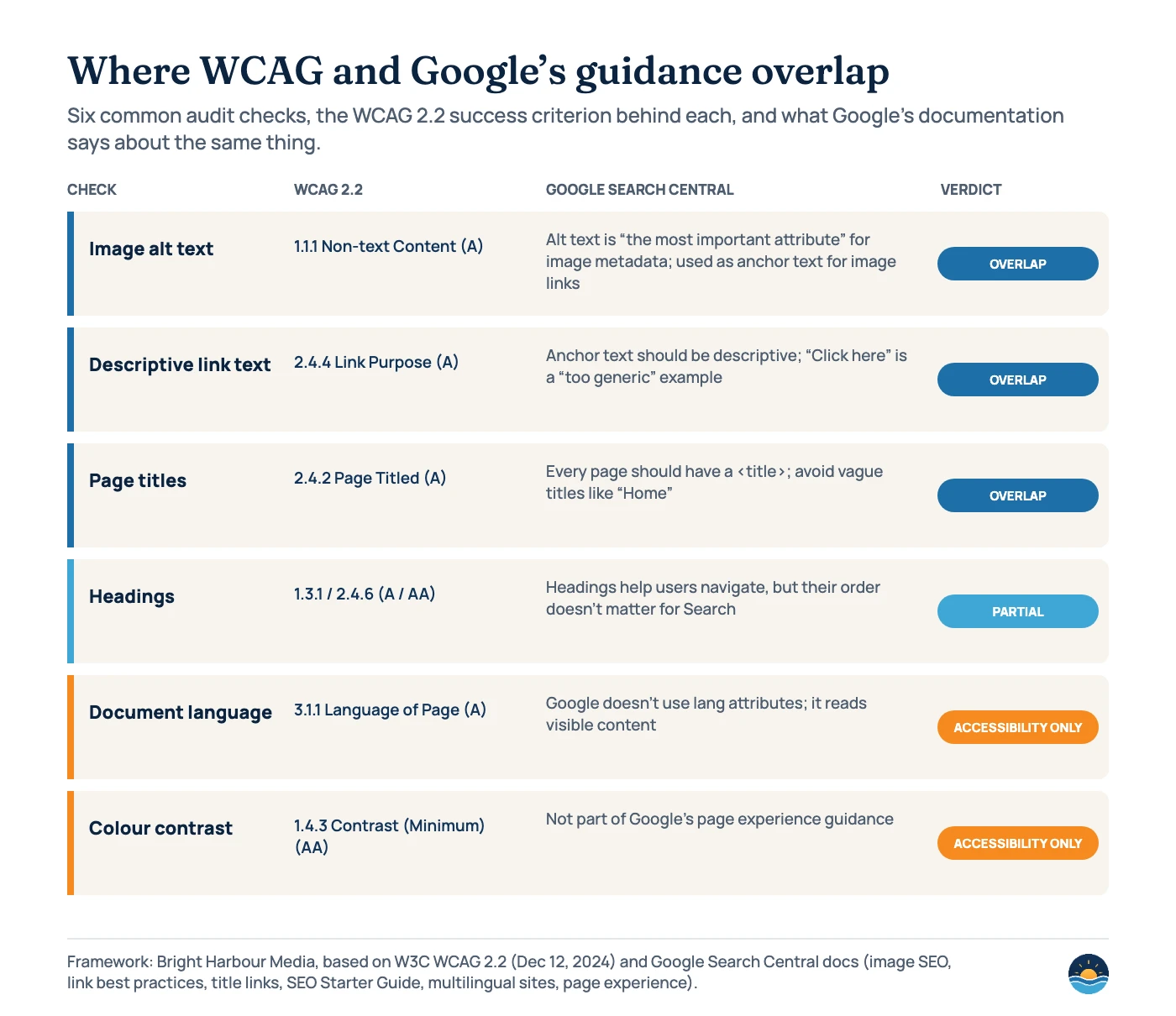
| Audit check | WCAG 2.2 criterion (level) | What Google’s documentation says | Verdict |
|---|---|---|---|
| Image alt text | 1.1.1 Non-text Content (A): non-text content needs a text alternative “that serves the equivalent purpose” | Image SEO (updated Mar 2, 2026): alt text is “the most important attribute” for image metadata; link best practices: for image links, Google uses the alt attribute as anchor text | Overlap |
| Link text | 2.4.4 Link Purpose (In Context) (A) | Link best practices (updated Dec 10, 2025): links must be <a> elements with an href; “Click here” is a “too generic” anchor | Overlap |
| Page titles | 2.4.2 Page Titled (A): “Web pages have titles that describe topic or purpose.” | Title links (updated Dec 10, 2025): give every page a <title> and avoid vague titles like “Home” | Overlap |
| Headings | 1.3.1 Info and Relationships (A); 2.4.6 Headings and Labels (AA) | SEO Starter Guide (updated Dec 10, 2025): semantic order is “fantastic for screen readers”, but for Google Search “it doesn’t matter” if headings are out of order | Partial |
| Page language | 3.1.1 Language of Page (A) | Multilingual sites guide (updated Dec 10, 2025): Google doesn’t use “code-level language information such as lang attributes” | Accessibility only |
| Colour contrast | 1.4.3 Contrast (Minimum) (AA): 4.5:1, or 3:1 for large text | No mention in page experience guidance | Accessibility only |
| Tap targets | 2.5.8 Target Size (Minimum) (AA, new in 2.2): at least 24 by 24 CSS pixels, with exceptions | No mention in page experience guidance | Accessibility only |
The overlaps are worth prioritising in any SEO audit because one fix earns two benefits. Our guides to image SEO, heading tags and title tags cover the search side of each in more depth.
How common are accessibility problems?
Very common. The WebAIM Million is the largest regular study. Each year WebAIM runs its WAVE engine against the rendered home pages of the top 1,000,000 websites. The 2026 edition (data from February 2026, page last updated March 30, 2026) found detected WCAG 2 failures on 95.9% of home pages, reversing six years of small improvements. That means full conformance was “certainly lower than 4.1%”.
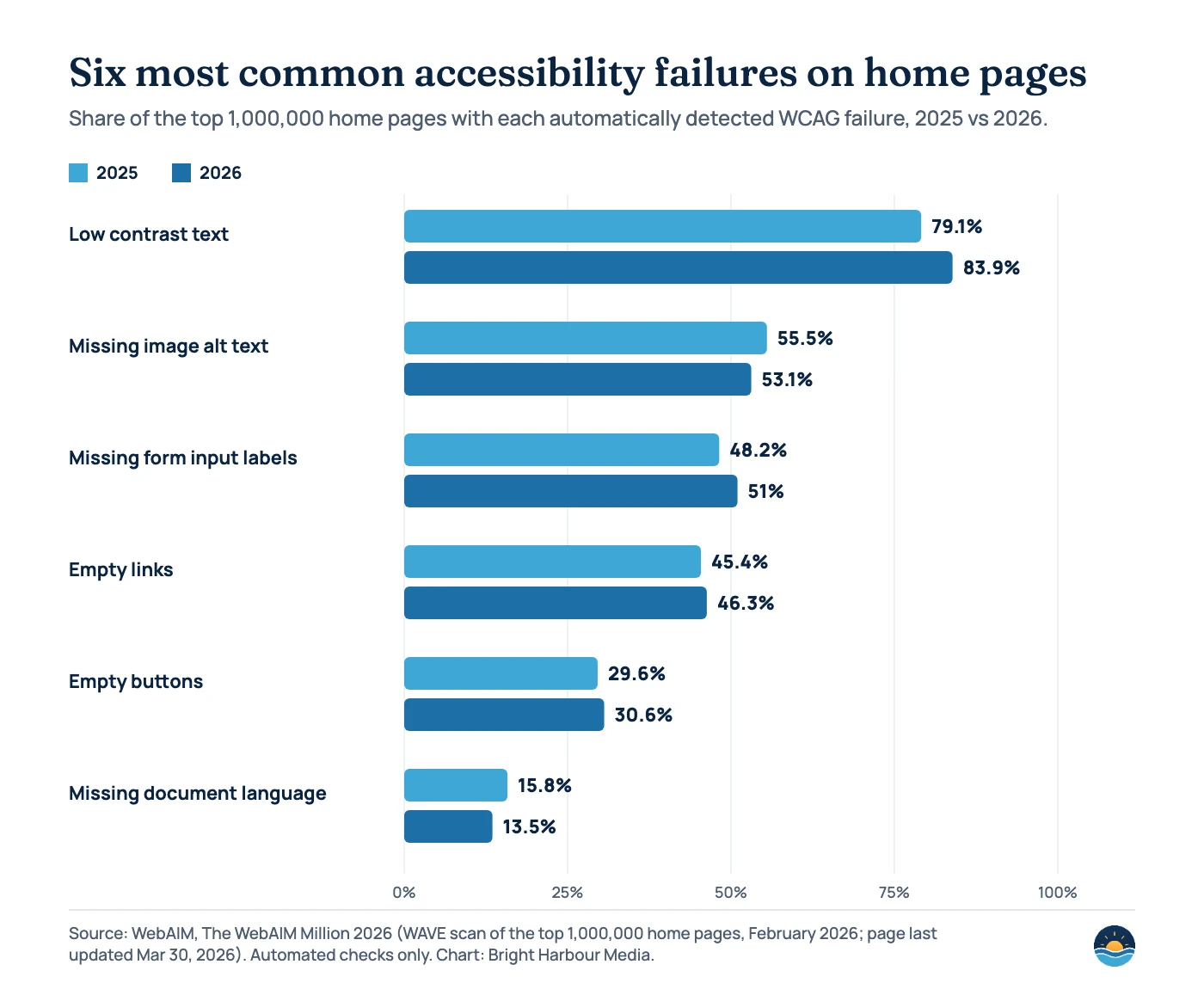
The average home page had 56.1 detected errors, up 10.1% from 51 in 2025, and pages are getting heavier: 1,437 elements on average, a 14.3% rise in a year. Some SEO-relevant details from the same report:
- Of 66.6 images per home page, 16.2% had no alt text, and 45% of those missing-alt images were links.
- 15.2% of pages used ambiguous link text such as “click here” (13.7% in 2025).
- 18.1% of pages had more than one <h1>, 41.8% skipped heading levels and 7.5% had no headings at all.
- Pages using ARIA averaged 59.1 errors, against 42 for pages without it.
| Platform | Home pages analysed | Average errors | vs overall average (56.1) |
|---|---|---|---|
| WordPress | 252,302 | 52.8 | −5.8% |
| Drupal | 18,222 | 41.2 | −26.5% |
| Wix | 3,183 | 33.3 | −40.6% |
| Squarespace | 2,669 | 33.0 | −41.2% |
| Shopify | 42,516 | 75.1 | +33.9% |
HTTP Archive’s Web Almanac 2025 accessibility chapter, which uses Lighthouse on far more sites, tells a similar story: only around 30% of sites pass the colour contrast check, roughly 86% have a valid lang attribute, and about 98% of pages have a <title>. The median Lighthouse accessibility score is a little over 85%.
Why automated scores aren’t an accessibility audit
Every automated tool has the same caveat. WebAIM says “absence of detected errors does not indicate that a page is accessible or conformant.” Lighthouse’s accessibility score is “a weighted average of all accessibility audits”, weighted by axe’s user-impact ratings, and manual audits don’t affect it. Missing alt text, unnamed buttons and missing form labels carry the most weight. Deque, which makes the axe engine, found that its automated tests identified 57.38% of issues across more than 13,000 pages and page states from first-time audits. Those automated findings covered 16 of the 50 WCAG 2.1 AA success criteria. The Web Almanac adds that tools compared by GOV.UK each detected “less than 50%” of accessibility errors.
So treat a perfect Lighthouse score like a clean PageSpeed Insights report: useful, but not proof. Automated checks can tell you an image has no alt attribute. They can’t tell you whether the alt text that is there makes sense, whether the page works with a keyboard, or whether a screen reader user can complete your enquiry form.
Who is legally required to make a website accessible?
This isn’t legal advice, and obligations depend on where you trade. Two rules come up most often:
| Law | Who it covers | Standard and dates |
|---|---|---|
| European Accessibility Act (Directive (EU) 2019/882) | Products and services for consumers, including e-commerce, consumer banking, e-books, electronic communications and passenger transport websites and apps. Microenterprises providing services (fewer than 10 staff and turnover or balance sheet of no more than €2 million) are exempt. | Applies from June 28, 2025. Harmonised standard EN 301 549 v3.2.1 (based on WCAG 2.1 AA) remains the legal reference until v4.1.1 (published September 2026, adopts WCAG 2.2) is cited in the Official Journal. |
| US ADA Title II rule (DOJ, April 24, 2024) | State and local government entities only; private businesses fall under Title III, which this rule doesn’t cover. | WCAG 2.1 AA. An interim final rule (April 20, 2026) extended compliance to April 26, 2027 (population 50,000+) and April 26, 2028 (smaller entities and special districts). |
How to run an accessibility audit as part of SEO
Automated (fast, partial)
- Lighthouse or axe on key templates
- WAVE on the home page and top landing pages
- Crawl for missing alt, empty links, missing titles and lang
- Contrast checks on brand colours
Manual (slower, essential)
- Keyboard-only walk-through of menus and forms
- Screen reader test of one key journey
- Read alt text and link text in context
- Zoom to 200% and check nothing overlaps
- Pick templates, not pages. Audit one example of each template (home, service, article, contact, product), because most errors repeat across every page built from it.
- Run automated checks. Use Lighthouse or WAVE on each template and a crawler across the site. Export missing alt text, empty links and buttons, missing titles and missing lang attributes.
- Fix the overlaps first. Alt text, descriptive link text, unique titles and a logical heading outline help users and search engines at the same time.
- Check contrast against your brand palette. Text needs 4.5:1 (3:1 for large text) under WCAG 1.4.3. Low contrast is the most common failure, at 83.9% of home pages.
- Test forms and buttons by hand. Every input needs a programmatic label and every icon button an accessible name; 33.1% of inputs in the WebAIM Million were unlabelled.
- Do a keyboard and screen reader pass. Tab through the main navigation and your enquiry form, and listen to one page with a screen reader. In WebAIM’s 2024 screen reader survey, 71.6% of respondents navigate a long page by its headings first.
- Log, fix and re-test. Record each issue with its WCAG criterion and template, fix at template level, and add the checks to your regular SEO audit checklist.
Frequently asked questions
Does improving accessibility improve rankings?
Not directly. Google has said accessibility isn’t a direct ranking factor. Some fixes overlap with Google’s SEO guidance, such as alt text, descriptive link text and page titles, so they can help how Google understands your pages.
Which WCAG level should a business aim for?
Level AA is the usual target. The US ADA Title II rule uses WCAG 2.1 AA, and the EU’s current harmonised standard, EN 301 549 v3.2.1, is based on WCAG 2.1 AA. WCAG 2.2 AA adds criteria such as minimum target size.
Is a 100 Lighthouse accessibility score enough?
No. Lighthouse only runs automated audits, and manual checks don’t affect the score. Deque found that automated tests identified 57.38% of issues, so keyboard, screen reader and content checks are still needed.
Do accessibility overlay widgets fix compliance?
Not on their own. The Web Almanac 2025 says overlays “often promise quick-fix compliance but fall short” of complex problems that need code and design changes. It found them on 2.1% of desktop and 1.8% of mobile pages. Fixing templates at the source is the more reliable route.
Sources
- The WebAIM Million: The 2026 report on the accessibility of the top 1,000,000 home pages — WebAIM, last updated Mar 30, 2026 — failure rates, common errors, CMS averages
- Web Content Accessibility Guidelines (WCAG) 2.2 — W3C Recommendation, Dec 12, 2024 (first published Oct 5, 2023) — success criteria
- Google image SEO best practices — Google Search Central, updated Mar 2, 2026 — alt text
- Link best practices for Google — Google Search Central, updated Dec 10, 2025 — anchor text, image links
- Influencing your title links in search results — Google Search Central, updated Dec 10, 2025
- SEO Starter Guide — Google Search Central, updated Dec 10, 2025 — headings
- Managing multi-regional and multilingual sites — Google Search Central, updated Dec 10, 2025 — lang attributes
- Understanding page experience in Google Search results — Google Search Central, updated Sep 22, 2026
- Google: Accessibility Is Not A Direct Ranking Factor — Search Engine Journal, Mar 29, 2022 — Mueller quote
- ADA Compliance Not A Google Search Ranking Signal — Search Engine Roundtable, May 17, 2021
- Lighthouse accessibility scoring — Chrome for Developers, updated Oct 22, 2025
- Automated Accessibility Coverage Report — Deque (no visible date) — 57.38% of issues
- Accessibility — 2025 Web Almanac — HTTP Archive, published Jan 15, 2026 — Lighthouse-based figures
- Screen Reader User Survey #10 Results — WebAIM, Feb 22, 2024 — heading navigation
- Directive (EU) 2019/882 (European Accessibility Act) — EUR-Lex, OJ L 151, June 7, 2019 — scope, dates, microenterprise exemption
- Extension of Compliance Dates (ADA Title II web accessibility) — Federal Register, Apr 20, 2026
Cite this article: Bright Harbour Media. “Accessibility Audit for SEO: Where WCAG and Search Overlap.” Bright Harbour Media Insights, November 2026. https://brightharbourmedia.com/accessibility-seo-audit/
You are welcome to reference the charts and frameworks in this article with a link back to this page.
Want an audit that covers search and accessibility in one pass? Our SEO audit service flags the fixes that help both. Get in touch to book one.