

Pagination SEO is the practice of splitting long lists, such as product categories, blog archives or search results, across numbered pages that Google can still crawl and index. Google’s current guidance is to link pages in sequence with normal <a href> links, give every page its own URL and canonical, and stop relying on rel="next" and rel="prev", which Google no longer uses.
Key takeaways
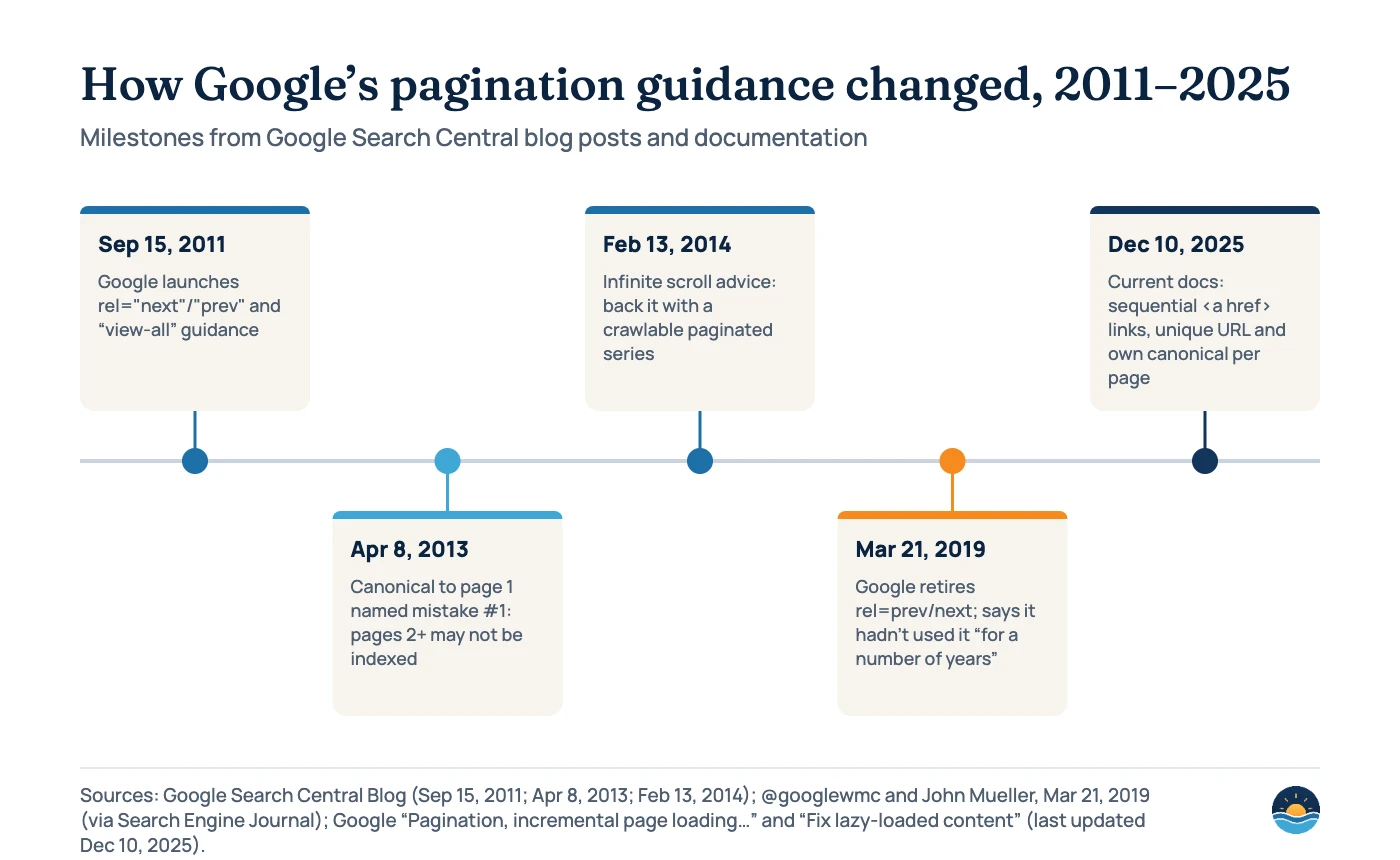
- Google retired rel=prev/next on March 21, 2019, and said it hadn’t used the markup in indexing “for a number of years.” Other search engines may still use it.
- Google’s pagination doc (last updated December 10, 2025) says: “Don’t use the first page of a paginated sequence as the canonical page.” Each page should have its own canonical URL.
- Google’s crawlers “don’t ‘click’ buttons,” so “Load more” and infinite scroll need real, linked page URLs behind them.
- URL fragments don’t work for pagination: “Google ignores fragment identifiers.” Use something like
?page=2instead. - Canonical tags are now on 68% of desktop and 67% of mobile pages, up from 59% and 61% in 2022 (HTTP Archive Web Almanac).
How does Google treat paginated pages today?
Google treats each paginated URL as a page in its own right. Its ecommerce documentation, “Pagination, incremental page loading, and their impact on Google Search,” says paginated URLs “are treated as separate pages by Google.” There is no special grouping signal. When Google announced the end of rel=prev/next in 2019, John Mueller summed it up: “For the most part, we just index the pages as we find them,” adding that you should “make sure that all pages can stand on their own.”
That has three practical consequences. Google has to be able to find page 2, page 3 and beyond through links. Each page has to be a valid, indexable URL. And your category’s first page is likely to be the strongest landing page, simply because it gets the most internal links. Google even suggests you can link every page back to page 1 to give “a hint that the first page of a collection might be a better landing page.”
What happened to rel=”next” and rel=”prev”?
Google introduced the markup on September 15, 2011, describing it as “a strong hint” to consolidate indexing properties, such as links, across a series. On March 21, 2019, the Google Webmasters account posted: “As we evaluated our indexing signals, we decided to retire rel=prev/next.” Mueller added that Google “noticed that we weren’t using rel-next/prev in indexing for a number of years now.” Google never gave an exact date for when it stopped.
Today’s pagination doc confirms it: “Google no longer uses these tags, although these links may still be used by other search engines.” Bing’s 2012 webmaster blog described the markup as giving “a strong indication of the structure and scope” of sequenced content. We couldn’t verify Bing’s current position on a first-party page, so we wouldn’t add the tags for Google, and wouldn’t rip out working tags either. They don’t hurt.
Pagination, “Load more” or infinite scroll?
Google’s doc compares three ways of showing long lists. All three can work for search, but only if there are crawlable URLs underneath. Google notes that its crawlers “generally don’t trigger JavaScript functions that require user actions,” so a button or scroll event alone hides everything after the first batch.
| Pattern | What users see | What Google needs | Google’s caveat |
|---|---|---|---|
| Pagination | Numbered pages with next/previous links | Sequential <a href> links to each page’s unique URL | “More complex controls” and “viewing more requires new page loads” |
| Load more | A button that appends the next batch to the page | A linked, paginated URL for each batch the button loads | “Can’t handle very large numbers of results” |
| Infinite scroll | New items load as the user scrolls | Each chunk with “its own persistent, unique URL,” linked in sequence, with the address bar updated via the History API | Possible “scrolling fatigue”; “can’t handle very large numbers of results” |
Google’s lazy-loading doc is specific about infinite scroll: give each chunk a unique URL, use absolute page numbers such as ?page=12 rather than relative values such as ?date=yesterday, link sequentially, and test with the URL Inspection tool. Its older 2014 infinite-scroll post added that pages shouldn’t overlap and that out-of-range pages should return a 404. For how Google renders script-driven pages more generally, see our JavaScript SEO guide.
How should you set canonicals on paginated pages?
This is where most pagination problems start. A common shortcut is to point every page’s canonical at page 1, so that “the category” consolidates. Google has warned against this for over a decade. Its 2013 post “5 common mistakes with rel=canonical” listed it first and said it “would result in the content on pages 2 and beyond not being indexed at all.” The current doc is just as direct: “Give each page its own canonical URL.”
Do
- Self-referencing canonical on every page:
?page=2canonicalises to?page=2 - Link internally to the same URL format you canonicalise
- Return a 404 for page numbers beyond the end of the series
Don’t
- Canonical pages 2+ to page 1
- Use
#page=2fragments: Googlebot “may not follow the link, thinking it has already retrieved the page” - Block paginated pages in robots.txt or noindex them by default; products only linked from deeper pages get harder to find
The 2011 “view-all” advice, where component pages canonicalised to a single page listing everything, has never been formally withdrawn, but it doesn’t appear in Google’s current pagination doc. Treat it as history unless a view-all page loads quickly and is what users actually want. For canonical signals in general, see our guide to canonical tags and duplicate content.

The Web Almanac doesn’t measure pagination or rel=prev/next directly. We checked the 2019 to 2025 SEO chapters and found no pagination figures. The canonical data is the closest proxy: two-thirds of pages now carry a canonical tag, and the 2025 chapter found rendering changed the canonical on 2.71% of desktop and 3.02% of mobile pages.
What about filters, sort orders and crawl budget?
Pagination multiplies quickly when it combines with filters and sorting. Page 3 of a category sorted by price, filtered by colour, is a different URL from page 3 of the plain category. Google’s pagination doc says to avoid indexing URLs with filters or alternative sort orders, using noindex, or robots.txt to discourage crawling of URLs such as ?order=price.
Google’s crawl budget guide (updated July 22, 2026) is aimed at large sites, 1 million+ unique pages changing weekly or 10,000+ changing daily. It suggests robots.txt for “infinite scrolling pages that duplicate information on linked pages, or differently sorted versions of the same page,” and warns not to use noindex for crawl budget, because Google still requests the page. The faceted navigation doc adds that sites should return a 404 for nonexistent pagination URLs. Our faceted navigation guide covers the filter side in depth.
| URL type | Example | Index? | Google-aligned handling |
|---|---|---|---|
| Plain paginated page | /shoes/?page=3 | Yes | Crawlable link from page 2, self-referencing canonical |
| Sorted variation | /shoes/?page=3&order=price | No | noindex, or robots.txt disallow to discourage crawling |
| Filtered variation (no search demand) | /shoes/?colour=red&page=3 | Usually no | Block or handle with the faceted navigation guidance |
| Out-of-range page | /shoes/?page=999 (only 40 pages) | No | Return HTTP 404, not a redirect to page 1 |
| Fragment-based page | /shoes/#page=3 | Not possible | Replace with a query parameter or path URL |
Do paginated pages need unique titles?
Not according to Google. Its pagination doc makes an exception to the usual advice on unique titles: “pages in a paginated sequence don’t need to follow this recommendation. You can use the same titles and descriptions for all pages in the sequence.” Adding “Page 2” to titles is harmless and can help users scanning tabs, but it isn’t a ranking fix. Spend the effort on making page 1 a strong landing page instead.
A seven-step pagination audit
- List your paginated series. Categories, blog archives, tag pages, internal search. Note how many pages each one has.
- Check the links. View the raw HTML of page 1 and confirm a real
<a href>to page 2, not a button or JavaScript handler. - Check the URLs. Every page should have a unique, stable URL such as
?page=n, with no fragments and no relative values. - Check the canonicals. Each page should canonicalise to itself. Flag any series where pages 2+ point to page 1.
- Test “Load more” and infinite scroll. Disable JavaScript or use URL Inspection to confirm the underlying paginated URLs exist and are linked.
- Contain sorts and filters. Make sure sorted and unhelpful filtered variations are noindexed or blocked, and out-of-range pages return 404.
- Confirm deep items get found. Spot-check that products on the last pages are indexed. List them in your sitemap too, as Google suggests. See our XML sitemaps guide.
Frequently asked questions
Does Google still use rel=”next” and rel=”prev”?
No. Google retired the markup on March 21, 2019, and its current pagination doc says Google no longer uses these tags, although other search engines may. You don’t need to add them for Google, and existing tags do no harm.
Should paginated pages canonicalise to page 1?
No. Google says not to use the first page of a paginated sequence as the canonical page and to give each page its own canonical URL. Pointing pages 2+ at page 1 can stop the content on those pages from being indexed.
Should I noindex page 2 and beyond?
Google doesn’t recommend it for plain pagination. Its guidance is to keep paginated pages crawlable and indexable with unique URLs, and to reserve noindex or robots.txt for filtered and sorted variations.
Is infinite scroll bad for SEO?
Not if it’s backed by paginated URLs. Google says its crawlers don’t interact with the page, so each chunk needs its own persistent URL, linked in sequence, with the address bar updated through the History API.
Sources
- Pagination, incremental page loading, and their impact on Google Search — Google Search Central, last updated Dec 10, 2025 — patterns, sequential links, unique URLs, canonicals, fragments, titles, rel=prev/next status
- Fix lazy-loaded content — Google Search Central, last updated Dec 10, 2025 — paginated loading for infinite scroll
- Pagination with rel=”next” and rel=”prev” — Google Search Central Blog, Sep 15, 2011 — original markup guidance
- View-all in search results — Google Search Central Blog, Sep 15, 2011 — view-all guidance
- 5 common mistakes with rel=canonical — Google Search Central Blog, Apr 8, 2013 — canonical to page 1 as mistake #1
- Infinite scroll search-friendly recommendations — Google Search Central Blog, Feb 13, 2014 — paginated series behind infinite scroll, 404 for out-of-range pages
- Google Stopped Supporting Rel=prev/next in Search Indexing Years Ago — Search Engine Journal, Mar 21, 2019 — Google Webmasters and John Mueller statements
- Crawl budget management — Google, last updated Jul 22, 2026 — large-site thresholds, robots.txt for infinite scroll and sorted duplicates
- Managing crawling of faceted navigation URLs — Google, last updated Dec 18, 2025 — 404s for nonexistent pagination URLs
- Web Almanac 2025: SEO — HTTP Archive, published Jan 15, 2026 — canonical tag usage and rendering changes
- Web Almanac 2024: SEO — HTTP Archive, published Dec 2, 2024 — 2022 canonical usage figures
- Implementing Markup For Paginated And Sequenced Content — Bing Webmaster Blog, Apr 14, 2012 — Bing’s historical position on the markup
Cite this article: Bright Harbour Media. “Pagination SEO: How Google Crawls and Indexes Paginated Pages.” Bright Harbour Media Insights, October 2026. https://brightharbourmedia.com/pagination-seo/
You are welcome to reference the charts and frameworks in this article with a link back to this page.
Products buried on page 12, or categories canonicalised to page 1? Our technical SEO service audits pagination, faceted navigation and crawl paths. Get in touch to talk it through.