
Google Business Profile verification is how Google confirms that a business really exists at the address or in the service area it claims, and that the person managing the profile is authorised to do so. Google chooses the verification method (video recording, live video call, phone or text, email, postcard or instant verification), and most reviews take up to 5 business days.
Key takeaways
- Google picks the method: verification options “are automatically determined by Google and can’t be changed,” and some businesses need more than one method.
- Video recording is Google’s recommended option where available. It must be one continuous, unedited recording of at least 30 seconds, made in the app.
- Reviews take up to 5 business days. Postcard codes mostly arrive within 14 days and expire after 30 days.
- Changing your name or address after verification can trigger re-verification. Editing name, address or category while a postcard is on its way makes the code useless.
- Bulk verification needs 10 or more locations of the same business. Agencies managing several businesses in one account and service-area businesses can’t use it.
What does verification actually unlock?
An unverified profile isn’t useless, but it is limited. Google’s Help page on edits says you can still change basics such as name, category, address, hours, phone and website on an unverified profile, then adds: “To edit all your info, verify your profile.” Several features are explicitly tied to verification, including messaging, posts Google publishes on your behalf, and opting out of Google’s automated calls to the business.
Verification also matters for trust and visibility. Google’s getting-started guide says a verified profile “can help customers find you and build greater trust in your business.” In Whitespark’s 2026 Local Search Ranking Factors survey, 47 local SEO experts ranked “Verified GBP” #29 of 187 factors for the local pack and #79 for conversion. That is expert opinion, not measured data, but it reflects a common view: verification is a gate you must pass before most other local work counts. If you are setting up from scratch, start with our Google Business Profile fundamentals.
Which verification methods does Google use?
You don’t choose from a menu of every method. Google’s Help centre says the options depend on your “business type, public info, region, or business hours,” and you may need to verify with more than one method. Here is what each method involves, based on Google’s current Help pages.
| Method | How it works | Key rules from Google |
|---|---|---|
| Video recording | Record and upload a video of your location or service area from the Business Profile on a mobile device | Recommended where eligible. At least 30 seconds, one continuous unedited recording, no pre-recorded uploads, no other people’s faces or sensitive documents |
| Live video call | A support representative guides you through a call, starting as a text chat | Not available for all businesses. Only during your location’s business hours. You must be at the business |
| Phone or text | A code is sent by call or SMS to the business number | Interactive Voice Response (IVR) systems “won’t get the code” |
| A code or link is sent to an email address | Follow the steps in the email | |
| Postcard (mail) | A 5-digit code is mailed to the business address | Not available for all businesses. Most codes arrive within 14 days and expire after 30 days |
| Instant verification | Profile is verified without a separate step | Can happen if you’ve verified your website in Google Search Console, or through bulk verification |
How long does Google Business Profile verification take?
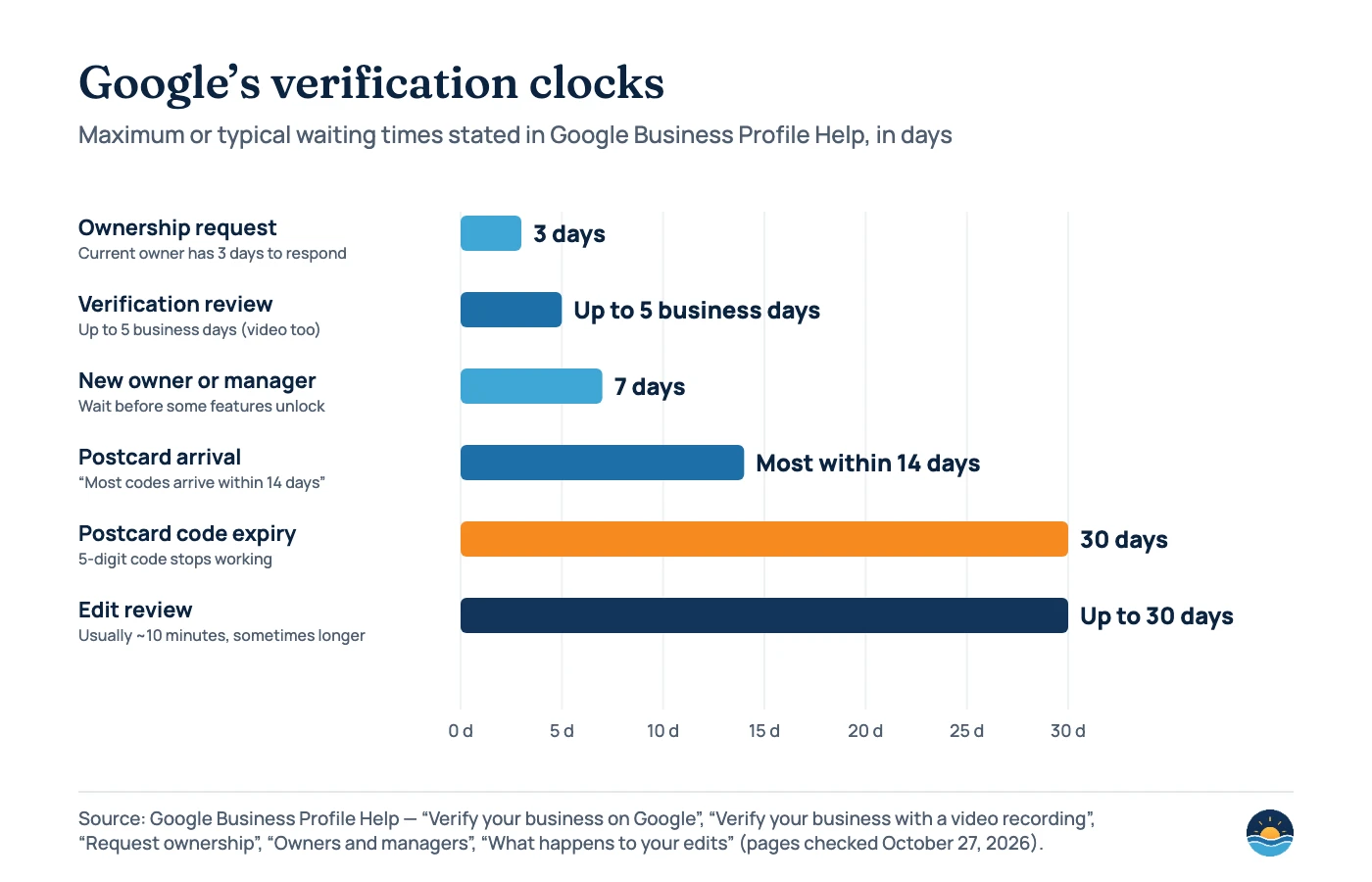
Google’s main verification page tells you to “wait up to 5 business days to be verified” and warns that “on rare occasions, reviews may take longer.” Video recordings have the same up-to-5-business-days window. When it works, you’ll receive a confirmation email.
Postcards are slower. Google says “most codes arrive within 14 days” and that codes expire after 30 days. The chart below collects the other clocks that affect verification and ownership. Note that Google’s Help pages don’t show a “last updated” date, so treat these as current on the day we checked them.
Third-party guides sometimes give different figures. BrightLocal’s verification guide (updated May 2026) says postcards take “around a week to arrive on average.” That is an observation, not a Google commitment. Plan around Google’s 14-day figure.
What does Google want to see in a verification video?
Video is the method most businesses now meet, and it’s where most avoidable rejections happen. Google’s video recording page lists three things to show. The details differ for storefronts and service-area businesses.
Storefront or hybrid business
- Location: street signs, building numbers or nearby businesses
- The business exists: its name “clearly printed on a permanent fixture”, matching the profile name
- You manage it: something only an employee can access, such as a cash register, kitchen, storage room or point-of-sale system
Service-area business
- Where you operate: local landmarks or signs. Google says to avoid “empty land or locations without clear markers”
- The business exists: tools, equipment, business cards or branded clothing
- You manage it: performing a service, unlocking a branded van, or a permit, invoice or utility bill that matches the profile name
Google is blunt about signage. If your business doesn’t have permanent on-site signage, it says to list it as a service-area business instead of a storefront. That links verification to your profile setup, which we cover in our guide to service-area business SEO.
If a video is rejected, Google shares the reasons. Its examples include “Business name not visible on storefront,” “No nearby area shown,” and “Missing proof of authorization to operate the business.” A new video must include everything from the first one plus whatever was missing.
Who is eligible to be verified?
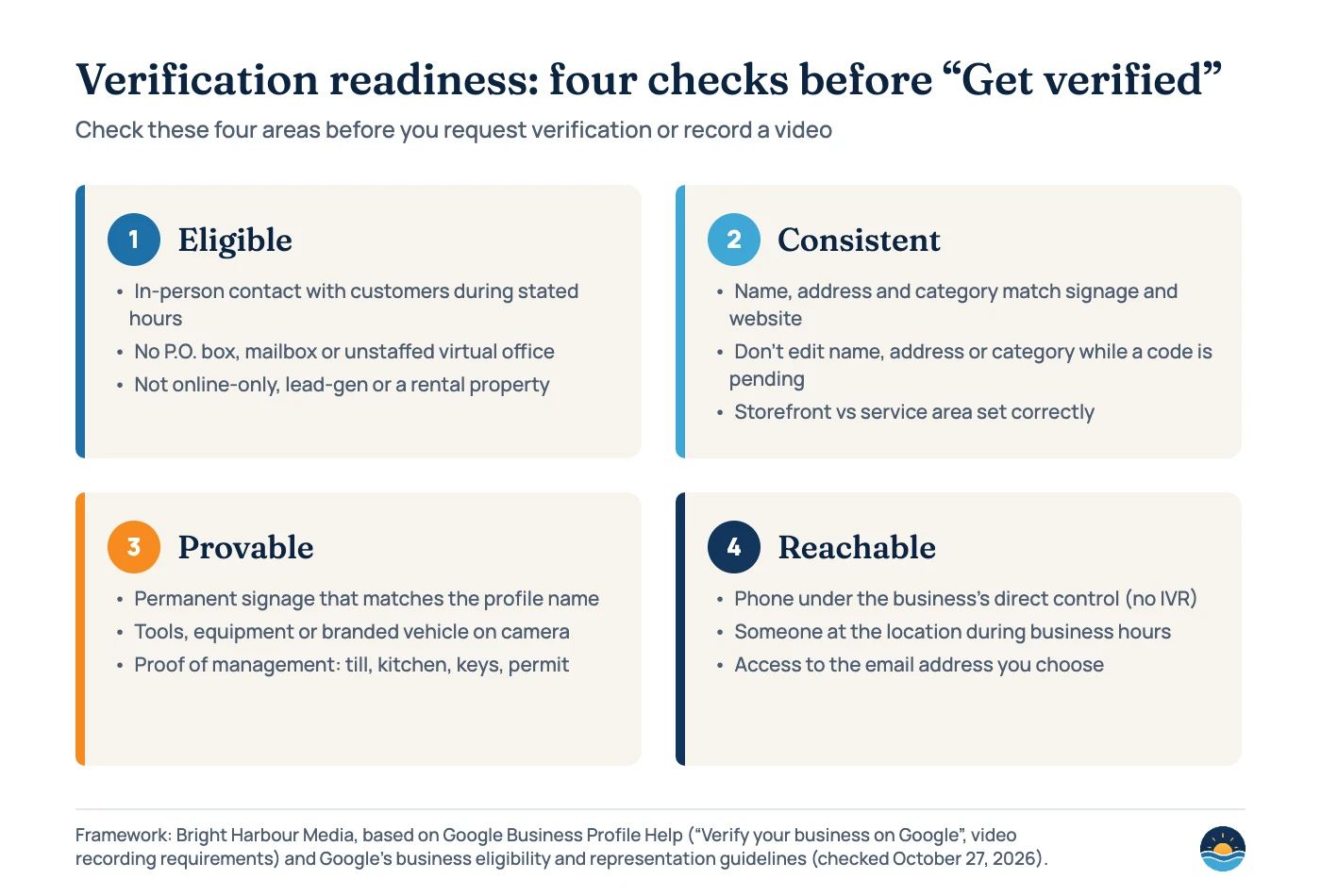
Verification can’t fix an ineligible business. Google’s eligibility guidelines say “a business must make in-person contact with customers during its stated hours.” Online-only businesses are “not eligible for a Business Profile and can’t be verified.” Google’s representation guidelines add address rules that commonly block verification:
- “P.O. boxes or mailboxes located at remote locations aren’t acceptable.”
- A virtual office (a rented mailing address you don’t operate from) isn’t eligible. Co-working spaces need clear signage and must be staffed and receive customers during business hours.
- Businesses that show their address “should maintain permanent fixed signage.”
- Service-area businesses get one profile, should hide their address, and should keep the service area within “about 2 hours of driving time.”
- The phone number “must be under the direct control of the business.”
- Agencies must “always work directly with the business owner to complete verification.”
Whitespark’s 2026 expert survey ranked “Address is a PO Box, UPS Mail Store, Virtual Office, or Other False Address” as the #1 suspension risk factor (score 202). Getting eligibility right before verification also protects you later. Our guide to Google Business Profile suspensions covers what happens when it goes wrong.
Why might you be asked to verify again?
Verification isn’t always one-and-done. Google’s Help pages describe several situations that bring the “Get verified” prompt back.
| What you see or do | What Google says | What to do |
|---|---|---|
| “Get verified” button reappears | Google “couldn’t completely verify your business” | Re-verify, or try another method if one is offered |
| “Review issues” notice after a video | “Your video wasn’t accepted” | Read the reasons and record a new, complete video |
| Asked for additional information | Likely because “some of your business details were recently updated” | Confirm the edits match your signage and website, then provide what’s requested |
| You change your business name | You “might need to verify your business again” | Change it only when the real-world name changes, and update signage first |
| You move to a new address | You “must verify your business again” | Edit the existing profile. Don’t create a new one, which may be treated as a duplicate |
| You edit name, address or category while a postcard is in the mail | “The code we sent you won’t work” | Wait for the code, verify, then make edits |
| You request a new postcard code | Google invalidates the code already in the mail | Wait out the 14 days before requesting again |
What if someone else already owns the profile?
If a profile already exists and someone else controls it, you request access rather than creating a duplicate. Google’s process is to search at business.google.com/add, choose the option saying someone else may manage the profile, and send a request. “The current profile owner is then notified by email and has 3 days to respond.” If there’s no response after 3 days, you may have the option to claim the profile, but Google notes “the option to claim a profile isn’t always available.” Denied requests can be appealed.
New owners and managers then “have to wait 7 days” before they can use some features, such as removing other owners or transferring primary ownership. Plan agency handovers with that week in mind.
How does bulk verification work for 10+ locations?
Chains can verify many locations at once through Business Profile Manager (Verifications → Chain). Google’s bulk verification page sets these conditions:
- At least 10 locations of the same business. Duplicate, suspended or disabled profiles don’t count towards the minimum.
- “Agencies with more than one business in one account can’t bulk verify,” and service-area businesses are excluded.
- Your spreadsheet should include all the locations you manage. Uploading it “doesn’t send a verification request.”
- Google may still ask for video verification, with an authorised representative at the location.
- Google “may de-verify accounts that don’t actively manage their profiles,” and revokes bulk verification for abuse.
For the wider structure of chain profiles and location pages, see our multi-location SEO guide.
A seven-step process to get verified first time
- Confirm eligibility. Check that you meet customers in person during stated hours and that your address is a real, staffed location, not a P.O. box or virtual office.
- Choose storefront or service area honestly. No permanent signage at the address means service-area setup, with the address hidden.
- Match the real world. Make the profile name, address and primary category match your signage, website and documents before you request verification.
- Verify your website in Search Console. Google lists this as one route to instant verification, and it’s useful for SEO anyway.
- Prepare the video. Plan a continuous route of 30+ seconds: location markers, then the business name or equipment, then proof of management. Keep faces and sensitive documents out of shot.
- Don’t touch key fields while waiting. No edits to name, address or category while a postcard or review is pending, and don’t request repeat codes.
- Fix and resubmit with evidence. If rejected, read Google’s reasons, address every missing item, and re-record or choose another method if offered.
Frequently asked questions
Can I choose which verification method Google gives me?
No. Google says verification methods are automatically determined and can’t be changed. The options depend on your business type, public information, region and business hours, and some businesses need more than one method.
How long does Google Business Profile verification take?
Google says reviews take up to 5 business days, occasionally longer, and video recordings are reviewed within the same window. Postcard codes mostly arrive within 14 days and expire after 30 days.
Does Google still send verification postcards?
Yes, for some businesses. Google’s main verification page still describes mail verification with a 5-digit code, but notes that postcard verification isn’t available for all businesses. Video verification is now Google’s recommended option where available.
Will changing my business details make me verify again?
It can. Google says a name change after verification might require re-verification and a move to a new address requires it. Editing name, address or category while a postcard is in transit also makes that code stop working.
Sources
- Verify your business on Google — Google Business Profile Help, checked Oct 27, 2026 — methods, timings, postcard rules, instant verification, re-verification prompts
- Verify your business with a video recording — Google Business Profile Help, checked Oct 27, 2026 — video requirements, rejection reasons, review time
- Verify Business Profiles in bulk — Google Business Profile Help, checked Oct 27, 2026 — 10-location minimum, eligibility, de-verification
- Business eligibility and ownership guidelines — Google Business Profile Help, checked Oct 27, 2026 — in-person contact rule, ineligible businesses, agencies
- Guidelines for representing your business on Google — Google Business Profile Help, checked Oct 27, 2026 — P.O. boxes, virtual offices, signage, service areas, phone control
- Edit your Business Profile — Google Business Profile Help, checked Oct 27, 2026 — re-verification after name or address changes
- Understand what happens to your Business Profile edits — Google Business Profile Help, checked Oct 27, 2026 — edit review times, unverified profile limits
- Request ownership of a Business Profile — Google Business Profile Help, checked Oct 27, 2026 — 3-day response window, claim option
- Manage your Business Profile owners & managers — Google Business Profile Help, checked Oct 27, 2026 — 7-day wait for new owners and managers
- Local Search Ranking Factors 2026 — Whitespark, published Nov 6, 2025 — expert survey (47 experts, 187 factors): “Verified GBP” ranks and suspension risk factors
- How to Verify a Google Business Profile — BrightLocal, updated May 2026 — observed postcard arrival times
Cite this article: Bright Harbour Media. “Google Business Profile Verification: Methods, Timelines and Fixes.” Bright Harbour Media Insights, October 2026. https://brightharbourmedia.com/google-business-profile-verification/
You are welcome to reference the charts and frameworks in this article with a link back to this page.
Stuck in a verification loop, or setting up profiles for several locations? Our local SEO service handles Google Business Profile setup, verification and ongoing management. Get in touch and we’ll look at your profile.