
Google Business Profile photos are the images and short videos shown on your business’s listing in Google Search and Maps. Google requires JPG or PNG photos between 10 KB and 5 MB (720 × 720 px recommended), videos up to 30 seconds, and media that “represent reality”, while posts let you publish updates, offers and events directly on the profile.
Key takeaways
- Google’s photo specs: JPG or PNG, 10 KB–5 MB, 720 × 720 px recommended, 250 × 250 px minimum. Videos: up to 30 seconds, 75 MB, 720p or higher.
- New uploads can take up to 24–48 hours to appear, and nothing shows until the profile is verified.
- Google suggests at least three photos each of your exterior, interior, products, team at work and team, and warns against “excessive use of filters or AI”.
- In Whitespark’s 2026 expert survey, photo quality scored 108 for the local pack, while geo-tagged photos came last of 187 factors (score 23).
- Posts older than 6 months are archived unless you set a date range, and offer posts need a title, dates and a time.
Why do photos and posts matter for local SEO?
Google’s own guidance on local ranking is careful. Its help page “Tips to improve your local ranking on Google” says local results are “mainly based on relevance, distance, and popularity”, and that “businesses with complete and accurate info are more likely to show up in local search results.” On photos it says only that you can “tell the story of your business with photos and videos.” It doesn’t claim that uploading more photos lifts rankings.
So treat photos and posts mainly as a conversion tool: they help someone who has found you decide to call, visit or book. That’s also how local SEO experts see them. In Whitespark’s 2026 Local Search Ranking Factors survey, “Photo & Video Quality” ranked #11 of 120 factors for conversion but only #45 for the local pack. For the basics of the profile itself, see our Google Business Profile fundamentals guide.
What are Google’s photo and video requirements?
Google lists these specifications in its Business Profile help page “Manage your Business Profile photos & videos”. Files that miss them may fail to upload or be rejected.
| Requirement | Photos | Videos |
|---|---|---|
| Format | JPG or PNG | Not stated on the help page |
| File size | Between 10 KB and 5 MB | Up to 75 MB |
| Resolution | 720 × 720 px recommended; 250 × 250 px minimum | 720p or higher |
| Length | — | Up to 30 seconds |
| Quality | In focus, well lit, no significant alterations or excessive filters | Should show the business; same quality standard |
| When it appears | Up to 24–48 hours after upload, and only once the profile is verified | Same |
Each upload moves through three statuses: Pending, Not approved or Live. Businesses with 10 or more locations can bulk upload photos. Photo views aren’t in the Performance report any more. Google ended the photo view and photo count metrics in its API on February 20, 2023, though view counts still appear on individual photos in Search. Our Google Business Profile performance guide covers the metrics that remain.
Which photos should a Business Profile have?
Google’s “Tips for business-specific photos” page gives minimum counts by type. The cover photo and logo come from the main photos help page. One detail matters for the cover: setting one “doesn’t guarantee the cover photo will show up as the first image”. If your cover is low quality, Google says “a user-submitted photo may be selected instead.”
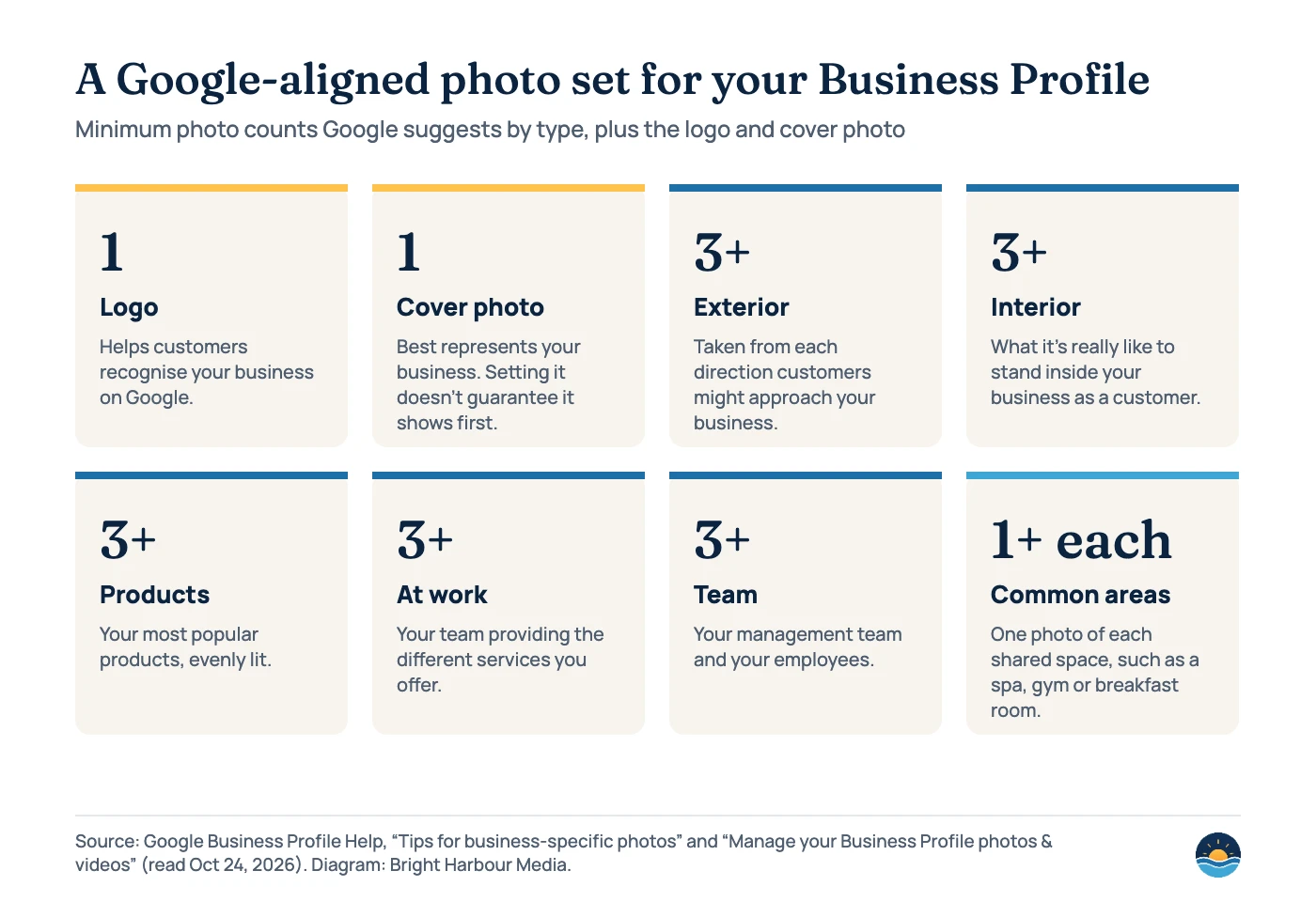
The exterior advice is practical: “Capture a photo from each direction that customers might approach your business.” For a service-area business with no storefront, the at-work and team photos do most of the job, because they show who will turn up and what the finished work looks like. Restaurants and hotels have extra categories too: food and drink photos, rooms and common areas.
What gets photos rejected or removed?
Business owner photos must meet the Maps user-contributed content policy as well as the Business Profile rules. Google’s quality guidance for business photos asks for “no significant alterations or excessive use of filters or AI. In other words, the image should represent reality.” The Maps media tips go further:
| Problem | What Google says | What to do instead |
|---|---|---|
| Stock or borrowed images | Avoid “stock photos… or imagery created by other parties.” | Photograph your own premises, team and work |
| Heavy editing or AI | Avoid “heavily edited or otherwise manipulated photos.” Filters are OK if the photo remains a clear, accurate depiction. | Light colour correction only; no AI-generated scenes |
| Text, borders, collages | “Avoid adding elements such as borders, text, or collaged images.” Screenshots and GIFs are also on the avoid list. | Put offers in posts, not on images |
| Wrong location | Relevant photos “are created at the location you’re posting about.” | Shoot on-site, or at real customer jobs |
| Low quality | “Low quality media may be removed; quality removals can’t be appealed.” | Shoot in focus, in good light, at 720 px or more |
Stock and AI imagery also carry suspension risk in the experts’ view. Whitespark’s 2026 survey ranks “Presence of AI-Generated Photos/Videos on Profile” #31 and “Presence of Stock Photos/Videos on Profile” #33 among negative factors. If a profile has already been suspended, our suspension recovery guide explains the appeal process.
Do geotags, keywords in file names or photo volume help rankings?
Probably not in the way many checklists claim. Whitespark’s experts placed “Presence of Geo-tagged Photos” last of 187 factors for the local pack and first on the survey’s list of local SEO myths. Sterling Sky tested it in January 2024 on five listings with three images each. It found geotags had “no measurable impact on rankings in the local pack” and that Google Business Profile stripped the geotags from the photos after upload.
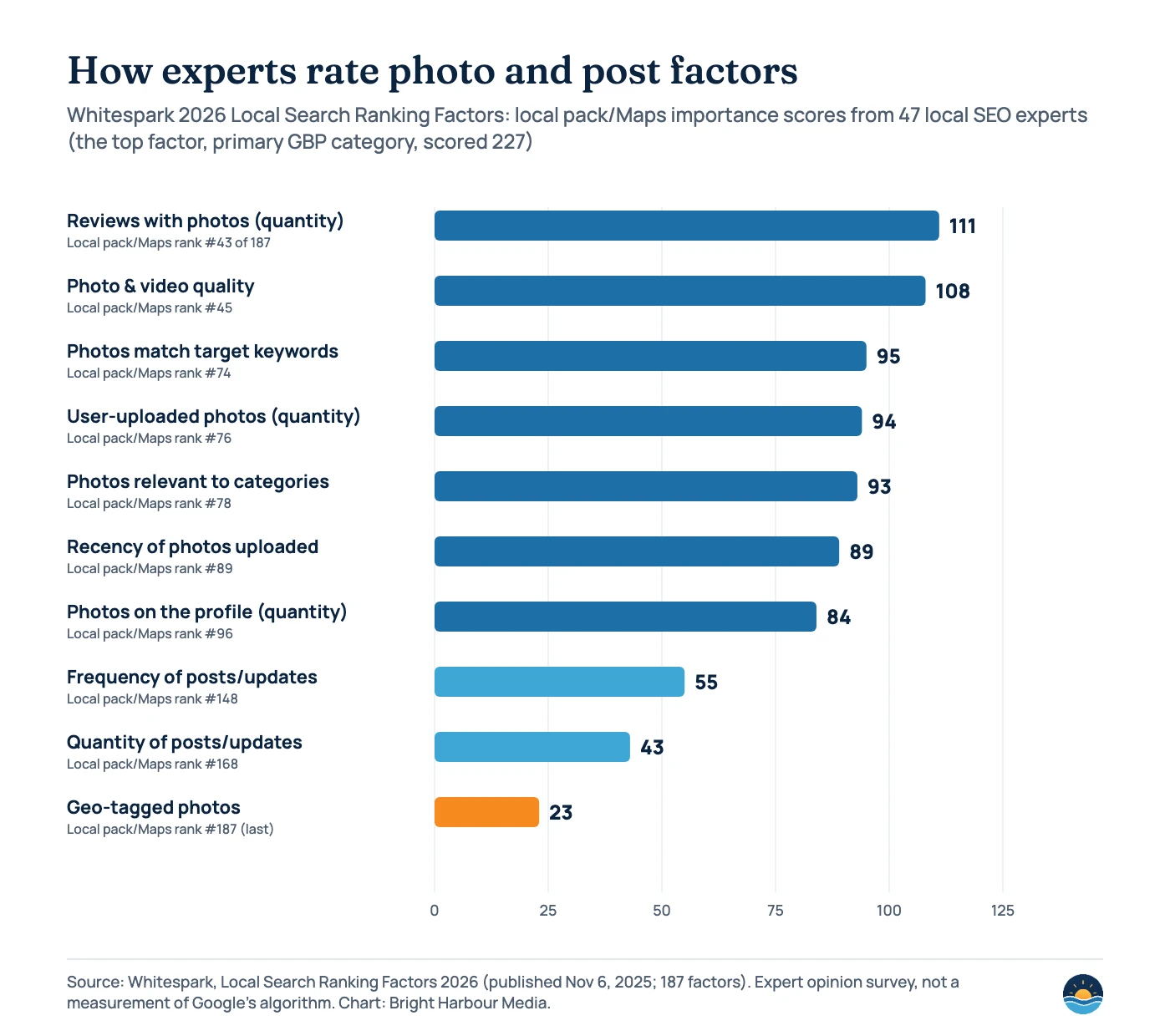
Photo volume gets quoted a lot, usually with weak sourcing. BrightLocal’s 2019 study of 45,000 listings found businesses with more than 100 images got 520% more calls and 2,717% more direction requests than the average business. But BrightLocal cautioned that those businesses may simply be “better” at Google Business Profile in general. That’s correlation, not cause. The often-repeated claim that profiles with photos get “42% more requests for directions” isn’t on any current Google page we could find. The help page it was once linked to now redirects to the Help Center home page, so we don’t use it.
Worth your time
- Real, well-lit photos of each type Google lists
- A strong logo and cover photo, checked so a customer photo doesn’t replace them
- Fresh photos after a refit, new service or new team members
- Encouraging reviews with photos, which experts rated highest of the photo factors
Safe to skip
- Geotagging or EXIF editing (stripped on upload, rated last by experts)
- Keyword text overlaid on images (rank #164 of 187)
- Stock photos and AI-generated scenes (a policy risk)
- Posting daily just to “stay active”: post quantity ranked #168
How do Google Business Profile posts work?
Posts appear in the “Updates” or “Overview” tab on mobile and under “From the owner” on desktop. Google’s “Create & manage posts” help page describes three types:
| Post type | What it needs | Good for |
|---|---|---|
| Update | A description, plus an optional photo, video and action button with a link | News, new services, seasonal reminders, project photos |
| Offer | A title, dates and a time; adds a “View Offer” button. Can include a coupon code and terms | Time-limited deals. Hotels can’t create offer posts |
| Event | A title, start and end dates and times; without times it shows as lasting 24 hours on the event dates | Workshops, open days, launches |
Three rules catch businesses out. First, “posts older than 6 months are archived unless a date range is set.” Second, Google “may remove posts with unverified contact information”, including phone numbers, email addresses and social media handles. Third, the Maps policy bans repetitive content, meaning the same post published several times. You can schedule posts, set them to recur weekly or monthly, and publish to several profiles at once. Google’s current help page gives no character limit. The 1,500-character limit often quoted comes from a 2018 change reported by Search Engine Journal.
Expert opinion is clear that posts are a minor ranking factor at best. “Frequency of Google Posts/Updates” ranked #148 of 187 for the local pack and #78 of 120 for conversion. “Keyword Stuffing Google Posts/Updates Content” ranked #23 on the suspension-risk list. Post when you have something a customer would want to know, not on a quota.
A seven-step photo and post review
- Verify the profile first. Photos and videos only appear on Google after verification.
- Check the logo and cover photo. Search for your business on a phone and see which image actually leads the profile.
- Fill the photo set. Aim for at least three exterior, interior, product, at-work and team photos, plus each common area.
- Audit for policy risks. Remove stock photos, collages, text overlays and anything AI-generated or heavily edited.
- Review customer photos. You can’t stop customers posting photo updates, but you can report ones that break policy.
- Plan posts around real events. Offers, events, new services and recent work, with dates set so they don’t silently archive.
- Repeat quarterly. Add new photos when anything visible changes, and check that uploads moved from Pending to Live.
Photos help most when the rest of the profile is right. Categories and reviews do far more for visibility, so read our guides to choosing GBP categories and review management alongside this one.
Frequently asked questions
What size should Google Business Profile photos be?
Google recommends 720 × 720 px, with a minimum of 250 × 250 px. Files must be JPG or PNG and between 10 KB and 5 MB. Videos can be up to 30 seconds, 75 MB and 720p or higher.
Why aren’t my Google Business Profile photos showing?
New uploads can take 24–48 hours to appear, and nothing shows until the profile is verified. Photos can also be marked “Not approved” for quality or policy reasons, and Google says quality removals can’t be appealed.
Can I use AI-generated or stock images on my profile?
Google asks for images that “represent reality”, without excessive filters or AI. It tells contributors to avoid stock photos and manipulated images. Experts also rate AI and stock imagery as a suspension risk, so use real photos of your business.
How often should I post on Google Business Profile?
Google sets no required frequency. Posts archive after six months unless a date range is set, and experts rate post frequency low as a ranking factor. Posting when you have a real update, offer or event works better than a fixed schedule.
Sources
- Manage your Business Profile photos & videos — Google Business Profile Help, read Oct 24, 2026. Photo and video specs, statuses, 24–48 hours, cover photo, bulk upload
- Tips for business-specific photos — Google Business Profile Help, read Oct 24, 2026. Minimum counts by type, “represent reality”
- Tips for posting media to Maps — Maps User Generated Content Policy Help, read Oct 24, 2026. Stock, edited, text and low-quality media
- Prohibited & restricted content — Maps User Generated Content Policy Help, read Oct 24, 2026. Repetitive and off-topic content
- Create & manage posts — Google Business Profile Help, read Oct 24, 2026. Post types, archiving, scheduling, placement
- Business Profile photos, videos & posts content policy — Google Business Profile Help, read Oct 24, 2026. Unverified contact information, hotel offers
- Tips to improve your local ranking on Google — Google Business Profile Help, read Oct 24, 2026. Relevance, distance, popularity; complete info
- Deprecation schedule — Google Business Profile APIs, last updated Aug 28, 2026. Photo metrics discontinued Feb 20, 2023
- Local Search Ranking Factors 2026 — Whitespark, published Nov 6, 2025. 47 experts, 187 factors; photo and post factor ranks
- Does Geotagging Photos Influence Ranking? — Sterling Sky (Joy Hawkins), Jan 15, 2024. Geotag test
- Google My Business Insights Study — BrightLocal, Jul 15, 2019. 45,000 listings; photo volume correlation
- Google My Business Changes Post Limit to 1,500 Characters — Search Engine Journal, Sept 30, 2018. Historical post length limit
Cite this article: Bright Harbour Media. “Google Business Profile Photos and Posts: What Google Requires.” Bright Harbour Media Insights, October 2026. https://brightharbourmedia.com/google-business-profile-photos/
You are welcome to reference the charts and frameworks in this article with a link back to this page.
Want a profile that turns local searches into calls? Our local SEO service covers Business Profile optimisation, photos, posts and reviews. Get in touch for a free audit.