
Apple Business Connect was Apple’s free tool for claiming a business location and controlling its Apple Maps place card. Since April 14, 2026 it has been part of Apple Business, a single free platform where businesses verify their organization, claim locations, edit place cards, add photos, Actions and showcases, and read insights on searches, views and taps.
Key takeaways
- Apple announced on March 24, 2026 that Business Connect “will no longer be available” once Apple Business launched on April 14; claimed locations and place card data migrated automatically.
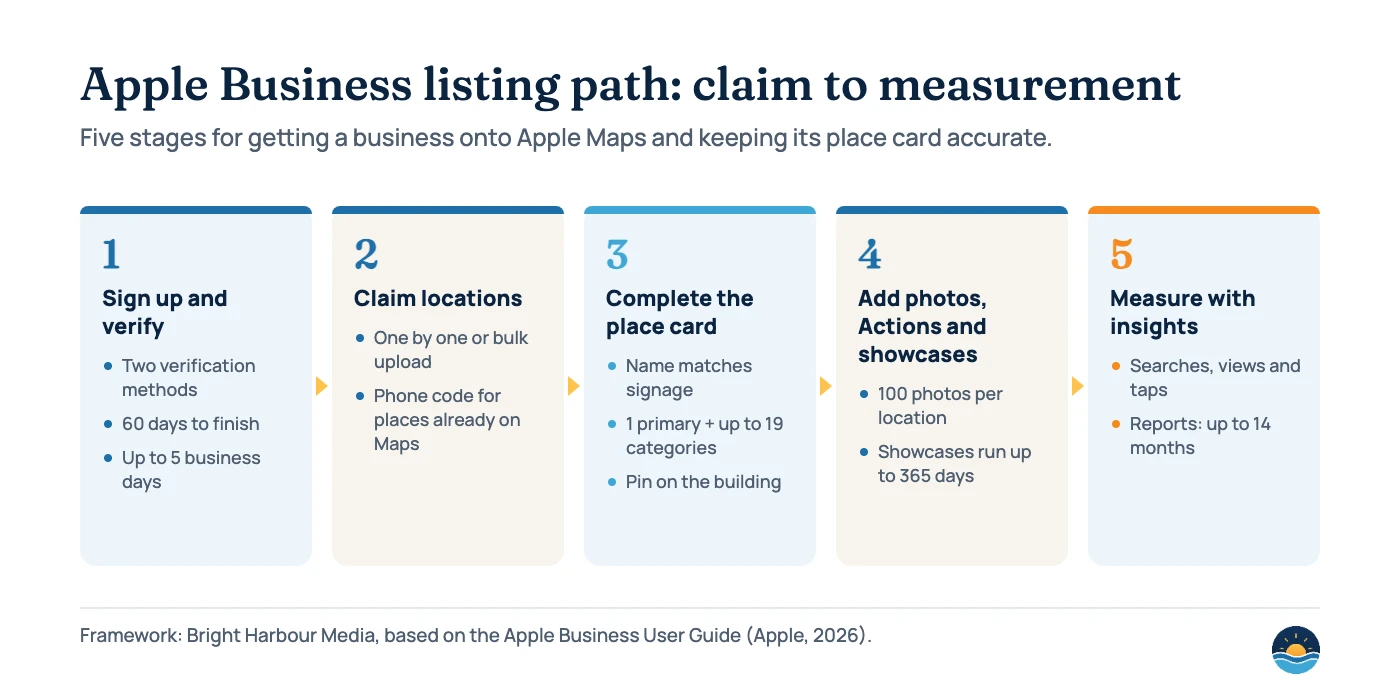
- Organizations have 60 days to verify, using two verification methods, and Apple says verification can take up to five business days.
- A place card takes one primary category plus up to 19 optional ones, a name that must match your storefront, signage or official website, and up to 100 photos per location.
- Showcases can run for up to 365 days (default 90) and need up to three calendar days of review; Actions and photos need up to three business days.
- Apple Maps is growing as a review source: BrightLocal’s 2026 survey of 1,002 US adults found use for reading reviews rose from 14% to 27% in a year.
What happened to Apple Business Connect?
Apple launched Business Connect on January 11, 2023 as a free tool that let businesses “customize the way key information appears” on place cards seen by “more than a billion Apple users across Apple Maps, Messages, Wallet, Siri, and other apps”.
On March 24, 2026 Apple announced Apple Business, which combines Apple Business Manager, Apple Business Essentials and Business Connect. It became available on April 14, 2026 as a free service in more than 200 countries and regions. Apple’s announcement says the three older products “will no longer be available” once Apple Business launched, and that claimed locations, place card information and photos would “automatically migrate”. The old Business Connect user guide now simply says it “is now Apple Business”.
For local SEO this is mostly a change of name and login. The job is the same one you already do for Google: make sure the listing exists, is verified, is accurate, and gives people a reason to tap. If you manage Google Business Profiles, our Google Business Profile fundamentals guide covers the same ideas for Google.
| Date | What changed | Source |
|---|---|---|
| Jan 11, 2023 | Apple Business Connect launches; showcases first in the US, API access through listing partners such as Yext, Uberall, SOCi, Reputation and Rio SEO | Apple Newsroom |
| Mar 24, 2026 | Apple Business announced; Business Connect, Business Manager and Business Essentials to be retired at launch | Apple Newsroom |
| Apr 14, 2026 | Apple Business available in 200+ countries and regions; existing locations and place card data migrated | Apple Newsroom; Apple Business User Guide |
| Aug 14, 2026 | User guide adds Ads on Maps (US, excluding American Samoa and the Northern Mariana Islands, and Canada) | Apple Business User Guide release notes |
| Oct 8, 2026 | Bulk location upload guidance published (.csv, .tsv or .xlsx, up to 10,000 rows) | Apple Business User Guide |
Where does Apple place card information appear?
Apple’s user guide says the place card “appears in many parts of Apple’s software, from Maps to Siri to Calendar, Messages”, and the 2026 announcement lists Apple Maps, Safari and Spotlight. Brand names and logos can also appear in Mail through Branded Mail, and on the Tap to Pay on iPhone payment screen.
That reach is the main argument for spending an hour on Apple. A wrong phone number or closed-down location on Apple Maps follows the business into Siri answers and Spotlight results. Apple Maps also counts as one of the “primary search engines” in Whitespark’s 2026 Local Search Ranking Factors survey, where “consistency of citations on primary search engines (Google Maps, Bing Maps, Apple Maps)” ranked #28 for the local pack, #71 for local organic and #31 for AI search visibility. That survey is the opinion of 47 local SEO experts, not a measurement, but it matches the logic behind our local citations and NAP guide: consistent data across the big map platforms is a baseline.
How do you claim and verify a business on Apple Maps?
Sign-up has two layers: the organization, then its locations.
- Organization verification. After signing up, Apple gives you 60 days to verify. Verification “requires two methods” and can take up to five business days. Accepted methods include a Business ID (a D-U-N-S Number or EIN), domain validation with a DNS TXT record, App Store Connect, or an official document such as a business license, sales tax permit, lease or utility bill.
- Who signs up. You choose between an organization and a third-party partner or agency account. Apple asks for “a legal, human name” at sign-up.
- Claiming an existing place. If the location is already on Maps, Apple may offer phone verification with a four-digit code.
- Locations someone else claimed. You can request a transfer instead of creating a duplicate.
- Not open yet. An “Opening Soon” date can be set up to six months ahead.
Agencies should not sign up as the business. Apple Business supports delegated access through OAuth or a Partner Organization ID, and you can share brand profiles, locations and read-only access to Ads on Maps.
What should a complete Apple place card include?
Apple’s “Configure location attributes” page lists the place card header (logo and cover photo), display name, “about” text, address and map pin, regular, special and temporary hours, phone, website, Actions, a showcase, an app, categories, “Good to Know” attributes and status. Several fields come with strict rules.
| Field | Apple’s rule | Why it matters |
|---|---|---|
| Name | Must “match the name on the storefront, signage, or official website”; no ®, © or ™; no city added as a distinguisher | Keyword-stuffed names are a spam pattern on every map platform |
| Map pin | Must be “on top of the building”, not on the sidewalk or entrance | Directions and distance depend on it |
| Categories | One primary plus up to 19 optional; changing the primary needs Apple approval and “may impact search behavior” | Categories decide which category searches can show you |
| Phone | Extensions aren’t supported | Use a direct local number |
| Website | Can’t be a third-party website; a Facebook, Instagram or TikTok page is allowed | Point it at the matching location page |
| Photos | HEIF, JPEG or PNG; up to 100 per location; no stock photos, watermarks, QR codes, added text or “any AI-generated content” | Approved photos appear in an album named “From the Business” |
| Hours | Regular, special and temporary hours supported | Wrong hours are the fastest way to lose a customer |
How do Actions and showcases work?
Actions
Buttons such as Menu, Reserve, Waitlist, Pickup and Delivery that link to your own booking or ordering pages. They need Apple’s approval (up to three business days) and show on devices running iOS or iPadOS 17.4 or later. Action URLs may carry UTM parameters, so you can track them in GA4, but GCLIDs and tokens aren’t allowed.
Showcases
A promotional card on the place card with a 38-character heading, a 100-character body and a 492×492 image. Showcases run for up to 365 days (90 by default) and Apple reviews each one, which “can take up to three calendar days”. Once approved, only the end date can be changed, so plan them like small ads.
Treat both the way you treat posts and booking links on Google: useful when they match what people search for, wasted when they repeat the business name. Our guide to Google Business Profile photos and posts uses the same standard.
How long do Apple Business reviews take?
Almost every change goes through Apple review. The user guide gives a maximum time for each, and warns that busy periods can add more.
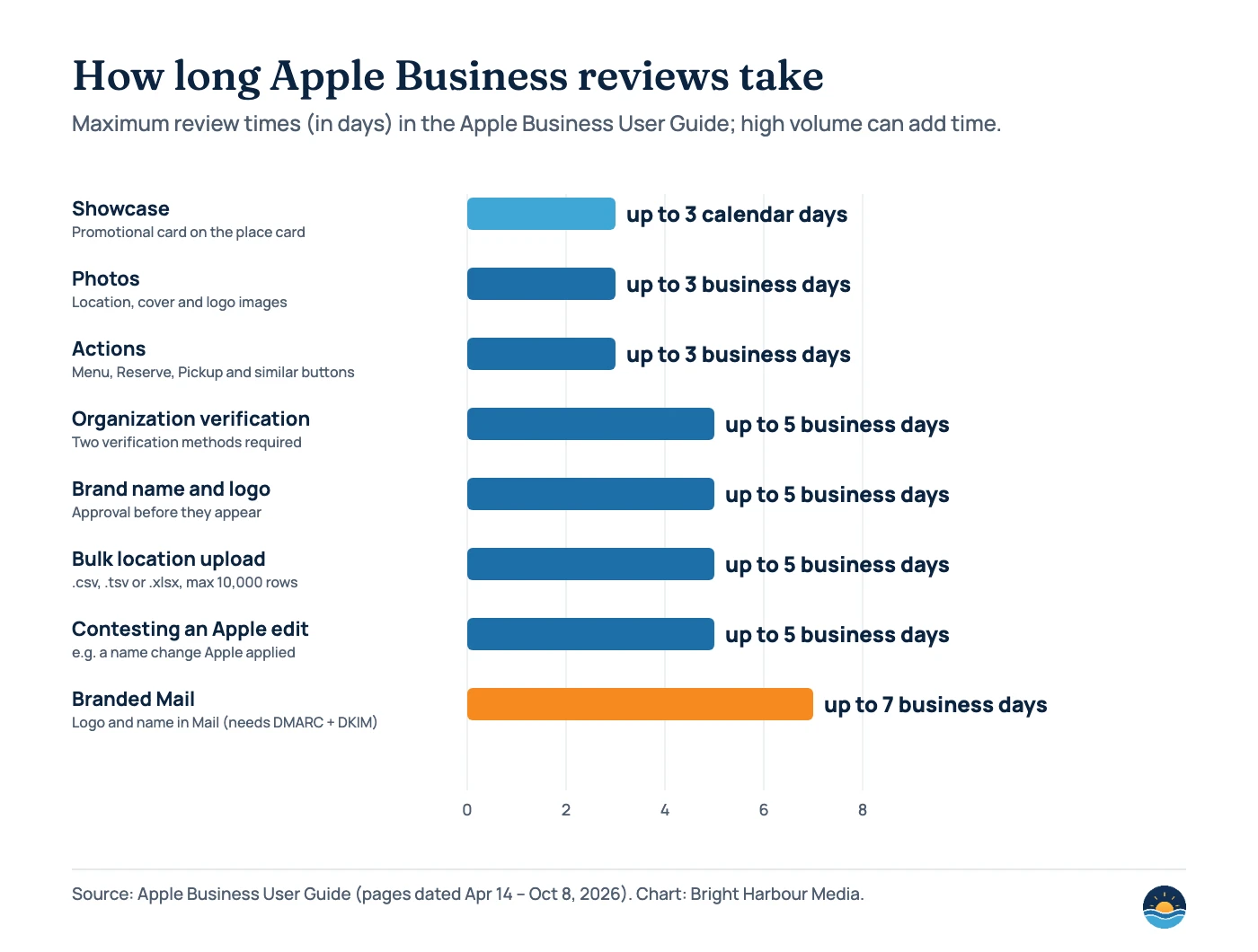
Apple can also change your listing. If customers report a place as closed, Apple may edit the name, status or hours and email your admins; you can accept or contest the change, and a contested name review can take up to five business days. Check the admin inbox regularly, especially for seasonal businesses.
What do Apple Business insights measure?
Insights cover how people find and use your place card. Searches are split into “name or brand” searches, category searches and other searches. Place card actions include Directions, Website, Call, Share, Photos, Showcase and brand Actions. Data can be grouped by day, week (Sunday to Saturday) or month, and there is a “Similar Locations” benchmark plus CSV export.
- Data isn’t available for up to one hour after you verify a location.
- Usage below a reporting threshold is “represented as zero” to protect customer privacy, so small locations may see gaps.
- ZIP code lists show at most 10 results and leave out anything under 1%.
- Multi-location reports can cover up to 14 months, run five at a time, and are available for brands with 2,000 or fewer locations.
Use the split between name and category searches the way you use discovery searches on Google: a rising share of category searches means Apple is showing you to people who didn’t already know your name. For the bigger reporting picture, see our guide to SEO reporting and KPIs.
Should you advertise on Apple Maps?
Ads on Maps arrived in the Apple Business user guide on August 14, 2026. Ads can appear at the top of Maps search results “based on relevance” and in a new Suggested Places area. They are available in the United States (excluding American Samoa and the Northern Mariana Islands) and Canada, you set a monthly budget, and Apple advertises a one-time US$150 sign-up credit for eligible businesses. You must claim your location first.
Apple’s ads page says “over a billion relevant searches for businesses” happen on Maps each month in the US and Canada, and that one in two searches for a business leads to an action. These are Apple’s own marketing figures, so treat them as directional. For most local businesses the free work comes first: an accurate, verified, well-photographed place card is what an ad would point to anyway.
A seven-step Apple Maps checklist
- Search for the business in Apple Maps on an iPhone and note what already shows: name, pin, hours, phone, photos and ratings.
- Sign up for Apple Business as the organization and complete both verification methods within 60 days.
- Claim each location, using phone verification or a transfer request where the place already exists, or bulk upload for many locations.
- Match the core data to your Google Business Profile, website and main citations: name, address, phone, hours and categories.
- Add a logo, cover photo and real location photos that meet Apple’s standards (no stock, text overlays or AI images).
- Set up Actions and one showcase with UTM-tagged links so you can see Apple traffic in GA4.
- Review insights monthly and check the admin inbox for Apple edits you need to accept or contest.
Running many locations? The same rules about one listing per real location apply as in our multi-location SEO guide.
Frequently asked questions
Is Apple Business Connect still available?
No. Apple says Business Connect stopped being available when Apple Business launched on April 14, 2026. Existing claimed locations, place card information and photos migrated automatically, and you now manage them in Apple Business.
Is Apple Business free?
Yes. Apple describes Apple Business as a free service. Ads on Maps are optional and paid, with a monthly budget you control.
How long does Apple Business verification take?
Apple says organization verification requires two methods and can take up to five business days, and you have 60 days after sign-up to complete it. High application volume can add time.
Does Apple Maps affect Google rankings?
Apple doesn’t feed Google’s local results directly. The link is consistency: Whitespark’s 2026 expert survey ranks consistent citations on Google Maps, Bing Maps and Apple Maps #28 of 187 factors for the local pack. That is expert opinion, not a measured effect.
Sources
- Introducing Apple Business — a new all-in-one platform for businesses of all sizes — Apple Newsroom, Mar 24, 2026 — launch date, retirement of Business Connect, migration, Ads on Maps
- Introducing Apple Business Connect — Apple Newsroom, Jan 11, 2023 — original launch, reach and partners
- Apple Business Connect User Guide — Apple Support, no date shown — notice that Business Connect is now Apple Business
- Sign up for Apple Business and verify your organization — Apple Business User Guide, Apr 14, 2026 — 60 days, two methods, up to five business days
- Configure location attributes — Apple Business User Guide, Apr 14, 2026 — place card fields, name, pin, phone, website and category rules
- Photo and text standards and guidelines — Apple Business User Guide, Aug 14, 2026 — 100-photo limit, prohibited content, review time
- Create your first showcase — Apple Business User Guide, May 28, 2026 — character limits, duration, review time
- About Actions — Apple Business User Guide, Apr 14, 2026 — Action types, iOS 17.4, review time
- Use insights for a single location — Apple Business User Guide, Apr 14, 2026 — search types, actions, thresholds
- Promote your business on Apple Maps — Apple Business User Guide, Aug 14, 2026 — Ads on Maps availability and sign-up credit
- Ads on Apple Maps — Apple Ads, no date shown — Apple’s search and action figures
- Local Consumer Review Survey 2026 — BrightLocal, Feb 11, 2026 (1,002 US adults) — Apple Maps review usage
- Local Search Ranking Factors 2026 — Whitespark, Nov 6, 2025 (47 experts, 187 factors) — citation consistency ranks
Cite this article: Bright Harbour Media. “Apple Business Connect Is Now Apple Business: Apple Maps Guide.” Bright Harbour Media Insights, November 2026. https://brightharbourmedia.com/apple-business-connect/
You are welcome to reference the charts and frameworks in this article with a link back to this page.
Want your Apple Maps, Google and Bing listings checked and aligned in one pass? Our local SEO service covers every major map platform — get in touch for a free review.