A knowledge panel is the information box Google shows when someone searches for a person, organisation, place or thing that is in its Knowledge Graph. Google generates panels automatically from sources across the web. You can’t create one on request, but you can claim an existing panel, suggest corrections, and give Google clear, consistent facts about your organisation.
Key takeaways
- Google’s help page says its “current policy doesn’t manually create or delete Knowledge Panels.” Automated systems decide when a panel appears.
- To claim a panel, you sign in to one of the official sites or profiles Google lists. The help page names YouTube, Search Console, Twitter (now X) and Facebook.
- Google says it reviews feedback from verified users “within a few days,” though it can take longer. Descriptions “can’t be edited” and custom subtitles aren’t accepted.
- Google’s Organization structured data has no required properties, and a logo must be at least 112×112px (doc updated Sep 8, 2026).
- The Knowledge Graph grew from 500 million objects (Google, 2012) to 5 billion entities and 500 billion facts (Google, 2020). Organization markup is on about 26% of home pages (Web Almanac 2025).
What is a knowledge panel?
Google’s help page defines knowledge panels as “information boxes that appear on Google when you search for entities (people, places, organizations, things) that are in the Knowledge Graph.” The Knowledge Graph is Google’s database of entities and the facts that connect them.
Google introduced the Knowledge Graph on May 16, 2012, saying it held “more than 500 million objects, as well as more than 3.5 billion facts about and relationships between these different objects.” Its early sources included Freebase, Wikipedia and the CIA World Factbook. In a May 20, 2020 post, Google’s Danny Sullivan wrote that it had “amassed over 500 billion facts about five billion entities,” drawn from “hundreds of sources” plus licensed data.
| Date | What Google said | Source |
|---|---|---|
| May 16, 2012 | 500 million+ objects and 3.5 billion+ facts and relationships | Google blog, “Introducing the Knowledge Graph: things, not strings” |
| May 20, 2020 | 500 billion+ facts about 5 billion entities | Google blog, “A reintroduction to our Knowledge Graph and knowledge panels” |
| Accessed Nov 10, 2026 | Panels are “automatically generated” and “updated automatically as information changes on the web” | Google Search Help, “About knowledge panels” (no update date shown) |
Knowledge panels are different from Business Profiles. Google’s help page says Business Profiles “look similar to knowledge panels, but are specific to businesses that serve customers at a particular location or within a designated service area.” A local plumber manages its panel-like box through Google Business Profile. A software company, publisher or public figure without a storefront is more likely to get a knowledge panel. See our Google Business Profile fundamentals for the local side.
Where does the information in a panel come from?
Google says panel information “comes from various sources across the web,” and that it may “work with data partners who provide authoritative data on specific topics like movies or music.” Some entities, such as prominent individuals, are treated as “self-authoritative,” so details they suggest after verifying can appear in the panel.
Images work in a similar way. A featured image may be one the verified owner picked from images already on the web. Other images, such as collections, are a preview of Google Images results. Descriptions usually come from a source such as Wikipedia. Sullivan’s 2020 post notes that Wikipedia “is a commonly-cited source, but it’s not the only one.”
This matters for strategy. You can’t write your panel directly. You can only influence the sources Google reads and suggest fixes. Consistent facts on your own site, your structured data and your official profiles give Google less to reconcile. Our article on brand mentions and backlinks covers the wider reputation signals around a brand.
How do you claim a knowledge panel?
Google’s “Get verified on Google” page sets out the process. Not every panel can be claimed yet.
- Sign in to a Google Account you will keep long term. A shared company account is safer than a personal one.
- Search for the person or organisation and find the panel.
- Click “Claim this knowledge panel” at the bottom of the panel. On mobile, tap Menu, then Claim this knowledge panel.
- Review the information Google shows about the entity.
- Sign in to one of the official sites or profiles listed. Google names YouTube, Search Console, Twitter and Facebook. If Google can’t identify any associated sites, “you’ll be prompted to provide more information to help us verify you.”
If the button doesn’t appear, Google says “Not all knowledge panels are claimable as of now” and suggests checking back periodically. Until then, anyone can use the Feedback link on the panel.
Google’s help pages still use some older names. They say Twitter rather than X, refer to “Google My Business” rather than Google Business Profile, and mention “Webmaster Central.” Follow the steps as written. The sign-in options shown on screen are what count.
Once verified, you can add other people at google.com/search/contributions/manage. Google defines three roles:
| Role | What it can do |
|---|---|
| Owner | The primary user, with the same permissions as managers. Ownership can be transferred. |
| Manager | Suggests changes and adds or removes users. |
| Contributor | Suggests changes only. |
If someone you don’t know has already claimed the panel, Google’s account recovery process applies. Knowledge Panel Support emails the current owners or managers and waits 3 business days. If they don’t respond, “the knowledge panel will become claimable again.”
What can you change once you’ve claimed it?
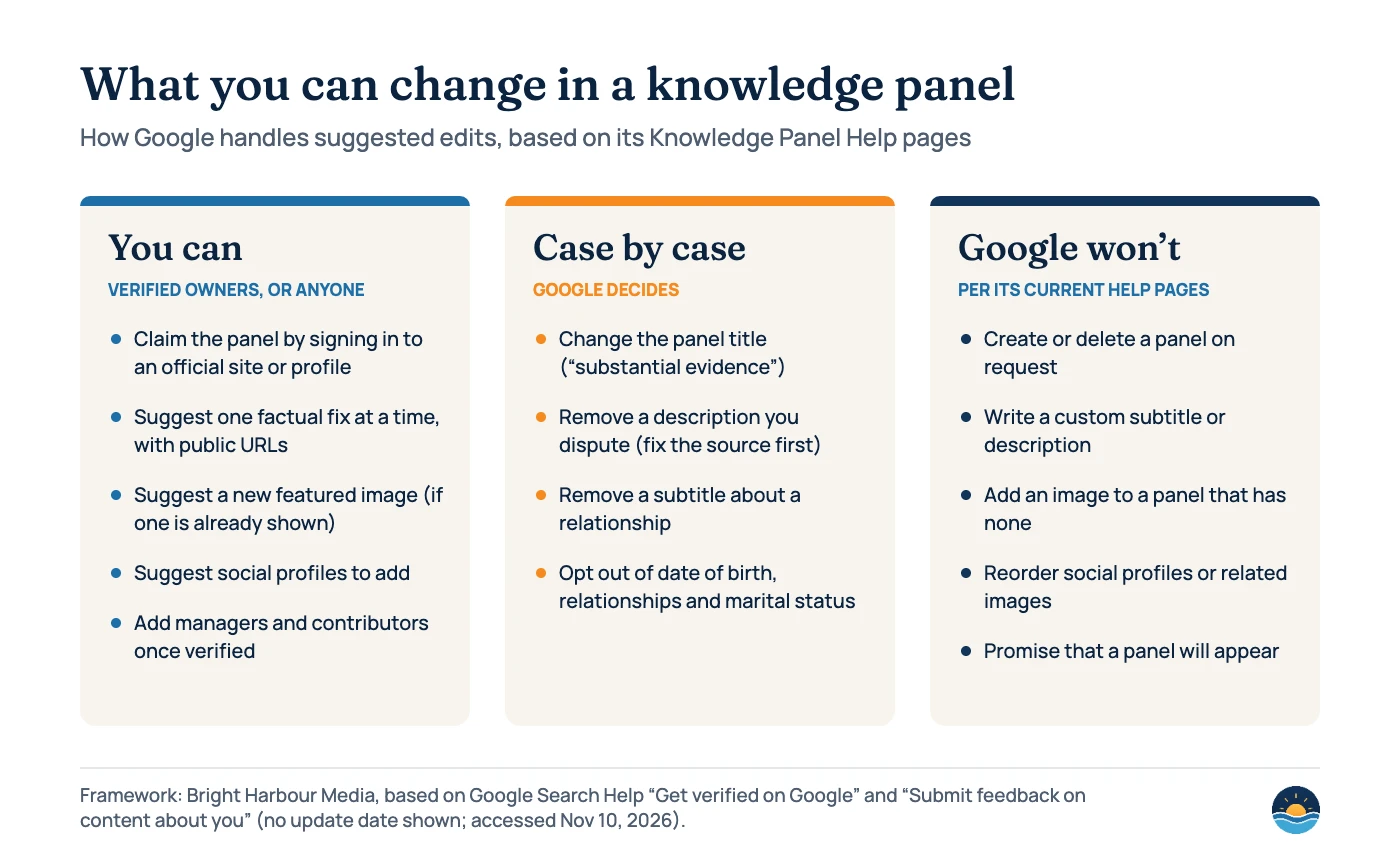
Less than most people expect. Google’s “Submit feedback on content about you” page explains how it handles each part of a panel.
| Panel element | What Google says |
|---|---|
| Title | Generated automatically. Changes are considered only with “substantial evidence” that the systems picked the wrong one. |
| Subtitle | “Google doesn’t accept or create custom subtitles.” A subtitle about a relationship can be removed. |
| Description | “Descriptions come from various data sources and can’t be edited.” Contact the source. With strong evidence Google may remove one, but it can’t create a custom one. |
| Featured image | You can suggest a replacement using a direct image URL. If the panel has no image, Google “can’t add an image by request.” |
| Social profiles | You can suggest new profiles or edit existing ones. “We can’t change the order that profiles appear in.” |
| Personal details | People can ask to remove date of birth, relationships and children, or marital status. |
| People also search for | Items are removed only if they violate a policy. |
To suggest a change, sign in with the verified account, make sure Web and App Activity is turned on, click “Suggest edits,” then the edit icon next to the item. Submit one change at a time and include publicly accessible URLs that support it. Google says it reviews feedback from verified users “within a few days” and sends a confirmation email, though “This can sometimes take more time.”
Can structured data influence your knowledge panel?
It can help Google understand who you are, but it doesn’t guarantee a panel. Google’s Organization structured data documentation (updated Sep 8, 2026) says adding it to your home page “can help Google better understand your organization’s administrative details and disambiguate your organization in search results.” It adds that some properties can influence visual elements, “such as which logo is shown in Search results and your knowledge panel.”
What the doc requires
- No required properties: add those that apply
- Place it on the home page or one page about the organisation, not every page
- Use the most specific subtype that fits
- Logo at least 112×112px, crawlable and indexable, and readable on a white background
Properties worth adding
name,alternateNameandurllogosameAslinks to your official profilescontactPoint,addressand identifiers such asvatIDorleiCodewhere relevant
Here is a minimal example for an agency. Replace each value with your own details and only list profiles you control:
<script type="application/ld+json">
{
  "@context": "https://schema.org",
  "@type": "Organization",
  "name": "Example Agency",
  "url": "https://www.example.com/",
  "logo": "https://www.example.com/images/logo.png",
  "sameAs": [
    "https://www.linkedin.com/company/example-agency",
    "https://www.youtube.com/@exampleagency"
  ]
}
</script>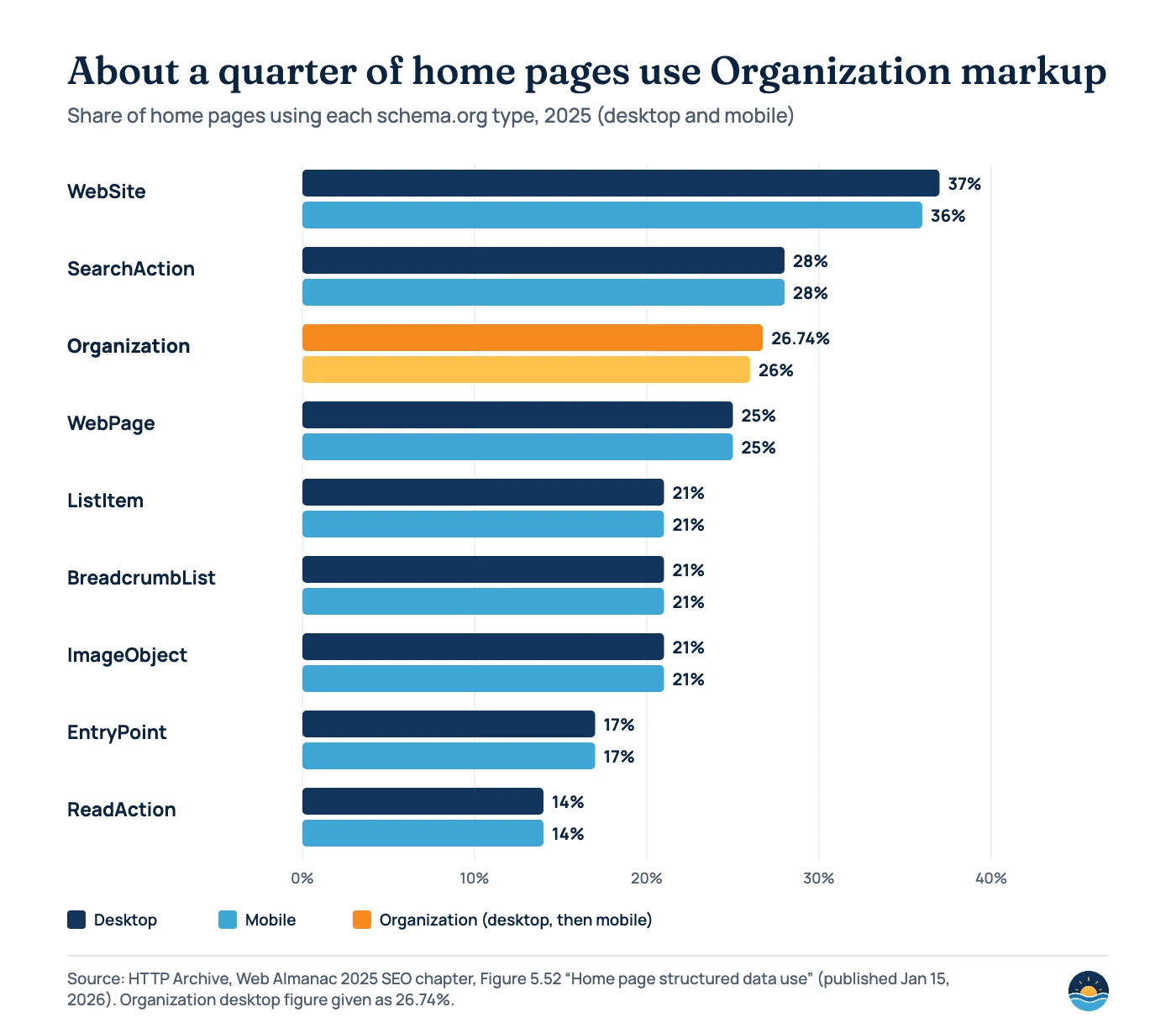
How common is this markup? The Web Almanac 2025 SEO chapter found structured data on 50% of home pages. Organization markup appeared on 26.74% of desktop and 26% of mobile home pages, and “overtook WebPage schema… for the first time in 2025.” That leaves roughly three in four home pages without it. Our guides to structured data for service businesses and site names and favicons cover the related WebSite and LocalBusiness markup.
How do you check what Google knows about your entity?
Start with a plain search for your brand name, then for your brand plus a qualifier such as your industry or city. If a panel shows, note the title, subtitle, description source, image and social profiles.
For a more technical check, Google’s Knowledge Graph Search API “lets you find entities in the Google Knowledge Graph” and returns results in JSON-LD. It is read-only, and Google warns it “is not suitable for use as a production-critical service.” The free quota is up to 100,000 read calls per day per project. Google says it is migrating the API to Cloud Enterprise Knowledge Graph. Treat API results as a rough signal of whether Google recognises an entity, not a ranking tool.
Why might you not have a knowledge panel?
Google says its systems decide when panels appear “based on the relevance of info to a user’s query.” Common reasons a business doesn’t get one:
- It’s a local business. Google shows a Business Profile instead.
- Google can’t tell it apart from a similar name. Clear
name,urlandsameAsdata, plus consistent naming across profiles, help with this. - There isn’t enough independent information. Panels draw on sources across the web, not just your site.
- The query is too broad. A panel may appear for “brand + industry” before it appears for the brand name alone.
Be wary of anyone who promises to “get you a knowledge panel.” Google says it doesn’t create panels manually, so no one can guarantee one. What you can do is make your facts easy to find and consistent, which also supports E-E-A-T and author pages.
A seven-step knowledge panel process
- Search your brand and key people. Record whether a panel appears and what it says, including the description source.
- Claim any panel that is claimable. Use a long-term Google Account and an official profile or your Search Console property.
- Add managers. Give at least two people access so the panel isn’t tied to one employee.
- Publish Organization markup on the home page. Include name, url, logo and sameAs, and test it before going live.
- Align your sources. Use the same name, logo and description on your website, social profiles and any directory or reference pages you control.
- Fix errors at the source first. If a description is wrong, correct the source page, then send feedback with supporting URLs, one item at a time.
- Re-check quarterly. Panels update automatically as the web changes, so review after rebrands, leadership changes or a new logo.
Frequently asked questions
Can I pay Google or request a knowledge panel?
No. Google’s help page says its current policy doesn’t manually create or delete knowledge panels. Automated systems decide when a panel appears, so the practical route is clear, consistent information about your organisation across the web.
How long does Google take to review knowledge panel edits?
Google says it reviews feedback from verified users within a few days and sends a confirmation email, but that it can sometimes take longer. Unverified feedback has no stated timeline.
Is a knowledge panel the same as a Google Business Profile?
No. Business Profiles look similar but are for businesses that serve customers at a location or in a service area, and they are claimed through Google Business Profile. Knowledge panels cover entities in the Knowledge Graph, such as companies, people and organisations.
Does Organization structured data guarantee a knowledge panel?
No. Google says the markup can help it understand and disambiguate your organisation and can influence which logo is shown, but it doesn’t promise a panel.
Sources
- About knowledge panels — Google Search Help, no date shown, accessed Nov 10, 2026. Used for: definition, sources, images, Business Profiles.
- Get verified on Google — Google Search Help, no date shown. Used for: claim steps, sign-in options, roles, account recovery.
- Submit feedback on content about you — Google Search Help, no date shown. Used for: what can and can’t be changed, review timing.
- Organization (Organization) structured data — Google Search Central, last updated Sep 8, 2026. Used for: purpose, logo size, sameAs, placement.
- Introducing the Knowledge Graph: things, not strings — Google, May 16, 2012. Used for: launch size and sources.
- A reintroduction to our Knowledge Graph and knowledge panels — Google (Danny Sullivan), May 20, 2020. Used for: 500 billion facts, 5 billion entities, sources.
- Knowledge Graph Search API — Google for Developers, last updated Apr 26, 2024. Used for: what the API returns, production warning.
- Knowledge Graph Search API usage limits — Google for Developers, last updated Aug 28, 2025. Used for: 100,000 calls per day.
- Web Almanac 2025: SEO — HTTP Archive, published Jan 15, 2026. Used for: structured data and Organization usage on home pages (Figure 5.52).
Cite this article: Bright Harbour Media. “Google Knowledge Panels: How to Claim and Update One.” Bright Harbour Media Insights, November 2026. https://brightharbourmedia.com/knowledge-panel/
You are welcome to reference the charts and frameworks in this article with a link back to this page.
Want Google to understand your brand clearly, from structured data to the sources it trusts? Our SEO strategy and consulting service covers entity and brand search. Get in touch to talk it through.