
Google Maps spam is any Business Profile, edit or review that breaks Google’s rules to win local visibility: fake listings, keyword-stuffed business names, invented addresses and paid or fake reviews. You report it through Maps’ “Suggest an edit” options, the Business Redressal Complaint Form, or the review reporting tools, depending on what kind of spam it is.
Key takeaways
- Google says it blocked or removed over 292 million policy-violating reviews and over 13 million fake Business Profiles in 2025 (Google, Apr 16, 2026).
- Fraudulent names, phone numbers and URLs go to the Business Redressal Complaint Form, which accepts bulk uploads; Google recommends 10–100 Maps URLs per submission.
- Google’s guidelines say unnecessary words in a business name “could result in the suspension” of the profile, yet experts still rank keywords in the business name #3 of 187 local pack factors (Whitespark, Nov 6, 2025).
- Review reports “typically” take several days to evaluate, and owners get a one-time appeal when a report is marked “no policy violation”.
- Google warns it “cannot guarantee” action on redressal complaints and won’t send status updates, so specific evidence matters more than volume.
What counts as spam on Google Maps?
Google’s rules for listings live in its Guidelines for representing your business on Google. Reviews and other contributions fall under the Maps user-content policy. Most of the spam local businesses run into breaks one of a handful of rules, and knowing which rule applies tells you which report to file.
A listing doesn’t become spam because it outranks you or because you dislike its name. It becomes reportable when it breaks a specific rule, such as using a mailbox as an address, adding keywords to the name, or running a second profile for the same location. If you name the rule in your report, the reviewer can check it quickly.
| Spam tactic | The rule it breaks | Expert view of the risk |
|---|---|---|
| Keywords added to the business name (e.g. “Smith Plumbing Emergency Plumber Denver”) | “Your name should reflect your business’s real-world name”; unnecessary information “could result in the suspension” of the profile | Keyword stuffing is a #8 suspension risk (score 125) |
| Fake address: P.O. box, mailbox or virtual office | “P.O. boxes or mailboxes located at remote locations aren’t acceptable”; virtual offices “isn’t eligible” | Ranked the #1 suspension risk (score 202) |
| Several profiles for one location | “Do not create more than one page for each location of your business” | Multiple profiles with the same phone number ranked #9 suspension risk (score 118) |
| Lead-generation listings | “Lead generation agents or companies” are ineligible for a Business Profile | No separate factor in the survey |
| Call-tracking or redirecting numbers and URLs | Don’t provide numbers or URLs that “redirect or ‘refer’ users” to anyone other than the actual business | No separate factor in the survey |
| Fake, paid or competitor reviews | “Fake engagement is not allowed and will be removed”, including reviews “paid for, directly or in kind” | Reports of fake reviews ranked #7 suspension risk (score 132) |
The same rules apply to your own profile. Before you report a competitor, check that your name, address and categories would pass the same review. Our guide to Google Business Profile suspensions covers what happens when a profile fails it.
Why does Maps spam still work?
Because some of it does help rankings, at least for a while. In Whitespark’s 2026 Local Search Ranking Factors survey, 47 local search experts scored “Keywords in GBP Business Title” #3 of 187 factors for the local pack and Maps (score 223). Only primary category (227) and proximity (225) scored higher. Whitespark says the experts have no special access to Google’s algorithm, so the survey reflects informed opinion, not measurement.
A separate Whitespark study of more than 1.4 million listings across 17 industries (Sep 8, 2026) found that keywords in business names correlate with top-3 local pack visibility. Correlation isn’t proof, but it explains why competitors keep trying, and why a successful report can change rankings in a crowded local pack.
Google isn’t ignoring the problem. Its yearly Maps enforcement posts show the volume of review spam it blocks rising every year.
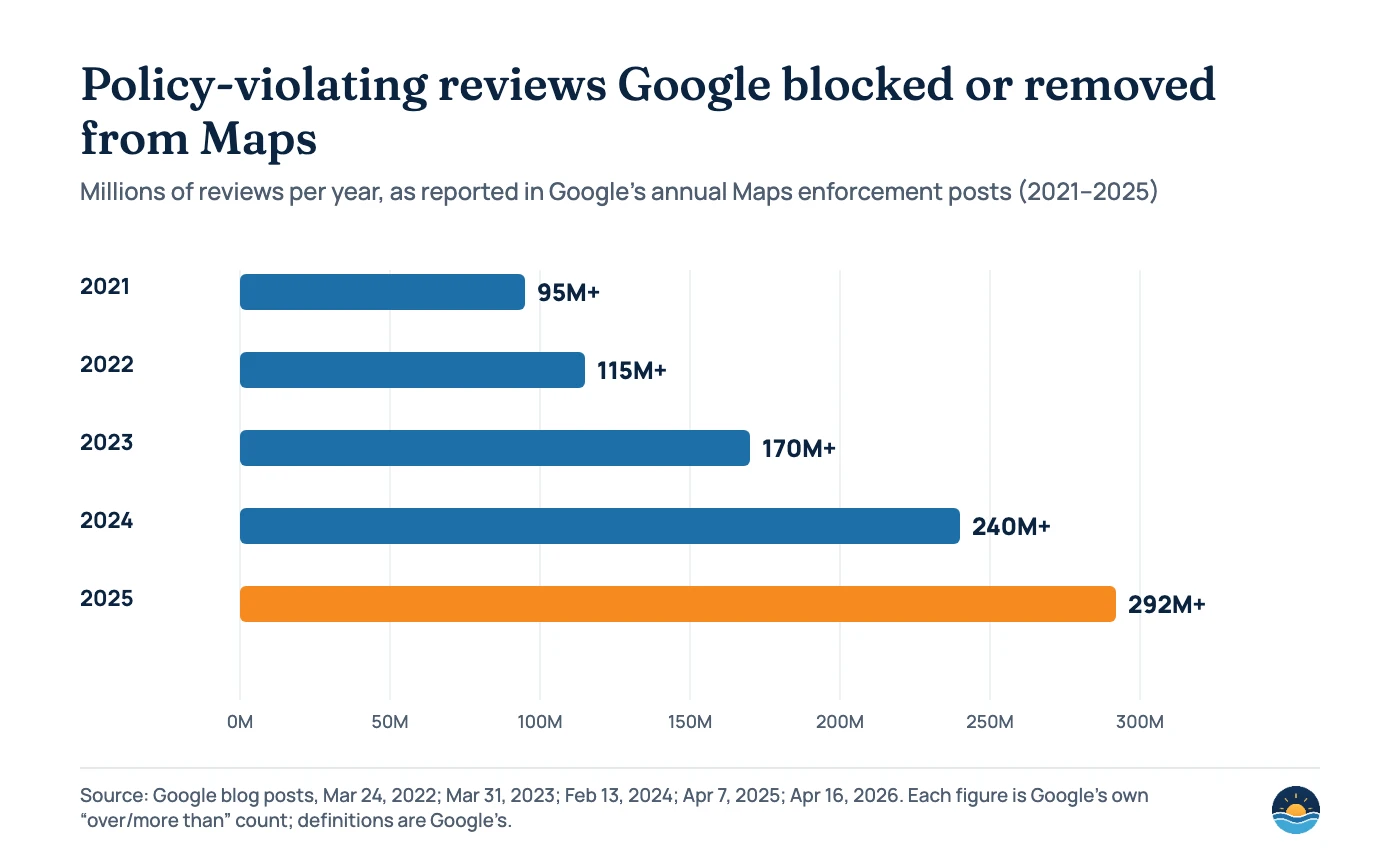
| Year | Reviews blocked or removed | Fake profiles | Other figures Google reported |
|---|---|---|---|
| 2021 | Over 95M | 7M+ fake profiles removed (630,000+ reported by users) | 12M+ attempts to create fake profiles stopped; 100M+ edits blocked |
| 2022 | Over 115M | 20M attempts to create fake profiles stopped | 185,000+ businesses protected |
| 2023 | Over 170M | 12M+ removed or blocked | 2M+ attempts to claim profiles that weren’t theirs |
| 2024 | Over 240M | 12M+ removed or blocked | 70M+ policy-violating edits; posting restrictions on 900,000+ accounts; 10,000 fake locksmith listings removed |
| 2025 | Over 292M | Over 13M removed | 79M inaccurate or unverified edits blocked; posting restrictions on 782,000+ accounts |
Which Google Maps report should you use?
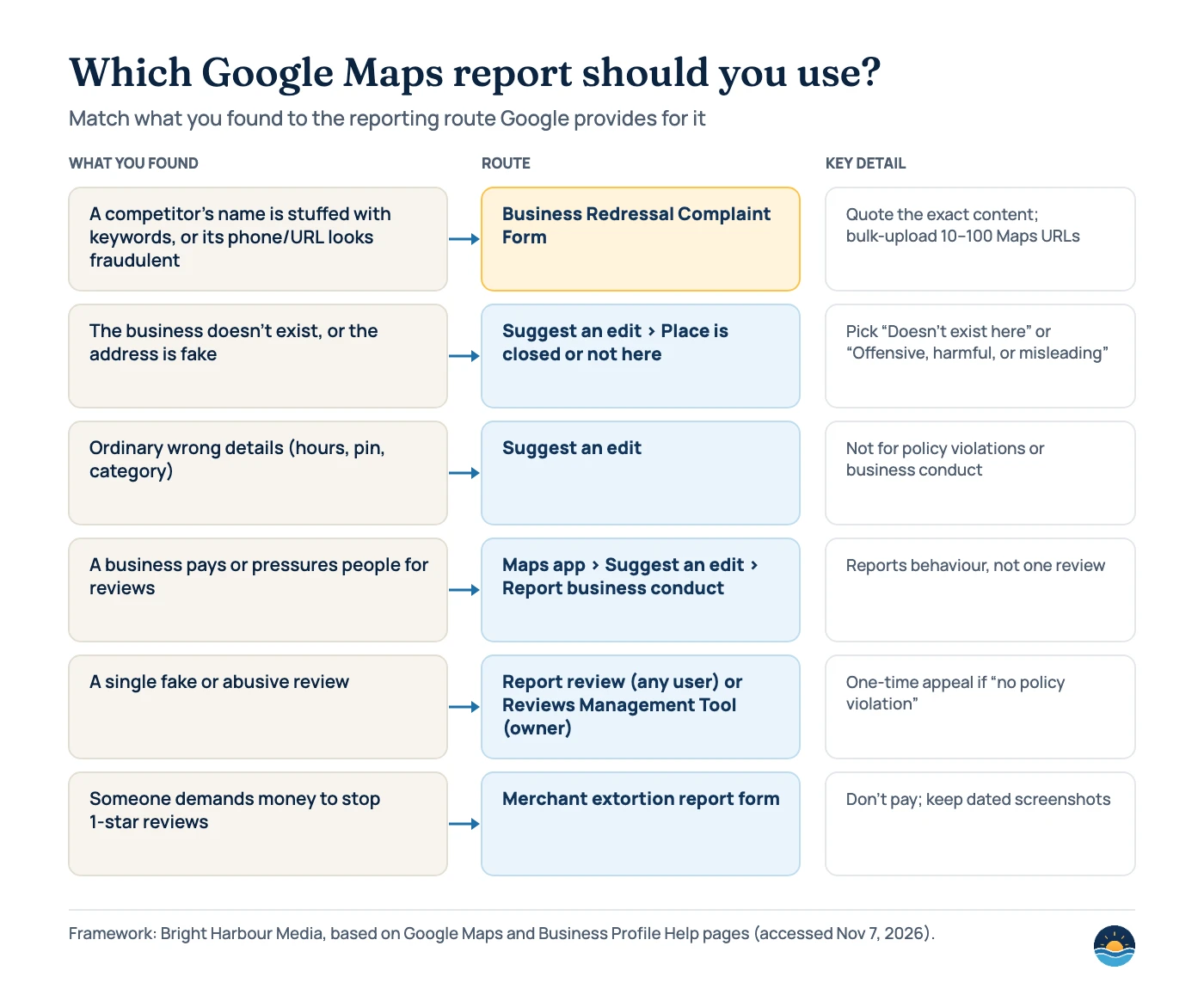
Google offers several reporting routes, and each handles a different problem. The Business Redressal Complaint Form, for example, is meant for fraudulent names, phone numbers and URLs. Google says not to use it for ordinary corrections. Pick the route that fits what you found.
Suggest an edit
Quick, in-app and good for a single listing that doesn’t exist or has a fake address. Choose Place is closed or not here, then Doesn’t exist here or Offensive, harmful, or misleading. You must be signed in, and Google may email follow-up questions.
Business Redressal Complaint Form
Built for fraudulent names, phone numbers and URLs. Accepts many Maps URLs at once, asks you to quote the exact offending content, and returns a case ID. Google won’t update you on the outcome.
How to report a fake or keyword-stuffed listing
For a single listing that misleads customers or doesn’t exist, Google’s steps are: open Google Maps, find the business, then select Suggest an edit › Place is closed or not here › Offensive, harmful, or misleading › Submit. Use Doesn’t exist here when there is no business at the address. Google says a business can be removed “even if you don’t own the Business Profile” when it never existed or isn’t eligible.
For keyword-stuffed names, fake phone numbers or redirecting URLs, especially across several listings, use the Business Redressal Complaint Form. It asks for:
- your name and contact email, and the business or organisation being affected;
- the type of malicious content: Title, Address, Phone number, Website or This business doesn’t exist;
- the public Maps URL of each listing (starting with https://www.google.com/maps), added one by one or in an uploaded spreadsheet. Google recommends “10-100 at a time for a faster processing time”;
- an explanation that quotes the exact content you believe is malicious and, for phones or websites, how it could affect other users or businesses.
Google says it won’t process a complaint that isn’t properly filled out. Save the case ID and use the form’s Download submission option so you have a record.
How to report fake reviews
Anyone can report a review. On desktop, open the business’s reviews, use the menu next to the review and choose Report review. In the app, tap the review and choose Report review. The Maps app tracks your reports with statuses such as Processing report, Content removed and Content not removed.
Owners have more options for reviews on their own profile. From the Business Profile, open Read reviews, select Report next to a review and pick a reason such as Spam. Google says evaluation “typically takes several days”. You can follow progress in the Reviews Management Tool, which shows Decision pending, Report reviewed – no policy violation or Escalated – check your email for updates. A report marked as no violation can be appealed once, and you can select up to 10 eligible reviews in one appeal.
Two rules keep these reports credible. Google says “only those that violate Google policies are eligible for removal” and asks owners not to report a review “just because you disagree with it”. Google’s policy does prohibit content posted on a competitor’s listing “to undermine that business’ or product’s reputation”. If a competitor is behind a wave of one-star reviews, say so and show the pattern. For more on handling genuine reviews, see our Google review management guide.
| Situation | Where to report | What happens next |
|---|---|---|
| One fake or off-topic review on any listing | Report review (desktop or app) | Status in the Maps app “Reports” section; you may be eligible for one appeal |
| Fake reviews on your own profile | Business Profile › Read reviews › Report, or the Reviews Management Tool | Evaluation “typically takes several days”; one-time appeal for up to 10 reviews |
| A business paying or pressuring people for reviews | Maps app › Suggest an edit › Report business conduct | Reviewed as business conduct, not as a single review |
| Someone demanding money to stop negative reviews | Merchant extortion report form | Google says “Do not engage with or pay the malicious individuals” |
| You’re in the EEA | Report third-party reviews directly on Google | Google lists this as a separate merchant option |
Google can also penalise profiles that buy fake engagement. Its Business Profile restrictions page lists blocking new reviews for “a set period of time”, unpublishing existing reviews and showing customers a warning that fake reviews were removed. In April 2026, Google said it would start pausing reviews and showing a notification banner when it spots suspicious review spikes on a profile. In the US, the FTC’s rule on fake reviews and testimonials (16 CFR Part 465) has been in effect since October 21, 2024.
A seven-step process for reporting competitor spam
- Confirm the violation. Match what you see to a specific rule in Google’s representation or eligibility guidelines. Rankings you dislike aren’t a violation.
- Collect evidence. Take dated screenshots of the listing, the business’s real name on its website, signage or registration, and Street View of the address if it looks like a mailbox or empty lot.
- Check your own profile first. Make sure your name, address and categories would pass the same review.
- Choose the right route. Use Suggest an edit for single non-existent listings, the redressal form for names, phones and URLs (or many listings), and review tools for reviews.
- Write a specific report. Quote the exact offending text, name the rule, and describe how it misleads customers.
- Batch similar cases. If one operator runs many fake listings, submit them together on the redressal form with a spreadsheet of Maps URLs.
- Track and follow up. Keep case IDs and check the listings weekly. Google doesn’t promise updates on redressal complaints, so watch the listing itself. Resubmit with new evidence if it doesn’t change.
Spam fighting works best alongside steady work on your own profile. Accurate categories and consistent citations are things you control, and our local citations and NAP guide covers the citation side.
Frequently asked questions
How long does Google take to act on a spam report?
Google doesn’t publish a timeline for listing edits or redressal complaints. It says edits may take time to appear and that it won’t update you on redressal complaints. For reviews, Google says evaluation typically takes several days.
Can I report a competitor’s keyword-stuffed business name?
Yes. Google’s guidelines say a name should reflect the real-world business name, and that unnecessary information could lead to suspension. Use the Business Redressal Complaint Form, choose “Title”, and quote the exact name alongside evidence of the real one.
Will reporting spam improve my rankings?
It can if the removed or corrected listing was outranking you, but Google makes no promise of action. Reporting is no substitute for a complete, accurate profile of your own.
What if my report is rejected?
For reviews, Google allows a one-time appeal when a report is marked as no policy violation. For listings, gather stronger evidence, such as registration records, signage photos or Street View, and submit again through the most specific route.
Sources
- Report a business on Google Maps — Google Maps Help, no date shown (accessed Nov 7, 2026) — reporting steps, Report business conduct
- Request removal of a Business Profile from Google Search & Maps — Google Business Profile Help, no date shown — removal requests by non-owners
- Business Redressal Complaint Form — Google Business Profile Help — form fields, bulk uploads, no status updates
- Guidelines for representing your business on Google — Google Business Profile Help, no date shown — name, address, phone and duplicate rules
- Business eligibility and ownership guidelines — Google Business Profile Help, no date shown — ineligible business types
- Prohibited and restricted content — Google Maps user-contributed content policy — fake engagement and competitor content
- Report inappropriate reviews on your Business Profile — Google Business Profile Help — owner reporting, Reviews Management Tool, appeals
- Report or fix content on Google Maps — Google Maps Help — reporting reviews and report statuses
- Report negative review extortion scams — Google Business Profile Help — extortion reports
- Business Profile restrictions for policy violations — Google Business Profile Help — fake engagement penalties
- New ways we’re protecting businesses on Maps — Google, Apr 16, 2026 — 2025 enforcement figures, review-spike protections
- New ways AI helps keep business information trustworthy — Google, Apr 7, 2025 — 2024 enforcement figures
- How machine learning keeps contributed content helpful — Google, Feb 13, 2024 — 2023 enforcement figures
- How Google Maps uses machine learning to fight fake contributions — Google, Mar 31, 2023 — 2022 enforcement figures
- How we kept information on Maps reliable in 2021 — Google, Mar 24, 2022 — 2021 enforcement figures
- 2026 Local Search Ranking Factors — Whitespark, Nov 6, 2025 (47 experts, 187 factors) — keyword-in-name and suspension-risk ranks
- How keywords in business names currently impact Google local pack rank and AI search — Whitespark, Sep 8, 2026 — 1.4M+ listing correlation study
- Trade Regulation Rule on the Use of Consumer Reviews and Testimonials — Federal Register, Aug 22, 2024 — 16 CFR Part 465, effective Oct 21, 2024
Cite this article: Bright Harbour Media. “How to Report Spam Listings on Google Maps.” Bright Harbour Media Insights, November 2026. https://brightharbourmedia.com/report-google-maps-spam/
You are welcome to reference the charts and frameworks in this article with a link back to this page.
Losing calls to fake or keyword-stuffed competitors? Our local SEO service includes competitor spam audits and profile clean-ups. Get in touch to talk it through.