

Google Business Profile hours tell Google and searchers when your business is open. Google lists them among the details that make a profile “more likely to show up in local search results,” and since late 2023 local SEO practitioners have observed businesses losing local pack visibility while they are closed — so accurate regular, special and holiday hours matter for both rankings and the customers who turn up at your door.
Key takeaways
- Google’s local ranking help lists “Your business hours, including special store hours” as part of the complete, accurate information that helps local visibility.
- In Whitespark’s 2026 expert survey, “business is open at time of search” ranked #5 of local pack factors (score 189) — an expert opinion, not a Google statement.
- Special hours are for closures of up to 6 days in a row; Google says longer closures should use “Temporarily closed,” and those businesses “can rank after open businesses” for broad queries.
- Google’s guidelines ask for regular customer-facing hours, and say businesses with varied or appointment-only hours (hotels, schools, cinemas) shouldn’t list hours.
- In BrightLocal’s 2018 survey of 1,025 US consumers, incorrect opening hours online damaged the trust of 51%, and 24% had arrived too early or too late because of them.
Do business hours affect local rankings?
Google’s own help page, “Tips to improve your local ranking on Google,” says local results “are mainly based on relevance, distance, and popularity” (the heading below that sentence still says “Prominence”). Hours aren’t named in those definitions. They appear in the advice to enter complete data — “Your business hours, including special store hours” — with the note that “businesses with complete and accurate info are more likely to show up in local search results.”
The stronger claim comes from practitioners. On December 7, 2023, Joy Hawkins of Sterling Sky wrote: “As of November 2023, Google appears to be looking at whether a business is currently open as a ranking factor for local pack rankings.” Asked about it, Google’s Danny Sullivan replied on December 8, 2023: “It seems more likely a local ranking change, if it is one.” Google hasn’t documented how opening hours are used, so treat this as observed behaviour rather than an official rule. Our overview of local SEO ranking factors explains the relevance, distance and prominence model in more detail.

Whitespark’s Local Search Ranking Factors 2026, published November 6, 2025, asked 47 local search experts to score 187 factors. The new factor “Business is Open at Time of Search” went straight in at #5 for the local pack and #6 for conversion. Whitespark’s Darren Shaw describes what he sees in tracking: you can rank “#1 in the local results, and then 60 minutes before you close you’ll start to drop off.” He also adds a clear warning: “do NOT list your hours other than what they actually are” for brick-and-mortar businesses.
| Factor (Whitespark 2026) | Local pack | Local organic | AI search | Conversion |
|---|---|---|---|---|
| Business is open at time of search | #5 (189) | #129 (38) | #104 (57) | #6 (171) |
| Proper hours set on GBP | #21 (134) | #142 (31) | #109 (56) | #10 (152) |
| Age of business (GBP opening date) | #98 (82) | #115 (47) | #124 (45) | #58 (99) |
| Negative: marked permanently closed | #1 (217) | — | — | — |
| Negative: marked temporarily closed | #5 (166) | — | — | — |
| Negative: no hours of operation on GBP | #8 (141) | — | — | — |
What do Google’s guidelines say about business hours?
Google’s “Guidelines for representing your business on Google” ask you to “provide your regular customer-facing hours of operation,” and allow current seasonal hours to be used as regular hours. They also say that certain businesses “shouldn’t provide hours” — those with varied schedules such as showtimes, worship services or classes, and those that “operate only by appointment.” Google’s examples include hotels and motels, schools and universities, movie theaters, transport services and airports, and event venues.
Departments with their own profiles list their own hours, and the main profile lists the main business’s hours. Hours also don’t belong in your business name: Google’s examples of names that aren’t permitted include “Regal Pizzeria Open 24 hours” and “Sears Outlet (Closed)”. Name violations can lead to suspension, which our guide to Google Business Profile suspensions covers.
| Business type | Which hours to list as main hours |
|---|---|
| Banks | Lobby hours if possible, otherwise drive-through hours. An attached ATM can have its own profile and hours. |
| Car dealerships | Car sales hours; if new and pre-owned differ, use new car sales hours. |
| Gas stations | Hours for the gas pumps. |
| Restaurants | Dine-in hours; otherwise takeout, then drive-through, and “as a last resort, delivery hours.” |
| Storage facilities | Office hours, otherwise front gate hours. |
| Seasonal businesses | Regular hours during the season; you can mark the business temporarily closed in the off-season. |
Regular, special and more hours: which setting to use
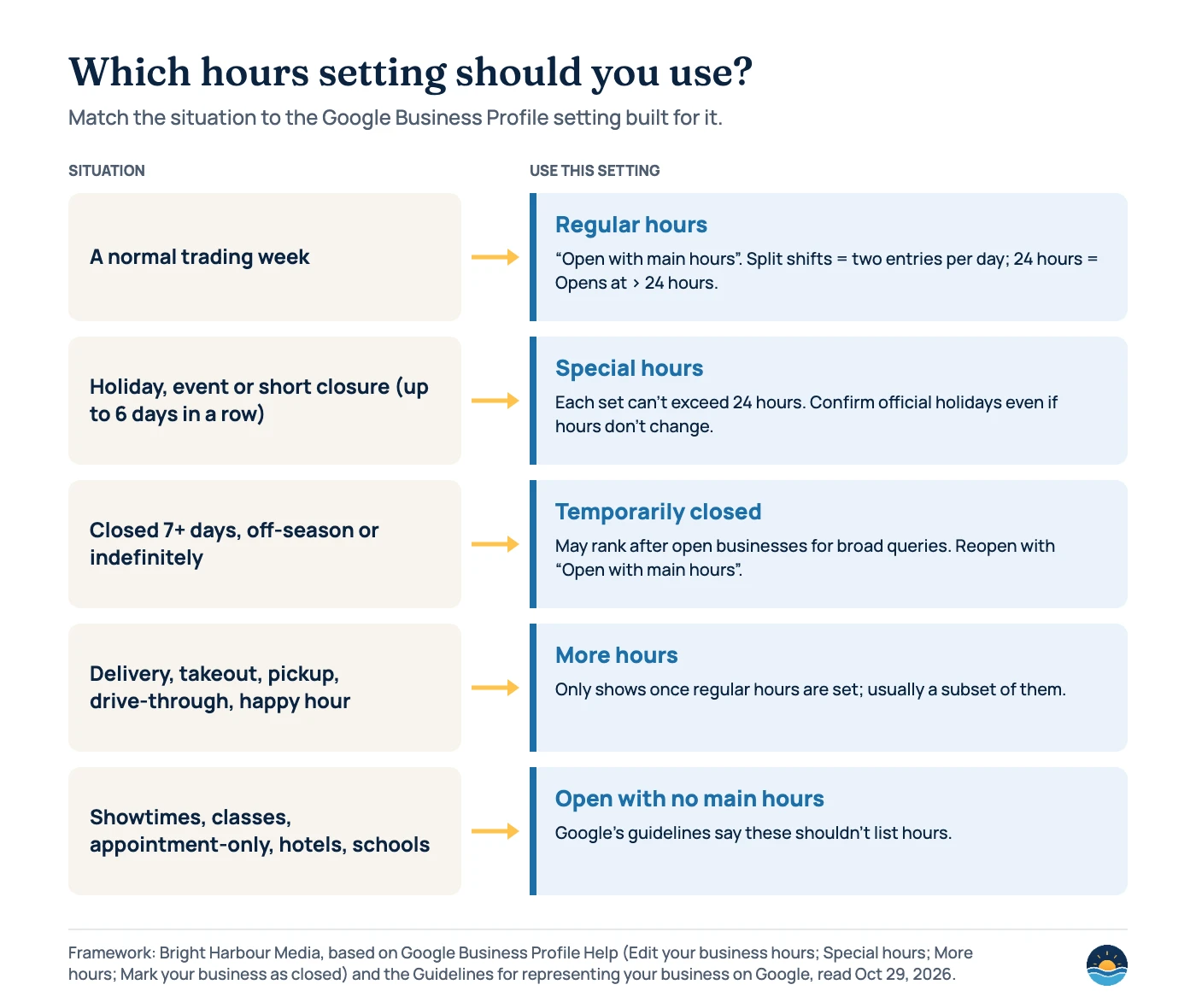
Regular hours. In your profile, choose Edit profile › Hours › “Open with main hours.” For a break in the day, Google says to “create 2 entries for the same day with different times” (for example 9 AM–2 PM and 5 PM–10 PM). For 24-hour businesses, choose Opens at › 24 hours.
Special hours. Google’s help says to “set special hours if your business temporarily adjusts its hours of operation or remains closed for up to 6 days in a row” — holidays, special events and other exceptional circumstances. A set of special hours “can’t exceed 24 hours,” so overnight hours are split into two sets, and special hours only appear if the profile is set to “Open with main hours.” Google suggests holiday dates in the editor and recommends confirming hours for official holidays “even if they’re the same as your regular hours.” On listed holidays, Google’s holidays page says a warning may appear telling users your hours “might differ” — setting special hours is how you tell customers what they actually are.
More hours. These cover specific services such as “delivery, takeout, drive through, and pickup.” They “don’t display until you first set regular hours,” and Google says they should generally be a subset of your primary hours.
Temporary closures, reopening and opening dates
Google’s help is direct about longer closures: “If your business is closed for more than 7 days, closed for the off-season, or closed indefinitely, use the option ‘Temporarily closed.’” It also explains the ranking effect: “For broad queries, temporarily-closed businesses can rank after open businesses,” depending on the category, the query type and how many matching businesses are closed. To reopen, set the profile back to “Open with main hours.” If you closed because you moved or renamed, Google says not to reopen the old profile and to add a new business instead.
Use “Temporarily closed” for
- Closures of more than 7 days
- The off-season of a seasonal business
- Closures with no known end date
Don’t use it for
- A holiday or short closure (use special hours)
- A move or rebrand (add a new business)
- Quiet periods when you are still open
Getting this wrong is costly. Whitespark’s experts ranked “Business Marked as Permanently Closed” as the #1 negative factor and “Temporarily Closed” as #5. A permanently closed profile “may still appear on Search and Maps,” but shows clearly that the business is closed. Google may also send automated calls, texts or WhatsApp messages to confirm details “like your operating hours,” and if it receives an update that a location is temporarily closed, “you may get an email notification.”
New businesses can add an opening date: only the year and month are required, and you can enter a date “up to one year in the future.” Google says the profile “shows up on Google 90 days prior to your opening date” and carries a “Recently opened” tag for 90 days after opening.
Hours in structured data and the Business Profile API
Your website should match your profile. Google’s LocalBusiness structured data documentation (updated September 8, 2026) lists openingHoursSpecification as a recommended property. Its examples show 24-hour opening as "opens": "00:00" and "closes": "23:59", a closed day as both values set to "00:00", and seasonal hours with validFrom and validThrough. See our guide to structured data for service businesses for the full markup.
If you manage many locations through the Business Profile API, the same rules apply: specialHours override regular hours, and the field “cannot be set without regular hours.” Some hours-related information isn’t yours to set at all — Google’s Popular times and live visit data come from aggregated, anonymised Location History data, and “you can’t manually add this information.”
A seven-step business hours audit
- Check main hours against reality. Compare your profile with the hours customers can actually walk in, call or be served, using Google’s industry rules if you have several sets of hours.
- Fix split and overnight hours. Use two entries for a mid-day break, and confirm late-night hours display on the right days.
- Load holiday hours early. Review Google’s suggested holiday dates and confirm each one, even when your hours don’t change.
- Add more hours where they help. Delivery, takeout, pickup or drive-through hours should sit inside your main hours.
- Use closures correctly. Special hours for up to 6 days; Temporarily closed for longer; a new profile for a move or rebrand.
- Match your website and schema. Make the contact page, footer and
openingHoursSpecificationagree with the profile. - Watch for Google’s edits. Answer Google’s verification calls or messages, and check the profile after any notification about changed hours.
Hours are only one part of profile quality — our Google Business Profile fundamentals guide covers the rest.
Frequently asked questions
Should I list longer hours to rank more often?
No. Google’s guidelines ask for your regular customer-facing hours, and Whitespark’s Darren Shaw warns against listing hours other than what they actually are for businesses customers visit. Listing hours you don’t keep sends people to a closed door and risks edits or enforcement.
What is the difference between special hours and temporarily closed?
Special hours cover changed hours or closures of up to 6 days in a row, such as holidays. Google says closures of more than 7 days, off-season closures and indefinite closures should use “Temporarily closed,” which can make the business rank after open businesses for broad queries.
Should an appointment-only business list opening hours?
Google’s guidelines say businesses that operate only by appointment, and those with varied schedules such as classes or showtimes, shouldn’t provide hours. In the profile editor, that is the “Open with no main hours” option.
Does being closed at night hurt my rankings?
Practitioners such as Sterling Sky and Whitespark report that businesses can drop in the local pack while closed, and Whitespark’s 2026 survey rates “open at time of search” highly. Google hasn’t documented this, and it doesn’t justify listing false hours — the fix is accurate hours, plus genuine extended hours if you really offer them.
Sources
- Tips to improve your local ranking on Google — Google Business Profile Help — relevance, distance and popularity; complete info including hours
- Guidelines for representing your business on Google — Google Business Profile Help — business hours, sets of hours, seasonal hours, name rules
- Edit your business hours — Google Business Profile Help — main hours, split hours, 24 hours
- How to set Special hours — Google Business Profile Help — up to 6 days, 24-hour limit, holiday confirmation
- About holidays on Google — Google Business Profile Help — “hours might differ” warning
- How to set More hours — Google Business Profile Help — delivery, takeout, pickup; subset of main hours
- Mark your business as closed — Google Business Profile Help — temporarily closed, ranking effect, permanently closed
- Mark your business as reopened — Google Business Profile Help — reopening; moves and name changes
- Add a business opening date — Google Business Profile Help — one year ahead, 90 days, “Recently opened”
- About automated calls and texts from Google to your business — Google Business Profile Help — confirming operating hours
- About popular times, wait times & visit duration data — Google Business Profile Help — can’t be added manually
- Local Business (LocalBusiness) structured data — Google Search Central, updated September 8, 2026 — openingHoursSpecification examples
- REST Resource: accounts.locations — Google Business Profile APIs, updated October 27, 2026 — regularHours, specialHours, moreHours
- Local Search Ranking Factors 2026 — Whitespark, November 6, 2025 — 47 experts, 187 factors; hours-related factor ranks and scores
- Google Just Added Business Hours As A NEW Local Pack Ranking Factor — Sterling Sky (Joy Hawkins), December 7, 2023 — open-at-time-of-search observation
- Report: Google Local Ranking Now Looks If A Business Is Open Or Closed (Business Hours) — Search Engine Roundtable, December 7, 2023 — Danny Sullivan reply
- Local Citations Trust Report — BrightLocal, March 2018 survey of 1,025 US consumers — incorrect hours and trust
Cite this article: Bright Harbour Media. “Google Business Profile Hours: How They Affect Local Search.” Bright Harbour Media Insights, October 2026. https://brightharbourmedia.com/google-business-profile-hours/
You are welcome to reference the charts and frameworks in this article with a link back to this page.
Want your profiles, hours and location pages checked together? Our local SEO service covers Google Business Profile management end to end — get in touch to talk it through.