
There is no ideal word count for SEO. Google says the length of content alone doesn’t matter for ranking and that it has no preferred word count, so the right length for a blog post is whatever it takes to fully answer the searcher’s question, without filler.
Key takeaways
- Google’s SEO Starter Guide (updated Dec 10, 2025) says “there’s no magical word count target, minimum or maximum.”
- Its helpful content guide (updated Oct 5, 2026) asks if you are writing to a word count because you think Google prefers one, and answers: “No, we don’t.”
- The median web page is short: 323 visible words on a mobile inner page and 378 on a mobile home page (Web Almanac 2025).
- Backlinko’s analysis of 11.8 million results put the average first-page result at 1,447 words but found no direct relationship between word count and rankings.
- Google’s quality rater guidelines (Sept 11, 2025) treat a “large amount” of low-effort filler as a reason for a Low rating.
What does Google say about content length?
Google has been unusually direct on this one. Its SEO Starter Guide lists word count among the things not to focus on: “The length of the content alone doesn’t matter for ranking purposes.” The same section adds that using more keywords doesn’t give you more chances to show up in Search.
The helpful content guide goes further. In its list of warning signs for “search engine-first” content, it asks whether you are writing to a particular word count because you have heard Google has a preferred one, and answers in brackets: “(No, we don’t.)” The same guide asks whether your content gives “a substantial, complete, or comprehensive description of the topic.” That is the useful tension: Google doesn’t reward length, but it does reward completeness, and complete coverage of a big topic takes more words than complete coverage of a small one.
| Google source | What it says about length | What it means in practice |
|---|---|---|
| SEO Starter Guide (updated Dec 10, 2025) | Length alone doesn’t matter for ranking; no magical word count target, minimum or maximum | Don’t set word counts as SEO targets |
| Creating helpful, reliable, people-first content (updated Oct 5, 2026) | No preferred word count; asks if content is a “substantial, complete, or comprehensive description” | Aim for complete answers, not long ones |
| Same guide, search engine-first questions | Warns against content that leaves readers needing to “search again” for better information | Cover the follow-up questions a reader will have |
| Search Quality Rater Guidelines (Sept 11, 2025), section 5.2.2 | Filler “can artificially inflate content”; a large amount of it justifies a Low rating | Padding is a quality problem, not a neutral extra |
How long are web pages, really?
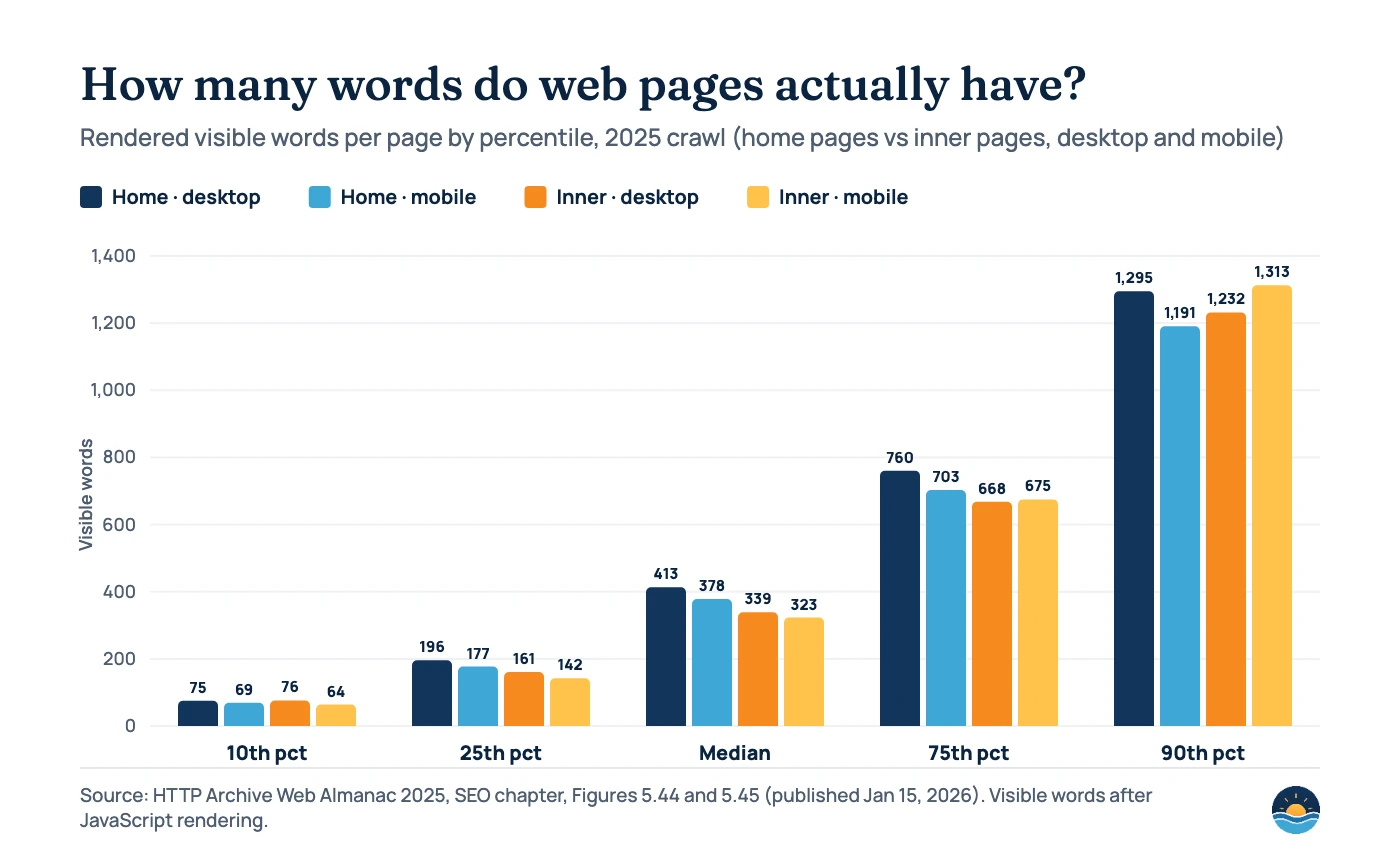
The HTTP Archive’s Web Almanac 2025 SEO chapter (published January 15, 2026) measured the visible words on millions of home pages and inner pages. Most pages are much shorter than the “2,000-word blog post” advice that circulates in SEO. The median mobile home page had 378 rendered words (up from 364 in 2024) and the median desktop home page 413 (up from 400). Inner pages were shorter still: a median of 339 words on desktop and 323 on mobile.
Only the top tenth of pages pass about 1,200 words. At the 90th percentile, inner pages had 1,232 words on desktop and 1,313 on mobile. These figures cover all kinds of pages, including product, category and contact pages, so they are not a target for blog posts. They are a reminder that plenty of short pages exist, and plenty of them rank.
Do longer posts rank better?
Correlation studies are where most word-count advice comes from, so it is worth reading them closely. Backlinko’s analysis of 11.8 million Google search results found that the average first-page result contained 1,447 words. The same study found “no direct relationship between word count and rankings”: word count was evenly spread across the top 10, and pages with more words had the same chance of ranking highly as pages with fewer. The authors note that long-form content tended to earn more backlinks, which may explain why longer pages show up on page one at all.
The two datasets measure different things. The Web Almanac reports the median of every crawled page; Backlinko reports the mean of pages that already rank. Means are pulled up by a few very long pages, and ranking pages skew towards informational content. Neither shows that adding words causes better rankings.
| Source | What was measured | Headline number | Caveat |
|---|---|---|---|
| Web Almanac 2025 (HTTP Archive) | Visible rendered words on all crawled home and inner pages | Median inner page: 339 desktop / 323 mobile | All page types, not just articles |
| Backlinko, 11.8M results (page updated Apr 14, 2025) | Words on first-page Google results | Mean: 1,447 words | Correlation only; no direct link between word count and rank; older dataset |
| Google SEO Starter Guide | Official guidance | No target, minimum or maximum | Describes what Google does not reward |
What actually sets the right length?
Length is an outcome of three things: what the searcher wants, how much the answer needs to include, and how much you cut. A query like “what time does the post office close” needs one sentence. “How to migrate a WordPress site to a new domain” needs steps, checks and warnings. If you have already mapped search intent for your keywords, you already know which kind of page each one needs.
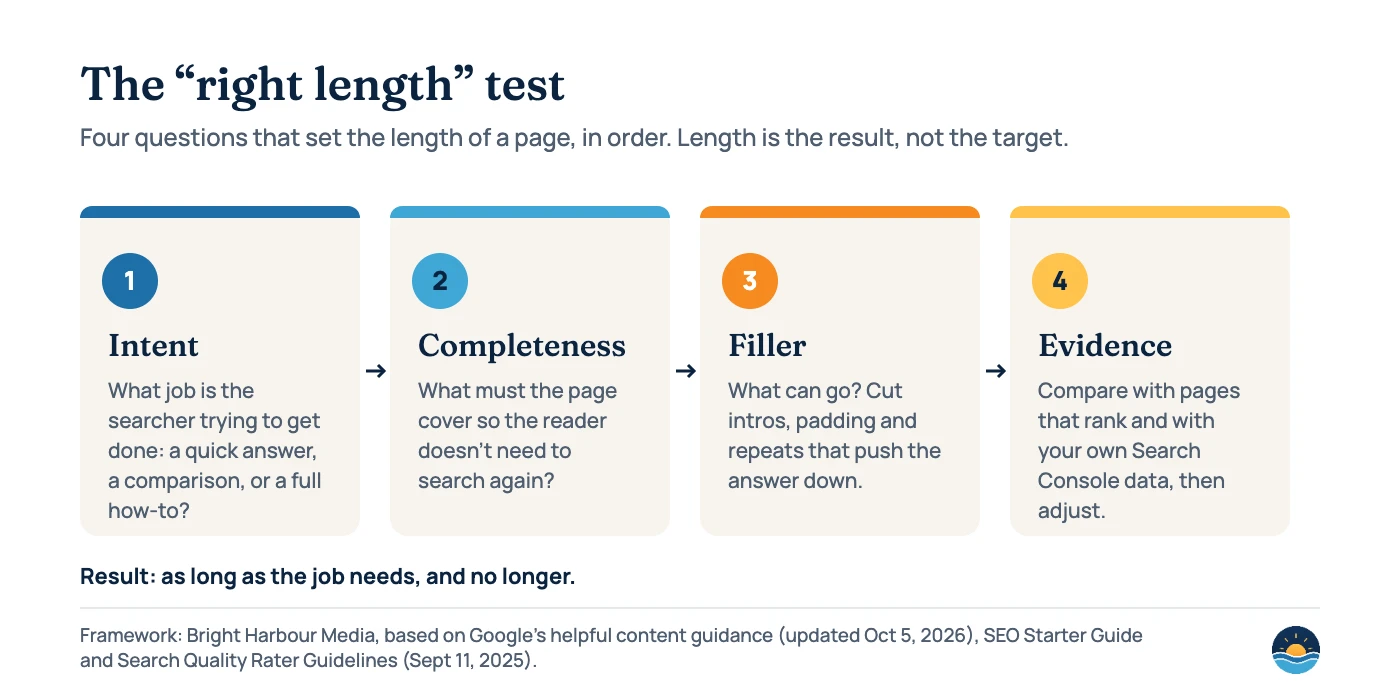
The rater guidelines describe the cost of getting step three wrong. Filler is “low-effort content that adds little value and doesn’t directly support the purpose of the page,” and it “can artificially inflate content, creating a page that appears rich but lacks content website visitors find valuable.” The guidelines also say the most helpful content should sit near the top of the page. Raters don’t change rankings directly, but their guidelines show what Google is trying to reward.
| Page type | Usually needs | Typical signs it is too long |
|---|---|---|
| Quick answer (definition, fact, hours) | A direct answer in the first sentence or two, plus brief context | Long intro before the answer; history nobody asked for |
| How-to guide | Every step, prerequisites, warnings and what “done” looks like | Repeating each step in a summary and again in a conclusion |
| Comparison or “best” list | Criteria, a fair look at each option, and a recommendation by situation | Padding each option with generic pros and cons |
| Local service page | What you do, where, proof, prices or how quotes work, and how to contact you | Keyword-stuffed paragraphs about every nearby suburb |
| Pillar or guide page | Definitions, process, examples, data and links to deeper pages | Covering sub-topics so thinly that each needs its own page anyway |
Write more when…
the query is broad or high-stakes, readers ask follow-up questions you haven’t answered, competitors cover steps you skip, or your page needs evidence (data, examples, sources) to be trusted.
Write less when…
the answer is a fact or a single step, your intro delays the answer, sections repeat each other, or you are adding paragraphs only because a tool gave you a target number.
How to check whether a page is the right length
- Write down the job. One sentence: what should the reader be able to do or decide after reading?
- List the must-cover questions. Use People also ask, your sales and support questions, and the subheadings of pages that rank.
- Answer first. Put the direct answer near the top. Pages that do this are also better placed for featured snippets.
- Cut filler. Delete throat-clearing intros, repeated summaries and paragraphs that don’t support the page’s purpose.
- Add proof, not padding. Data, examples, screenshots and named sources add value; extra adjectives don’t. Clear authorship helps too (see our guide to E-E-A-T and author pages).
- Check the data after publishing. In Search Console, look at the queries a page gets impressions for. New queries you don’t answer are gaps; a low click-through rate may be a title problem rather than a length problem.
- Refresh, don’t inflate. When you update a page, add what changed. Our content refresh and pruning guide covers when to expand, merge or remove pages.
Frequently asked questions
Is there a minimum word count for SEO?
No. Google’s SEO Starter Guide says there is no magical word count target, minimum or maximum. A short page can rank well if it fully answers a narrow query, while a long page full of filler can be rated low quality.
Why do many SEO tools recommend 1,500 or 2,000 words?
Most of these targets come from averages of pages that already rank. Backlinko’s study found a 1,447-word average on page one but no direct relationship between word count and rankings, so the average describes the results rather than causing them.
Should I make my existing posts longer?
Only if they leave questions unanswered. Expand a post when Search Console shows impressions for queries it doesn’t cover, or when the topic has changed. Google’s helpful content guide warns against adding or removing lots of content just because you believe it will help rankings.
Do longer articles earn more backlinks?
Backlinko reports that long-form content tends to attract more backlinks, citing other industry studies, which may be one reason longer pages appear on page one. That is a reason to make a page worth linking to (original data, clear frameworks, useful charts), not a reason to add words.
Sources
- SEO Starter Guide — Google Search Central, last updated Dec 10, 2025 — length and word count statements
- Creating helpful, reliable, people-first content — Google Search Central, last updated Oct 5, 2026 — preferred word count question, completeness question
- Search Quality Rater Guidelines — Google, version of September 11, 2025 — section 5.2.2 on filler
- Web Almanac 2025: SEO chapter — HTTP Archive, published Jan 15, 2026 (updated Jun 9, 2026) — rendered word counts by percentile
- We Analyzed 11.8 Million Google Search Results — Backlinko, page last updated Apr 14, 2025 — average first-page word count and correlation finding
Cite this article: Bright Harbour Media. “How Long Should a Blog Post Be for SEO? What the Data Says.” Bright Harbour Media Insights, October 2026. https://brightharbourmedia.com/content-length-seo/
You are welcome to reference the charts and frameworks in this article with a link back to this page.
Want content that answers the question instead of hitting a word count? Our content strategy and SEO content service plans, writes and refreshes pages around what searchers need. Get in touch to talk about your content.